Wi-Fi Standard Explained: What It Means for Mesh Wifi Systems
As an Amazon Associate we earn from qualifying purchases. Links on this page are affiliate links.
Wi-Fi Standard Explained for Mesh Systems
The wi fi standard explained helps you choose the right mesh system. This label tells you the generation of wireless technology inside the device. It determines speed, capacity, and how well the system handles multiple devices. You see labels like Wi-Fi 5, Wi-Fi 6, Wi-Fi 6E, or Wi-Fi 7 on product listings.
Wi-Fi 5 uses the 5 GHz band. It offers solid speeds for basic streaming and web browsing. However, it struggles with congestion in busy homes. Many older mesh nodes still use this standard. It is often found in budget-friendly options.
Wi-Fi 6 improves on Wi-Fi 5. It uses Orthogonal Frequency Division Multiple Access. This allows more devices to connect without slowing down. It also works on both 2.4 GHz and 5 GHz bands. You notice better performance when many people stream video or game online. Latency drops, which matters for real-time applications.
Wi-Fi 6E adds the 6 GHz band. This creates a third, less crowded channel. Interference from neighbors and other electronics decreases significantly. You get higher throughput and cleaner connections. This is ideal for large homes with many smart devices.
Wi-Fi 7 is the newest standard. It introduces Multi-Link Operation. Devices can use multiple bands simultaneously. This boosts reliability and reduces lag. It supports wider channels for faster data transfer. Not all mesh systems support this yet. It is best for future-proofing your network.
You care about this spec because it defines your network’s potential. A higher number means better handling of modern traffic. It affects how smoothly your smart home devices communicate. Check the listing for the exact standard. Match it to your household’s device count. This ensures you do not buy an outdated system.
Compare Wi-Fi Standards for Mesh
Wi-Fi 5
Wi-Fi 5, also known as 802.11ac, is the older standard found in systems like the Tenda Nova MW6. It uses dual-band frequencies to deliver reliable coverage for basic tasks. This standard suits small homes with moderate device loads. You get stable connections for web browsing and standard definition streaming. The trade-off is lower speed and capacity compared to newer versions. It struggles with many simultaneous high-bandwidth connections. Choose this if you have few devices and do not need the latest performance. It is a budget-friendly entry point for basic mesh coverage.
Wi-Fi 6
Wi-Fi 6, or 802.11ax, improves efficiency and capacity. The TP-Link Deco X55 exemplifies this standard for large homes with many devices. It handles dense environments better than Wi-Fi 5. You benefit from faster speeds and reduced latency. This standard is ideal for households with numerous smartphones, laptops, and smart home gadgets. It manages multiple data streams more effectively. The trade-off is that it lacks the 6 GHz band. If you have gigabit internet and many users, this standard provides a solid balance of performance and value without the premium cost of newer tech.
Wi-Fi 6E
Wi-Fi 6E extends Wi-Fi 6 into the 6 GHz spectrum. The TP-Link Deco XE75 uses this tri-band setup for high capacity. You gain access to a less congested channel. This reduces interference from neighbors and other devices. It is best for large homes needing high performance. You enjoy lower latency for gaming and 4K streaming. The trade-off is that not all devices support the 6 GHz band yet. You need compatible clients to benefit from the extra speed. This standard is a future-proof choice for users who want the best of Wi-Fi 6 with added bandwidth.
Wi-Fi 7
Wi-Fi 7, or 802.11be, is the newest generation. The Amazon eero Pro 7 represents this high-capacity standard. It offers significantly higher throughput and efficiency. You get faster speeds for bandwidth-heavy tasks. This is ideal for large homes with gigabit internet plans. It handles dense device environments with ease. The trade-off is the high cost and limited device support. You need Wi-Fi 7 compatible devices to see the benefits. This standard is for users who want the absolute latest performance. It prepares your network for future demands and heavier workloads.
Is the Wi-Fi Standard Worth It
Who needs it
You need this spec if your home has many connected devices. Modern households often have phones, laptops, tablets, smart TVs, and IoT gadgets. Wi-Fi 6 and Wi-Fi 7 handle this load better than older standards. They use technologies like OFDMA to share bandwidth efficiently. This reduces lag when multiple streams run at once. If you work from home or stream 4K video, consistency matters. Wi-Fi 6E adds the 6 GHz band for less congestion. Wi-Fi 7 offers the highest speeds and lowest latency. These standards future-proof your network. You will notice smoother performance during peak hours. The capacity improvements mean your internet feels faster even if your plan does not change. Choose these standards if you want reliability and headroom for new devices.
Who can skip it
You can ignore the latest standards if you have a small home with few devices. A single laptop and a phone may not benefit from Wi-Fi 6 or 7. Wi-Fi 5 still works for basic browsing and email. If your budget is tight, prioritize coverage area over speed. A mesh system with good node placement matters more than the standard. You might save money by choosing an older standard. Focus on the number of nodes and their placement instead. This ensures your signal reaches every corner. Speed is irrelevant if your connection drops in the bedroom. Check the coverage specs first. Upgrade the standard later if you add more devices. For now, stable coverage is your main goal. Do not pay extra for features you will not use.
Mesh Wi-Fi Glossary
Wi-Fi Standard
The generation of wireless technology, such as Wi-Fi 6 or Wi-Fi 7. It defines maximum speed, device capacity, and efficiency for modern mesh networks.
Frequency Band
The radio spectrum used for communication. Dual-band uses 2.4GHz and 5GHz. Tri-band adds a dedicated 5GHz backhaul channel to reduce congestion between nodes.
Coverage Area
The total square footage the system handles. A typical mesh node covers 1,500 square feet. Multiple nodes extend this range to eliminate dead zones in large homes.
Speed Rating
The theoretical maximum throughput, like AX3000. This number combines speeds across all bands. It indicates potential performance, not actual speed, which varies by environment.
Device Capacity
The number of gadgets the system supports simultaneously. High-end models handle 100 or more connections. This ensures stable performance for smart homes with many IoT devices.
Number of Ports
The Ethernet jacks on each node. Most units have two gigabit ports. More ports allow wired connections for gaming consoles, TVs, or desktop computers.
Pack Size
The quantity of nodes included in the box. A two-pack covers small areas. Three or more packs provide better coverage for multi-story homes or larger footprints.
PoE Support
Power over Ethernet capability. It allows a single cable to deliver both data and electricity. This simplifies installation for ceiling-mounted or outdoor mesh nodes.
Quick picks
| # | Product | Best for | Price |
|---|---|---|---|
| 1 | TP-Link Deco X55 3-Pack Wi-Fi 6 | Large homes with many connected devices | Check price of TP-Link Deco X55 3-Pack Wi-Fi 6 on Amazon |
| 2 | TP-Link Deco Tri-Band WiFi 6E 2-Pack | Large homes needing Wi-Fi 6E performance | Check price of TP-Link Deco Tri-Band WiFi 6E 2-Pack on Amazon |
| 3 | Tenda 3-Pack Dual-Band Wi-Fi 5 Mesh System | small homes with moderate device loads | Check price of Tenda 3-Pack Dual-Band Wi-Fi 5 Mesh System on Amazon |
| 4 | Amazon eero 6 Mesh Wi-Fi Add-On Extender | expanding existing eero networks | Check price of Amazon eero 6 Mesh Wi-Fi Add-On Extender on Amazon |
| 5 | Amazon eero Pro 7 Tri-Band Mesh System (3-Pack) | Large homes with gigabit internet plans | Check price of Amazon eero Pro 7 Tri-Band Mesh System (3-Pack) on Amazon |
| 6 | TP-Link Deco Tri-Band WiFi 6E 2-Pack | large homes with multi-gig internet plans | Check price of TP-Link Deco Tri-Band WiFi 6E 2-Pack on Amazon |
Our 6 picks

TP-Link Deco X55 3-Pack Wi-Fi 6
Best for: Large homes with many connected devices
- Wi-Fi Standard
- Wi-Fi 6 (what this guide is about)
- Speed Rating
- AX3000
- Coverage Area
- Up to 6,500 sq ft
- Pack Size
- 3-Pack
- Port Speed
- 1 Gbps
- Device Capacity
- Up to 150 devices
View on Amazon: TP-Link Deco X55 3-Pack Wi-Fi 6 Affiliate link
The TP-Link Deco X55 is a Wi-Fi 6 mesh system designed for larger homes. This 3-pack covers up to 6,500 square feet and supports up to 150 connected devices. It delivers AX3000 speeds using dual-band 5 GHz and 2.4 GHz radios. The system includes three gigabit Ethernet ports per unit for wired backhaul. It uses the Deco app for setup and management, making it a practical choice for households needing broad coverage and high device capacity.
Pros
- Wi-Fi 6 standard for improved efficiency and speed
- Covers up to 6,500 square feet with a 3-pack
- Supports up to 150 connected devices simultaneously
- Includes gigabit Ethernet ports for wired backhaul
Cons
- Limited to Wi-Fi 6, lacking the newer Wi-Fi 6E or Wi-Fi 7 standards
- No mention of 2.5 Gbps or multi-gigabit WAN ports for faster internet speeds
- Dual-band design may offer less congestion relief than tri-band systems
Good fit if
- You need whole-home coverage for a large house up to 6,500 square feet
- You have many devices connecting to your network simultaneously
- You want a reliable Wi-Fi 6 system with wired port options
Skip if
- You require the latest Wi-Fi 7 speeds for future-proofing
- You live in an area with heavy 6 GHz congestion and need Wi-Fi 6E
- You need multi-gigabit internet speeds beyond standard gigabit
Verdict: TP-Link Deco X55 3-Pack Mesh System is a solid Wi-Fi 6 solution for large homes with many devices. It fits users who prioritize coverage area and device capacity over the newest wireless standards.
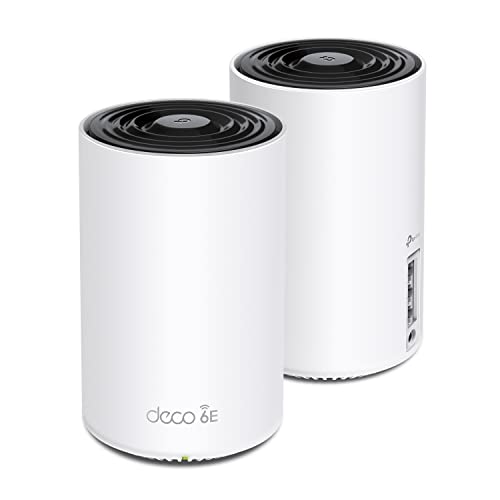
TP-Link Deco Tri-Band WiFi 6E 2-Pack
Best for: Large homes needing Wi-Fi 6E performance
- Wi-Fi Standard
- Wi-Fi 6E (what this guide is about)
- Speed Rating
- AXE5400
- Coverage Area
- up to 5500 Sq.Ft
- Frequency Bands
- Tri-Band
- Pack Size
- 2-Pack
- Device Capacity
- 200 devices
View on Amazon: TP-Link Deco Tri-Band WiFi 6E 2-Pack Affiliate link
The TP-Link Deco XE75 is a Wi-Fi 6E mesh system that uses the 6 GHz band to reduce interference from older devices. It offers AXE5400 tri-band speeds and covers up to 5,500 square feet. The system supports 200 devices and includes HomeShield security. This setup suits users who want the latest standard for a stable, high-capacity network in a large home.
Pros
- Wi-Fi 6E standard with dedicated 6 GHz band
- AXE5400 tri-band speeds up to 5,400 Mbps
- Covers up to 5,500 square feet
- Supports up to 200 connected devices
Cons
- Includes only 2 nodes in the pack
- Higher price point due to Wi-Fi 6E technology
- Requires Wi-Fi 6E clients to use the 6 GHz band
Good fit if
- You want the latest Wi-Fi 6E standard
- You have a large home over 2,500 square feet
- You have many connected devices
Skip if
- You only need basic Wi-Fi 5 coverage
- You have a small apartment under 1,500 square feet
- You are on a tight budget
Verdict: TP-Link Deco XE75 AXE5400 Tri-Band Mesh is ideal for large homes needing high capacity and the latest Wi-Fi 6E speeds. It provides robust coverage and security for modern networks.
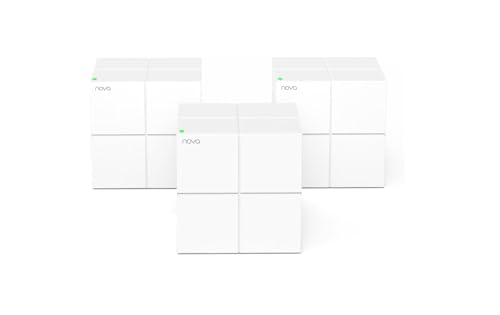
Tenda 3-Pack Dual-Band Wi-Fi 5 Mesh System
Best for: small homes with moderate device loads
- Wi-Fi Standard
- Wi-Fi 5 (what this guide is about)
- Speed Rating
- AC1200
- Coverage Area
- up to 3500 sq.ft.
- Frequency Bands
- Dual-Band
- Pack Size
- 3-Pack
- Device Capacity
- up to 90 devices
View on Amazon: Tenda 3-Pack Dual-Band Wi-Fi 5 Mesh System Affiliate link
The Tenda Nova MW6 is a Wi-Fi 5 mesh system designed for homes up to 3,500 square feet. It uses dual-band AC1200 speeds to support up to 90 devices simultaneously. The system includes three units for whole-home coverage and seamless roaming. You get gigabit ports for wired connections and app-based management. It is a practical option for smaller households or budget-conscious buyers who do not need the latest Wi-Fi standards.
Pros
- Wi-Fi 5 (802.11ac) dual-band standard
- Supports up to 90 connected devices
- Covers up to 3,500 square feet
- Includes gigabit Ethernet ports
- Managed via Tenda Wi-Fi APP
Cons
- Lacks Wi-Fi 6 or Wi-Fi 6E speeds
- Limited to dual-band frequency bands
- Lower device capacity than Wi-Fi 6 models
Good fit if
- You need coverage for a small to medium home
- You want a budget-friendly mesh solution
- You have fewer than 90 devices to connect
Skip if
- You require Wi-Fi 6 or Wi-Fi 6E performance
- You have more than 90 devices on your network
- You need tri-band connectivity for heavy congestion
Verdict: Tenda Nova MW6 AC1200 3-Pack offers solid Wi-Fi 5 coverage for small homes with moderate device loads. It fits buyers prioritizing basic mesh functionality over advanced speed standards.
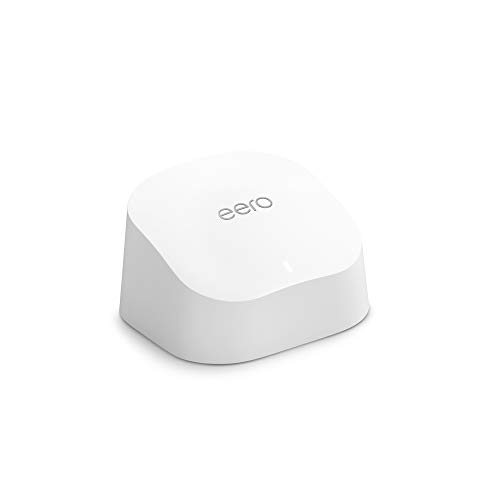
Amazon eero 6 Mesh Wi-Fi Add-On Extender
Best for: expanding existing eero networks
- Wi-Fi Standard
- Wi-Fi 6 (what this guide is about)
- Coverage Area
- up to 1,500 sq. ft.
- Features
- Mesh
- Dimensions
- 3.91 × 3.82 × 2.42 inches
- Weight
- 10.1 ounces
View on Amazon: Amazon eero 6 Mesh Wi-Fi Add-On Extender Affiliate link
This is an add-on extender for existing eero mesh networks. It supports Wi-Fi 6 and covers up to 1,500 square feet. The unit measures 3.91 by 3.82 by 2.42 inches and weighs 10.1 ounces. You use the eero app to manage the network. It integrates with TrueMesh technology to route traffic. This device helps you eliminate dead spots in larger homes.
Pros
- Supports Wi-Fi 6 standard
- Covers up to 1,500 square feet
- Integrates with TrueMesh technology
- Managed via eero app
Cons
- Requires an existing eero mesh system
- Sold as a single add-on unit
- No independent router functionality
Good fit if
- You already own an eero mesh system
- You need to extend coverage by 1,500 square feet
- You want to add Wi-Fi 6 support to your network
Skip if
- You need a standalone mesh router
- You do not have an existing eero network
- You require a multi-pack bundle
Verdict: eero 6 Wi-Fi 6 Mesh Extender is a targeted solution for expanding an existing eero network. It fits users who need to add Wi-Fi 6 coverage to specific areas without replacing their main router.

Amazon eero Pro 7 Tri-Band Mesh System (3-Pack)
Best for: Large homes with gigabit internet plans
- Wi-Fi Standard
- Wi-Fi 7 (what this guide is about)
- Speed Rating
- 3.9 Gbps
- Coverage Area
- 6,000 sq ft
- Frequency Bands
- Tri-Band
- Pack Size
- 3-Pack
- Port Speed
- 5 Gbps
View on Amazon: Amazon eero Pro 7 Tri-Band Mesh System (3-Pack) Affiliate link
The eero Pro 7 is a tri-band Wi-Fi 7 mesh system designed for high-bandwidth environments. It supports internet plans up to 5 Gbps and delivers wireless speeds up to 3.9 Gbps. The 3-pack setup covers up to 6,000 sq. ft. and connects 600+ devices. It uses Multi-Link Operation for improved reliability. This system suits users with gigabit-plus plans and large homes needing dense device support.
Pros
- Wi-Fi 7 standard with Multi-Link Operation
- Supports internet plans up to 5 Gbps
- Two auto-sensing 5 GbE ports
- Covers up to 6,000 sq. ft.
- Handles 600+ connected devices
Cons
- Advanced security features require an optional eero Plus subscription
- Physical dimensions are 7.09 inches in height
- No mention of built-in voice assistant hardware
Good fit if
- You have an internet plan over 1 Gbps
- You need coverage for 6,000 sq. ft.
- You connect more than 100 devices simultaneously
Skip if
- You only have internet speeds under 100 Mbps
- You prefer a single compact router
- You want advanced security without a subscription
Verdict: Amazon eero Pro 7 3-Pack Wi-Fi 7 is a high-capacity mesh system for large homes with gigabit internet plans. It delivers the throughput needed for bandwidth-heavy tasks and dense device environments.

TP-Link Deco Tri-Band WiFi 6E 2-Pack
Best for: large homes with multi-gig internet plans
- Wi-Fi Standard
- Wi-Fi 6E (what this guide is about)
- Speed Rating
- AXE5400
- Coverage Area
- 5,500 sq ft
- Frequency Bands
- Tri-Band
- Pack Size
- 2-Pack
- Port Speed
- 2.5 Gbps
View on Amazon: TP-Link Deco Tri-Band WiFi 6E 2-Pack Affiliate link
This is a Wi-Fi 6E mesh system covering up to 5,500 square feet. It uses tri-band technology for a total speed rating of AXE5400. The setup includes one 2.5 Gbps port and two 1 Gbps ports for wired connections. It supports up to 200 devices. This system suits users with multi-gig internet plans who need a dedicated 6 GHz band for backhaul to reduce interference.
Pros
- Wi-Fi 6E standard with a dedicated 6 GHz band
- One 2.5 Gbps WAN/LAN port for high-speed wired connections
- Tri-band AXE5400 speed rating for 200 devices
- Coverage area up to 5,500 square feet
Cons
- Only includes a 2-Pack, limiting initial coverage compared to 3-Pack options
- Lacks a second 2.5 Gbps port for advanced wired setups
- Heavier build at 2.76 pounds per unit
Good fit if
- You have a multi-gig internet plan and need wired speeds above 1 Gbps
- You want to eliminate interference from legacy devices using the 6 GHz band
- You need to connect up to 200 devices in a large home
Skip if
- You only need coverage for small spaces under 2,000 square feet
- You require a single unit extender rather than a multi-node system
- You are on a standard gigabit plan and do not need 2.5 Gbps ports
Verdict: TP-Link Deco XE75 Pro 2-Pack is a high-capacity Wi-Fi 6E system ideal for large homes with multi-gig internet plans. It provides robust wired connectivity and a dedicated 6 GHz backhaul for stable performance across 200 devices.
Specifications side by side
| Spec | TP-Link Deco X55 3-Pack Wi-Fi 6 | TP-Link Deco Tri-Band WiFi 6E 2-Pack | Tenda 3-Pack Dual-Band Wi-Fi 5 Mesh System | Amazon eero 6 Mesh Wi-Fi Add-On Extender | Amazon eero Pro 7 Tri-Band Mesh System (3-Pack) | TP-Link Deco Tri-Band WiFi 6E 2-Pack |
|---|---|---|---|---|---|---|
| Wi-Fi Standard | Wi-Fi 6 | WiFi 6E | not stated | Wi-Fi 6 | Wi-Fi 7 | WiFi 6E |
| Speed Rating | AX3000 | AXE5400 | AC1200 | not stated | 3.9 Gbps | AXE5400 |
| Coverage Area | Up to 6,500 sq ft | up to 5500 Sq.Ft | up to 3500 sq.ft. | up to 1,500 sq. ft. | 6,000 sq ft | 5,500 sq ft |
| Frequency Bands | not stated | Tri-Band | Dual-Band | not stated | Tri-Band | Tri-Band |
| Pack Size | 3-Pack | 2-Pack | 3-Pack | not stated | 3-Pack | 2-Pack |
| Port Speed | 1 Gbps | not stated | not stated | not stated | 5 Gbps | 2.5 Gbps |
| Device Capacity | Up to 150 devices | 200 devices | up to 90 devices | not stated | 600+ | 200 |
| Frequency Band | not stated | Tri-Band | Dual-Band | not stated | Tri-Band | Tri-Band |
| Use Case | not stated | Gaming, Streaming | not stated | not stated | not stated | not stated |
| Features | Mesh | Mesh, WPA3 | Mesh | Mesh | Mesh | Mesh |
| Intended Use | not stated | Home | Home | not stated | not stated | not stated |
| Placement | Indoor | not stated | not stated | not stated | not stated | not stated |
| Dimensions | 4.33 × 4.33 × 4.49 inches | 4.13 × 4.13 × 6.67 inches | 3.93 × 3.93 × 3.93 inches | 3.91 × 3.82 × 2.42 inches | 5.79 × 3.11 × 7.09 inches | 4.13 × 4.13 × 6.65 inches |
| Weight | 5.07 pounds | 2.69 pounds | 1.83 pounds | 10.1 ounces | 1.68 pounds | 2.76 pounds |
| Size | 3 Pack | 2 Pack | 3 Pack | 1 add-on extender | 3-pack | 2 Pack |
| Color | Black, White | Black and White | white | WHITE | WHITE | Black and White |
| Model | Deco X55 | Deco XE75(2-pack) | MW6-3 | Q010111 | ME10001 | Deco XE75 Pro(2-pack) |
Frequently asked questions
What is the difference between Wi-Fi 5 and Wi-Fi 6?
Wi-Fi 6 offers higher capacity and efficiency for multiple devices compared to Wi-Fi 5. Systems like the TP-Link Deco X55 use Wi-Fi 6 to handle large homes with many connected gadgets. Wi-Fi 5, found in the Tenda Nova MW6, relies on dual-band frequencies for basic coverage in smaller spaces with fewer devices.
Do I need Wi-Fi 6E for my mesh system?
You need Wi-Fi 6E if you want access to the less congested 6 GHz band. The TP-Link Deco XE75 uses this standard to provide high capacity for large homes. It separates traffic across three bands, reducing interference and supporting modern high-speed internet plans better than dual-band Wi-Fi 6 systems.
Which Wi-Fi standard is best for large homes with many devices?
Wi-Fi 6 and Wi-Fi 6E are ideal for large homes with many connected devices. The TP-Link Deco X55 3-Pack handles dense environments efficiently. For even higher capacity, the TP-Link Deco XE75 Pro uses Wi-Fi 6E and tri-band design to support up to 200 devices with stable performance.
Can Wi-Fi 7 handle gigabit internet speeds?
Yes, Wi-Fi 7 is designed for high-throughput tasks and gigabit internet plans. The Amazon eero Pro 7 3-Pack delivers the necessary speed for bandwidth-heavy activities. Its tri-band setup ensures that large homes with fast internet connections maintain consistent performance across multiple devices and rooms.
Is Wi-Fi 5 still good for small homes?
Wi-Fi 5 remains a solid choice for small homes with moderate device loads. The Tenda Nova MW6 provides reliable dual-band coverage for basic internet tasks. It prioritizes essential mesh functionality over advanced speed standards, making it a practical option for users with simpler networking needs.
What does tri-band mean in a Wi-Fi standard?
Tri-band means the system uses three separate frequency bands to transmit data. This includes two 5 GHz bands and one 2.4 GHz band, or a 6 GHz band in Wi-Fi 6E models. The Amazon eero Pro 7 and TP-Link Deco XE75 use tri-band design to reduce congestion and improve stability.
How does Wi-Fi 6 improve network efficiency?
Wi-Fi 6 improves efficiency by managing multiple devices simultaneously without slowing down. The TP-Link Deco X55 uses this standard to maintain speed in busy households. It allows more devices to connect while reducing latency, which is crucial for streaming, gaming, and video calls in modern smart homes.