Wi-Fi 6 vs Wi-Fi 6E Mesh Wifi Systems in 2026: Key Differences
As an Amazon Associate we earn from qualifying purchases. Links on this page are affiliate links.
Choosing between a Wi-Fi 6 vs Wi-Fi 6E mesh wifi system depends on your specific hardware and home layout. Both TP-Link Deco models offer whole-home coverage and smart mesh features. They share similar security commitments and app-based management. The main difference lies in the radio technology. One uses older Wi-Fi 6 standards on dual bands. The other introduces the new 6 GHz band for less congestion. This change affects speed and interference levels significantly.
Key differences
| Aspect | TP-Link Deco X55 3-Pack Wi-Fi 6 | TP-Link Deco Tri-Band WiFi 6E 2-Pack |
|---|---|---|
| Wi-Fi Standard | Wi-Fi 6 | Wi-Fi 6E |
| Frequency Bands | Dual-Band | Tri-Band |
| Speed Rating | AX3000 | AXE5400 |
| Coverage Area | Up to 6,500 sq ft | Up to 5,500 sq ft |
| Device Capacity | Up to 150 devices | Up to 200 devices |
| Pack Size | 3-Pack | 2-Pack |
Which one should you choose?
Choose TP-Link Deco X55 3-Pack Wi-Fi 6 if
- You need coverage for a larger home up to 6,500 square feet.
- You have more than 150 devices to connect simultaneously.
- You prefer a three-node system for broader initial coverage.
Choose TP-Link Deco Tri-Band WiFi 6E 2-Pack if
- You want to use the dedicated 6 GHz band for backhaul.
- You have Wi-Fi 6E compatible devices that need lower latency.
- You want higher theoretical speeds up to AXE5400.
Verdict: Choose the Wi-Fi 6 model if your priority is maximum square footage coverage and a three-node pack. Select the Wi-Fi 6E model if you want to leverage the new 6 GHz band for reduced interference and higher speeds. Your decision hinges on whether your devices support the newer standard and your home size requirements.
Wi-Fi 6 vs 6E Mesh Comparison
Wi-Fi Standard
The TP-Link Deco X55 uses the Wi-Fi 6 standard, which is a mature technology offering strong performance for most homes. It supports 2x2 HE160 streams on the 5 GHz band and 2x2 on the 2.4 GHz band. The Deco XE75 upgrades to Wi-Fi 6E. This standard adds a new 6 GHz frequency band. That band is exclusive to Wi-Fi 6E devices. It provides a clear channel with less interference from legacy gadgets. If your devices support Wi-Fi 6E, this standard offers better efficiency. Otherwise, both systems handle modern traffic well.
Speed Rating
Speed ratings indicate the theoretical maximum combined throughput across all bands. The Deco X55 carries an AX3000 rating. This combines 2402 Mbps on 5 GHz and 574 Mbps on 2.4 GHz. The Deco XE75 holds an AXE5400 rating. It adds a third band. The 6 GHz band offers 2402 Mbps. The 5 GHz band also offers 2402 Mbps. The 2.4 GHz band provides 574 Mbps. The XE75 totals 5400 Mbps. This higher rating supports faster data rates for high-bandwidth tasks like 4K streaming or large file transfers.
Frequency Bands
The Deco X55 operates on dual bands: 2.4 GHz and 5 GHz. These bands share the available spectrum, which can lead to congestion in dense areas. The Deco XE75 is a tri-band system. It adds the 6 GHz band to the mix. This third band allows dedicated backhaul. The 6 GHz band can work as a backhaul by default. This keeps the connection between nodes stable. You can also switch it to Wi-Fi mode for devices. Tri-band architecture reduces congestion significantly compared to dual-band setups.
Coverage Area
Coverage depends on your home layout and construction. The Deco X55 3-pack covers up to 6500 square feet. It includes three nodes to spread the signal. The Deco XE75 2-pack covers up to 5500 square feet. It includes only two nodes. The X55 covers more area because it has an extra unit. However, the XE75 uses a more powerful standard. If you have a large home, the three-pack X55 might reach further corners. For smaller spaces, the two-pack XE75 is sufficient.
Device Capacity
Both systems handle multiple connections well. The Deco X55 supports up to 150 devices. This is enough for smart homes with many sensors and phones. The Deco XE75 supports up to 200 devices. The Wi-Fi 6E standard helps manage this load better. It uses the 6 GHz band to offload traffic. This reduces latency for connected gadgets. If you have many simultaneous users or IoT devices, the XE75 has a higher capacity limit. The extra 50 devices provide a buffer for future growth.
Pack Size
The packaging contents differ between the two models. The Deco X55 comes in a 3-pack. You get three nodes right out of the box. This is ideal for larger homes needing more points of access. The Deco XE75 comes in a 2-pack. You receive only two nodes. You may need to buy additional units separately for wider coverage. The X55 gives you more hardware for the same comparison. The XE75 requires you to assess if two nodes are enough for your space.
Which TP-Link Deco Mesh System Fits You
Users with many Wi-Fi 6E devices needing speed
The Deco XE75 supports the Wi-Fi 6E standard and includes a dedicated 6 GHz band. This tri-band setup provides a total speed rating of AXE5400. It handles up to 200 devices. The 6 GHz band reduces interference from legacy equipment. You get higher throughput for compatible clients. This model is ideal if your devices support the newer standard and you want maximum wireless capacity.
Large homes prioritizing coverage and device count
The Deco X55 3-pack covers up to 6500 square feet. This larger footprint suits bigger homes better than the 2-pack alternative. It supports up to 150 connected devices. The AX3000 speed rating is sufficient for standard Wi-Fi 6 clients. You get three units for broader reach. This configuration eliminates dead zones effectively in expansive layouts without requiring the newer 6 GHz band.
Buyers wanting more nodes for the same budget
This option includes a 3-pack of nodes. The competitor offers only a 2-pack. More nodes can improve mesh stability in complex floor plans. The Deco X55 provides Gigabit Ethernet ports on each unit. You can use wired backhaul for better reliability. The coverage area extends to 6500 square feet. This gives you extra hardware to manage network load across a larger physical space.
Quick picks
| # | Product | Best for | Price |
|---|---|---|---|
| 1 | TP-Link Deco X55 3-Pack Wi-Fi 6 | Medium to large homes needing Wi-Fi 6 coverage | Check price of TP-Link Deco X55 3-Pack Wi-Fi 6 on Amazon |
| 2 | TP-Link Deco Tri-Band WiFi 6E 2-Pack | large homes with Wi-Fi 6E devices | Check price of TP-Link Deco Tri-Band WiFi 6E 2-Pack on Amazon |
The products compared

TP-Link Deco X55 3-Pack Wi-Fi 6
Best for: Medium to large homes needing Wi-Fi 6 coverage
- Wi-Fi Standard
- Wi-Fi 6 (what this guide is about)
- Speed Rating
- AX3000
- Coverage Area
- Up to 6,500 sq ft
- Pack Size
- 3-Pack
- Port Speed
- 1 Gbps
- Device Capacity
- Up to 150 devices
View on Amazon: TP-Link Deco X55 3-Pack Wi-Fi 6 Affiliate link
The TP-Link Deco X55 is a Wi-Fi 6 mesh system designed for homes up to 6500 square feet. This 3-pack setup supports up to 150 connected devices with AX3000 speeds. It uses AI-driven mesh technology to optimize your network and includes HomeShield security features. You get three gigabit ports per unit for wired backhaul. It suits medium to large homes needing reliable whole-home coverage without the complexity of traditional routers.
Pros
- Covers up to 6500 square feet of space
- Supports up to 150 connected devices simultaneously
- Includes three gigabit Ethernet ports per unit
- Features AI-driven mesh for optimized performance
Cons
- Limited to Wi-Fi 6 standard without 6E capability
- No mention of Wi-Fi 6E tri-band support
- Lacks dedicated 5GHz backhaul band specification
Good fit if
- You need coverage for homes up to 6500 square feet
- You connect up to 150 devices to your network
- You prefer wired gigabit backhaul options
Skip if
- You require Wi-Fi 6E speeds on the 6GHz band
- You need coverage larger than 6500 square feet
- You want a system with dedicated wireless backhaul bands
Verdict: TP-Link Deco X55 AX3000 3-Pack delivers solid Wi-Fi 6 coverage for medium to large homes. It fits users who prioritize device capacity and wired connectivity over next-generation 6E speeds.
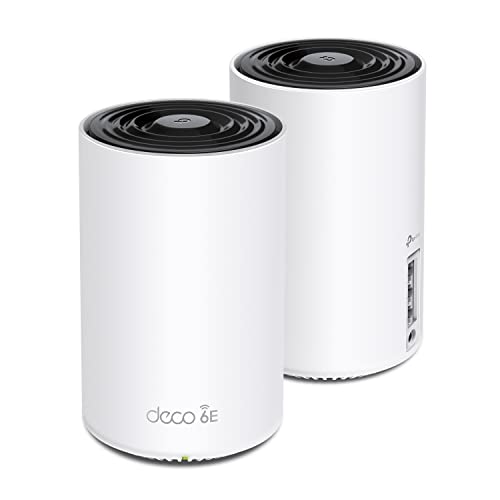
TP-Link Deco Tri-Band WiFi 6E 2-Pack
Best for: large homes with Wi-Fi 6E devices
- Wi-Fi Standard
- Wi-Fi 6E (what this guide is about)
- Speed Rating
- AXE5400
- Coverage Area
- up to 5500 Sq.Ft
- Frequency Bands
- Tri-Band
- Pack Size
- 2-Pack
- Device Capacity
- 200 devices
View on Amazon: TP-Link Deco Tri-Band WiFi 6E 2-Pack Affiliate link
The TP-Link Deco XE75 is a Wi-Fi 6E mesh system covering up to 5,500 square feet. It delivers AXE5400 speeds across three bands, including a dedicated 6 GHz band for backhaul. This setup supports 200 devices and uses AI-driven mesh technology to manage connections. It includes HomeShield security features and app control. It suits users seeking next-generation performance in larger homes.
Pros
- Wi-Fi 6E standard with dedicated 6 GHz band
- AXE5400 tri-band speed rating up to 5,400 Mbps
- Supports up to 200 connected devices
- Covers areas up to 5,500 square feet
- Includes TP-Link HomeShield security features
Cons
- Sold as a 2-pack, limiting initial node count
- Heavier at 2.69 pounds per unit
- Larger footprint at 6.67 inches tall
Good fit if
- You have Wi-Fi 6E devices to utilize the 6 GHz band
- You need coverage for large spaces up to 5,500 square feet
- You want a dedicated backhaul band for stable node connections
Skip if
- You require more than two nodes in your initial setup
- You only have Wi-Fi 6 devices and do not need 6 GHz
- You prefer smaller, less bulky mesh units
Verdict: The TP-Link Deco XE75 2-Pack offers robust Wi-Fi 6E performance for homes needing extensive coverage. It is ideal for users with compatible devices who prioritize a dedicated 6 GHz backhaul for stability.
Specifications side by side
| Spec | TP-Link Deco X55 3-Pack Wi-Fi 6 | TP-Link Deco Tri-Band WiFi 6E 2-Pack |
|---|---|---|
| Wi-Fi Standard | Wi-Fi 6 | WiFi 6E |
| Speed Rating | AX3000 | AXE5400 |
| Coverage Area | Up to 6,500 sq ft | up to 5500 Sq.Ft |
| Frequency Bands | not stated | Tri-Band |
| Pack Size | 3-Pack | 2-Pack |
| Port Speed | 1 Gbps | not stated |
| Device Capacity | Up to 150 devices | 200 devices |
| Frequency Band | not stated | Tri-Band |
| Use Case | not stated | Gaming, Streaming |
| Features | Mesh | Mesh, WPA3 |
| Intended Use | not stated | Home |
| Placement | Indoor | not stated |
| Dimensions | 4.33 × 4.33 × 4.49 inches | 4.13 × 4.13 × 6.67 inches |
| Weight | 5.07 pounds | 2.69 pounds |
| Size | 3 Pack | 2 Pack |
| Color | Black, White | Black and White |
| Model | Deco X55 | Deco XE75(2-pack) |
Frequently asked questions
Does Wi-Fi 6E work with my old devices?
Yes. Wi-Fi 6E networks remain backward compatible with Wi-Fi 6 and older devices. You can connect your existing laptops and phones to the 2.4 GHz or 5 GHz bands without issue. The new 6 GHz band is simply an additional option for newer hardware.
What is the main speed difference between Wi-Fi 6 and 6E?
Wi-Fi 6E adds the 6 GHz band for faster data rates. The TP-Link Deco XE75 uses this band to achieve an AXE5400 speed rating. The Deco X55 relies on Wi-Fi 6 and offers an AX3000 rating. The extra band reduces congestion for high-speed tasks.
Do I need Wi-Fi 6E devices to see benefits?
You need compatible devices to use the 6 GHz band. If your laptops and phones only support Wi-Fi 6, you will not access the new spectrum. However, you still get the mesh coverage benefits. The system manages traffic for all connected devices efficiently.
Which system is better for large homes with many devices?
The TP-Link Deco XE75 is ideal for large homes with many Wi-Fi 6E devices. It uses a tri-band setup with a dedicated 6 GHz backhaul. This keeps the connection stable even with heavy traffic. The Deco X55 is better for homes prioritizing capacity over next-gen speeds.
Is the 6 GHz band less prone to interference?
Yes. The 6 GHz band has more channels and fewer overlapping signals. This reduces interference from neighbors and household appliances. The TP-Link Deco XE75 leverages this for a cleaner connection. It provides a dedicated path for backhaul traffic, improving overall mesh stability.
Can I mix Wi-Fi 6 and 6E mesh nodes?
It is best to use nodes of the same standard for optimal performance. Mixing standards may limit the backhaul speed to the lower standard. The Deco XE75 and Deco X55 have different speed ratings. Sticking to one system ensures consistent whole-home coverage and smart mesh management.
What is the physical size difference between the two models?
The Deco XE75 is slightly taller and lighter than the X55. The XE75 measures 6.67 inches in height and weighs 2.69 pounds per unit. The X55 is 4.49 inches tall and weighs 5.07 pounds for a 3-pack. Both designs fit standard indoor spaces.