TP-Link Tri-Band Wi-Fi 6 Gaming Review (2026): A Spec-Based Look
As an Amazon Associate we earn from qualifying purchases. Links on this page are affiliate links.
This tp link wifi 6 internet gaming review focuses on the Archer AX10000, a tri-band router designed for high-performance home networks. It delivers AX10000 speeds, combining 4804 Mbps on two 5 GHz bands with 918 Mbps on the 2.4 GHz band. The unit features a 2.5 Gbps WAN port, allowing it to handle internet plans faster than standard gigabit connections. With a 1.8 GHz quad-core CPU and dedicated coprocessors, it manages heavy traffic efficiently. You get extensive connectivity through eight Gigabit LAN ports and two USB 3.0 interfaces. This setup targets users who need raw speed and low latency for gaming and large households.
What stands out
- Tri-band Wi-Fi 6 architecture with AX10000 speed rating
- 2.5 Gbps WAN port for high-speed internet plans
- 1.8 GHz quad-core CPU with three coprocessors
- Game Accelerator for optimizing gaming streams
Who it fits
Good fit for
You should consider this router if you have a high-speed internet plan exceeding 1 Gbps and want to utilize the 2.5 Gbps WAN port. It suits gamers who need dedicated 5 GHz bands for low latency and support for many simultaneous devices via OFDMA and MU-MIMO. Large homes with many connected devices will benefit from the tri-band design and the option to extend coverage using OneMesh compatible extenders. If you prioritize raw throughput and wired connectivity for multiple PCs or consoles, this spec-heavy model fits your needs.
Who should skip it
You might want to look elsewhere if you do not have an internet plan faster than 1 Gbps, as the 2.5 Gbps WAN port offers no advantage. This router is a single unit, so if you need seamless whole-home mesh coverage without adding separate extenders, a dedicated mesh system may be better. Users who prefer a compact, minimalist design might find the large physical dimensions and gaming aesthetic less appealing. Additionally, if you do not need the specific USB 3.0 connectivity options or the Game Accelerator features, a simpler Wi-Fi 6 router could suffice for your basic networking needs.
Verdict: The Archer AX10000 is a powerful tri-band router built for speed and gaming. It best suits users with fast internet plans and high device counts who need robust wired and wireless performance.
Key specs explained for Archer AX10000
Speed Rating: AX10000
This rating combines the maximum wireless speeds across all three frequency bands. The Archer AX10000 offers 4804 Mbps on each of the two 5 GHz bands and 918 Mbps on the 2.4 GHz band. This high aggregate throughput ensures that multiple devices can stream, game, and download simultaneously without congestion. It is ideal for households with many connected devices or heavy internet usage patterns.
Wi-Fi Standard: Wi-Fi 6
Wi-Fi 6, or 802.11ax, introduces OFDMA and MU-MIMO technologies. These allow the router to communicate with multiple devices at once rather than sequentially. This reduces latency and improves efficiency in crowded networks. For gaming and streaming, this means smoother performance when many users are online. It is a modern standard that future-proofs your home network against increasing device counts.
Frequency Bands: Tri-Band
Tri-band routers operate on three separate channels: one 2.4 GHz band and two 5 GHz bands. This separation allows you to dedicate one 5 GHz band specifically for high-demand tasks like gaming or 4K video streaming. The other bands handle general internet traffic and IoT devices. This isolation reduces interference and ensures consistent speeds for critical applications in your home network.
Max Port Speed: 2.5 Gbps
The router includes a 2.5 Gbps WAN port, which allows it to handle internet speeds faster than standard 1 Gbps connections. If your internet service provider offers speeds above 1 Gbps, this port ensures you do not bottleneck your connection. It also supports faster file transfers between devices on your local network. This feature is essential for users with high-speed fiber or cable internet plans.
Design and Build of Archer AX10000
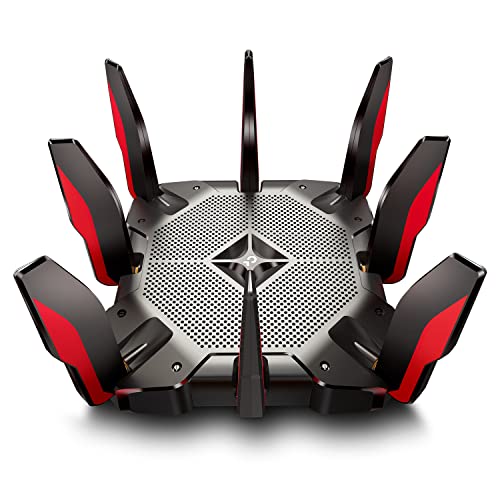
The TP-Link Archer AX10000 features a black and red finish that signals its gaming focus. According to the listing, the router measures 14.4 inches in length, 11.4 inches in width, and 4.72 inches in height. It weighs 4 pounds. This substantial weight and large footprint suggest it is not designed for portable use or tight spaces. You will likely place it on a desk or shelf where stability matters more than a small profile. The dimensions indicate a chassis built to house powerful internal components rather than to blend into minimal decor.
The design prioritizes connectivity over compactness. The unit includes a 2.5 Gbps WAN port and eight Gigabit LAN ports, along with two USB 3.0 ports in Type A and Type C formats. This layout requires ample rear space and cable management room. The presence of these ports means you need a clear area behind your router to connect wired devices, gaming consoles, and storage drives without strain. The physical build supports high data throughput by accommodating extensive cabling.
TP-Link markets this as a home gaming router. The aggressive styling and robust port selection align with this intent. You should expect a device that sits prominently in your network setup. The build does not attempt to hide in a corner. It is meant to be the central hub for a large home network, supporting many simultaneous connections through its physical interfaces and internal processing power.
Setup and Everyday Use Guide
You set up the Archer AX10000 by connecting it to your existing modem. The listing notes that a separate modem is required for most internet service providers, including AT&T, Verizon, Xfinity, Spectrum, RCN, Cox, CenturyLink, and Frontier. This router works with all major ISPs, giving you flexibility in your service choice. Once connected, you manage the network through the TP-Link ecosystem. The device supports TP-Link OneMesh, allowing you to expand coverage by adding compatible range extenders like the RE700X. This lets you create a whole-home WiFi network without buying a full mesh system from scratch. For daily use, the router handles multiple devices simultaneously thanks to OFDMA and MU-MIMO technologies. These features reduce lag when many gadgets are online. The 1.8 GHz quad-core CPU and three coprocessors keep performance steady under load. You can prioritize gaming traffic using the Game Accelerator, which detects and optimizes gaming streams. The included TP-Link HomeCare suite provides antivirus protection, parental controls, and QoS settings to manage bandwidth. Security is also handled via a built-in smart VPN feature. With eight Gigabit LAN ports and a 2.5 Gbps WAN port, you have ample wired connections for stationary devices. Two USB 3.0 ports, one Type A and one Type C, offer additional connectivity for storage or peripherals. The tri-band design ensures that gaming on the dedicated 5 GHz band does not interfere with general internet use on the other bands. This separation helps maintain low latency for your games while supporting other household activities.
Before You Buy This Router
You need a separate modem for most ISPs, including AT&T and Verizon, to get online. This device is a router, not a mesh system. It does not create whole-home coverage on its own. If you have a large home, you must buy a compatible OneMesh extender, such as the RE700X, to expand signal. Check your internet plan speed. The 2.5 Gbps WAN port helps if your service exceeds 1 Gbps. Otherwise, it works as a standard Gigabit router. Keep the unit in a well-ventilated area. It runs warm due to the quad-core CPU. You get free lifetime HomeCare for security and parental controls. This router suits gamers who want dedicated bands. It does not replace a mesh system for multi-story homes. Consider your layout before choosing this single unit over the other 1 options.
Check before you buy
- Confirm you have a compatible modem for your ISP.
- Check if your internet plan exceeds 1 Gbps speed.
- Verify if OneMesh extenders fit your large home needs.
- Ensure you have space for a 4-pound unit.
The product at a glance
TP-Link Tri-Band Wi-Fi 6 Gaming Router
Best for: Gamers with gigabit-plus internet and many wired devices
- Wi-Fi Standard
- Wi-Fi 6
- Speed Rating
- AX10000
- Frequency Bands
- Tri-Band
- Max Port Speed
- 2.5 Gbps
- Use Case
- Gaming
- Features
- VPN
View on Amazon: TP-Link Tri-Band Wi-Fi 6 Gaming Router Affiliate link
The TP-Link Archer AX10000 is a tri-band Wi-Fi 6 router designed for high-performance gaming. It delivers up to 10 Gbps across three bands, with dedicated 5 GHz streams for gaming traffic. A 2.5 Gbps WAN port supports internet plans faster than standard gigabit speeds. The 1.8 GHz quad-core CPU handles multiple devices simultaneously using OFDMA and MU-MIMO. It includes a 2.5 Gbps port and eight gigabit LAN ports for extensive wired connectivity.
Pros
- Tri-band Wi-Fi 6 architecture with 10 Gbps total speed
- 2.5 Gbps WAN port for high-speed internet connections
- Dedicated 5 GHz gaming band with Game Accelerator
- Eight gigabit LAN ports and two USB 3.0 ports
- 1.8 GHz quad-core CPU with three coprocessors
Cons
- Large physical footprint at 14.4 inches wide
- Heavy build weighing 4 pounds
- No mention of USB 3.1 or Thunderbolt support
Good fit if
- You have internet speeds exceeding 1 Gbps
- You need a dedicated band for gaming traffic
- You require extensive wired connections for consoles and PCs
Skip if
- You have limited space for large routers
- You only need standard gigabit internet speeds
- You prefer a compact desktop form factor
Verdict: TP-Link Archer AX10000 Tri-Band Gaming Router suits gamers with fast internet plans who need a dedicated gaming band and many wired ports. Its large size fits well in open areas but may overwhelm small desks.
Specifications side by side
| Spec | TP-Link Tri-Band Wi-Fi 6 Gaming Router |
|---|---|
| Wi-Fi Standard | Wi-Fi 6 |
| Speed Rating | AX10000 |
| Frequency Bands | Tri-Band |
| Max Port Speed | 2.5 Gbps |
| Frequency Band | Tri-Band |
| Use Case | Gaming |
| Features | VPN |
| Port Speed | Gigabit, 2.5G |
| Intended Use | Home |
| Dimensions | 14.4 × 11.4 × 4.72 inches |
| Weight | 4 pounds |
| Color | Black and Red |
| Model | Archer AX10000 |
Frequently asked questions
Is the TP-Link Archer AX10000 a mesh system?
No, it is a standalone router. The product data identifies it as a single unit rather than a mesh network. You need separate nodes to create whole-home coverage. It is designed to connect to a modem directly. This setup works well for single-story homes or small apartments.
What ports does the Archer AX10000 have?
It includes Gigabit Ethernet ports and a 2.5G WAN/LAN port. These speeds support internet plans faster than 1 Gbps. You can connect wired devices like consoles or PCs for stable connections. The 2.5G port allows for future-proofing your network speed without upgrading your entire setup.
Does this router support Wi-Fi 6?
Yes, it uses the Wi-Fi 6 standard. This technology improves efficiency and handles multiple devices better than older versions. The Archer AX10000 combines this with tri-band connectivity. You get dedicated bands for gaming and other high-bandwidth tasks, reducing congestion in your home network.
Can I use this router for online gaming?
Yes, it is designed specifically for gaming use cases. The tri-band setup includes a dedicated band to isolate gaming traffic. This helps reduce latency and packet loss during intense sessions. You also benefit from VPN features for secure connections while playing online.
How large is the TP-Link AX10000?
It measures 14.4 inches long, 11.4 inches wide, and 4.72 inches high. The unit weighs 4 pounds, making it a substantial piece of hardware. Its size fits well in open areas but may dominate small desks. Plan your placement carefully to ensure proper ventilation and signal distribution.
Does it work with all internet providers?
The listing notes compatibility with major ISPs like AT&T, Verizon, and Xfinity. You must use a separate modem for most connections. This router handles various service types effectively. Check your provider requirements to ensure your modem is compatible before purchasing.