TP-Link N300 WiFi Extender Review: Specs, Pros and Cons
As an Amazon Associate we earn from qualifying purchases. Links on this page are affiliate links.
This tp link n300 wifi extender review covers the RE105, a device designed to boost your home network. It is defined by its N300 speed rating and two external antennas. The unit helps extend WiFi coverage to areas where your main router signal is weak. It supports both repeater and access point modes for flexible setup. You can connect wired devices via its Ethernet port. The compact design fits easily into most home environments. This guide explains how these specifications translate to real-world performance for your network needs.
What stands out
- N300 speed rating for basic WiFi extension
- Two external antennas using MIMO technology
- Supports both Repeater and Access Point modes
- Fast Ethernet port for wired connections
Who it fits
Good fit for
This extender suits users with basic internet needs who need to cover dead zones in a small to medium home. If you primarily browse the web, check email, or stream standard definition video, the N300 rating is sufficient. The two antennas help maintain a stable connection in areas with moderate interference. It is also a good fit for those who want to add a wired connection for a desktop computer or smart TV in a room far from the router. The simple setup via the Tether app makes it accessible for non-technical users.
Who should skip it
You should look at another option if you require high-speed performance for 4K streaming, online gaming, or large file transfers. The N300 speed rating is limited compared to modern AC or AX standards. Users with many connected devices may find the bandwidth insufficient during peak usage. Additionally, if you need advanced features like mesh networking or dual-band support, this single-band extender will not meet your requirements. It is not designed for high-throughput applications or large homes with multiple floors.
Verdict: The TP-Link RE105 is a straightforward solution for extending WiFi coverage in smaller homes with basic internet needs. Its two antennas and simple setup make it a practical choice for eliminating dead zones.
Key specs explained for RE105
Speed Rating: N300
This rating indicates a maximum combined wireless speed of 300 Mbps. It uses older 802.11n standards on the 2.4 GHz band. You should expect this speed for basic tasks like web browsing or email. It is not suitable for 4K video streaming or large file transfers. When comparing to modern mesh systems, N300 is significantly slower than Wi-Fi 6 or Wi-Fi 6E options.
Antenna Count: 2
The device includes two external antennas. These antennas use MIMO technology to improve signal range and stability. This setup helps maintain a stronger connection in larger homes or areas with obstacles. It offers better coverage than models with internal or single antennas. You get more consistent performance in corners or distant rooms compared to simpler repeaters.
Operating Modes: Repeater, Access Point
You can use this device as a standard repeater to extend your existing router's signal. Alternatively, you can set it up in Access Point mode. This creates a new, separate network for wired devices. This mode is useful if you connect the extender to your router via an Ethernet cable. It provides a stable link for gaming consoles or smart TVs.
Fast Ethernet Port
The unit features a wired Ethernet port for connecting devices directly. This allows you to get reliable, high-speed internet for gadgets that lack WiFi. You can connect computers, smart TVs, or game consoles for stable performance. This is crucial for devices that need low latency. It adds versatility to the extender beyond just boosting wireless signals.
Design and Build Quality
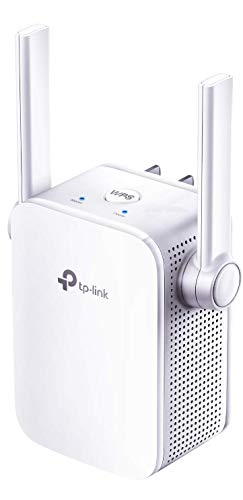
According to the listing, the TP-Link RE105 features a compact, minimalist design. The housing combines white and grey plastic for a neutral look. It measures 2 inches wide, 2.7 inches high, and 3.15 inches long. At 4.23 ounces, the unit is lightweight. This small form factor allows you to plug it directly into a wall outlet without blocking adjacent sockets. The low profile helps it blend into home environments without drawing attention.
The device includes two external antennas. These antennas use MIMO technology to improve range compared to standard extenders. This design choice suggests better signal stability in larger homes. You can position the extender to optimize coverage based on your router location. The compact size also means it does not take up much desk or shelf space if you choose to place it elsewhere.
Setup is managed through the Tether app on Android or iOS devices. The listing notes an intelligent signal indicator to help you find the optimal location. This feature simplifies placement decisions. You do not need to guess where the extender works best. The simple layout and straightforward controls make it accessible for users who want a quick installation. The design prioritizes function over complex aesthetics, focusing on reliable coverage extension.
Setup and everyday use
Setting up this extender takes only a few minutes. You can manage the device using the TP-Link Tether app on Android or iOS. The app guides you through quick steps to connect the unit to your existing network. An intelligent signal indicator helps you find the optimal placement for the best connection. This feature ensures you position the extender where it can effectively boost your signal without being too far from the main router.
The device works with any WiFi router, gateway, or access point. It does not require specific brand compatibility. You can use it to extend coverage to areas with weak signals. The listing notes that WiFi extenders are designed to improve coverage, not directly increase speed. Improving signal reliability may affect overall throughput in some cases. You should understand that this unit expands your network footprint rather than boosting raw data rates.
In daily use, you can operate the RE105 in two modes. The repeater mode extends your current WiFi network. The access point mode creates a new WiFi network for your home. A fast Ethernet port allows you to connect wired devices anywhere in your house. This provides reliable connectivity for devices that do not support WiFi. The two external antennas with MIMO technology help maintain a stable connection over a better range than standard models. You get consistent coverage for basic internet tasks throughout your home.
Before You Buy This Extender
Before you buy this extender, check your router compatibility. It works with any standard WiFi router, gateway, or access point. Ensure your existing network supports the 802.11n standard for best results. You need a power outlet near the installation spot. The unit plugs directly into the wall, so keep furniture away. You will need the Tether app on your phone for setup. This device fits best as a temporary fix or for small spaces. It does not replace a full mesh system for large homes. If you need whole-home coverage, consider mesh options. This extender is practical for extending signal to one dead zone. It adds an ethernet port for wired connections. Keep the firmware updated via the app. This ensures stable performance over time. It is a simple tool for basic connectivity needs.
Check before you buy
- Verify your router supports 802.11n standard.
- Ensure a power outlet is nearby.
- Download the Tether app for setup.
- Check if mesh is needed for large areas.
The product at a glance
TP-Link N300 WiFi Extender
Best for: basic Wi-Fi range extension
- Speed Rating
- N300
- Frequency Bands
- Single-Band (2.4 GHz)
- Operating Modes
- Range Extender, Access Point
- Antenna Count
- 2 external
- Placement
- Wall Plug Design
- Intended Use
- Home
View on Amazon: TP-Link N300 WiFi Extender Affiliate link
The TP-Link N300 WiFi Extender covers dead zones using two external antennas and MIMO technology. It supports both Repeater and Access Point modes. A single Ethernet port allows wired connections for devices. You can manage it via the Tether app on iOS or Android. The compact white unit weighs 4.23 ounces. It suits homes needing basic coverage extension rather than high-speed upgrades.
Pros
- Two external antennas with MIMO for better range
- Supports Repeater and Access Point modes
- Includes fast Ethernet port for wired devices
- Manageable via Tether app with signal indicator
Cons
- Limited to N300 speed rating
- Single Ethernet port restricts wired connections
- No mention of dual-band support
Good fit if
- You need to extend Wi-Fi range in a small area
- You want to connect a device via Ethernet wirelessly
- You prefer simple app-based setup and management
Skip if
- You require high-speed gaming or 4K streaming
- You need to connect multiple wired devices wirelessly
- You already have a modern dual-band router
Verdict: TP-Link N300 WiFi Extender is a basic range booster for users who need simple coverage extension. It fits those who value straightforward setup and wired connectivity options over speed.
Specifications side by side
| Spec | TP-Link N300 WiFi Extender |
|---|---|
| Speed Rating | N300 |
| Frequency Bands | Single-Band (2.4 GHz) |
| Operating Modes | Range Extender, Access Point |
| Antenna Count | 2 external |
| Placement | Wall Plug Design |
| Intended Use | Home |
| Operating Mode | Access Point Mode |
| Dimensions | 3.15 × 2 × 2.7 inches |
| Weight | 4.23 ounces |
| Size | WiFi Extender- N300(Newer Model) |
| Color | White,Grey |
| Model | ELCM |
Frequently asked questions
Does the TP-Link N300 support 5GHz networks?
No, this device operates only on the 2.4 GHz band. It uses the older 802.11n standard to deliver N300 speeds. This band offers better range but lower maximum speeds compared to 5GHz options. You should expect performance suitable for basic web browsing and email tasks rather than high-bandwidth activities.
What are the physical dimensions of the extender?
The unit measures 2 inches wide, 2.7 inches high, and 3.15 inches long. It weighs 4.23 ounces, making it lightweight and easy to place. The compact size allows it to fit into standard wall outlets without blocking adjacent sockets. The color scheme combines white and grey plastic for a neutral appearance.
Can I use this extender with any router?
Yes, the TP-Link N300 works with any standard WiFi router, gateway, or access point. It is designed to extend existing networks regardless of the brand. For best results, ensure your main router supports the 802.11n standard. This compatibility makes it a versatile choice for upgrading coverage in various home setups.
Is this device suitable for 4K video streaming?
It is not recommended for 4K video streaming. The N300 speed rating caps combined wireless speeds at 300 Mbps on the 2.4 GHz band. This bandwidth is sufficient for basic tasks like web browsing or email. High-definition video requires more stable and faster connections than this basic range booster can provide.
How do I manage the extender after setup?
You can manage the device using the TP-Link Tether app on Android or iOS. The app guides you through quick setup steps to connect the unit to your network. It also helps you monitor signal strength and adjust settings. This software support simplifies configuration without needing to access a computer.
What is the primary use case for this extender?
This device is best for basic WiFi range extension. It fits users who need simple coverage boosts in areas with weak signals. The design prioritizes straightforward setup and wired connectivity options over high speed. It is ideal for homes where basic internet access is the main requirement rather than heavy media consumption.