TP-Link Dual-Band Wi-Fi 7 Gaming Review: Who It Fits and Who Should Skip It
As an Amazon Associate we earn from qualifying purchases. Links on this page are affiliate links.
This tp link dual band wi fi 7 gaming review focuses on the Archer GE400, a dedicated router for players seeking speed and stability. It delivers BE6500 class performance across dual bands, combining a 5 GHz speed of up to 5765 Mbps with a 2.4 GHz band at 688 Mbps. The unit supports up to 90 connected devices within a 2,600 square foot area. You get multi-gigabit ports to handle high-speed internet plans, ensuring your wired connections keep up with your wireless speeds. This model is built specifically for gaming environments.
What stands out
- Wi-Fi 7 standard with BE6500 speed rating
- Dual-band coverage up to 2,600 sq. ft.
- 1x 2.5 Gbps WAN/LAN and 1x 2.5 Gbps LAN ports
- Dedicated gaming port with traffic prioritization and WTFast acceleration
- Support for up to 90 simultaneous devices
Who it fits
Good fit for
This router suits gamers who want low latency and high throughput for a single connected home. If you have a multi-gig internet plan, the 2.5 Gbps ports let you fully utilize that speed. It is ideal for households with up to 90 devices, including multiple consoles, PCs, and smart home gadgets. The dedicated game panel helps you manage traffic priorities easily. You will benefit from the focused signal coverage if your network needs to reach up to 2,600 square feet without dead zones.
Who should skip it
You should look elsewhere if you need tri-band performance or a mesh system. This model is dual-band only and does not support the 6 GHz band. It is not compatible with Deco mesh systems, so you cannot expand coverage using those specific units. If you require a whole-home mesh network with seamless roaming between multiple nodes, this standalone router will not meet your needs. It also lacks the extra 5 GHz band found in higher-end tri-band options.
Verdict: The Archer GE400 is a solid choice for gamers who need fast dual-band Wi-Fi 7 and multi-gigabit wired ports. It fits single-home setups but falls short for users requiring tri-band speeds or compatible mesh expansion.
Key specs explained for Archer GE400
Wi-Fi Standard: WiFi 7
WiFi 7 introduces new data transmission methods that improve efficiency and reduce latency. For gamers, this means lower ping times and more consistent connections during peak usage. It supports features like multi-link operation, allowing devices to use multiple bands simultaneously. This standard future-proofs your network for newer devices that support the latest protocols, ensuring you get the best possible performance from compatible hardware.
Speed Rating: BE6500
This rating indicates the combined maximum theoretical wireless speed across all bands. The Archer GE400 reaches up to 5765 Mbps on the 5 GHz band and 688 Mbps on the 2.4 GHz band. While actual speeds depend on distance and obstacles, this high rating ensures ample bandwidth for multiple 4K streams or large file transfers. It is sufficient for most high-speed internet plans without bottlenecking your connection.
Max Port Speed: 2.5 Gbps
The router includes two 2.5 Gbps ports, which are faster than standard Gigabit Ethernet. This allows you to utilize internet plans exceeding 1 Gbps when connected to a compatible modem or switch. Wired connections for gaming consoles or PCs benefit from this extra headroom, reducing congestion during heavy downloads or uploads. It is a key feature for users with multi-gigabit internet service who want to maximize their wired throughput.
Coverage Area: 2,600 sq. ft.
This specification estimates the effective wireless range of a single unit. It suits small to medium-sized homes where a single router can reach most rooms. If your space is larger, you may need additional mesh nodes to eliminate dead zones. The listing notes that coverage varies by obstacles like walls, so actual performance may differ. This makes it a good starting point for apartments or smaller houses with moderate interference.
Device Capacity: 90 devices
The router is rated to handle up to 90 connected devices simultaneously. This capacity supports smart homes with numerous IoT gadgets, multiple computers, phones, and streaming devices. High device counts can strain older routers, but this rating suggests robust handling for busy networks. Ensure your internet plan and modem can also support this many concurrent connections to avoid bottlenecks at the source rather than the router.
Design, Build Quality And Size
The Archer GE400 measures 10.6 inches in length, 6.02 inches in width, and 2.31 inches in height, according to the listing. It weighs 1.43 pounds. The unit is finished in black plastic. This compact footprint allows you to place it on a shelf, desk, or floor without taking up much space. The low profile ensures it does not dominate your gaming setup or living area visually.
The router features six optimally positioned antennas. These are built into the chassis rather than protruding excessively, which contributes to its streamlined appearance. You can adjust the RGB lighting settings through the dedicated game panel. This allows you to match the device to your existing peripherals or keep the lights off for a cleaner look. The physical layout includes a clear port arrangement on the rear. You have one 2.5 Gbps WAN/LAN port, one 2.5 Gbps LAN port, and three 1 Gbps LAN ports. This configuration supports high-speed wired connections for your console, PC, or streaming device.
The design prioritizes function over flashy aesthetics, while still offering customization through software-controlled lighting. The sturdy build and specific dimensions make it suitable for stable placement in a home office or entertainment center. It does not require a large footprint to deliver its rated coverage. The black finish helps it blend into most modern interior decors. You can position it centrally to maximize the 2,600 sq. ft. coverage area efficiently.
Setup, Compatibility, And Daily Use
You set up the Archer GE400 using the TP-Link HomeShield app or a web browser. The listing notes that all Wi-Fi routers require a separate modem, so you must connect your existing modem to the router’s 2.5 Gbps WAN/LAN port. This port allows you to utilize multi-gig internet plans if your provider offers them. The device supports EasyMesh, meaning you can extend coverage by adding compatible routers, range extenders, or wireless powerline adapters. It does not work with Deco mesh systems. You can manage network settings, prioritize game traffic, and view performance insights through the dedicated game panel on the dashboard. This panel also lets you control RGB lighting and see which devices are receiving accelerated performance. Daily use involves managing up to 90 devices within a 2,600 square foot area. Beamforming technology directs signals toward devices, improving strength in hard-to-reach spots. The router includes three 1 Gbps LAN ports and one additional 2.5 Gbps LAN port for wired connections. TP-Link cites a commitment to secure-by-design principles, aligning with CISA pledges. Basic parental controls and network security features are included in the free tier of HomeShield. You configure these settings through the interface provided by the manufacturer. The dual-band design focuses on 2.4 GHz and 5 GHz frequencies, excluding the 6 GHz band. This setup ensures a stable connection for gaming and general browsing across your home network.
Before You Buy This Router
You need a separate modem to use this device. The listing specifies that all Wi-Fi routers require a modem connection. Connect your modem to the 2.5 Gbps WAN/LAN port to utilize your internet plan fully. This router covers up to 2,600 square feet. If your home is larger, you must add compatible EasyMesh extenders. Note that it does not work with Deco mesh systems. You can manage settings via the TP-Link HomeShield app or a web browser. The router supports up to 90 devices. Ensure your gaming PC or console can handle the dual-band connection. Keep the firmware updated through the app for security. This model sits alongside other options in our guide. It suits gamers who want dedicated traffic prioritization. It fits well if you need multi-gigabit wired ports for your console or PC.
Check before you buy
- Verify you have a compatible modem for connection.
- Check if your home size exceeds 2,600 square feet.
- Confirm your devices support dual-band Wi-Fi 7.
- Ensure you do not plan to use Deco mesh systems.
The product at a glance
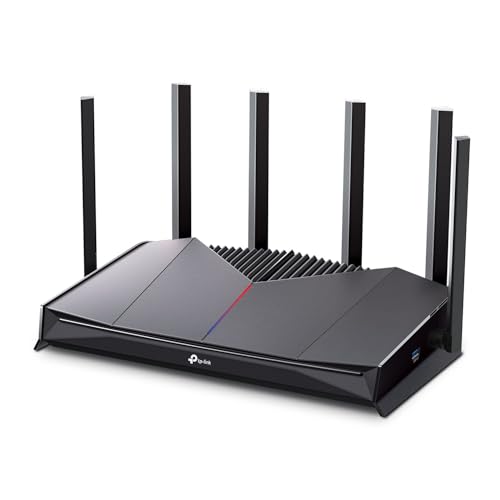
TP-Link Dual-Band Wi-Fi 7 Gaming Router
Best for: Gaming with multi-gig internet and 2.5 Gbps ports
- Wi-Fi Standard
- WiFi 7
- Speed Rating
- BE6500
- Frequency Bands
- Dual-Band
- Coverage Area
- 2,600 sq ft
- Device Capacity
- 90 devices
- Max Port Speed
- 2.5 Gbps
View on Amazon: TP-Link Dual-Band Wi-Fi 7 Gaming Router Affiliate link
The TP-Link Archer GE400 is a dual-band Wi-Fi 7 router designed for gaming. It offers up to 5765 Mbps on the 5 GHz band and 688 Mbps on the 2.4 GHz band. It supports up to 90 devices and covers 2,600 square feet. The unit includes a 2.5 Gbps WAN port and a dedicated 2.5 Gbps LAN port for wired connections. It features a dedicated game panel and QoS for prioritized traffic.
Pros
- Wi-Fi 7 standard with BE6500 speed rating
- Dual 2.5 Gbps ports for high-speed wired connections
- Supports up to 90 connected devices
- Dedicated game traffic prioritization and WTFast acceleration
- Covers up to 2,600 square feet with beamforming
Cons
- Dual-band design lacks the 6 GHz band for less congested speeds
- 2,600 square foot coverage may be small for larger homes
- Does not support TP-Link Deco mesh systems for whole-home extension
Good fit if
- You want Wi-Fi 7 speeds for gaming on a budget
- You have a multi-gig internet plan and need 2.5 Gbps ports
- You play competitive games and need low-latency traffic prioritization
Skip if
- You need tri-band performance or a 6 GHz band for crowded areas
- You have a large home over 2,600 square feet
- You want to expand coverage using a TP-Link Deco mesh system
Verdict: The TP-Link Archer GE400 Dual-Band Wi-Fi 7 is a focused gaming router for users with multi-gig internet who need dedicated wired ports and traffic prioritization. It suits gamers in smaller to medium homes who do not require tri-band frequencies or Deco mesh expansion.
Specifications side by side
| Spec | TP-Link Dual-Band Wi-Fi 7 Gaming Router |
|---|---|
| Wi-Fi Standard | WiFi 7 |
| Speed Rating | BE6500 |
| Frequency Bands | Dual-Band |
| Coverage Area | 2,600 sq ft |
| Device Capacity | 90 devices |
| Max Port Speed | 2.5 Gbps |
| Ethernet Ports | 5 |
| Frequency Band | Dual-Band |
| Use Case | Gaming |
| Port Speed | Gigabit, 2.5G |
| Dimensions | 10.6 × 6.02 × 2.31 inches |
| Weight | 1.43 pounds |
| Size | 1 Count (Pack of 1) |
| Color | Black |
| Model | Archer GE400 |
Frequently asked questions
Is this router good for gaming?
Yes, it is built for gaming. The TP-Link Archer GE400 targets players who need stable connections. It supports Wi-Fi 7 for lower latency. You get dedicated ports for wired devices. This setup helps keep your ping times low during intense matches.
Does it support Wi-Fi 7?
Yes, it uses the latest Wi-Fi 7 standard. This technology improves efficiency and reduces lag. It supports multi-link operation for better reliability. You get faster speeds on the 5 GHz band. This helps handle multiple devices without slowing down your game.
How many ports does it have?
It features a 2.5 Gbps WAN/LAN port. This allows you to connect your modem directly. You can use this port for high-speed internet plans. The router focuses on wired stability for gaming. Check the listing for other available LAN ports for your console.
Can I use it with my existing modem?
Yes, you can use your current modem. All Wi-Fi routers require a separate modem connection. You must plug your modem into the 2.5 Gbps port. This ensures you get the full speed of your internet plan. The router does not include a built-in modem.
What is the size of the router?
It measures 10.6 inches in length. The width is 6.02 inches and height is 2.31 inches. It weighs 1.43 pounds. The black plastic design is compact. You can place it on a desk or shelf. It fits easily in most gaming setups without taking up too much space.
Is it tri-band or dual-band?
It is a dual-band router. It operates on 2.4 GHz and 5 GHz bands. It does not include a third band. This is fine for smaller to medium homes. You get strong performance on the 5 GHz band for gaming. It suits users who do not need tri-band frequencies.
What app do I use to setup?
You can use the TP-Link HomeShield app. You can also use a web browser. Both options allow you to manage settings. The app helps you configure the router quickly. You can monitor connected devices and adjust priorities. This makes initial setup straightforward for most users.
Who should skip this router?
Skip it if you need tri-band Wi-Fi. It is not ideal for very large homes. You might need a mesh system instead. It is best for smaller to medium spaces. Gamers with multi-gig internet will benefit most. Users needing extensive mesh expansion should look elsewhere.