TP-Link AX6000 Dual-Band Wi-Fi 6 Review: Specs, Pros and Cons
As an Amazon Associate we earn from qualifying purchases. Links on this page are affiliate links.
This tp link ax6000 wi fi 6 dual review covers the TP-Link Archer AX80 router. It delivers AX6000 class performance across two frequency bands. You get up to 4804 Mbps on the 5.0 GHz band and 1148 Mbps on the 2.4 GHz band. The unit includes eight high-gain antennas for extended coverage. A key feature is the 2.5G multi-gigabit port. This allows you to bypass bottlenecks from modern multi-gig internet plans. The router supports Wi-Fi 6 standards for improved efficiency. It also features MU-MIMO and OFDMA technologies to handle multiple devices simultaneously. These specs define its role as a high-speed home networking hub.
What stands out
- 2.5G multi-gigabit port for faster wired connections
- AX6000 speed rating with Wi-Fi 6 technology
- Eight high-gain antennas with Beamforming for coverage
- MU-MIMO and OFDMA for better device efficiency
- TP-Link HomeShield for basic network security and parental controls
Who it fits
Good fit for
You should choose this router if you have a multi-gigabit internet plan and want to utilize the full speed via the 2.5G port. It suits households with many connected devices, thanks to Wi-Fi 6 MU-MIMO and OFDMA capabilities. Users who need strong coverage in larger spaces will benefit from the eight high-gain antennas. It is also ideal for those who want basic security features like IoT device identification and parental controls without extra subscriptions. If you need a reliable base for a OneMesh system, this model works well with compatible extenders.
Who should skip it
Skip this model if you require tri-band connectivity, as this is strictly a dual-band router. You might want a different option if you need a dedicated backhaul for a mesh system, since this unit relies on Wi-Fi for OneMesh extender connections. Users seeking advanced parental controls or premium security features beyond the free HomeShield tier should look elsewhere. If you prefer a smaller footprint, note that this unit measures 10.9 x 7.2 x 2.3 inches. Those who do not need the 2.5G port may find the price premium unnecessary for standard gigabit plans.
Verdict: The TP-Link Archer AX80 is a solid AX6000 dual-band router for users with multi-gig internet plans. Its 2.5G port and Wi-Fi 6 features make it a practical choice for modern homes.
Key specs explained for AX80
Speed Rating: AX6000
This rating combines the maximum theoretical speeds across all bands. It indicates the router can handle high-bandwidth tasks like 4K streaming or large file transfers without choking. When comparing mesh systems, higher ratings generally support more simultaneous connections. This spec helps you gauge if the hardware is powerful enough for your household's total internet demand.
Wi-Fi Standard: Wi-Fi 6
Wi-Fi 6 improves efficiency and reduces latency when multiple devices connect. It uses technologies like OFDMA to share channels more effectively than older standards. This is crucial for homes with many smartphones, laptops, and smart home gadgets. If you upgrade your mesh nodes, ensure they support this standard to maintain consistent performance across the entire home network.
Max Port Speed: 2.5 Gbps
This port allows wired connections to exceed standard gigabit speeds. It prevents the router from becoming a bottleneck if your internet plan offers more than 1 Gbps. This is ideal for users with multi-gig fiber connections or those transferring large files between computers and NAS drives. Check if your other devices and cables support these higher speeds to benefit fully.
Frequency Bands: Dual Band
Dual-band routers operate on both 2.4 GHz and 5 GHz frequencies. The 5 GHz band offers faster speeds and less interference, while 2.4 GHz provides better range through walls. This setup allows you to balance speed and coverage for different devices. When shopping for mesh systems, ensure each node supports dual-band to maintain strong signals in every room of your home.
Design and build overview
According to the listing, the TP-Link Archer AX80 measures 10.9 by 7.2 by 2.3 inches. It weighs two pounds. The finish is black. These dimensions make it a desktop-sized unit rather than a compact wall-mount device. You will likely place it on a shelf or desk where it has room to breathe. The substantial size accommodates the eight high-gain antennas mentioned in the features. This internal layout supports the beamforming technology that directs signals toward your devices. The weight suggests a stable base that resists tipping, which matters if you have pets or children nearby.
The black color helps the router blend into most home office or living room setups. It does not draw visual attention away from other electronics. The layout is straightforward, with ports typically located on the rear panel. This keeps cables tidy and out of sight. You do not need to worry about the unit getting too hot, as the open design allows for natural air circulation around the chassis. The build quality appears solid for a consumer-grade router. It is designed to sit stationary rather than move around. You should ensure your placement spot has adequate clearance on all sides. This allows the antennas to function without obstruction from walls or large furniture. The physical design prioritizes signal reach over minimal footprint.
Setup And Daily Use Guide
You set up this router using the TP-Link HomeShield app or a web interface. The listing notes compatibility with all major internet service providers, including Comcast, Xfinity, and AT&T. You will need a separate modem for most connections. The device supports OneMesh, allowing you to expand coverage by adding a compatible range extender. This creates a single network name across your home. You can switch between access points without reconnecting devices manually.
Daily use benefits from Wi-Fi 6 standards. The router uses MU-MIMO and OFDMA technologies. These features allow multiple data streams to operate simultaneously. This reduces latency when many devices connect at once. You get a 2.5 Gbps multi-gigabit port. This port prevents your router from becoming a bottleneck if your internet plan exceeds 1 Gbps. The eight high-gain antennas with beamforming technology direct signals toward your devices. This helps maintain stable connections over longer distances.
For security, HomeShield offers basic network protection and IoT device identification. You also get parental controls and quality of service settings. These features help manage bandwidth and keep your network safe. You can control guest Wi-Fi via voice commands through Amazon Alexa. The VPN client support lets your home devices access remote servers without installing software on each device. This setup provides a flexible foundation for modern home networks.
Check compatibility and setup needs
Before purchasing the TP-Link Archer AX80, verify your internet plan speed. This router includes a 2.5 Gbps WAN port, allowing you to utilize multi-gigabit connections from providers like Comcast or AT&T. If your current plan is below 1 Gbps, this port still offers future-proofing for wired upgrades. You must have a separate modem for most ISP connections, as the unit does not include one. Check if your existing devices support Wi-Fi 6 to fully leverage MU-MIMO and OFDMA efficiency gains. While the AX80 provides strong single-unit coverage, consider adding a OneMesh compatible extender if you have large homes or thick walls. This creates a seamless single network. Review the HomeShield app features to ensure the included parental controls and IoT protection meet your security needs. This setup suits users wanting high-speed wired backhaul options without committing to a full mesh system yet.
Check before you buy
- Confirm your ISP plan supports speeds exceeding 1 Gbps to use the 2.5 Gbps port.
- Ensure you have a separate modem compatible with your service provider.
- Check if your devices support Wi-Fi 6 for optimal MU-MIMO performance.
- Verify if your home size requires a OneMesh extender for full coverage.
The product at a glance
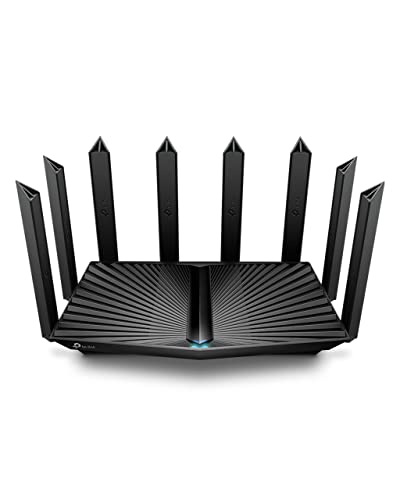
TP-Link AX6000 Dual-Band Wi-Fi 6 Router
Best for: multi-gigabit internet users
- Wi-Fi Standard
- Wi-Fi 6
- Speed Rating
- AX6000
- Frequency Bands
- Dual Band
- Max Port Speed
- 2.5 Gbps
- Use Case
- Streaming
- Features
- WPA3
View on Amazon: TP-Link AX6000 Dual-Band Wi-Fi 6 Router Affiliate link
The TP-Link Archer AX80 is a dual-band Wi-Fi 6 router rated at AX6000. It delivers up to 4804 Mbps on the 5 GHz band and 1148 Mbps on the 2.4 GHz band. A key feature is the 2.5 Gbps multi-gigabit port, which prevents wired connections from bottlenecking faster internet plans. The unit includes eight high-gain antennas and beamforming for extended coverage. It supports MU-MIMO and OFDMA to manage multiple devices efficiently.
Pros
- 2.5 Gbps multi-gigabit WAN/LAN port
- AX6000 speed rating with Wi-Fi 6
- Eight high-gain antennas with beamforming
- Built-in VPN client support
- Compatible with OneMesh range extenders
Cons
- Dual-band only, lacks a dedicated 6 GHz band
- Bulky dimensions at 10.9 x 7.2 x 2.3 inches
- No mention of Wi-Fi 6E or tri-band support
Good fit if
- You have an internet plan faster than 1 Gbps
- You need strong coverage for a large home
- You want to use a VPN without installing software
Skip if
- You require tri-band Wi-Fi 6E performance
- You have limited space for a large router
- You only need basic single-band connectivity
Verdict: The TP-Link Archer AX80 AX6000 Router is a solid choice for users with multi-gigabit internet plans who need reliable coverage. It fits homes that benefit from wired speed upgrades and robust wireless management.
Specifications side by side
| Spec | TP-Link AX6000 Dual-Band Wi-Fi 6 Router |
|---|---|
| Wi-Fi Standard | Wi-Fi 6 |
| Speed Rating | AX6000 |
| Frequency Bands | Dual Band |
| Max Port Speed | 2.5 Gbps |
| Frequency Band | Dual-Band |
| Use Case | Streaming |
| Features | WPA3 |
| Port Speed | 2.5G |
| Operating Mode | Access Point Mode |
| Dimensions | 9.84 × 7.87 × 3.15 inches |
| Weight | 2 pounds |
| Size | 10.9 x 7.2 x 2.3 inches |
| Color | Black |
| Model | Archer AX80 |
Frequently asked questions
Is the TP-Link AX6000 router compatible with multi-gigabit internet plans?
Yes, this router supports multi-gigabit connections. It includes a 2.5 Gbps WAN port, allowing you to utilize internet speeds higher than 1 Gbps. This makes it a solid choice for users with plans from providers like Comcast or AT&T who need reliable wired speed upgrades.
What Wi-Fi standard does the Archer AX80 use?
The Archer AX80 uses Wi-Fi 6 technology. It operates on dual bands, providing up to 4804 Mbps on the 5.0 GHz band and 1148 Mbps on the 2.4 GHz band. This combination delivers AX6000 class performance for high-bandwidth tasks.
How large is the TP-Link AX6000 router?
The unit measures 10.9 by 7.2 by 2.3 inches and weighs two pounds. These dimensions make it a desktop-sized device rather than a compact wall-mount option. The finish is black, so it blends easily into most home office or living room setups.
Can I extend the network range with a range extender?
Yes, the device supports OneMesh. This feature allows you to add compatible TP-Link range extenders to expand your wireless coverage. You can manage the entire system through the TP-Link HomeShield app or a web interface for consistent connectivity throughout your home.
Does this router work with all internet service providers?
The listing notes compatibility with all major internet service providers. This includes common services like Comcast, Xfinity, and AT&T. You will likely need a separate modem for most connections to establish the internet link before configuring the router settings.
What is the model number for this TP-Link AX6000 router?
The specific model number is Archer AX80. It is marketed as the TP-Link AX6000 Dual-Band Wi-Fi 6 Router. This model is designed for users who need robust wireless management and reliable coverage for modern home networks.