TP-Link AC2600 Quad-Antenna Dual-Band Wi-Fi vs TP-Link AX3000 Wi-Fi 6 Range: Spec Comparison
As an Amazon Associate we earn from qualifying purchases. Links on this page are affiliate links.
This guide compares the tp link ac2600 quad antenna dual band wi fi vs ax3000 wi fi 6 range models. Both devices are dual-band extenders with gigabit ports. They share the same core function: boosting your existing network signal. The main difference lies in their underlying technology. One uses the older Wi-Fi 5 standard. The other uses the newer Wi-Fi 6 standard. This shift affects how data moves through your home network. You need to know which fits your current setup. We look at the specs to help you decide.
Key differences
| Aspect | TP-Link AC2600 Quad-Antenna Dual-Band Wi-Fi Extender | TP-Link AX3000 Wi-Fi 6 Range Extender |
|---|---|---|
| Wi-Fi Standard | Wi-Fi 5 | Wi-Fi 6 |
| Speed Rating | AC2600 | AX3000 |
| Dimensions | 6.4 x 3.4 x 1.6 inches | 8 x 6 x 4 inches |
| Weight | 14.1 ounces | 10.9 ounces |
Which one should you choose?
Choose TP-Link AC2600 Quad-Antenna Dual-Band Wi-Fi Extender if
- You have an older router that only supports Wi-Fi 5
- You need a compact device that fits in tight spaces
- You want to maximize throughput on the 5GHz band for older devices
Choose TP-Link AX3000 Wi-Fi 6 Range Extender if
- You have a Wi-Fi 6 compatible router
- You want better performance with multiple connected devices
- You plan to use the device in Access Point mode
Verdict: Choose the AC2600 if your existing router is Wi-Fi 5 or if space is tight. Pick the AX3000 if you have a Wi-Fi 6 router and want modern efficiency. The newer standard handles multiple devices better.
Wi-Fi 6 vs Wi-Fi 5 Specs
Wi-Fi standard
The TP-Link AX3000 Wi-Fi 6 Range Extender uses the newer Wi-Fi 6 standard. This modern protocol supports OFDMA and MU-MIMO for better efficiency when multiple devices connect. It handles network traffic more smoothly in busy households. The TP-Link AC2600 Quad-Antenna Dual-Band Wi-Fi Extender relies on the older Wi-Fi 5 standard. While it includes MU-MIMO Wave 2 technology, it lacks the advanced data scheduling features of Wi-Fi 6. Wi-Fi 6 generally offers improved performance in dense device environments. If you have many connected gadgets, the newer standard provides a clearer path for data. The AC2600 is sufficient for basic tasks but does not match the technological advancement of the AX3000 model.
Speed rating
Speed ratings indicate the maximum theoretical throughput across both bands. The TP-Link AX3000 Wi-Fi 6 Range Extender carries an AX3000 rating. This suggests higher combined speeds compared to the AC2600 model. The TP-Link AC2600 Quad-Antenna Dual-Band Wi-Fi Extender is rated at AC2600. This split typically offers 800 Mbps on the 2.4 GHz band and 1733 Mbps on the 5 GHz band. The AX3000 rating implies a significant jump in potential bandwidth, especially on the 5 GHz band. Higher ratings mean faster data transfer capabilities for compatible devices. You will notice better speeds on the AX3000 if your devices support the newer standard. The AC2600 provides solid performance but tops out at a lower maximum limit.
Antenna design
Physical antenna configuration affects signal distribution and coverage strength. The TP-Link AC2600 Quad-Antenna Dual-Band Wi-Fi Extender features a quad-antenna design. This four-antenna setup is explicitly noted for providing ultimate coverage to all areas of your home. It helps maintain strong signals in corners and distant rooms. The TP-Link AX3000 Wi-Fi 6 Range Extender does not list its antenna count in the provided specifications. Without this data, we cannot compare the physical hardware directly. However, the AX3000 includes beamforming technology to target signals to individual devices. The AC2600 also uses beamforming. The quad-antenna setup on the AC2600 may offer more robust physical signal generation, while the AX3000 relies on its newer standard for efficiency.
Operating modes
Flexibility in how the device connects to your network matters for different home layouts. The TP-Link AX3000 Wi-Fi 6 Range Extender supports both Range Extender mode and Access Point (AP) Mode. AP mode allows you to connect the device via Ethernet to create a new Wi-Fi network from a wired location. This is useful for extending coverage to a basement or garage with existing cabling. The TP-Link AC2600 Quad-Antenna Dual-Band Wi-Fi Extender is primarily described as a range extender. Its features focus on boosting existing wireless signals. It does not explicitly mention AP mode in the provided data. If you need to use a wired connection to expand your network, the AX3000 offers that capability. The AC2600 is best suited for wireless boosting only.
Physical dimensions
Size determines where you can place the extender in your home. The TP-Link AC2600 Quad-Antenna Dual-Band Wi-Fi Extender is compact, measuring 6.4 inches in width, 3.4 inches in length, and 1.6 inches in height. It weighs 14.1 ounces. Its low profile makes it easy to fit behind furniture or in tight spaces. The TP-Link AX3000 Wi-Fi 6 Range Extender is larger, with dimensions of 6 inches wide, 8 inches long, and 4 inches high. It weighs 10.9 ounces. The AX3000 is taller and deeper, which might make it more visible on a shelf or desk. The AC2600 is slimmer and lighter. If space is limited or you prefer a discreet setup, the AC2600 fits better. The AX3000 requires more room due to its bulkier design.
Which TP-Link Extender Fits You
Users with modern phones and laptops
The AX3000 model supports Wi-Fi 6. This standard uses OFDMA to manage multiple devices more efficiently. You will notice smoother performance when many gadgets connect at once. The newer protocol handles network traffic better than the older AC2600. It is the clear choice for current devices that support Wi-Fi 6 features.
People who need wired connections
The AC2600 extender includes a gigabit Ethernet port. You can connect wired devices like gaming consoles or smart TVs directly. This ensures stable, high-speed links without relying on wireless signals. The quad-antenna design also helps maintain strong coverage in larger areas. It is a solid option for homes with multiple wired endpoints.
Those wanting flexible setup modes
The AX3000 offers both range extender and access point modes. You can choose the mode that best fits your home layout. This flexibility allows you to adapt the device to different room configurations. The AC2600 focuses primarily on extending range. If you need versatility in how you deploy the hardware, the Wi-Fi 6 model is the better fit.
The products compared

TP-Link AC2600 Quad-Antenna Dual-Band Wi-Fi Extender
Best for: extending range for multiple devices via Wi-Fi 5
- Speed Rating
- AC2600 (Up to 2600 Mbps)
- Frequency Bands
- Dual-Band
- Ethernet Ports
- 1x Gigabit Ethernet
- Operating Modes
- Range Extender, Repeater, Access Point
- Antenna Count
- 4
- Wi-Fi Standard
- Wi-Fi 5
View on Amazon: TP-Link AC2600 Quad-Antenna Dual-Band Wi-Fi Extender Affiliate link
The TP-Link RE650 uses Wi-Fi 5 (AC2600) to extend your network range. It features quad antennas, MU-MIMO, and beamforming for stable connections across multiple devices. A single gigabit Ethernet port supports wired gear. This dual-band extender fits homes needing broad coverage rather than top-tier speeds. It works with any router or access point. The design prioritizes signal reliability and range over raw throughput.
Pros
- AC2600 speed rating with 800Mbps on 2.4GHz and 1733Mbps on 5GHz
- Quad antenna design for enhanced coverage
- MU-MIMO and beamforming technology for targeted connections
- Single gigabit Ethernet port for wired devices
Cons
- Uses older Wi-Fi 5 standard instead of Wi-Fi 6
- Only one gigabit Ethernet port available
- Extender design may reduce overall throughput for connected clients
Good fit if
- You need to cover dead zones in a large home
- You have multiple devices requiring stable connections via MU-MIMO
- You want to connect a wired device to your extended network
Skip if
- You require Wi-Fi 6 (AX) speeds and efficiency
- You need multiple wired Ethernet ports on the extender
- You prioritize the highest possible data throughput over range
Verdict: TP-Link RE650 AC2600 Dual-Band Extender suits users who need reliable range extension for many devices rather than maximum speed. It is a practical solution for filling coverage gaps with established Wi-Fi 5 technology.
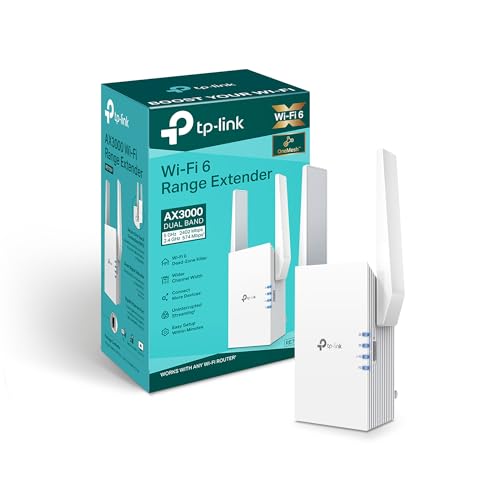
TP-Link AX3000 Wi-Fi 6 Range Extender
Best for: Single wired device extension
- Wi-Fi Standard
- Wi-Fi 6
- Speed Rating
- AX3000
- Frequency Bands
- Dual-Band
- Ethernet Ports
- Gigabit Port
- Operating Modes
- Range Extender, AP Mode
- Dimensions
- 8 × 6 × 4 inches
View on Amazon: TP-Link AX3000 Wi-Fi 6 Range Extender Affiliate link
This TP-Link AX3000 extender uses Wi-Fi 6 technology to boost your home network. It supports dual-band connections and includes a Gigabit Ethernet port. You can use it as a range extender or in AP mode. The device measures 8 by 6 by 4 inches and weighs 10.9 ounces. It is designed for users who need reliable coverage and wired connectivity options for their devices.
Pros
- Wi-Fi 6 standard for improved efficiency
- AX3000 speed rating for strong throughput
- Gigabit Ethernet port for wired connections
- Dual-band operation for reduced interference
- Supports AP mode for flexible setup
Cons
- Only includes a single Gigabit port
- Dual-band only lacks Wi-Fi 6E
- No mention of smart home app control
Good fit if
- You need a wired connection for a console
- You want to extend Wi-Fi 6 coverage
- You prefer a simple AP mode setup
Skip if
- You require tri-band speeds for heavy load
- You need multiple Ethernet ports for devices
- You want Wi-Fi 6E on the 6 GHz band
Verdict: TP-Link AX3000 Wi-Fi 6 Extender fits users who need a single wired connection and Wi-Fi 6 performance. It is a solid option for extending coverage to areas with fewer devices.
Specifications side by side
| Spec | TP-Link AC2600 Quad-Antenna Dual-Band Wi-Fi Extender | TP-Link AX3000 Wi-Fi 6 Range Extender |
|---|---|---|
| Wi-Fi Standard | not stated | Wi-Fi 6 |
| Speed Rating | AC2600 (Up to 2600 Mbps) | AX3000 |
| Frequency Bands | Dual-Band | Dual-Band |
| Ethernet Ports | 1x Gigabit Ethernet | Gigabit Port |
| Operating Modes | Range Extender, Repeater, Access Point | Range Extender, AP Mode |
| Antenna Count | 4 | not stated |
| Frequency Band | Dual-Band | Dual-Band |
| Features | MU-MIMO | not stated |
| Port Speed | Gigabit | Gigabit |
| Operating Mode | Access Point Mode | Access Point Mode |
| Dimensions | 3.4 × 6.4 × 1.6 inches | 8 × 6 × 4 inches |
| Weight | 14.1 ounces | 10.9 ounces |
| Size | AC2600 | not stated |
| Color | white | White |
| Model | RE650 | not stated |
Frequently asked questions
Which extender is better for a home with many connected devices?
The TP-Link AX3000 Wi-Fi 6 Range Extender is the better choice for busy households. It uses the Wi-Fi 6 standard, which includes OFDMA and MU-MIMO technologies. These features manage network traffic more efficiently when multiple gadgets connect simultaneously. This results in smoother performance compared to the older Wi-Fi 5 standard found in the AC2600 model.
Can I use the AX3000 as a wired access point?
Yes, the TP-Link AX3000 Wi-Fi 6 Range Extender supports Access Point Mode. This allows you to connect it via an Ethernet cable to provide a stable wired connection and extend Wi-Fi coverage. It is specifically noted as suitable for users who need a single wired device extension while benefiting from modern Wi-Fi 6 speeds.
What is the size difference between the two extenders?
The TP-Link AC2600 Quad-Antenna Dual-Band Wi-Fi Extender is smaller and lighter. It measures 6.4 by 3.4 by 1.6 inches and weighs 14.1 ounces. The TP-Link AX3000 Wi-Fi 6 Range Extender is larger, measuring 6 by 8 by 4 inches, but is lighter at 10.9 ounces. Both are white, but their physical footprints differ significantly.
Do both models support dual-band Wi-Fi?
Yes, both the TP-Link AC2600 and the AX3000 models support dual-band Wi-Fi. They operate on both 2.4 GHz and 5 GHz frequency bands. This allows you to connect devices to the optimal band for your needs, whether that is range or speed, regardless of which extender you choose for your network setup.
Is the AX3000 faster than the AC2600?
The TP-Link AX3000 Wi-Fi 6 Range Extender offers higher speed ratings with its AX3000 designation. It utilizes the newer Wi-Fi 6 standard for improved data throughput. The AC2600 model uses the older Wi-Fi 5 standard. While both provide reliable connectivity, the AX3000 is designed for higher performance in modern networks.
Which extender should I buy for a single wired device?
You should choose the TP-Link AX3000 Wi-Fi 6 Range Extender for a single wired device. It is specifically recommended for users needing a single wired connection. Its Access Point Mode and Wi-Fi 6 capabilities make it ideal for extending coverage to areas with fewer devices while maintaining high performance for that specific connection.
Does the AC2600 support Wi-Fi 6?
No, the TP-Link AC2600 Quad-Antenna Dual-Band Wi-Fi Extender does not support Wi-Fi 6. It operates on the Wi-Fi 5 standard. If you require Wi-Fi 6 features like OFDMA, you must select the AX3000 model. The AC2600 is a practical solution for filling coverage gaps using established Wi-Fi 5 technology.