NICGIGA 16 Port 2.5Gb Ethernet Review: Who It Fits and Who Should Skip It
As an Amazon Associate we earn from qualifying purchases. Links on this page are affiliate links.
This nicgiga 16 port 2 5gb ethernet review covers a straightforward unmanaged switch built for high-speed local networking. It features sixteen RJ45 ports, each capable of speeds up to 2.5Gbps. The device offers a total switching capacity of 80Gbps, allowing multiple devices to communicate simultaneously without bottlenecks. It supports auto-negotiation for 100Mb, 1G, and 2.5G connections, ensuring compatibility with older and newer gear. The metal housing and fanless design prioritize passive cooling and durability. You can mount it on a desk, wall, or in a standard 19-inch rack. It requires no software configuration, making it a plug-and-play solution for expanding your wired network infrastructure.
What stands out
- 16 ports with 2.5Gbps speed capability
- 80Gbps non-blocking switching capacity
- Auto-negotiation for 100/1000/2500Mbps links
- 4KV lightning protection for surge safety
- Supports desktop, wall, and 19-inch rack mounting
Who it fits
Good fit for
This switch suits users who need to connect many devices at high speeds without complex setup. It is ideal for homes or small offices with multiple 2.5G devices like NAS units, gaming PCs, or WiFi 6 access points. The 80Gbps capacity ensures stable performance when many ports are active. The rack-mount option fits well in server closets or media racks. If you want a reliable, passive-cooled switch that handles heavy local traffic, this model delivers the necessary throughput and physical flexibility.
Who should skip it
Look elsewhere if you need remote management or advanced network features. This is an unmanaged switch, so it lacks VLAN support, QoS controls, and web interfaces. You cannot monitor traffic or configure ports remotely. If your setup requires detailed network segmentation or bandwidth prioritization, this basic hardware will not meet those needs. Additionally, users needing SFP+ uplinks for high-speed backbone connections should check other models, as this unit relies solely on copper RJ45 ports for all connections.
Verdict: The NICGIGA 16-Port 2.5G switch provides robust, plug-and-play connectivity for dense wired setups. It is a solid choice for users prioritizing speed and simplicity over advanced management features.
Key specs for this switch
Port Count: 16
This switch provides sixteen connection points for your network devices. You can plug in multiple computers, access points, or storage drives without needing extra hardware. This count suits homes or small offices with many wired endpoints. If you have fewer than ten devices, a smaller switch may suffice. For larger setups, ensure your wiring supports this density.
Port Speed: 100/1000/2500Mbps
Each port supports three speed tiers: 100Mb, 1Gb, and 2.5Gb. The auto-negotiation feature selects the best speed for each connected device. This ensures compatibility with older gear while allowing newer devices to use faster 2.5G connections. You benefit from seamless mixing of old and new equipment without manual configuration or speed bottlenecks.
Switching Capacity: 80Gbps
This figure represents the total data throughput the switch can handle across all ports simultaneously. An 80Gbps capacity prevents congestion when multiple devices transfer large files or stream high-resolution video at once. It ensures stable performance for bandwidth-heavy tasks. Compare this with lower-capacity models if you plan to run multiple high-speed connections concurrently.
Management Type: Unmanaged
This switch operates without software configuration or admin interfaces. You plug it in, and it starts forwarding data immediately. This simplicity reduces setup time and eliminates the risk of misconfiguration errors. It is ideal for users who want reliable performance without learning complex network settings. Managed switches offer more control but require technical knowledge to operate effectively.
Mounting Type: Desktop, Wall, 19-inch Rack Mount
The device supports flexible placement options to fit your workspace. You can set it on a desk, attach it to a wall, or install it in a standard equipment rack. This versatility helps you keep cables organized and the unit secure. Choose the mounting method that best suits your home office layout or server room environment for optimal airflow and access.
Build Quality and Physical Layout
According to the listing, this switch uses a metal housing finished in black. This material choice helps with heat dissipation, which is important for a device with sixteen ports running continuously. The fanless design reduces noise and removes moving parts that can fail over time. You get 4KV lightning protection built into the circuitry to guard against power surges from bad weather or electrical spikes. This adds a layer of stability for your connected devices without requiring extra hardware.
The unit supports three mounting options: desktop, wall, or 19-inch rack mount. This flexibility means you can place it on a shelf, hang it behind a desk, or slide it into a standard server cabinet. The layout is straightforward, featuring sixteen RJ45 ports on the front. There are no buttons, screens, or configuration interfaces to manage. This plug-and-play approach means you do not need to install software or adjust settings. You simply connect your cables and the switch handles the rest. The auto-negotiation feature adjusts link speeds automatically, so you do not need to worry about matching cable types or speeds manually. The non-blocking data forwarding ensures that traffic moves freely between all sixteen ports without bottlenecks. This simple, robust build suits users who want reliable connectivity without the complexity of managed switches.
Setup and everyday use
You plug this switch into power and connect your network cables. The listing describes it as plug and play. You do not need to install software or adjust settings. The device handles configuration automatically. It supports auto negotiation. This means each port senses the connected device and adjusts to the best available speed. You can connect 100Mb, 1Gb, or 2.5Gb devices. The switch adjusts to match each one. You do not need to manually set speeds. It also supports automatic MDI/MDIX. This feature allows you to use any standard Ethernet cable. You do not need to worry about crossover cables. The non-blocking data forwarding ensures all ports can send and receive data at full speed simultaneously. In daily use, the metal housing and fanless design help keep the unit cool. You can place it on a desk or mount it to a wall or rack. The 4KV lightning protection adds a layer of safety for your connected gear. You get a stable connection without managing VLANs or QoS settings. This simplicity suits users who want reliable speed without technical overhead. The unmanaged nature means you simply plug in and work. It works with 2.5G WiFi 6 APs, NAS drives, and gaming PCs. You benefit from the 80Gbps switching capacity as you add more devices. The setup is immediate. You are ready to use your network within minutes.
Before You Buy This Switch
You need to verify your existing network infrastructure before connecting this unit. Your router or primary switch must have a 2.5G uplink port. If your core network only supports 1Gbps, the extra speed on these sixteen ports will not help your internet connection. You also need appropriate Cat5e or Cat6 Ethernet cables to support 2.5G speeds reliably. Check that your devices, such as NAS drives or gaming PCs, have 2.5G NICs installed. This switch is unmanaged, so it lacks VLAN support or traffic prioritization features. If you need advanced network segmentation, look elsewhere. It fits best in homes or small offices where you simply need more high-speed ports without configuration complexity. It complements mesh WiFi systems by providing stable wired backhaul for access points. Ensure your power outlet is nearby, as it lacks battery backup options. The metal housing requires adequate airflow space around it to prevent overheating during continuous use.
Check before you buy
- Confirm your router has a 2.5G uplink port.
- Verify your devices support 2.5G Ethernet speeds.
- Ensure you have Cat5e or Cat6 cables.
- Check if you need VLAN or management features.
The product at a glance
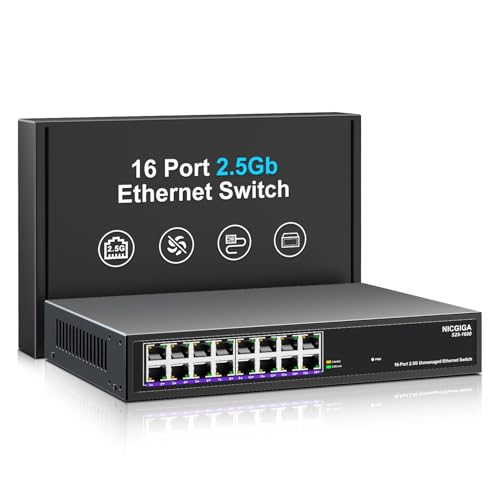
NICGIGA 16-Port 2.5G Unmanaged Switch
Best for: Simple high-density 2.5G wired expansion
- Port Count
- 16
- Port Speed
- 100/1000/2500Mbps
- Management Type
- Unmanaged
- Switching Capacity
- 80Gbps
- Mounting Type
- Desktop, Wall, 19-inch Rack Mount
- Number of Ports
- 16 Ports
View on Amazon: NICGIGA 16-Port 2.5G Unmanaged Switch Affiliate link
This NICGIGA switch offers 16 ports for 100/1000/2500Mbps connections. It delivers 80Gbps switching capacity to handle multiple high-speed devices. The unmanaged design requires no configuration. It features 4KV lightning protection and a metal housing. You can mount it on a desk, wall, or 19-inch rack. It suits users needing simple, scalable wired connectivity for 2.5G networks.
Pros
- 16 RJ45 ports supporting 2.5G speeds
- 80Gbps non-blocking switching capacity
- 4KV lightning protection for device safety
- Supports desktop, wall, and rack mounting
Cons
- Unmanaged design offers no traffic monitoring
- No web interface for advanced settings
- No SFP+ uplink ports included
Good fit if
- You need to connect many 2.5G devices simply
- You want a rack-mountable wired backbone
- You prefer plug-and-play network expansion
Skip if
- You require VLAN segmentation or QoS controls
- You need remote management capabilities
- You want fiber uplink options for long distances
Verdict: NICGIGA 16-Port 2.5Gb Unmanaged Switch is ideal for users who need a straightforward, high-density wired connection for 2.5G devices without configuration overhead.
Specifications side by side
| Spec | NICGIGA 16-Port 2.5G Unmanaged Switch |
|---|---|
| Port Count | 16 |
| Port Speed | 100/1000/2500Mbps |
| Management Type | Unmanaged |
| Switching Capacity | 80Gbps |
| Mounting Type | Desktop, Wall, 19-inch Rack Mount |
| Number of Ports | 16 Ports |
| Color | Black |
| Model | 16 Port | 16x 2.5G RJ45 |
Frequently asked questions
Is this switch compatible with existing 1Gbps devices?
Yes, it works with older equipment. The ports support auto negotiation, allowing them to downlink to 1Gbps or 100Mbps connections. This ensures your legacy devices still function correctly. You can mix 2.5G and 1G devices on the same switch without issues. The hardware adapts to the connected device's speed automatically.
Can I mount this switch in a rack?
Yes, it supports rack mounting. The listing specifies it is suitable for both desktop and rackmount installations. This flexibility allows you to integrate it into standard server racks or place it on a desk. The metal housing aids in heat dissipation, which is beneficial in enclosed rack spaces.
Does this device require a power supply unit?
It requires external power. The listing describes it as needing to be plugged into power. It does not mention Power over Ethernet (PoE) capabilities. You must connect it to a wall outlet. The fanless design helps keep noise levels low during operation.
Is this switch suitable for gaming setups?
It is ideal for high-density wired expansion. Gamers benefit from the 2.5G port speed for faster local transfers. The unmanaged nature means no configuration overhead, reducing latency variables. You get straightforward plug-and-play performance. This suits users who want reliable, high-speed connections without software complexity.
How many devices can I connect simultaneously?
You can connect up to sixteen devices. The switch provides sixteen RJ45 ports for simultaneous connections. This capacity supports multiple computers, access points, or storage drives. The 80Gbps switching capacity allows these devices to communicate without bottlenecks. It is designed for environments with many wired endpoints.
Does it come with management software?
No, it is an unmanaged switch. You do not need to install software or adjust settings. The device handles configuration automatically upon connection. This plug-and-play approach simplifies setup. You avoid the complexity of VLANs or QoS tuning, making it ideal for straightforward network expansion.