NICGIGA Network Switches: 3 Picks Ranked by Specs
As an Amazon Associate we earn from qualifying purchases. Links on this page are affiliate links.
Finding the best NICGIGA network switches helps you build a reliable local infrastructure. This guide compares 3 models based strictly on published specifications. NICGIGA offers unmanaged switches in various port densities, including 10, 16, and 48-port options, with speeds ranging from Gigabit to 10G. The top pick is the NICGIGA 48-Port Gigabit PoE+ Switch with 2 SFP. It leads because it provides substantial power and port density for high-density PoE camera and AP networks. You get raw capacity and durability without complex software management.
Quick picks
| # | Product | Best for | Price |
|---|---|---|---|
| 1 | NICGIGA 48-Port Gigabit PoE+ Switch with 2 SFP Best overall | High-density PoE camera and AP networks | Check price of NICGIGA 48-Port Gigabit PoE+ Switch with 2 SFP on Amazon |
| 2 | NICGIGA 16-Port 2.5G Unmanaged Switch Best premium | Simple 2.5G local network expansion | Check price of NICGIGA 16-Port 2.5G Unmanaged Switch on Amazon |
| 3 | NICGIGA 10-Port 10G/2.5G Unmanaged Switch Best budget | High-speed non-PoE backbone connections | Check price of NICGIGA 10-Port 10G/2.5G Unmanaged Switch on Amazon |
Our 3 picks

NICGIGA 48-Port Gigabit PoE+ Switch with 2 SFP
Best for: High-density PoE camera and AP networks
- Port Count
- 50
- Port Speed
- 10/100/1000 Mbps
- Management Type
- Unmanaged
- PoE Support
- PoE+ (IEEE 802.3af/at)
- PoE Power Budget
- 400W
- Uplink Ports
- 2 x 1G SFP
View on Amazon: NICGIGA 48-Port Gigabit PoE+ Switch with 2 SFP Affiliate link
This unmanaged switch offers 48 Gigabit PoE+ ports and two 1G SFP uplinks. It delivers a 400W power budget, supporting up to 30W per port for devices like IP cameras and access points. The metal shell and industrial fan aid heat dissipation, while 4KV lightning protection adds durability. It supports both desktop and rack mounting. You should choose this if you need high port density and robust power delivery for a large network setup.
Pros
- 48 PoE+ ports with 30W per port support
- 400W total PoE power budget
- Two 1G SFP uplink ports
- 4KV lightning protection design
Cons
- Unmanaged configuration requires no software setup
- Heavy 9.81-pound metal chassis
- Does not support passive PoE
Good fit if
- You need to power many IP cameras or access points
- You require a high-density Gigabit connection
- You want rack-mountable hardware for server rooms
Skip if
- You need smart management features or app control
- You require 10GbE uplink speeds
- You are looking for passive PoE compatibility
Verdict: NICGIGA 48-Port PoE+ Switch provides substantial power and port density for large deployments. It is best for users who prioritize raw capacity and durability over software management.
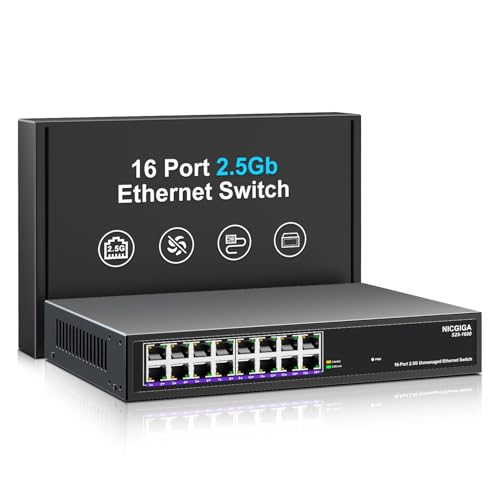
NICGIGA 16-Port 2.5G Unmanaged Switch
Best for: Simple 2.5G local network expansion
- Port Count
- 16
- Port Speed
- 100/1000/2500Mbps
- Management Type
- Unmanaged
- Switching Capacity
- 80Gbps
- Mounting Type
- Desktop, Wall, 19-inch Rack Mount
- Number of Ports
- 16 Ports
View on Amazon: NICGIGA 16-Port 2.5G Unmanaged Switch Affiliate link
This NICGIGA switch offers 16 ports supporting 100/1000/2500Mbps speeds. It features an 80Gbps switching capacity and auto-negotiation for compatible devices. The metal housing includes 4KV lightning protection and a fanless design. You can mount it on a desktop, wall, or 19-inch rack. It requires no software configuration for setup.
Pros
- 16 ports with 2.5G speed support
- 80Gbps non-blocking switching capacity
- 4KV lightning protection for hardware safety
- Fanless metal housing for heat dissipation
- Supports desktop, wall, and rack mounting
Cons
- Unmanaged design limits advanced traffic control
- No web interface for remote monitoring
- Lacks SFP+ uplink ports for fiber connections
Good fit if
- You need many 2.5G ports for local devices
- You prefer plug-and-play simplicity without setup
- You require lightning protection for outdoor or unstable power areas
Skip if
- You need remote management via a web interface
- You require fiber uplinks for long-distance connections
- You want to prioritize traffic with QoS settings
Verdict: NICGIGA 16 Port 2.5G Unmanaged Switch provides high port density for local networks but lacks the management features needed for complex setups.

NICGIGA 10-Port 10G/2.5G Unmanaged Switch
Best for: High-speed non-PoE backbone connections
- Port Count
- 10
- Port Speed
- 2.5 Gbps, 10 Gbps
- Management Type
- Unmanaged
- Switching Capacity
- 80Gbps
- Mounting Type
- Desktop, Wall Mount
- Number of Ports
- 10 Ports
View on Amazon: NICGIGA 10-Port 10G/2.5G Unmanaged Switch Affiliate link
This unmanaged NICGIGA switch offers ten ports: eight 2.5 Gbps and two 10 Gbps RJ45 uplinks. Its 80 Gbps switching capacity handles heavy traffic for 10 Gbps NAS, WiFi 7 routers, and servers. The fanless metal design ensures silent operation and includes wall-mount options. It suits users needing high-speed backbone connections without configuration complexity.
Pros
- Eight 2.5 Gbps ports for fast local transfers
- Two 10 Gbps RJ45 ports for high-speed uplinks
- 80 Gbps non-blocking switching capacity
- Fanless silent operation with metal heat dissipation
- Supports both desktop and wall mounting
Cons
- No Power over Ethernet (PoE) support on any port
- Unmanaged interface offers no VLAN or traffic monitoring
- Only includes a one-year warranty
Good fit if
- You need 10 Gbps uplinks for a NAS or server
- You want silent operation without fans
- You need flexible desktop or wall mounting
Skip if
- You require Power over Ethernet for cameras or access points
- You need managed features like VLANs or QoS
- You want to power devices directly from the switch
Verdict: NICGIGA 10-Port 10G/2.5G Switch provides essential high-speed ports for users building a fast home backbone. It fits those prioritizing raw throughput and silent operation over advanced network management.
Specifications side by side
| Spec | NICGIGA 48-Port Gigabit PoE+ Switch with 2 SFP | NICGIGA 16-Port 2.5G Unmanaged Switch | NICGIGA 10-Port 10G/2.5G Unmanaged Switch |
|---|---|---|---|
| Port Count | 50 | 16 | 10 |
| Port Speed | 10/100/1000 Mbps | 100/1000/2500Mbps | 2.5 Gbps, 10 Gbps |
| Management Type | Unmanaged | Unmanaged | Unmanaged |
| PoE Support | PoE+ (IEEE 802.3af/at) | not stated | not stated |
| PoE Power Budget | 400W | not stated | not stated |
| Uplink Ports | 2 x 1G SFP | not stated | not stated |
| Switching Capacity | not stated | 80Gbps | 80Gbps |
| Mounting Type | Desktop, Rackmount | Desktop, Wall, 19-inch Rack Mount | Desktop, Wall Mount |
| Number of Ports | 48 Ports | 16 Ports | 10 Ports |
| Uplink Port Type | SFP | not stated | not stated |
| Operating Mode | not stated | not stated | Access Point Mode |
| Weight | 9.81 pounds | not stated | not stated |
| Color | Black | Black | Black |
| Model | 50 Port | 48xPoE+ 400W+2xSFP | 16 Port | 16x 2.5G RJ45 | 10 Port | 2x 10G RJ45 + 8x 2.5G |
NICGIGA Switches Ranked by Specs
The lineup splits into three clear groups based on port density and speed. The NICGIGA 48-Port Gigabit PoE+ Switch leads with 48 ports and 400W of power, ideal for high-density camera networks. It supports rack mounting and includes SFP uplinks for robust connectivity.
For simpler setups, the 16-Port 2.5G Unmanaged Switch offers high density without management features. The 10-Port 10G/2.5G model targets backbone connections with two 10G ports and eight 2.5G ports. You can choose based on whether you need PoE power, raw speed, or basic expansion.
Who NICGIGA Switches Suit
NICGIGA targets users who need simple, high-density connectivity without complex software. You can choose from 10, 16, or 48-port options. The smallest 10-port model offers 10G and 2.5G speeds for fast backbones. The 16-port version provides pure 2.5G expansion. The largest 48-port switch delivers Gigabit speeds with PoE+ power for cameras and access points. All models are unmanaged. You do not get smart features or web interfaces. This range fits those who prioritize raw port count and durability over advanced management tools.
Choosing the Right NICGIGA Switch
-
Match Port Count to Needs
Start by counting the wired devices you need to connect. NICGIGA offers 10, 16, and 48-port options. The 10-port model suits small setups with a few high-speed devices. The 16-port version handles moderate expansion. The 48-port switch serves large deployments with many cameras or access points. Choose the density that covers your current devices with some headroom for future growth. Avoid buying too many ports if you only need a few, as it adds unnecessary cost and size.
-
Select Speed for Backbone
Decide if you need standard Gigabit or faster speeds for your main network lines. The NICGIGA 10-Port 10G/2.5G Switch provides 10G ports for high-throughput tasks like large file transfers or video editing. The 16-port model offers 2.5G speeds for general expansion. The 48-port switch sticks to Gigabit speeds. If you have devices that benefit from faster local transfers, prioritize the 10G or 2.5G models. For standard office or home use, Gigabit is usually sufficient.
-
Check PoE Requirements
Determine if your devices, like security cameras or wireless access points, require power over Ethernet. The NICGIGA 48-Port Gigabit PoE+ Switch supports PoE, delivering power and data through a single cable. The other models do not list PoE support. If you are installing cameras or APs, the PoE switch simplifies wiring by reducing the need for separate power outlets. If you only connect computers or routers, a non-PoE switch is adequate and often simpler.
-
Verify Mounting Options
Consider where you will place the switch. The NICGIGA 48-Port model supports both desktop and rack mounting, making it suitable for server rooms or closets. The 16-port switch also offers desktop and rack mounting flexibility. The 10-port model supports desktop and wall mounting, which is useful for tight spaces or under desks. Check the physical dimensions and mounting holes if you plan to install the unit in a rack or on a wall. This ensures it fits your available space securely.
-
Confirm Management Type
Understand that all listed NICGIGA switches are unmanaged. This means they operate automatically without requiring software configuration or web interfaces. You plug in the cables, and the switch handles traffic. This is ideal for users who want a simple, set-and-forget solution. If you need advanced features like VLANs or traffic prioritization, these models may not suit your needs. For most home and small office users, unmanaged switches provide reliable performance without the complexity of management software.
Frequently asked questions
Which NICGIGA switch is best for connecting many security cameras?
The NICGIGA 48-Port Gigabit PoE+ Switch is the best choice for high-density camera networks. It provides 48 PoE ports to power devices directly. The unit includes two SFP uplink ports for fiber connections. It weighs 9.81 pounds and supports both desktop and rack mounting for flexible installation.
Does NICGIGA offer a switch with 10G ports for home networks?
Yes, the NICGIGA 10-Port 10G/2.5G Unmanaged Switch includes high-speed options. It features two 10G RJ45 ports and eight 2.5G ports. This model is designed for fast non-PoE backbone connections. It supports desktop and wall mounting and includes an access point mode for versatile use in your local network.
Can I mount these switches in a server rack?
Most models support rack mounting for professional setups. The 48-Port Gigabit PoE+ Switch supports both desktop and rack mounting. The 16-Port 2.5G Switch also allows for rack installation. The 10-Port 10G/2.5G Switch offers desktop and wall mounting options. Check the specific mounting type for your chosen model.
Are all NICGIGA switches managed or unmanaged?
All listed NICGIGA switches are unmanaged devices. They do not require software configuration for basic operation. This design prioritizes raw capacity and durability over complex management features. You get plug-and-play connectivity for your network needs without dealing with settings or menus.
What is the maximum port density available from NICGIGA?
The highest port density is 48 ports. The NICGIGA 48-Port Gigabit PoE+ Switch leads the lineup with substantial power and port count. It is ideal for large deployments. Other options include a 16-port 2.5G model and a 10-port 10G/2.5G model for smaller setups.
Does the 16-port switch support PoE power delivery?
The provided specifications do not list PoE support for the 16-Port 2.5G Unmanaged Switch. It is described as a simple expansion solution for local networks. It lacks the management features needed for complex setups. If you need power over Ethernet, consider the 48-port PoE+ model instead.
How many SFP uplink ports does the 48-port switch have?
The NICGIGA 48-Port Gigabit PoE+ Switch includes two SFP uplink ports. These ports allow for fiber optic connections to extend your network range. The remaining 48 ports are Gigabit RJ45 connections. This setup provides robust connectivity for high-density environments like offices or large homes.