Linksys AC750 Dual-Band Gigabit Extender Review: Who It Fits and Who Should Skip It
As an Amazon Associate we earn from qualifying purchases. Links on this page are affiliate links.
This linksys ac750 boost dual band wi fi review covers the Linksys RE6300, a range extender designed to fill weak signal areas. It operates on dual-band frequencies, splitting traffic between 2.4 GHz and 5 GHz bands to reduce interference. The device offers AC750 speeds, combining N300 and AC433 Mbps rates for compatible clients. A key hardware feature is its single Gigabit Ethernet port, allowing you to connect wired devices like smart TVs or game consoles to the network. It supports Push Button Connect for easy pairing and uses Spot Finder Technology to help you place the unit in the best location for coverage.
What stands out
- Dual-band Wi-Fi with AC750 speed ratings (N300 + AC433 Mbps)
- Single Gigabit Ethernet port for wired device connections
- Coverage area up to 6,500 square feet
- Push Button Connect and Spot Finder Technology for setup and placement
Who it fits
Good fit for
This extender suits users with small to mid-sized homes who need to eliminate dead zones on patios, garages, or second floors. It is ideal for those who want to connect a wired device, such as a desktop computer or streaming media player, via the Gigabit port. If your current router struggles with range in specific corners, this dual-band unit can extend coverage up to 6,500 square feet. It works well for basic browsing and streaming tasks where maximum throughput is not the primary concern.
Who should skip it
You should look elsewhere if you require multi-gigabit speeds or extensive wired connectivity. This model only includes one Gigabit Ethernet port, so it cannot support multiple high-speed wired devices simultaneously. If your home is larger than 6,500 square feet, this unit may not provide adequate coverage for the entire space. Users needing advanced mesh networking features or seamless roaming between multiple nodes will find this standalone extender insufficient for their setup.
Verdict: The Linksys AC750 is a practical solution for extending Wi-Fi to specific dead zones and adding a single wired connection point. It fits well in homes needing basic range extension without complex mesh infrastructure.
Linksys AC750 Extender Key Specs
Speed Rating: AC750 (N300 + AC433 Mbps)
This rating combines 300 Mbps on the 2.4 GHz band and 433 Mbps on the 5 GHz band. You get faster speeds on 5 GHz for streaming or gaming, while 2.4 GHz handles basic browsing and smart home devices. This is entry-level Wi-Fi speed, suitable for light usage but not for heavy 4K streaming on multiple devices simultaneously.
Coverage Area: Up to 6,500 sq ft
The manufacturer claims this extender can boost signal coverage for homes up to 6,500 square feet. In practice, this depends on your walls and interference. This spec suggests it is good for medium to large homes where your main router signal fades in distant rooms, basements, or garages. It helps you eliminate dead zones in larger spaces.
Ethernet Ports: Gigabit
The device includes a Gigabit Ethernet port, allowing you to connect wired devices like smart TVs or gaming consoles. This provides a stable, fast connection via cable, bypassing Wi-Fi limitations. It is useful for devices that need consistent bandwidth. You can also use it to connect your extender to your router via cable for better backhaul performance.
Frequency Bands: Dual-Band
Dual-band means the extender operates on both 2.4 GHz and 5 GHz frequencies. This lets you split traffic to reduce congestion. Use 5 GHz for speed and distance, and 2.4 GHz for range and compatibility with older devices. This flexibility helps you optimize performance based on what you are connecting, avoiding interference from neighbors or household appliances.
Operating Modes: Range Extender, Repeater
This extender works as a range extender or repeater, boosting your existing Wi-Fi signal rather than creating a new network. It connects to your main router and rebroadcasts the signal. This is ideal if you want to keep your current router and simply extend its reach. It is not a full mesh system, so you manage one network name.
Physical Design And Build Specs
The Linksys RE6300 is a compact extender. According to the listing, it measures 2.36 inches wide, 3.43 inches long, and 4.76 inches high. It weighs 6.4 ounces. This small footprint allows you to plug it into any standard wall outlet without blocking adjacent sockets. The device is designed to sit flush against your wall, making it unobtrusive in most home environments.
The finish is a simple, clean plastic housing. There are no complex buttons or displays visible in the provided data. Setup relies on Push Button Connect and Spot Finder Technology. You press a button on your router and then on the extender to pair them. Spot Finder helps you choose the best location for optimal signal strength. This means you do not need to guess where to place it. You can move it until the indicator shows the best connection.
It includes one Gigabit Ethernet port. This port allows you to connect wired devices like smart TVs or gaming consoles. The dual-band design is internal, so you do not need to manage antennas. The build focuses on simplicity. It is not a high-end router with multiple ports or advanced controls. It is a straightforward tool to extend your existing network. The design prioritizes ease of use over complex customization. You get a plug-and-play solution that fits into tight spaces.
Setup Process And Daily Operation
Setting up the Linksys RE6300 relies on Push Button Connect. This method simplifies the initial configuration by pairing the extender with your main router via a single button press. You do not need to navigate complex web interfaces or enter manual network keys during this phase. The listing also highlights Spot Finder Technology. This feature guides you to place the unit in an optimal location. It helps you identify the best spot to boost your signal without guesswork. The device operates as both a range extender and a repeater. This dual mode allows it to rebroadcast your existing Wi-Fi network. You get extended coverage up to 6,500 square feet. This capacity aims to eliminate dead zones in areas like patios, garages, and upper floors. The Gigabit Ethernet port lets you connect wired devices directly. You can link a desktop computer, smart TV, or gaming console to the extender. This provides a stable, high-speed connection for bandwidth-heavy tasks. The AC750 speed rating supports N300 on the 2.4 GHz band and AC433 on the 5 GHz band. In daily use, the 5 GHz band handles streaming and gaming with less interference. The 2.4 GHz band manages basic browsing and smart home devices. The compact design, weighing 6.4 ounces, fits easily into any standard outlet. It does not require a separate power adapter. The setup is straightforward, and the placement guidance ensures you maximize the signal strength for your specific home layout.
Before You Buy This Extender
This extender works best as a single-point booster for dead zones, not as a full home mesh system. You must verify your main router supports WPS or has a compatible web interface for the Push Button Connect setup. Since it relies on your existing network backbone, ensure your primary router is not severely outdated, as the extender cannot exceed its source speed. You will need to plug it into a wall outlet near the edge of your current Wi-Fi range. Do not place it in a dead zone, or it will amplify nothing. Regularly check the LED indicators to confirm signal strength. If your home exceeds 6,500 square feet, this unit will likely leave other areas uncovered. Consider a dedicated mesh node for larger spaces. This device fits users who need a quick fix for one specific room rather than whole-home coverage overhaul.
Check before you buy
- Check if your main router supports WPS for easy setup.
- Confirm your dead zone is within 6,500 sq ft range.
- Ensure you have a wall outlet near the weak signal area.
- Verify your primary router is not severely outdated.
The product at a glance
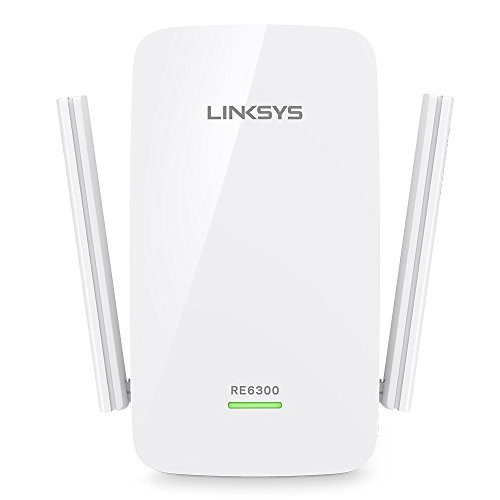
Linksys AC750 Dual-Band Gigabit Extender
Best for: Basic dead zone elimination in large homes
- Speed Rating
- AC750 (N300 + AC433 Mbps)
- Frequency Bands
- Dual-Band
- Coverage Area
- Up to 6,500 sq ft
- Ethernet Ports
- Gigabit
- Operating Modes
- Range Extender, Repeater
- Dimensions
- 3.43 × 2.36 × 4.76 inches
View on Amazon: Linksys AC750 Dual-Band Gigabit Extender Affiliate link
This Linksys AC750 extender boosts Wi-Fi coverage up to 6,500 square feet using dual-band speeds of N300 and AC433 Mbps. It features a Gigabit Ethernet port for wired connections and includes Spot Finder Technology to help you place the unit for optimal signal strength. The device operates as both a range extender and repeater. It is designed for homes with dead zones on patios, garages, or upper floors.
Pros
- Dual-band AC750 speeds up to 750 Mbps
- Gigabit Ethernet port for stable wired connections
- Spot Finder Technology aids in optimal placement
- Covers up to 6,500 square feet
Cons
- Limited to AC750 speed ratings
- Includes only a 90-day warranty
- No mention of mobile app control
Good fit if
- You need to eliminate dead zones in large areas
- You want a simple setup with push-button connectivity
- You require a wired Gigabit port for devices
Skip if
- You need Wi-Fi 6 or higher speeds
- You want a long-term warranty coverage
- You prefer app-based management over physical buttons
Verdict: Linksys RE6300 AC750 Dual-Band Extender fits users who need basic dual-band coverage for large spaces. It is a practical solution for fixing dead zones where high-speed throughput is not the primary concern.
Specifications side by side
| Spec | Linksys AC750 Dual-Band Gigabit Extender |
|---|---|
| Speed Rating | AC750 (N300 + AC433 Mbps) |
| Frequency Bands | Dual-Band |
| Coverage Area | Up to 6,500 sq ft |
| Ethernet Ports | Gigabit |
| Operating Modes | Range Extender, Repeater |
| Frequency Band | Dual-Band |
| Port Speed | Gigabit |
| Dimensions | 3.43 × 2.36 × 4.76 inches |
| Weight | 6.4 ounces |
| Size | re6300-rm3 For US Only |
| Color | For Canada Only |
| Model | RE6300-RM |
Frequently asked questions
Does the Linksys AC750 extender create a separate network name?
It typically extends your existing network name rather than creating a new one. This allows your devices to stay connected to the same SSID as you move through your home. The dual-band design helps manage traffic between 2.4 GHz and 5 GHz frequencies automatically.
Can I use this extender with any router brand?
Yes, it works with routers from various manufacturers. The setup relies on standard protocols like Push Button Connect or web interface configuration. As long as your main router supports these methods, you can pair the Linksys RE6300 to boost your existing network coverage.
Is the Gigabit port fast enough for modern internet plans?
The Gigabit port handles high-speed connections effectively. It provides a wired connection point for devices like smart TVs or gaming consoles. While the wireless speeds are rated at AC750, the wired port ensures stable, high-throughput connectivity for stationary devices in your home.
How much space does the Linksys RE6300 require?
It has a compact footprint that fits standard wall outlets. The device measures 2.36 inches wide, 3.43 inches long, and 4.76 inches high. Weighing only 6.4 ounces, it is small enough to blend into most rooms without obstructing adjacent outlets or taking up desk space.
Will this extender help with streaming video in dead zones?
It is designed to fill weak signal areas effectively. The dual-band operation splits traffic to reduce interference, which supports smoother streaming. While it is not a full mesh system, it serves as a practical booster for specific rooms where your main router signal is weak.
Does setup require downloading a dedicated mobile app?
No, it does not require a dedicated app for basic setup. You can use Push Button Connect to pair the extender with your router quickly. This method simplifies configuration by using a single button press, avoiding the need to navigate complex web interfaces or download additional software.
Is this device suitable for a large home with many dead zones?
It fits users who need basic dual-band coverage for large spaces. It is a practical solution for fixing specific dead zones where high-speed throughput is not the primary concern. However, it works best as a single-point booster rather than a comprehensive whole-home mesh system.