Best ASUS Mesh Wifi Systems Under $150: 3 Spec-Based Picks
As an Amazon Associate we earn from qualifying purchases. Links on this page are affiliate links.
Finding the best ASUS mesh wifi systems under $150 requires looking at hard specs rather than marketing claims. We compared 3 models based on the specifications published on their listings. The ASUS ZenWiFi BD4 1-Pack WiFi 7 Router takes the top spot because it includes dual 2.5G ports for future-proofing. This guide helps you decide which unit fits your home’s size and your need for modern standards. You will see exactly how each router’s Wi-Fi generation and port speeds impact your daily connection.
Quick picks
| # | Product | Best for | Price |
|---|---|---|---|
| 1 | ASUS ZenWiFi BD4 1-Pack WiFi 7 Router Best overall | small homes needing WiFi 7 | Check price of ASUS ZenWiFi BD4 1-Pack WiFi 7 Router on Amazon |
| 2 | ASUS ZenWiFi Hybrid Powerline WiFi 6 2-Pack Best 5,500 sq ft | large homes needing reliable Wi-Fi 6 range | Check price of ASUS ZenWiFi Hybrid Powerline WiFi 6 2-Pack on Amazon |
| 3 | ASUS ZenWiFi AX3000 MoCA Mesh Router Best budget | single-node expansion with wired backhaul | Check price of ASUS ZenWiFi AX3000 MoCA Mesh Router on Amazon |
The best fit for you
- You want the most compact model on the list ASUS ZenWiFi AX3000 MoCA Mesh Router It weighs only 1.09 pounds and measures 6.1 inches tall.
- You need future-proof speeds for a small home ASUS ZenWiFi BD4 1-Pack WiFi 7 Router It uses Wi-Fi 7 and includes dual 2.5G ports.
- You require wide coverage for a large home ASUS ZenWiFi Hybrid Powerline WiFi 6 2-Pack The 2-Pack covers up to 5,500 square feet.
Our 3 picks

ASUS ZenWiFi BD4 1-Pack WiFi 7 Router
Best for: small homes needing WiFi 7
- Wi-Fi Standard
- WiFi 7
- Speed Rating
- 3.6 Gbps
- Coverage Area
- 2450 sq.ft.
- Frequency Bands
- Dual-band
- Pack Size
- 1 Pack
- Port Speed
- 2.5G
View on Amazon: ASUS ZenWiFi BD4 1-Pack WiFi 7 Router Affiliate link
The ASUS ZenWiFi BD4 is a single-unit WiFi 7 mesh node designed for smaller spaces. It delivers up to 3.6 Gbps on dual bands and covers 2,450 square feet. The unit features dual 2.5G Ethernet ports and a quad-core 1.5 GHz processor. It supports AiMesh for expansion and includes AiProtection Pro security. This system suits users who need modern WiFi 7 performance in a compact, single-device form factor.
Pros
- WiFi 7 standard with MLO and 4K-QAM
- Dual 2.5G Ethernet ports
- Quad-core 1.5 GHz CPU
- AiProtection Pro security included
Cons
- Single-pack limits coverage to 2,450 sq ft
- Dual-band only lacks dedicated tri-band backhaul
- No 10G ports available in this configuration
Good fit if
- You need a single node for a small apartment
- You want WiFi 7 features in one device
- You plan to add more ASUS nodes later
Skip if
- You require a single unit for large homes
- You need dedicated tri-band backhaul
- You want 10G Ethernet ports
Verdict: The ASUS ZenWiFi BD4 WiFi 7 1-Pack offers modern WiFi 7 speeds and dual 2.5G ports for small homes. It fits users who prioritize future-proofing over wide single-unit coverage.
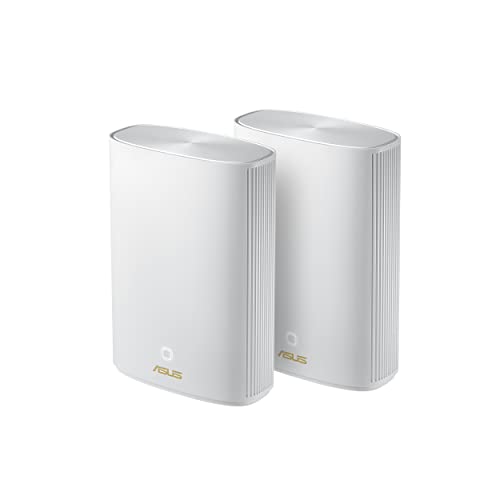
ASUS ZenWiFi Hybrid Powerline WiFi 6 2-Pack
Best for: large homes needing reliable Wi-Fi 6 range
- Wi-Fi Standard
- WiFi 6
- Coverage Area
- Up to 5,500 sq ft
- Pack Size
- 2PK
- Features
- Mesh
- Intended Use
- Home
- Dimensions
- 7.99 × 5.83 × 2.76 inches
View on Amazon: ASUS ZenWiFi Hybrid Powerline WiFi 6 2-Pack Affiliate link
The ASUS ZenWiFi AX Hybrid Powerline XP4 is a two-pack mesh system designed for homes up to 5,500 square feet. It uses Wi-Fi 6 standards to deliver reliable whole-home coverage. The units measure 7.99 by 5.83 by 2.76 inches and weigh 1.47 pounds each. This system is ideal for users who need extended range and stable connections in larger living spaces without relying solely on wireless backhaul.
Pros
- Covers up to 5,500 square feet
- Includes two nodes in the pack
- Uses Wi-Fi 6 technology
- Compact design at 2.76 inches tall
Cons
- Wi-Fi 6 is not the latest Wi-Fi 6E or 7 standard
- Renewed condition may vary in cosmetic appearance
- Single band specification limits dedicated backhaul options
Good fit if
- You need coverage for a large home up to 5,500 sq ft
- You prefer a two-node setup for whole-home reliability
- You want a compact device that fits discreetly in rooms
Skip if
- You require the absolute latest Wi-Fi 6E or Wi-Fi 7 speeds
- You need a brand-new unit with original packaging
- You have a small apartment under 1,500 sq ft
Verdict: ASUS ZenWiFi AX Hybrid Powerline XP4 provides solid Wi-Fi 6 coverage for large homes up to 5,500 square feet. It is a practical pick for buyers prioritizing range and reliability over the newest wireless standards.

ASUS ZenWiFi AX3000 MoCA Mesh Router
Best for: single-node expansion with wired backhaul
- Wi-Fi Standard
- WiFi 6
- Speed Rating
- AX3000
- Coverage Area
- up to 2,400 Sq.Ft.
- Pack Size
- 1pk
- Features
- Mesh
- Intended Use
- Home
View on Amazon: ASUS ZenWiFi AX3000 MoCA Mesh Router Affiliate link
The ASUS XC5 is a single-node AX3000 Wi-Fi 6 mesh unit covering up to 2,400 square feet. It supports a four-way hybrid backhaul, combining MoCA 2.5, 5GHz, 2.4GHz, and Ethernet for a total data rate of 5,500Mbps. The device measures 6.1 x 5.5 x 3.6 inches and weighs 1.09 pounds. It includes AiProtection Classic security and works with the ASUS Router app for setup. This system suits users needing flexible wired or wireless backhaul options.
Pros
- AX3000 Wi-Fi 6 speed rating
- MoCA 2.5 hybrid backhaul support
- AiProtection Classic security included
- AiMesh compatible for expansion
Cons
- Single-pack size limits whole-home coverage
- Smaller coverage area than multi-pack systems
- Requires additional nodes for larger homes
Good fit if
- You need a single node to extend an existing mesh
- You have MoCA ports for hybrid backhaul
- You want to mix ASUS routers with mesh nodes
Skip if
- You need a complete multi-room solution in one box
- Your home exceeds 2,400 square feet
- You prefer Wi-Fi 7 speeds
Verdict: ASUS XC5 AX3000 Wi-Fi 6 Mesh Node is a practical starter unit for users with existing wired infrastructure or single-room dead zones. It fits buyers who value hybrid backhaul flexibility over immediate whole-home coverage.
Specifications side by side
| Spec | ASUS ZenWiFi BD4 1-Pack WiFi 7 Router | ASUS ZenWiFi Hybrid Powerline WiFi 6 2-Pack | ASUS ZenWiFi AX3000 MoCA Mesh Router |
|---|---|---|---|
| Wi-Fi Standard | WiFi 7 | WiFi 6 | WiFi 6 |
| Speed Rating | 3.6 Gbps | not stated | AX3000 |
| Coverage Area | 2450 sq.ft. | Up to 5,500 sq ft | up to 2,400 Sq.Ft. |
| Frequency Bands | Dual-band | not stated | not stated |
| Pack Size | 1 Pack | 2PK | 1pk |
| Port Speed | 2.5G | not stated | not stated |
| Features | Parental Controls, Mesh | Mesh | Mesh |
| Intended Use | not stated | Home | Home |
| Dimensions | 5.51 × 2.76 × 5.51 inches | 7.99 × 5.83 × 2.76 inches | 5.5 × 3.6 × 6.1 inches |
| Weight | 1.21 pounds | 1.47 pounds | 1.09 pounds |
| Size | 1 Packs | 15-15.99 inches | 6.1 x 5.5 x 3.6 inches |
| Color | WHITE | Black | WHITE |
| Model | BD4 (W-1-PK) | not stated | XC5 (W-1-PK) |
How to Choose the Right Mesh System
-
Match Wi-Fi Standard to Needs
Check the Wi-Fi standard first. Wi-Fi 7 offers newer speeds and efficiency, ideal for small homes wanting future-proofing. The ASUS ZenWiFi BD4 uses this standard in a single pack. Wi-Fi 6 remains practical for larger areas up to 5,500 square feet. The XP4 2-Pack delivers reliable coverage for bigger homes. Choose Wi-Fi 7 if you prioritize modern technology. Select Wi-Fi 6 if you need wide range and proven reliability for extensive square footage. Your decision depends on whether you value cutting-edge specs or broad coverage.
-
Evaluate Pack Size and Coverage
Consider the number of units included. A 1-Pack suits small homes or single-node expansion. The ZenWiFi BD4 provides a compact solution for limited spaces. A 2-Pack covers larger areas effectively. The XP4 system ensures whole-home coverage for extensive layouts. You must match the pack size to your home’s square footage. Single units work well for apartments or small houses. Multiple units are necessary for multi-story or large footprints. Verify the coverage area claims to ensure your dead zones are addressed by the included hardware.
-
Check Port Speeds for Backhaul
Look at the wired port specifications. Dual 2.5G ports allow for faster wired backhaul connections. The ZenWiFi BD4 includes these ports for enhanced performance. Faster ports support higher throughput between nodes. This setup reduces bottlenecks in your network. You should prioritize models with multi-gigabit ports if you have a fast internet plan. Standard gigabit ports may limit your maximum speeds. Ensure your modem and router support these higher speeds. This spec is critical for maintaining high performance across your mesh network.
-
Assess Physical Dimensions and Weight
Review the physical size and weight of the units. The ZenWiFi XC5 weighs only 1.09 pounds. It measures 6.1 inches tall and fits discreetly. The XP4 is larger, measuring 7.99 inches long. Size matters for placement in living areas. Smaller units offer flexibility in positioning. Larger units may provide better antenna placement. Consider where you will place each node. Ensure the dimensions fit your intended location. Weight affects stability on shelves or desks. Choose based on your aesthetic and space constraints.
-
Verify Compatibility and Use Case
Confirm the intended use and compatibility. All listed models are designed for home use. The XC5 serves as a practical starter unit. It fits buyers with existing wired infrastructure. It addresses single-room dead zones effectively. You must ensure the system integrates with your current setup. Hybrid backhaul flexibility is valuable for mixed connections. Check if the model supports your specific needs. Some units excel in specific scenarios like large homes. Others are better for compact, future-proof setups. Align the product’s strengths with your home’s layout.
Frequently asked questions
Which ASUS mesh system is best for small homes?
The ASUS ZenWiFi BD4 1-Pack is the best choice for small homes. It uses Wi-Fi 7 for modern speeds and includes dual 2.5G ports. This single unit is ideal for users who prioritize future-proofing over wide single-unit coverage. Its compact design fits easily in smaller spaces.
What is the best budget ASUS mesh system?
The ASUS ZenWiFi Hybrid Powerline XP4 2-Pack is the best budget option. It provides solid Wi-Fi 6 coverage for large homes up to 5,500 square feet. This system is practical for buyers who need reliable range and stability rather than the newest wireless standards. It covers more area than single units.
Does the ASUS ZenWiFi BD4 support Wi-Fi 7?
Yes, the ASUS ZenWiFi BD4 supports Wi-Fi 7. It is a 1-Pack router that offers modern wireless speeds. This standard helps future-proof your network for newer devices. It also features dual 2.5G ports for high-speed wired connections to your modem or other devices.
How large an area does the XP4 cover?
The ASUS ZenWiFi Hybrid Powerline XP4 2-Pack covers up to 5,500 square feet. It is designed for large homes that need reliable Wi-Fi 6 range. The two-pack configuration ensures consistent signal strength across multiple rooms. This makes it a practical pick for extensive floor plans.
Can I add nodes to the AX3000 MoCA system?
The ASUS ZenWiFi AX3000 MoCA Mesh Router is a 1-Pack starter unit. It is designed for single-node expansion with wired backhaul. You can use it to fill dead zones in homes with existing wired infrastructure. It offers hybrid backhaul flexibility for targeted coverage improvements.
What Wi-Fi standard does the BD4 use?
The ASUS ZenWiFi BD4 uses the Wi-Fi 7 standard. This provides the latest in wireless efficiency and speed. It is packaged as a single unit, making it suitable for small homes. The system focuses on modern performance rather than extensive multi-pack coverage.
Is the XP4 a 2-Pack system?
Yes, the ASUS ZenWiFi Hybrid Powerline XP4 is a 2-Pack system. It includes two units to provide broader coverage. This setup is intended for home use and supports Wi-Fi 6. It is a practical solution for buyers prioritizing range and reliability in larger spaces.
What is the best AX3000 mesh system?
The ASUS ZenWiFi AX3000 MoCA Mesh Router is the best AX3000 option. It is a 1-Pack unit with Wi-Fi 6 speeds. It is ideal for users with existing wired infrastructure or single-room dead zones. It focuses on hybrid backhaul flexibility rather than immediate whole-home coverage.