ASUS ROG Rapture Tri-Band Mesh vs ASUS ZenWiFi Dual-Band WiFi 7: Spec Comparison
As an Amazon Associate we earn from qualifying purchases. Links on this page are affiliate links.
You are comparing the asus zenwifi bd5 wifi 7 vs rog rapture gt6. Both systems use ASUS AiMesh for whole-home coverage and include AiProtection security. They differ significantly in generation and design. The ZenWiFi BD5 is a newer dual-band WiFi 7 system focused on modern efficiency. The ROG Rapture GT6 is a tri-band WiFi 6 mesh system built for high-performance gaming. You need to decide which standard and band configuration fits your home layout and device needs.
Key differences
| Aspect | ASUS ZenWiFi Dual-Band WiFi 7 3-Pack | ASUS ROG Rapture Tri-Band Mesh System |
|---|---|---|
| Wi-Fi Standard | WiFi 7 | WiFi 6 |
| Frequency Bands | Dual-band | Tri-band |
| Speed Rating | 5000 Mbps | AX10000 |
| Coverage Area | up to 6800 sq.ft. | 5,800 sq ft |
| Pack Size | 3 Pack | 2-Pack |
Which one should you choose?
Choose ASUS ZenWiFi Dual-Band WiFi 7 3-Pack if
- You want the latest WiFi 7 technology with MLO support.
- You need coverage for larger spaces up to 6800 square feet.
- You prefer a three-unit pack for broader whole-home consistency.
Choose ASUS ROG Rapture Tri-Band Mesh System if
- You require tri-band connectivity with a dedicated backhaul.
- You prioritize gaming optimization features like Triple-Level Game Acceleration.
- You want a system designed specifically for high-performance gaming traffic.
Verdict: The ZenWiFi BD5 suits users seeking newer WiFi 7 standards and larger coverage areas with a three-pack setup. The ROG Rapture GT6 is better for gamers who need tri-band isolation and dedicated backhaul for low latency. Choose based on whether you value the latest Wi-Fi generation or specialized gaming performance.
WiFi 7 vs WiFi 6 Specs
Wi-Fi standard
The ASUS ZenWiFi BD5 uses the latest Wi-Fi 7 standard, bringing features like Multi-Link Operation (MLO) and 4K-QAM for improved efficiency and throughput. The ASUS ROG Rapture GT6 relies on the older Wi-Fi 6 (AX) standard. While Wi-Fi 6 remains robust for most households, Wi-Fi 7 offers future-proofing and better performance in congested environments. For buyers seeking the newest technology, the BD5 holds the advantage here.
Frequency bands
The ROG Rapture GT6 is a tri-band system, meaning it uses three separate frequency channels to handle traffic. This includes a dedicated band for backhaul communication between nodes, which helps maintain speed across multiple units. The ZenWiFi BD5 is dual-band, sharing its two frequency bands for both client connections and backhaul. Tri-band architecture generally provides more bandwidth for mesh networking, giving the GT6 an edge in dense network setups.
Speed rating
Speed ratings indicate the theoretical maximum combined throughput. The ROG Rapture GT6 boasts an AX10000 rating, reflecting its tri-band capabilities and high-speed connections. The ZenWiFi BD5 carries a 5000 Mbps rating. While the BD5 uses newer Wi-Fi 7 protocols for efficiency, the GT6 offers higher raw speed numbers due to its three-band design. If maximum theoretical bandwidth is your priority, the GT6 leads.
Coverage area
Coverage depends on pack size and power. The ZenWiFi BD5 is sold as a 3-pack, covering up to 6,800 square feet. The ROG Rapture GT6 is a 2-pack, covering up to 5,800 square feet. The BD5 covers a larger area because it includes an extra node. If you have a very large home, the three-node BD5 system provides more extensive coverage out of the box compared to the two-node GT6.
Port speed
Both systems include a 2.5 Gbps WAN/LAN port, allowing for internet speeds faster than 1 Gbps. This specification is identical for both products. This port enables you to utilize gigabit-plus internet plans and connect high-speed devices directly. Since neither product offers a 10 Gbps port or different port configurations in the provided data, this aspect is a tie between the two mesh systems.
Which mesh router fits your home
Users with large homes needing wide coverage
The ASUS ZenWiFi BD5 3-Pack covers up to 6,800 square feet. This extra space compared to the 5,800 square feet of the ROG Rapture 2-Pack ensures better whole-home reach. You get three nodes to place strategically, reducing dead zones in larger layouts without needing additional hardware.
Gamers wanting dedicated tri-band performance
The ROG Rapture GT6 uses tri-band WiFi 6 with a dedicated backhaul. This separates gaming traffic from general data, reducing latency. It also includes triple-level game acceleration to optimize traffic to servers. If you prioritize low lag for gaming over newer WiFi 7 features, this system is the better choice.
Buyers seeking the latest WiFi 7 technology
The ZenWiFi BD5 supports WiFi 7 with Multi-Link Operation and 4K-QAM. These features improve efficiency and throughput for modern devices. If you have WiFi 7 capable clients or want future-proofing, this system offers the newest standard. The ROG Rapture uses the older WiFi 6 standard, which lacks these advanced capabilities.
The products compared

ASUS ZenWiFi Dual-Band WiFi 7 3-Pack
Best for: homes under 6,800 sq. ft. needing WiFi 7
- Wi-Fi Standard
- WiFi 7
- Speed Rating
- 5000 Mbps
- Coverage Area
- up to 6800 sq.ft.
- Frequency Bands
- Dual-band
- Pack Size
- 3 Pack
- Features
- Mesh
View on Amazon: ASUS ZenWiFi Dual-Band WiFi 7 3-Pack Affiliate link
The ASUS ZenWiFi BD5 is a dual-band WiFi 7 mesh system designed for homes up to 6,800 square feet. It delivers speeds of 5,000 Mbps using MLO and 4K-QAM technology. The three-pack configuration includes four internal antennas to help eliminate dead zones. It also features commercial-grade AiProtection Pro security and supports IoT networks. This setup suits users who want modern WiFi standards without tri-band complexity.
Pros
- WiFi 7 standard with MLO and 4K-QAM support
- 5,000 Mbps speed rating for dual-band connections
- Covers up to 6,800 sq. ft. with a 3-pack
- Includes 2.5G port speed for wired backhaul
- Commercial-grade AiProtection Pro security included
Cons
- Dual-band design limits total bandwidth compared to tri-band options
- No mention of 10G ports for high-speed wired connections
- Indoor-only placement with no weatherproofing data
Good fit if
- You need WiFi 7 features in a dual-band setup
- You have a home under 6,800 square feet
- You prefer a 3-pack configuration for whole-home coverage
Skip if
- You require tri-band performance for heavy congestion
- You need 10G wired ports for data centers
- You are setting up outdoor mesh nodes
Verdict: The ASUS ZenWiFi BD5 Dual-Band WiFi 7 Mesh is a solid choice for users who want modern WiFi 7 speeds and security in a dual-band package. It fits homes up to 6,800 square feet well, especially if you do not need the extra capacity of tri-band systems.
ASUS ROG Rapture Tri-Band Mesh System
Best for: Gaming mesh coverage for medium homes
- Wi-Fi Standard
- WiFi 6
- Speed Rating
- AX10000
- Coverage Area
- 5,800 sq ft
- Frequency Bands
- Tri-Band
- Pack Size
- 2-Pack
- Port Speed
- 2.5 Gbps
View on Amazon: ASUS ROG Rapture Tri-Band Mesh System Affiliate link
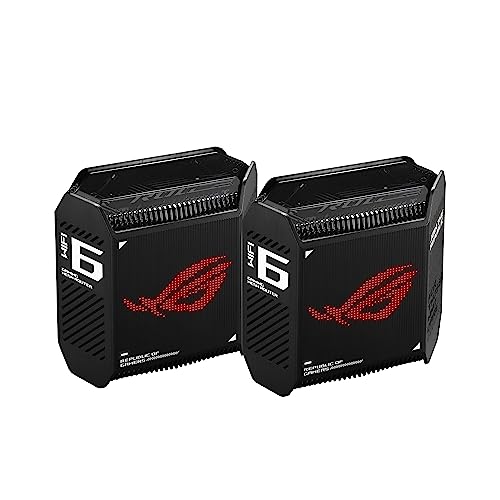
The ASUS ROG Rapture GT6 is a WiFi 6 tri-band mesh system designed for gaming. It covers up to 5,800 square feet with a two-pack configuration. The system features a 2.5 Gbps port for faster wired connectivity. It includes a 1.7GHz tri-core processor and nine internal antennas. This setup suits gamers who need dedicated backhaul and low-latency performance for large homes.
Pros
- Tri-band WiFi 6 standard for dedicated backhaul
- 2.5 Gbps WAN/LAN port for faster wired speeds
- Covers up to 5,800 square feet
- Includes lifetime AiProtection by Trend Micro security
- 1.7GHz tri-core processor for high-efficiency performance
Cons
- Uses older WiFi 6 standard instead of WiFi 7
- Lacks 10 Gbps ports for future-proofing
- Larger physical footprint than compact mesh nodes
Good fit if
- You play online games and need dedicated backhaul
- You have a home up to 5,800 square feet
- You want built-in security without extra subscriptions
Skip if
- You require the latest WiFi 7 speeds
- You need 10 Gbps wired connectivity
- You have a small apartment under 1,500 square feet
Verdict: The ASUS ROG Rapture GT6 Tri-Band Mesh delivers reliable gaming performance with its tri-band architecture and 2.5 Gbps port. It fits gamers with medium to large homes who prioritize stable connections over next-generation WiFi standards.
Specifications side by side
| Spec | ASUS ZenWiFi Dual-Band WiFi 7 3-Pack | ASUS ROG Rapture Tri-Band Mesh System |
|---|---|---|
| Wi-Fi Standard | WiFi 7 | WiFi 6 |
| Speed Rating | 5000 Mbps | AX10000 |
| Coverage Area | up to 6800 sq.ft. | 5,800 sq ft |
| Frequency Bands | Dual-band | Tri-Band |
| Pack Size | 3 Pack | 2-Pack |
| Port Speed | not stated | 2.5 Gbps |
| Frequency Band | not stated | Tri-Band |
| Use Case | not stated | Gaming |
| Features | Mesh | Mesh |
| Dimensions | 5.5 × 2.8 × 5.5 inches | 6.77 × 3.07 × 6.93 inches |
| Weight | 1.2 pounds | 1.94 pounds |
| Size | 3 Pack Indoor | not stated |
| Color | WHITE | BLACK |
| Model | BD5 (W-3-PK) | GT6 (B-2-PK) |
Frequently asked questions
Is the ASUS ZenWiFi BD5 better for future-proofing than the ROG Rapture GT6?
Yes. The ZenWiFi BD5 uses the Wi-Fi 7 standard, which offers newer features like Multi-Link Operation and 4K-QAM for improved efficiency. The ROG Rapture GT6 relies on the older Wi-Fi 6 standard. If you want the latest technology, the BD5 is the stronger choice.
Which system covers a larger home area?
The ASUS ZenWiFi BD5 3-Pack covers up to 6,800 square feet. The ROG Rapture GT6 2-Pack covers 5,800 square feet. The BD5 provides 1,000 more square feet of coverage, making it better for very large homes or those with many obstacles.
Does the ROG Rapture GT6 use tri-band or dual-band?
The ROG Rapture GT6 is a tri-band system. It uses three frequency bands to reduce congestion, which is helpful for gaming. The ZenWiFi BD5 is dual-band. It focuses on Wi-Fi 7 speeds rather than adding a third band for extra capacity.
Can I connect wired devices to both mesh systems?
Yes. Both systems include 2.5 Gbps ports. This allows you to connect high-speed devices like gaming consoles or NAS drives directly to the routers. These ports offer faster speeds than standard Gigabit Ethernet, ensuring your wired connections do not become a bottleneck.
How many units come in each package?
The ZenWiFi BD5 is sold as a 3-Pack. The ROG Rapture GT6 is sold as a 2-Pack. You get more units with the BD5, which helps spread coverage evenly across larger spaces. The GT6 requires you to buy additional units if you need more nodes.
Which router is physically smaller and lighter?
The ZenWiFi BD5 is smaller and lighter. It weighs 1.2 pounds and measures 2.8 by 5.5 inches. The ROG Rapture GT6 weighs 1.94 pounds and measures 3.07 by 6.93 inches. The BD5 is more compact and easier to place in tighter spaces.
Is the ZenWiFi BD5 suitable for gaming?
It works well, but the ROG Rapture GT6 is designed specifically for gaming. The GT6 prioritizes stable connections for gamers. The BD5 focuses on modern Wi-Fi 7 speeds and security. If gaming is your main priority, the GT6 is the better fit.