ASUS ROG Rapture Quad-Band Wi-Fi Review (2026): A Spec-Based Look
As an Amazon Associate we earn from qualifying purchases. Links on this page are affiliate links.
This asus rog rapture wifi 6e review focuses on the GT-AXE16000, a high-performance networking device designed for demanding environments. It is defined by its quad-band architecture and support for the new 6 GHz frequency band. These specifications allow for wider channels and reduced interference compared to older standards. The router also features dual 10 Gbps ports, enabling significantly faster data transfer rates for bandwidth-intensive tasks. You get a dedicated 2.5 Gbps WAN port to prioritize network traffic efficiently. This combination of advanced Wi-Fi 6E technology and robust wired connectivity targets users who require maximum throughput and low latency for their home or office networks.
What stands out
- Quad-band Wi-Fi 6E (802.11ax) with AXE16000 speed rating
- Dual 10 Gbps WAN/LAN ports for ultra-fast data transfer
- 2.5 Gbps WAN port for prioritized network traffic
- 6 GHz band for higher capacity and lower latency
- ASUS RangeBoost Plus technology for expanded signal coverage
Who it fits
Good fit for
You should consider this router if you have a large home with many connected devices and require the lowest possible latency for competitive gaming. The quad-band design helps manage congestion across different frequency ranges. The dual 10 Gbps ports are ideal for users with multi-gigabit internet plans or those who frequently transfer large files between devices on the local network. If you need the widest channels available with Wi-Fi 6E to minimize interference, this setup provides the necessary hardware foundation for high-performance networking.
Who should skip it
You might want to look at another option if you have a smaller home with limited connected devices. The quad-band architecture and 10 Gbps ports may be overkill for basic web browsing or standard streaming needs. Additionally, the device is physically large, measuring 13.9 inches in width and depth, and weighs 5.35 pounds. If you have limited space for networking equipment or do not require multi-gigabit wired speeds, a smaller, more compact router would likely serve your needs more efficiently without the excess hardware.
Verdict: The ASUS ROG Rapture GT-AXE16000 delivers extreme throughput and low latency through its quad-band Wi-Fi 6E design and 10 Gbps ports. It is best suited for power users and gamers who need the highest possible network performance.
Key specs explained for this router
Speed Rating: AXE16000
This rating combines the maximum theoretical speeds across all four frequency bands. You get a total aggregate throughput that supports heavy simultaneous usage. This number helps you compare performance tiers against other routers. Higher numbers generally indicate better handling of multiple devices and high-bandwidth tasks like 4K streaming or large file transfers without congestion.
Wi-Fi Standard: WiFi 6E
WiFi 6E adds the 6 GHz band to the traditional 2.4 GHz and 5 GHz bands. This provides wider channels and less interference from neighbors. You benefit from cleaner connections for gaming and video calls. When shopping, check if your devices support 6E, as older hardware will only use the older bands for connectivity.
Frequency Bands: Quad-Band
Quad-band means the router broadcasts on four separate frequencies. This allows dedicated bands for specific tasks, reducing congestion on any single channel. You can separate gaming, streaming, and general internet use. This is distinct from standard tri-band or dual-band mesh systems. It ensures your high-priority devices get consistent bandwidth without competing with other household traffic.
Max Port Speed: 10 Gbps
This router includes ports that support 10 Gigabit Ethernet speeds. You can connect high-end PCs, NAS drives, or switches for ultra-fast wired transfers. This exceeds standard 1 Gbps limits. When comparing mesh systems, note that most only offer 1 Gbps ports. This feature suits users with local network storage or high-speed workstations requiring minimal latency.
Design and Build Overview
The ASUS ROG Rapture GT-AXE16000 is a substantial piece of hardware. According to the listing, it measures 13.9 inches in width and length, with a height of 7.6 inches. It weighs 5.35 pounds. The finish is black. This large footprint means it requires significant floor or shelf space. You should plan for a dedicated spot that can support this weight and size. The dimensions suggest it is not designed for discreet placement in tight cabinets.
The physical layout is driven by its high-end specifications. The unit features dual 10 Gbps ports and a 2.5 Gbps WAN port. These ports are clearly visible and accessible. This arrangement prioritizes wired connectivity for high-speed devices. You will need adequate cable management space around the rear of the unit. The size also accommodates the internal antennas and cooling systems required for quad-band operation.
The design reflects its gaming use case. The black color and angular shape align with typical gaming aesthetics. The RangeBoost Plus feature is integrated into the internal structure. This means you do not need external add-ons for improved coverage. The build quality appears robust enough to handle the thermal output of a 16000 Mbps router. You should ensure proper ventilation around the unit to maintain performance.
Setup and Everyday Use
The ASUS ROG Rapture GT-AXE16000 requires a standard AC power connection. The listing specifies an input range of 110V to 240V. This allows you to use it in regions with different electrical standards without needing a separate converter. The device draws up to 3.42 amps at 19V, so you need a nearby outlet.
Setting up the network involves connecting your modem to the 2.5G WAN port. This port ensures your internet connection is not bottlenecked by the router itself. If you have a fiber or high-speed cable plan, this port unlocks the full potential of your service. You can also connect wired devices to the dual 10G LAN ports. These ports offer ten times the speed of standard gigabit connections. This is useful for transferring large files between computers or NAS drives.
In daily use, the quad-band architecture manages traffic efficiently. The new 6 GHz band provides wider channels. This means you can stream high-resolution video or play online games with less latency. The RangeBoost Plus feature expands your signal coverage. It helps maintain a strong connection in larger homes. The router prioritizes network traffic automatically. This ensures your gaming or work tasks get the bandwidth they need. You do not need to manually adjust settings for most everyday activities. The hardware handles the heavy lifting based on its internal specifications.
Before You Buy This Router
This device is a single gaming router, not a mesh system. You will need additional units or a separate mesh network to cover large homes. The quad-band design manages traffic well, but you must ensure your internet plan supports the 10 Gbps ports. Most ISPs do not yet offer such speeds. Check that your wired devices have compatible network interfaces. The 2.5 Gbps WAN port helps if you have a faster fiber connection. Keep the unit in a ventilated area. It generates heat during heavy use. Do not block the vents. This router sits at the top of the performance tier. It suits users who prioritize raw speed and low latency for gaming. It is less ideal for those seeking simple whole-home coverage without extra hardware. Verify your existing Ethernet cables can handle 10 Gbps if you plan to use those ports. This ensures you get the full benefit of the dual 10G ports listed in the specs.
Check before you buy
- Confirm your ISP plan supports speeds near 10 Gbps.
- Check if your devices have 10 Gbps Ethernet ports.
- Decide if a single router covers your home area.
- Verify your Ethernet cables support 10 Gbps data rates.
- Ensure you have space for a large, 5.35-pound unit.
The product at a glance
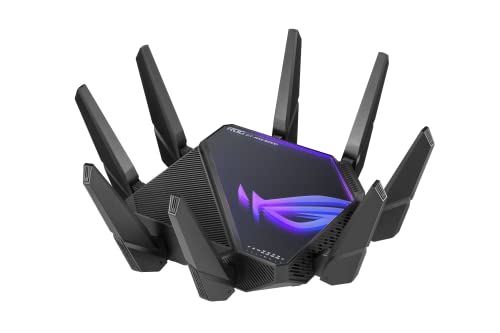
ASUS ROG Rapture Quad-Band Wi-Fi 6E Router
Best for: Gamers needing dual 10G ports
- Wi-Fi Standard
- WiFi 6E
- Speed Rating
- AXE16000
- Frequency Bands
- Quad-Band
- Max Port Speed
- 10 Gbps
- Use Case
- Gaming
- Dimensions
- 13.9 × 13.9 × 7.6 inches
View on Amazon: ASUS ROG Rapture Quad-Band Wi-Fi 6E Router Affiliate link
This ASUS ROG Rapture router uses Wi-Fi 6E with quad-band support to reach speeds up to 16000 Mbps. It includes dual 10G ports and a 2.5G WAN port for high-speed wired connections. The device uses RangeBoost Plus technology to improve signal coverage. It is designed for gaming and bandwidth-heavy tasks. You get wider channels on the 6 GHz band for lower latency.
Pros
- Quad-band Wi-Fi 6E support
- Dual 10G WAN/LAN ports
- 2.5G WAN port included
- RangeBoost Plus technology
Cons
- Large footprint at 13.9 inches wide
- Heavy build at 5.35 pounds
- No mention of smart home app features
Good fit if
- You need dual 10G ports for high-speed networking
- You want Wi-Fi 6E for lower latency
- You prioritize gaming performance
Skip if
- You have limited space for a large router
- You do not need quad-band speeds
- You prefer a compact desktop device
Verdict: ASUS ROG Rapture Quad-Band Gaming Router is built for users who need dual 10G ports and Wi-Fi 6E speeds. It suits those who can accommodate its large size for superior gaming performance.
Specifications side by side
| Spec | ASUS ROG Rapture Quad-Band Wi-Fi 6E Router |
|---|---|
| Wi-Fi Standard | WiFi 6E |
| Speed Rating | AXE16000 |
| Frequency Bands | Quad-Band |
| Max Port Speed | 10 Gbps |
| Frequency Band | Quad-Band |
| Use Case | Gaming |
| Port Speed | 2.5G, 10G |
| Dimensions | 13.9 × 13.9 × 7.6 inches |
| Weight | 5.35 pounds |
| Color | BLACK |
| Model | GT-AXE16000 |
Frequently asked questions
Is the ASUS ROG Rapture GT-AXE16000 a mesh system?
No, it is a single standalone router. You cannot add nodes to expand its coverage area automatically. To cover a larger home, you must purchase additional units or set up a separate mesh network. The device relies on its strong single-unit signal and dual 10G ports for performance.
What are the physical dimensions of this router?
The unit measures 13.9 inches in width and length, with a height of 7.6 inches. It weighs 5.35 pounds and features a black finish. You need ample space to accommodate this large footprint. The substantial size supports its internal cooling and antenna arrays for optimal signal distribution.
Does this router support Wi-Fi 6E?
Yes, it supports Wi-Fi 6E standards. This allows connections on the 2.4 GHz, 5 GHz, and 6 GHz bands. The quad-band architecture includes an additional 5 GHz band for dedicated traffic. This setup reduces congestion and provides wider channels for faster data rates compared to standard Wi-Fi 6.
What wired ports are included on the device?
It features dual 10G ports and 2.5G ports. These high-speed connections support demanding tasks like large file transfers or 4K streaming. You can connect gaming consoles, PCs, or NAS drives directly for maximum throughput. The ports ensure your local network does not bottleneck your internet speed.
Is this router suitable for gaming?
Yes, it is designed specifically for gaming environments. The quad-band system helps prioritize game traffic over other devices. Dual 10G ports allow for low-latency wired connections to consoles and PCs. The high aggregate speed rating of AXE16000 ensures minimal buffering during intense online sessions.
What power requirements does the GT-AXE16000 have?
It requires a standard AC power connection. The input range is 110V to 240V, making it compatible with various global electrical standards. You do not need a separate voltage converter for international travel. The device draws power through a standard cable included with the package.
Can I use this router in different countries?
Yes, the wide voltage input range supports international use. The 110V to 240V specification handles different electrical grids without modification. You only need a physical plug adapter if the outlet shape differs. The networking hardware remains functional regardless of the local power standard.