XikeStor 16 Port 10Gbe Carrier Review: Specs, Pros and Cons
As an Amazon Associate we earn from qualifying purchases. Links on this page are affiliate links.
This xikestor 16 port 10gbe carrier review covers a Layer 3 managed Ethernet switch designed for high-throughput environments. It features twelve 2.5 Gigabit RJ45 ports, two 10 Gigabit SFP+ slots, and two 10 Gigabit RJ45 uplinks. The unit offers a 140 Gbps switching capacity and supports jumbo frames up to 12 KB. You get full IPv4 and IPv6 routing, VLANs, and QoS controls. The compact chassis measures 8.26 by 9.84 inches. It uses a dedicated power input rather than PoE. This configuration targets users needing scalable wired infrastructure for demanding data workloads.
What stands out
- 16 total ports with mixed 2.5G and 10G speeds
- 140 Gbps non-blocking switching capacity
- Layer 3 routing with IPv4/IPv6 support
- Advanced security including SSHv2 and SNMPv3
- Jumbo frame support up to 12 KB
Who it fits
Good fit for
This switch suits network engineers, small-to-medium enterprises, and advanced home lab enthusiasts who need to connect multiple 2.5G or 10G devices. It is ideal for setups with 10G NAS drives, high-end servers, or WiFi 6 access points. The Layer 3 capabilities allow you to segment traffic with VLANs and apply QoS policies. If you require a cost-effective way to expand 10G uplink capacity while maintaining manageable port density, this unit fits your infrastructure needs.
Who should skip it
You should look elsewhere if you need Power over Ethernet (PoE) to power connected devices. This unit uses a dedicated power port and does not deliver power to endpoints. It is also unsuitable for users who want a simple, unmanaged plug-and-play experience. The web-based management interface requires manual IP configuration and does not offer a companion mobile app. If you prefer zero-config operation or lack the time to configure routing and security policies, this managed switch will be too complex for your setup.
Verdict: The XikeStor 16-Port L3 Managed 10G Switch provides robust Layer 3 features and high-speed uplinks for demanding wired networks. It is a solid choice for users who need granular control over traffic and security.
Key specs explained for this switch
12 x 2.5G RJ45 + 2 x 10G RJ45 + 2 x 10G SFP+
You get twelve ports for 2.5 Gigabit devices and four ports for 10 Gigabit connections. The SFP+ slots accept fiber or copper transceivers, while the RJ45 ports use standard cables. This mix lets you connect older 1G devices and newer high-speed gear on one switch. It suits users who need to bridge different speed tiers without buying separate hardware.
140Gbps switching capacity
This number defines the total data throughput the internal chip can handle simultaneously. A 140 Gbps capacity ensures the switch does not become a bottleneck when all ports are active. It supports heavy workloads like 4K video streaming or large file transfers. You should compare this against the sum of your connected device speeds to ensure smooth operation.
Layer 3 Managed
Layer 3 management allows the switch to route traffic between different network segments using IP addresses. You can configure VLANs, access control lists, and static routes. This feature adds security and organization to your network. It is essential for users who need to isolate guest traffic or separate server traffic from general user devices.
Packet Forwarding Rate 208Mpps
This metric shows how many million packets per second the switch can process. A rate of 208 million packets supports high-density environments with many small data requests. It ensures low latency for gaming or real-time applications. You should verify this matches your traffic patterns, especially if you have many IoT devices sending small bursts of data.
SSHv2 and SNMP v3
These protocols secure your remote management access. SSHv2 encrypts your command-line session, while SNMPv3 protects network monitoring data. This prevents unauthorized users from viewing or changing your switch settings. It is critical for anyone accessing the switch remotely. You should use these features to maintain a secure network environment against potential intrusions.
Design and build
The listing describes a compact unit measuring 8.26 inches wide, 9.84 inches long, and 1.73 inches high. This footprint allows it to fit into standard equipment racks or sit on a desk without taking up excessive space. The chassis appears to be a solid block, typical for this class of networking gear. According to the listing, the finish is not detailed, but the dimensions suggest a rigid metal or durable plastic construction designed to dissipate heat from the internal components.
The port layout is dense. You get twelve 2.5 Gigabit RJ45 ports on one side, followed by two 10 Gigabit RJ45 ports and two 10 Gigabit SFP+ slots. This arrangement keeps copper connections together while placing fiber options nearby. There are no external buttons or switches mentioned in the data. You manage the device through a web interface at 192.168.10.12. This means you do not need physical access to toggle settings.
The power input uses a dedicated port rather than PoE. This ensures the switch draws stable power from a wall outlet, which is important for a device handling 140 Gbps of traffic. The lack of external controls keeps the front panel clean and reduces the chance of accidental changes. The design prioritizes connectivity density over user interaction, fitting a server room or office closet environment where you access settings remotely.
Setup and everyday use
Setting up this switch requires adjusting your computer’s network configuration. You must change your IP address to the 192.168.10.X range, where X is a number between 2 and 254, excluding 12. Once configured, you access the management interface by entering 192.168.10.12 in a web browser. The default login credentials are admin for both username and password. After you adjust settings, you must click the Save button. If you fail to save, the switch reverts to factory settings upon power loss or upgrade.
This device supports Layer 3 routing for both IPv4 and IPv6. It handles VLANs, QoS, and security features like IP plus MAC plus port binding. These tools help you prioritize traffic and prevent ARP spoofing or flooding. The switch also includes SSHv2 and SNMPv3 for secure remote management. You can configure device and port queries directly through the interface.
In daily use, the switch connects to various high-speed devices. It works with 2.5G and 10G NAS units, gaming PCs, and WiFi 6 access points. The auto-negotiating ports detect the optimal speed for connected devices, ensuring compatibility with Cat6 Ethernet cables. The 140 Gbps switching capacity and 208 Mpps packet forwarding rate support heavy data loads. Jumbo frame support up to 12 KB allows for efficient large file transfers. The dedicated power port ensures stable operation without relying on PoE. This setup suits environments like schools, hospitals, or small businesses that need reliable, high-throughput networking.
Before you buy this switch
Before you buy this XikeStor switch, consider your existing network infrastructure. This is a Layer 3 managed device, meaning you need technical knowledge to configure VLANs, QoS, and routing. It does not include Power over Ethernet, so you must provide separate power to connected devices like access points or cameras. Ensure your current cabling supports 2.5G and 10G speeds; Cat6 is recommended for reliable 10G connections. You will also need a computer with a static IP in the 192.168.10.X range to access the web management interface at 192.168.10.12. This unit suits advanced home labs or small business networks rather than simple plug-and-play setups. If you only need basic switching, a cheaper unmanaged model may suffice. For those needing granular control over traffic and security, this 140Gbps capacity switch offers robust features. Check compatibility with your NAS and servers before purchasing.
Check before you buy
- Verify you have Cat6 cabling for 10G connections
- Confirm you can set a static IP for management
- Check if connected devices need separate power supplies
- Ensure you understand Layer 3 configuration requirements
The product at a glance
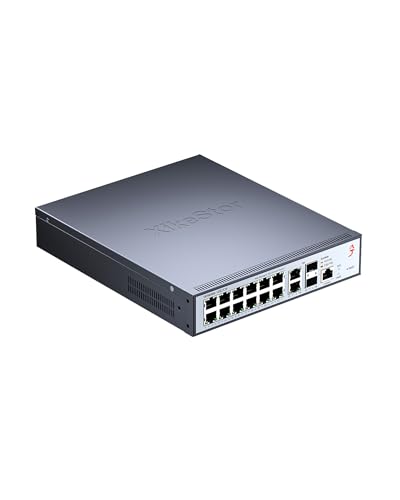
XikeStor 16-Port L3 Managed 10G Switch
Best for: High-density 10G networking with management needs
- Port Count
- 16
- Port Speed
- 2.5 Gbps
- Management Type
- L3 Managed
- Uplink Ports
- 2 x 10G SFP+
- Switching Capacity
- 140 Gbps
- Number of Ports
- 16 Ports
View on Amazon: XikeStor 16-Port L3 Managed 10G Switch Affiliate link
This XikeStor switch offers 16 ports for high-speed networking, including 12 multi-gigabit and four 10-gigabit connections. It provides 140Gbps of switching capacity and supports Layer 3 managed features like VLANs and QoS. The device is designed for environments requiring stable, high-bandwidth links for servers or access points. You get dedicated power input and enhanced security protocols. It suits users who need robust, scalable infrastructure for small to medium-sized setups.
Pros
- 12 x 2.5G RJ45 ports for flexible multi-gigabit connections
- 4 x 10G ports (2 RJ45, 2 SFP+) for high-speed uplinks
- 140Gbps switching capacity with 208Mpps packet forwarding rate
- Layer 3 managed features including VLAN, QoS, and IPv4/IPv6 routing
- Supports jumbo frames up to 12KB for efficient data transfer
Cons
- Requires manual IP configuration via web interface
- No mention of PoE support for connected devices
- Bulkier dimensions compared to compact 8-port models
Good fit if
- You need to connect multiple 2.5G or 10G devices
- You require Layer 3 management for network segmentation
- You are setting up a small office or enterprise network
Skip if
- You need PoE power for cameras or phones
- You prefer plug-and-play unmanaged simplicity
- You have limited rack or shelf space
Verdict: XikeStor 16-Port 10G L3 Managed Switch fits users who need scalable, high-bandwidth connectivity with advanced management controls for professional or serious home networks.
Specifications side by side
| Spec | XikeStor 16-Port L3 Managed 10G Switch |
|---|---|
| Port Count | 16 |
| Port Speed | 2.5 Gbps |
| Management Type | L3 Managed |
| Uplink Ports | 2 x 10G SFP+ |
| Switching Capacity | 140 Gbps |
| Number of Ports | 16 Ports |
| Uplink Port Type | SFP |
| Dimensions | 9.84 × 8.26 × 1.73 inches |
| Size | 12×2.5G RJ45+2×10G RJ45+2×10G SFP Ports |
| Color | L3 | 12×2.5G+2×10G RJ45+2×10G SFP+ |
| Model | 12x 2.5G|2x SFP+|2x 10G RJ45|Layer3 |
Frequently asked questions
Is the XikeStor 16-port switch managed or unmanaged?
It is a fully managed Layer 3 switch. You get full control over network settings, VLANs, and routing protocols. This allows you to segment traffic and optimize bandwidth for specific devices or groups, making it suitable for complex home or small office networks that require advanced configuration options.
What types of ports does this XikeStor switch have?
The device features twelve 2.5 Gigabit RJ45 ports, two 10 Gigabit RJ45 ports, and two 10 Gigabit SFP+ slots. This mix lets you connect standard Ethernet devices while using the higher-speed ports for uplinks or high-performance storage. The SFP+ slots also support fiber optic transceivers for long-distance connections.
Can I use this switch for a home lab setup?
Yes, it is well-suited for home labs needing high-density connectivity. The Layer 3 management allows you to simulate enterprise environments with VLANs and routing. With twelve 2.5G ports, you can connect multiple virtualization hosts or servers simultaneously, providing the bandwidth needed for testing and development workloads effectively.
Does this switch support Power over Ethernet for cameras?
No, this model does not include Power over Ethernet capabilities. You must provide separate power sources for any connected devices like IP cameras or access points. The switch focuses solely on data transmission and network management, so you need to plan your power infrastructure independently for PoE devices.
How do I access the management interface on this switch?
You access the interface via a web browser after configuring your computer’s IP address. Set your device to the 192.168.10.X range, excluding 12, and navigate to 192.168.10.12. This local access method ensures secure configuration without relying on cloud services, giving you direct control over the switch settings from your browser.
What is the physical size of this XikeStor switch?
The unit measures 8.26 inches in width, 9.84 inches in length, and 1.73 inches in height. This compact form factor allows it to fit into standard equipment racks or sit comfortably on a desk. The small footprint helps save space while still providing sixteen high-speed ports for your networking needs.
Is this switch good for connecting NAS devices?
Yes, the four 10 Gigabit ports are ideal for NAS connections. You can use the two RJ45 and two SFP+ ports to link storage arrays at high speeds. This reduces bottlenecks when transferring large files, ensuring that your network storage devices operate at their maximum potential without being limited by slower Ethernet standards.