TP-Link Deco Dual-Band Wi-Fi 6 Review: Specs, Pros and Cons
As an Amazon Associate we earn from qualifying purchases. Links on this page are affiliate links.
This tp link deco x20 dual band wifi review focuses on the Deco X20 3-pack mesh system. It delivers AX1800 speeds across two frequency bands to cover homes up to 5800 square feet. The system supports up to 150 connected devices, making it suitable for larger households. It uses Wi-Fi 6 technology to improve efficiency and reduce congestion. The white units are compact, measuring 4.33 by 4.49 inches. This setup is designed for seamless whole-home coverage without dead zones. It works with most major internet service providers and supports plans up to 1 Gbps. The system includes basic security and parental controls via the Deco app.
What stands out
- AX1800 speed rating with Wi-Fi 6 technology
- Covers up to 5800 square feet with a 3-pack
- Supports up to 150 connected devices simultaneously
- Dual-band frequency for stable connections
- Includes HomeShield for basic network security and IoT protection
Who it fits
Good fit for
This system suits households with moderate to high device counts, such as families with multiple smartphones, tablets, and smart home gadgets. The 5800 square foot coverage fits most standard homes. Users who want simple setup via the Deco app will appreciate the visual guidance. It is also ideal for those with internet plans up to 1 Gbps who need reliable whole-home coverage without complex networking knowledge.
Who should skip it
You should look elsewhere if you need tri-band performance for extremely large homes or heavy gaming with zero latency. The dual-band design may struggle in very dense environments with many competing networks. Users requiring advanced parental controls or premium security features beyond the basic HomeShield offerings might find the included tools limiting. If your home exceeds 5800 square feet, the 3-pack may not provide sufficient coverage without additional units.
Verdict: The Deco X20 3-pack offers solid AX1800 Wi-Fi 6 performance for average-sized homes. It provides reliable coverage for up to 150 devices, making it a practical choice for most families.
Key specs explained for Deco X20
Wi-Fi 6
This standard improves data efficiency and reduces latency compared to older Wi-Fi 5 systems. It handles multiple connections better, which helps when many devices stream video or join video calls at the same time. You benefit from more stable performance in busy households. When shopping, look for Wi-Fi 6 to ensure your network supports modern devices without slowing down during peak usage hours.
AX1800
This speed rating combines the maximum theoretical throughput of the 2.4 GHz and 5 GHz bands. It indicates the system can handle high-bandwidth activities like 4K streaming or large file transfers. While real-world speeds depend on your internet plan, this rating ensures the mesh nodes can process data quickly. Compare this to AX1200 or AX3000 models to gauge if the throughput meets your specific household demands.
Dual-Band
The system uses two frequency bands: 2.4 GHz for longer range and 5 GHz for faster speeds. This separation helps balance coverage and performance. Devices that need range connect to 2.4 GHz, while those needing speed use 5 GHz. This is standard for most mesh systems. When comparing options, note that tri-band models add a third band for dedicated backhaul, but dual-band remains cost-effective for average homes.
Up to 5800 sq ft
This coverage area tells you how much space the three-pack system can effectively blanket with Wi-Fi signal. It assumes typical home construction and interference levels. If your home exceeds this size, you may need additional nodes or a larger pack. This metric helps you decide if the 3-pack is sufficient or if you should look for a 2-pack or 6-pack option based on your floor plan dimensions.
Up to 150 devices
This capacity indicates how many gadgets can connect simultaneously while maintaining performance. It covers smartphones, laptops, smart home bulbs, and streaming sticks. If you have a large smart home ecosystem, this limit ensures the network does not drop connections under load. Compare this to smaller systems that support fewer devices to ensure your mesh network can handle all your connected electronics without congestion.
Design and Build Overview
According to the listing, the TP-Link Deco X20 units are white and measure 4.33 inches in width, 4.33 inches in length, and 4.49 inches in height. The 3-pack configuration includes three identical nodes. This compact, square form factor allows you to place each unit discreetly in various rooms without dominating your living space. The uniform color helps the devices blend into home decor, whether placed on a shelf, desk, or floor corner.
The listing does not specify the materials used in the construction, so we cannot confirm if the casing is plastic or another substance. There is no mention of weight in the provided data, so you should check the product page if portability or shelf load is a concern for your setup. The design relies on a minimalist aesthetic with no visible external antennas, which may appeal to users who prefer a clean look.
Controls are not detailed in the spec sheet, but the listing notes that setup and management are handled via the Deco app. This means physical buttons are likely limited to power or reset functions. You manage the network through your smartphone or tablet, which requires iOS 9.0 or later and Android 4.4 or later. This app-centric approach keeps the hardware simple, allowing you to focus on placement for optimal coverage rather than complex device interactions.
Setup and Everyday Use Guide
You set up the TP-Link Deco X20 system using the Deco app. The listing states the app provides clear visual guidance to help you complete the installation in minutes. This process connects the nodes to your existing modem. Most internet service providers require a separate modem for this connection. The system is compatible with major providers such as AT&T, Verizon, Xfinity, Spectrum, RCN, Cox, CenturyLink, and Frontier. It is designed to handle internet plans up to 1 Gbps. Once active, the app keeps you in control of your network even when you are away from home. You can manage the system from any iOS 9.0 or later smartphone or Android 4.4 or later device. Daily management includes using TP-Link HomeShield for basic network security and IoT device identification. The app also offers basic parental controls, allowing you to monitor and limit internet use for specific profiles. You can turn guest Wi-Fi on or off through simple voice commands if you use Alexa. The dual-band Wi-Fi 6 standard ensures stable connections for up to 150 devices. This capacity supports heavy usage without significant slowdowns. The seamless mesh design eliminates dead zones across your 5800 square feet of coverage. You do not need to switch between different network names as you move through your home. The system maintains a single, strong signal throughout the covered area. This setup allows for consistent performance for streaming, video calls, and general browsing. The app interface simplifies routine tasks like quality of service adjustments and weekly reports.
Before You Buy This Mesh System
Before you purchase this mesh system, verify your internet plan speed. The listing notes it supports plans up to 1 Gbps. Ensure your modem connects properly, as most providers require one. Check device compatibility if you use older phones. iOS 9.0 and Android 4.4 are the minimums. This AX1800 dual-band unit fits well alongside higher-end tri-band options if you prioritize value over raw throughput. You will need to manage parental controls and network security through the app. Keep the firmware updated for best performance. The system handles up to 150 devices, so count your connected gadgets. If you have many smart home items, this capacity might be tight. Consider the 3-pack coverage for homes up to 5800 square feet. Larger spaces may need additional nodes. This setup works with major ISPs like Xfinity or Spectrum. No extra hardware is needed for basic operation. Just plug in and configure via the Deco app for seamless whole-home Wi-Fi.
Check before you buy
- Confirm your internet plan speed is under 1 Gbps.
- Ensure you have a compatible modem for your ISP.
- Check if your mobile OS meets iOS 9.0 or Android 4.4 minimums.
- Count connected devices to see if 150 is enough for your home.
The product at a glance
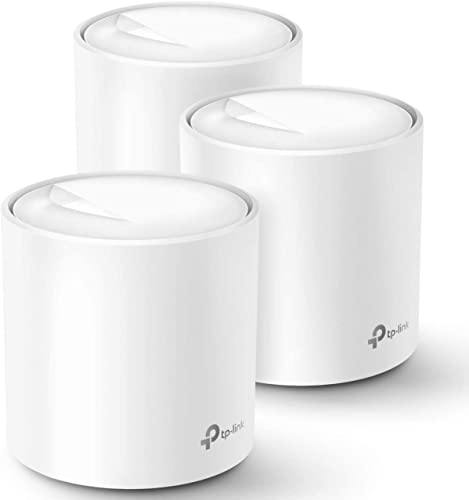
TP-Link Deco Dual-Band Wi-Fi 6 3-Pack
Best for: medium homes needing 150 device capacity
- Wi-Fi Standard
- WiFi 6
- Speed Rating
- AX1800
- Coverage Area
- up to 5800 square feet
- Frequency Bands
- Dual-Band
- Pack Size
- 3 Pack
- Device Capacity
- up to 150 devices
View on Amazon: TP-Link Deco Dual-Band Wi-Fi 6 3-Pack Affiliate link
The TP-Link Deco X20 3-pack is a dual-band Wi-Fi 6 mesh system rated at AX1800. It covers up to 5800 square feet and supports up to 150 connected devices. This setup includes three white units measuring 4.33 by 4.49 inches each. It suits homes needing whole-home coverage with reliable performance for multiple users and devices.
Pros
- Wi-Fi 6 AX1800 speed rating
- Covers up to 5800 square feet
- Supports up to 150 devices
- Includes 3-pack for whole home coverage
- Compatible with Alexa for voice control
Cons
- Dual-band only, lacking tri-band performance
- No mention of wired backhaul support
- Requires a separate modem for most ISPs
Good fit if
- You need coverage for homes up to 5800 square feet
- You have up to 150 devices to connect
- You want simple setup via the Deco app
Skip if
- You require tri-band Wi-Fi for heavy gaming
- You need wired backhaul for maximum stability
- You have a home larger than 5800 square feet
Verdict: TP-Link Deco X20 3-Pack offers solid AX1800 coverage for medium-sized homes. It fits users who prioritize device capacity and app management over advanced wired features.
Specifications side by side
| Spec | TP-Link Deco Dual-Band Wi-Fi 6 3-Pack |
|---|---|
| Wi-Fi Standard | WiFi 6 |
| Speed Rating | AX1800 |
| Coverage Area | up to 5800 square feet |
| Frequency Bands | Dual-Band |
| Pack Size | 3 Pack |
| Device Capacity | up to 150 devices |
| Frequency Band | Dual-Band |
| Features | Mesh |
| Dimensions | 4.33 × 4.33 × 4.49 inches |
| Size | 3 Pack |
| Color | White |
| Model | Deco X20(3-pack) |
Frequently asked questions
What is the maximum square footage coverage for the TP-Link Deco X20 3-pack?
The system covers homes up to 5800 square feet. This capacity relies on the AX1800 speed rating and Wi-Fi 6 technology to maintain signal strength across multiple rooms. You place the three nodes strategically to ensure consistent coverage throughout your entire living space.
How many devices can the Deco X20 support simultaneously?
It supports up to 150 connected devices at once. This high device capacity makes it ideal for medium-sized homes with many smart gadgets. The Wi-Fi 6 standard helps manage this load efficiently without significant slowdowns during peak usage times.
Does the TP-Link Deco X20 support Gigabit internet speeds?
Yes, the listing notes it supports internet plans up to 1 Gbps. You need a compatible modem and gigabit-speed service to reach these maximums. The dual-band AX1800 rating ensures you can handle high-bandwidth activities like 4K streaming across multiple devices.
What are the physical dimensions of each Deco X20 node?
Each unit measures 4.33 inches in width, 4.33 inches in length, and 4.49 inches in height. The white, compact square design allows for discreet placement in various home environments. The 3-pack includes three identical nodes for uniform coverage.
Is the Deco X20 system compatible with older smartphones?
It requires iOS 9.0 or Android 4.4 and later for app management. You use the Deco app to set up and control the network. Older devices that meet these minimum operating system requirements can connect and be managed through the interface.
What Wi-Fi standard does the TP-Link Deco X20 use?
It uses Wi-Fi 6 (802.11ax) technology. This standard offers improved data efficiency and reduced latency compared to older Wi-Fi 5 systems. You benefit from better performance when multiple devices stream video or join video calls simultaneously in your home.
How does the Deco app help with setup?
The app provides clear visual guidance to complete installation in minutes. It connects the nodes to your existing modem automatically. You follow the on-screen steps to create a unified mesh network that covers your specified square footage without complex manual configurations.
What is the best use case for this 3-pack mesh system?
It is best for medium homes needing 150 device capacity. The system fits users who prioritize device capacity and app management over advanced wired features. The AX1800 rating ensures solid coverage for everyday tasks like browsing, streaming, and smart home automation.