Speed Rating in Mesh Wifi Systems: What It Is and Is It Worth It?
As an Amazon Associate we earn from qualifying purchases. Links on this page are affiliate links.
Understanding Mesh WiFi Speed Ratings
You see numbers like AX3000 or AC1200 on every mesh WiFi listing. These labels are speed ratings. They are not absolute limits. They are theoretical maximums. The rating tells you the combined bandwidth of all bands on all nodes. It helps you compare systems quickly. But it does not guarantee your actual internet speed.
The rating combines the speeds of different frequency bands. For example, a tri-band system adds the 2.4 GHz speed, the lower 5 GHz speed, and the higher 5 GHz speed. The sum is the rating. A dual-band system adds only two bands. This total is the number you see. It is a marketing label. It simplifies complex technical specs into one easy figure.
Wi-Fi 6 uses the AX prefix. Wi-Fi 5 uses AC. AX1800 means the system uses Wi-Fi 6 technology. The total bandwidth is roughly 1800 Mbps. AX3000 systems offer higher potential throughput. AXE5400 systems use the new 6 GHz band. This adds more channels and less congestion. AC2200 is an older standard. It lacks the efficiency of Wi-Fi 6.
Why does this matter to you? Higher ratings often mean better performance in crowded homes. More bands allow devices to connect without slowing down the whole network. If you have many users, a higher rating like AX3000 or AXE5400 is wise. It provides more headroom for streaming, gaming, and video calls.
However, the speed rating explained is not the only factor. Router chip quality, antenna design, and backhaul type also matter. A high rating with poor hardware may underperform a mid-range system with better engineering. Check the backhaul. Dedicated backhaul is crucial for mesh performance. Do not rely on the number alone. Look at the full spec sheet. Compare the band counts and the Wi-Fi generation. This gives a clearer picture of real-world capability. Your home network needs depend on your device count and usage habits. Choose a rating that fits your load, not just the highest number.
Speed Rating Comparison Guide
AC1200
AC1200 uses the older 802.11ac standard on dual bands. It offers basic coverage for small homes or apartments. This rating suits users with few connected devices and light internet habits. You get reliable performance for browsing and video calls. However, it lacks the capacity for modern high-bandwidth tasks. The TP-Link Deco AC1200 3-Pack is a straightforward choice for these needs. It provides simple setup and solid coverage up to 4,500 square feet. You should expect slower speeds compared to newer Wi-Fi 6 models. This option is best if you prioritize cost and simplicity over raw throughput.
AC2200
AC2200 represents a higher tier of the legacy 802.11ac standard. It provides more bandwidth than AC1200 systems. This rating is suitable for small to medium homes with moderate device counts. You benefit from improved stability during simultaneous streaming. The Google Nest Wifi AC2200 Router serves as a modest starter for small spaces. It fits users who value simple aesthetics over raw speed. While it handles basic mesh coverage well, it does not support the latest efficiency features. You may find it less future-proof than Wi-Fi 6 alternatives. Choose this if you need a reliable single-node solution for light to medium usage.
AX1500
AX1500 is a Wi-Fi 6 entry-level rating. It uses 802.11ax technology on dual bands. This system offers better efficiency and capacity than AC counterparts. It suits small homes needing basic modern coverage. The TP-Link Deco X15 AX1500 Mesh is a practical entry-level option. It fits users who value simplicity and wired port availability over raw speed. You get improved performance in congested environments. However, the total bandwidth is limited compared to higher tiers. It is ideal for web browsing, email, and standard definition streaming. Avoid this if you have many 4K streams or large file transfers.
AX1800
AX1800 is a common mid-range Wi-Fi 6 rating. It balances speed and cost effectively. This system supports more simultaneous connections than lower tiers. It is suitable for average-sized homes with standard device loads. You experience better response times for gaming and video calls. The rating indicates a combined theoretical speed of 1800 megabits per second. This is sufficient for most household activities. You should ensure your internet plan matches this capability. It is a practical choice for users who want modern features without premium pricing. Look for models with strong wired ports to maximize performance.
AX3000
AX3000 is a robust Wi-Fi 6 rating for whole-home coverage. It supports large homes with many connected devices. The TP-Link Deco X55 AX3000 3-Pack delivers reliable performance for medium to large households. It is a practical choice for users who prioritize device capacity and wired connectivity. You get strong signal strength and better handling of multiple streams. This rating is ideal for families with heavy internet usage. It supports 4K streaming and online gaming simultaneously. The TP-Link Deco X50-PoE also offers this rating with PoE mounting options. Choose this for future-proofing and high capacity needs.
AXE5400
AXE5400 is a Wi-Fi 6E tri-band rating. It adds a dedicated 6 GHz band for ultra-fast speeds. This system is ideal for large spaces with many modern devices. The TP-Link Deco XE75 AXE5400 Mesh System delivers robust coverage. It provides minimal interference thanks to the dedicated backhaul band. You get the highest theoretical speeds and lowest latency. This is best for users with Wi-Fi 6E capable devices. You can stream uncompressed 8K video or transfer large files quickly. However, it is the most expensive option. Only choose this if you need maximum performance and have compatible devices.
Is Speed Rating Worth The Upgrade
Who needs it
You need higher speed ratings if your home has many connected devices. Systems like AX3000 or AXE5400 handle heavy loads better. These ratings combine bandwidth across multiple bands. This means more data moves at once. You should choose these if you stream 4K video on several screens. You also need them for large file transfers. Gamers benefit from the lower latency these systems often provide. AX1800 and AX1500 are good middle grounds. They support most modern tasks without overpaying. If your internet plan is fast, a higher rating ensures your mesh system does not become a bottleneck. You get smoother performance when multiple people use the network simultaneously. The extra capacity prevents slowdowns during peak hours.
Who can skip it
You can skip high speed ratings if you have a small apartment. AC1200 or AC2200 systems are sufficient for basic use. These older standards handle web browsing and email easily. You do not need extra bandwidth for checking social media. Light users with few devices do not benefit from expensive upgrades. Prioritize coverage area and range instead. A lower-rated system with better signal strength is more useful. You also save money by choosing simpler hardware. Focus on easy setup and reliable connection stability. These factors matter more for casual users. Do not pay for speed you will not use. Your actual internet plan speed is often the real limit. A high rating cannot make your connection faster than your provider allows. Keep it simple and practical.
Mesh Speed Glossary
Wi-Fi Standard
The protocol version, like Wi-Fi 6 or Wi-Fi 7. Newer standards offer better speed and efficiency for modern devices.
Frequency Band
The radio channel used for data. Common bands are 2.4 GHz for range and 5 GHz for speed. Wi-Fi 6E adds 6 GHz.
Coverage Area
The square footage the system covers. Larger homes need more nodes. Check the manufacturer’s listed range per node.
Speed Rating
A combined theoretical number like AX3000. It sums the max speed of all bands. It is not your actual internet speed.
Number of Ports
Ethernet jacks on each node. More ports allow wired connections for gaming or TVs. Check if they are gigabit or 2.5 gigabit.
Pack Size
The number of nodes in the box. One node covers less area. You may need a two-pack or three-pack for larger spaces.
PoE Support
Power over Ethernet capability. It lets you power nodes via network cables. This simplifies installation by reducing power outlets needed.
Device Capacity
The maximum number of devices the system supports simultaneously. Higher numbers suit smart homes. Check the limit per node or total.
Quick picks
| # | Product | Best for | Price |
|---|---|---|---|
| 1 | TP-Link Deco X55 3-Pack Wi-Fi 6 | large homes with many connected devices | Check price of TP-Link Deco X55 3-Pack Wi-Fi 6 on Amazon |
| 2 | TP-Link Deco Tri-Band WiFi 6E 2-Pack | Large homes with many Wi-Fi 6E devices | Check price of TP-Link Deco Tri-Band WiFi 6E 2-Pack on Amazon |
| 3 | TP-Link Deco AX1500 Dual-Band Mesh 2-Pack | Small homes needing basic Wi-Fi 6 coverage | Check price of TP-Link Deco AX1500 Dual-Band Mesh 2-Pack on Amazon |
| 4 | Google WiFi AC1200 3-Pack | Basic home coverage up to 4,500 sq ft | Check price of Google WiFi AC1200 3-Pack on Amazon |
| 5 | Google Nest Wifi AC2200 1-Pack Router | Small apartments needing basic mesh coverage | Check price of Google Nest Wifi AC2200 1-Pack Router on Amazon |
| 6 | TP-Link Deco PoE WiFi 6 3-Pack | PoE mounting and 2.5G wired backhaul needs | Check price of TP-Link Deco PoE WiFi 6 3-Pack on Amazon |
Our 6 picks

TP-Link Deco X55 3-Pack Wi-Fi 6
Best for: large homes with many connected devices
- Speed Rating
- AX3000 (what this guide is about)
- Wi-Fi Standard
- Wi-Fi 6
- Coverage Area
- Up to 6,500 sq ft
- Pack Size
- 3-Pack
- Port Speed
- 1 Gbps
- Device Capacity
- Up to 150 devices
View on Amazon: TP-Link Deco X55 3-Pack Wi-Fi 6 Affiliate link
The TP-Link Deco X55 is a Wi-Fi 6 mesh system rated AX3000. It covers up to 6500 square feet and supports 150 devices. Each unit includes three Gigabit Ethernet ports for wired backhaul. The system uses AI-driven mesh to optimize your home network. It fits homes needing strong coverage and high device capacity without requiring Wi-Fi 6E.
Pros
- AX3000 speed rating with Wi-Fi 6 standard
- Covers up to 6500 square feet of space
- Supports connection of up to 150 devices
- Each node has three Gigabit Ethernet ports
- Includes TP-Link HomeShield security features
Cons
- Limited to Wi-Fi 6, lacking Wi-Fi 6E bands
- Port speed is Gigabit, not multi-gigabit
- No mention of dedicated wireless backhaul band
Good fit if
- You need coverage for large homes up to 6500 sq ft
- You have many devices to connect simultaneously
- You prefer wired Ethernet connections for stability
Skip if
- You require Wi-Fi 6E for lower latency
- You need speeds exceeding Gigabit Ethernet limits
- You have a small home under 2000 sq ft
Verdict: The TP-Link Deco X55 AX3000 3-Pack delivers reliable whole-home coverage for medium to large households with many connected devices. It is a practical choice for users who prioritize device capacity and wired connectivity over next-generation Wi-Fi 6E speeds.
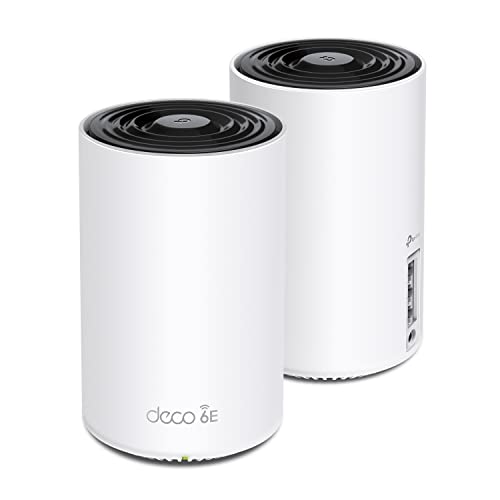
TP-Link Deco Tri-Band WiFi 6E 2-Pack
Best for: Large homes with many Wi-Fi 6E devices
- Speed Rating
- AXE5400 (what this guide is about)
- Wi-Fi Standard
- WiFi 6E
- Coverage Area
- up to 5500 Sq.Ft
- Frequency Bands
- Tri-Band
- Pack Size
- 2-Pack
- Device Capacity
- 200 devices
View on Amazon: TP-Link Deco Tri-Band WiFi 6E 2-Pack Affiliate link
The TP-Link Deco XE75 is a tri-band AXE5400 mesh system using Wi-Fi 6E. It covers up to 5,500 square feet and supports 200 devices. The 6 GHz band acts as a dedicated backhaul for stable connections between nodes. This setup reduces interference from legacy devices. It suits large homes needing high capacity and low latency for modern devices.
Pros
- AXE5400 tri-band speed rating with 6 GHz band
- Covers up to 5,500 square feet
- Supports 200 connected devices
- 6 GHz band serves as dedicated backhaul
- Includes HomeShield security features
Cons
- Sold as a 2-pack, limiting initial node count
- Requires Wi-Fi 6E devices to use 6 GHz band
- Higher total speed rating may exceed typical broadband limits
Good fit if
- You have a large home over 3,000 square feet
- You use multiple Wi-Fi 6E capable devices
- You need high device capacity for many connections
Skip if
- You only have Wi-Fi 5 or older devices
- You need more than two nodes included in the box
- Your internet plan is under 500 Mbps
Verdict: TP-Link Deco XE75 AXE5400 Mesh System delivers robust coverage for large spaces with dedicated 6 GHz backhaul. It is ideal for users with many modern devices who need high capacity and minimal interference.

TP-Link Deco AX1500 Dual-Band Mesh 2-Pack
Best for: Small homes needing basic Wi-Fi 6 coverage
- Speed Rating
- AX1500 (what this guide is about)
- Wi-Fi Standard
- WiFi 6
- Coverage Area
- up to 3,900 sq.ft.
- Frequency Bands
- Dual-Band
- Pack Size
- 2-Pack
- Port Speed
- Gigabit
View on Amazon: TP-Link Deco AX1500 Dual-Band Mesh 2-Pack Affiliate link
The TP-Link Deco X15 is a dual-band AX1500 Wi-Fi 6 mesh system designed for homes up to 3,900 square feet. It supports up to 120 devices with seamless roaming and includes two Gigabit Ethernet ports per unit for wired backhaul. This setup suits smaller residences or budget-conscious users who need reliable whole-home coverage without the cost of tri-band hardware.
Pros
- AX1500 dual-band Wi-Fi 6 standard
- Covers up to 3,900 square feet
- Supports up to 120 connected devices
- Includes two Gigabit Ethernet ports per unit
- Wired backhaul capability for stable speeds
Cons
- Dual-band architecture limits throughput compared to tri-band peers
- Lower AX1500 rating restricts high-bandwidth performance
- 2-Pack size may be insufficient for larger layouts
Good fit if
- You need basic whole-home coverage for a small house
- You prioritize budget-friendly Wi-Fi 6 performance
- You have under 120 devices to connect
Skip if
- You require tri-band speeds for heavy streaming
- Your home exceeds 3,900 square feet
- You need dedicated backhaul for high-density networks
Verdict: The TP-Link Deco X15 AX1500 Mesh is a practical entry-level option for small homes needing solid Wi-Fi 6 coverage. It fits users who value simplicity and wired port availability over raw speed.

Google WiFi AC1200 3-Pack
Best for: Basic home coverage up to 4,500 sq ft
- Speed Rating
- AC1200 (what this guide is about)
- Coverage Area
- up to 4,500 sq. ft.
- Pack Size
- 3-Pack
- Features
- Mesh
- Intended Use
- Home
- Dimensions
- 5.04 × 4.94 × 4.92 inches
View on Amazon: Google WiFi AC1200 3-Pack Affiliate link
This Google AC1200 mesh system provides whole-home coverage for spaces up to 4,500 square feet. It includes three routers to eliminate dead zones. The setup is simple using the Google Home app. You get parental controls and guest network management. This AC1200 speed rating suits basic browsing and streaming. It fits homes that prioritize easy management over high-speed performance.
Pros
- Covers up to 4,500 square feet with a 3-pack
- Simple setup via Google Home app
- Includes parental controls and guest networks
Cons
- AC1200 speed rating is lower than AX3000 or AXE5400 options
- Dual-band only lacks the extra capacity of tri-band systems
- No mention of WiFi 6 support
Good fit if
- You need coverage for a home up to 4,500 square feet
- You want simple app-based management
- You prioritize ease of use over maximum speed
Skip if
- You require WiFi 6 performance
- You need tri-band capacity for heavy congestion
- You have a home larger than 4,500 square feet
Verdict: Google AC1200 3-Pack Mesh System is a straightforward choice for small to medium homes. It fits users who value simple setup and reliable coverage over raw speed.

Google Nest Wifi AC2200 1-Pack Router
Best for: Small apartments needing basic mesh coverage
- Speed Rating
- AC2200 (what this guide is about)
- Coverage Area
- 2200 Sq Ft
- Pack Size
- 1 pack
- Features
- Mesh
- Dimensions
- 4.33 × 4.33 × 3.56 inches
- Weight
- 1 pounds
View on Amazon: Google Nest Wifi AC2200 1-Pack Router Affiliate link
This Google Nest Wifi router carries an AC2200 speed rating. It covers up to 2200 square feet of space. The unit is a single pack in white. It measures 4.33 by 4.33 by 3.56 inches. It weighs one pound. You should choose this if you need basic mesh coverage for a small apartment. It suits users who want simple setup without complex settings.
Pros
- AC2200 dual-band speed rating
- Covers up to 2200 square feet
- Compact design at 4.33 inches wide
- Lightweight at one pound
Cons
- Single router pack offers limited initial coverage
- Older AC standard lacks WiFi 6 speeds
- No mention of Ethernet ports in data
Good fit if
- You have a small home under 2200 square feet
- You prefer a minimalist white design
- You want a simple single-device start
Skip if
- You need high-speed WiFi 6 performance
- You require a multi-pack system immediately
- You need wired connections for gaming
Verdict: Google Nest Wifi AC2200 Router is a modest starter for small spaces. It fits users who prioritize simple aesthetics over raw speed.

TP-Link Deco PoE WiFi 6 3-Pack
Best for: PoE mounting and 2.5G wired backhaul needs
- Speed Rating
- AX3000 (what this guide is about)
- Wi-Fi Standard
- WiFi 6
- Coverage Area
- 6,500 sq ft
- Frequency Bands
- Dual-Band
- Pack Size
- 3-Pack
- Port Speed
- 2.5 Gbps
View on Amazon: TP-Link Deco PoE WiFi 6 3-Pack Affiliate link
The Deco X50-PoE is an AX3000 dual-band Wi-Fi 6 mesh system designed for flexible installation. It supports Power over Ethernet (PoE), allowing you to mount units in ceilings or walls using a PoE+ switch. The 3-pack covers up to 6,500 square feet and handles 150 devices. It features two 2.5 Gigabit Ethernet ports per unit for high-speed wired connections. This system suits users who need robust coverage and versatile mounting options.
Pros
- AX3000 dual-band Wi-Fi 6 speeds up to 2402 Mbps on 5 GHz
- PoE+ support enables ceiling or wall mounting via network switch
- Two 2.5 Gigabit Ethernet ports per router for multi-gigabit backhaul
- Covers up to 6,500 square feet with connections for 150 devices
Cons
- Dual-band design lacks a dedicated third band for wireless backhaul
- PoE+ switch required for power-over-Ethernet functionality is not included
- Does not support Wi-Fi 6E for 6 GHz band connectivity
Good fit if
- You want to mount mesh nodes in ceilings or walls using PoE
- You need 2.5 Gigabit ports for high-speed wired device connections
- You require coverage for large homes up to 6,500 square feet
Skip if
- You need Wi-Fi 6E for 6 GHz band performance
- You want a tri-band system with a dedicated backhaul band
- You prefer a plug-and-play setup without a PoE switch
Verdict: The TP-Link Deco X50-PoE AX3000 Mesh System fits users who prioritize flexible PoE mounting and 2.5G wired ports over tri-band wireless speeds.
Specifications side by side
| Spec | TP-Link Deco X55 3-Pack Wi-Fi 6 | TP-Link Deco Tri-Band WiFi 6E 2-Pack | TP-Link Deco AX1500 Dual-Band Mesh 2-Pack | Google WiFi AC1200 3-Pack | Google Nest Wifi AC2200 1-Pack Router | TP-Link Deco PoE WiFi 6 3-Pack |
|---|---|---|---|---|---|---|
| Wi-Fi Standard | Wi-Fi 6 | WiFi 6E | WiFi 6 | not stated | not stated | WiFi 6 |
| Speed Rating | AX3000 | AXE5400 | AX1500 | AC1200 | AC2200 | AX3000 |
| Coverage Area | Up to 6,500 sq ft | up to 5500 Sq.Ft | up to 3,900 sq.ft. | up to 4,500 sq. ft. | 2200 Sq Ft | 6,500 sq ft |
| Frequency Bands | not stated | Tri-Band | Dual-Band | not stated | not stated | Dual-Band |
| Pack Size | 3-Pack | 2-Pack | 2-Pack | 3-Pack | 1 pack | 3-Pack |
| Port Speed | 1 Gbps | not stated | Gigabit | not stated | not stated | 2.5 Gbps |
| Device Capacity | Up to 150 devices | 200 devices | up to 120 devices | not stated | not stated | 150 |
| Frequency Band | not stated | Tri-Band | Dual-Band | not stated | not stated | not stated |
| PoE Support | not stated | not stated | not stated | not stated | not stated | PoE |
| Use Case | not stated | Gaming, Streaming | not stated | not stated | not stated | not stated |
| Features | Mesh | Mesh, WPA3 | Mesh | Mesh | Mesh | Mesh |
| Intended Use | not stated | Home | not stated | Home | not stated | not stated |
| Operating Mode | not stated | not stated | not stated | not stated | not stated | Access Point Mode |
| Placement | Indoor | not stated | not stated | not stated | not stated | not stated |
| Dimensions | 4.33 × 4.33 × 4.49 inches | 4.13 × 4.13 × 6.67 inches | 9.48 × 4.74 × 6.72 inches | 5.04 × 4.94 × 4.92 inches | 4.33 × 4.33 × 3.56 inches | 6.1 × 6.1 × 2.7 inches |
| Weight | 5.07 pounds | 2.69 pounds | 1.74 pounds | not stated | 1 pounds | not stated |
| Size | 3 Pack | 2 Pack | 2 Pack | not stated | One Pack | 3 Pack |
| Color | Black, White | Black and White | White | Snow/ White | white | White |
| Model | Deco X55 | Deco XE75(2-pack) | Deco X15(2-Pack) | aos | GA00595-US | Deco X50-PoE(3-pack) |
Frequently asked questions
Does a higher speed rating mean faster internet for my devices?
No, it does not guarantee faster speeds for individual devices. The rating shows the combined theoretical maximum bandwidth of all bands across all nodes. Your actual speed depends on your internet plan and device capabilities. A higher number allows more data to move simultaneously, which helps in busy homes with many connected devices.
What is the difference between AX and AC speed ratings?
AX ratings indicate Wi-Fi 6 technology, while AC ratings refer to the older Wi-Fi 5 standard. Wi-Fi 6 systems like the Deco X55 offer better efficiency and capacity for multiple devices. AC systems, such as the Google Nest Wifi, use dual-band technology that may struggle with heavy loads. Choose AX for modern homes with many smart devices.
Why do some mesh systems have AXE ratings?
AXE ratings signify Wi-Fi 6E technology, which adds a dedicated 6 GHz band. This extra band reduces interference and provides higher speeds for compatible devices. The Deco XE75 uses this tri-band setup to ensure robust coverage for large spaces. It is ideal if you have many modern devices that can utilize the faster 6 GHz channel.
Is an AX1500 rating enough for my small apartment?
Yes, an AX1500 rating is sufficient for small homes needing basic Wi-Fi 6 coverage. This rating suits users who value simplicity and wired port availability over raw speed. The Deco X15 provides solid performance for light internet habits. It is a practical entry-level option that fits well in compact spaces without requiring complex setup.
How does pack size affect the speed rating?
Pack size does not change the speed rating of individual units. The rating reflects the capabilities of one node, such as the AX3000 Deco X55. However, more nodes improve coverage area and device capacity. A 3-pack system handles more connected devices than a single router. The rating remains the same regardless of how many units you buy.
Do I need a tri-band system for high speed ratings?
Not always, but tri-band systems often achieve higher ratings like AXE5400. They use a dedicated band for backhaul, which keeps wireless speeds stable. Dual-band systems like the AX1500 share all bands for client and backhaul traffic. Tri-band is better for large homes with many devices. Dual-band works well for smaller spaces with fewer connections.