Sinotchous 6-Port Gigabit PoE Switch Review: Specs, Pros and Cons
As an Amazon Associate we earn from qualifying purchases. Links on this page are affiliate links.
This sinotchous 6 port gigabit poe review covers a compact unmanaged switch designed for simple network expansions. It offers six Gigabit Ethernet ports with a total 65W PoE power budget. Four ports support 802.3af/at standards, delivering up to 30W per port for powered devices. Two additional uplink ports handle standard data traffic for routers or NVRs. The unit features a fanless design for silent operation and includes 4KV lightning protection. It is an unmanaged device, meaning no software configuration is required. This straightforward hardware targets users who need reliable power and data delivery without complex setup steps.
What stands out
- Four 1 Gbps PoE ports with 65W total budget
- Two dedicated Gigabit uplink ports for routers or NVRs
- Supports 802.3af/at standards for 48V devices
- Fanless design ensures silent operation and lower power use
- 4KV lightning protection for port and power supply safety
Who it fits
Good fit for
This switch suits small office or home setups requiring PoE for IP cameras or wireless access points. The four powered ports handle standard 48V devices efficiently. The two uplink ports provide clear separation for network backbone connections. Its unmanaged nature makes it ideal for users who prefer plug-and-play simplicity. The silent, fanless design allows placement in quiet environments. It is best for installations where VLAN isolation or remote management is not a priority.
Who should skip it
You should look elsewhere if you need advanced network control. This is an unmanaged switch, so it lacks VLAN configuration, QoS settings, or remote monitoring. It does not support 24V wireless APs directly, requiring a splitter for those devices. Passive PoE devices are also unsupported without additional hardware. If you require intelligent traffic management or detailed port statistics, this basic hardware will not meet your needs.
Verdict: The Sinotchous 6-Port Gigabit PoE Switch provides a straightforward, fanless solution for basic PoE deployments. Its fixed 65W budget and unmanaged design make it a practical choice for simple camera or AP networks.
Sinotchous 6-Port Switch Key Specs
PoE Power Budget: 65W
The switch provides a total of 65 watts to power connected devices. This budget is shared among the active PoE ports. You can connect multiple cameras or access points without external power bricks. If your devices require more total power than 65W, you will need a higher-budget switch. This limit applies to the entire unit, so plan your device count carefully.
Port Count: 6
You get six Ethernet ports for network connections. Four of these support PoE to deliver power and data. The other two are standard uplink ports for routers or NVRs. This count is ideal for small offices or home labs. It allows you to expand your wired network without needing an additional switch. Consider your total device count before buying.
Port Speed: 1 Gbps
Each port supports speeds up to one gigabit per second. This ensures fast data transfer for video surveillance or file sharing. It matches the speed of most modern routers and computers. If you have older 100 Mbps devices, they will still work but at lower speeds. This speed is standard for current home and small business networking needs.
PoE Support: PoE+ (802.3af/at)
The switch complies with IEEE 802.3af and 802.3at standards. This means it can power most standard PoE devices like wireless access points and IP cameras. It supplies up to 30W per port. Note that it only supports standard 48V devices. Passive PoE devices will not work without a splitter. Check your device specifications to ensure compatibility before connecting.
Design and build quality
The Sinotchous 6-Port Gigabit PoE Switch measures 7.87 inches in length, 4.72 inches in width, and 1.57 inches in height. It weighs 1.41 pounds. The listing describes the finish as black. These dimensions make it a compact unit that fits easily on a desk or in a small rack. The low profile allows it to sit flat without taking up much vertical space. You can place it near your router or in a utility closet where space is limited.
The switch uses a fanless design. According to the listing, this reduces power consumption and ensures silent operation. You will not hear any noise from a cooling fan during use. This makes the device suitable for quiet environments like home offices or living rooms where background noise matters. The internal components are enclosed in a solid chassis that provides structural stability.
There are no visible controls or lights mentioned in the data. The unit is unmanaged, so you do not need to adjust settings on the device itself. You simply plug in your cables. The built-in 65W power supply is housed inside the body, so you only need to connect one AC power cable to the wall. This simplifies your setup by removing the need for an external power brick. The layout is straightforward, with four PoE ports and two uplink ports clearly designated for your network needs.
Setup and everyday use
This is an unmanaged switch, so you do not need to install software or configure settings. You simply connect the included AC power cable and plug the unit into a wall outlet. The 65W built-in power supply handles all energy needs. Next, connect your router or network video recorder to one of the two Gigabit uplink ports using standard Ethernet cables. Then, plug your powered devices, such as wireless access points or IP cameras, into the four active PoE ports. The switch automatically negotiates the connection speed and power delivery. It supports 802.3af/at standards, delivering up to 30W per port. Note that it only powers standard 48V devices. A 24V wireless access point will not work directly and requires a PoE splitter. You can also connect non-PoE devices to any port for data transmission only, though they will need a separate power source. The unit features silent fanless operation, making it suitable for offices or homes where noise matters. It includes 4KV lightning protection for the ports and power supply. If a cable short circuit occurs, the switch protects itself. You can restore full PoE port functionality by simply reconnecting the AC power cable. The device also offers three switch modes. CCTV mode extends transmission distance up to 820 feet. Vlan mode isolates downlink ports while allowing communication with uplinks. Default mode provides standard 10/100/1000 Mbps speeds. This setup is ideal for users who want a plug-and-play solution for expanding their network without complex configuration.
Before You Buy This Switch
This switch expands your network by adding PoE ports to an existing router or switch. You must have a Gigabit uplink device to connect the two dedicated uplink ports. The listing notes it supports 802.3af/at standards, meaning it works with most standard IP cameras and wireless access points. However, it does not support 24V passive PoE. If you have older 24V devices, you will need separate power adapters or splitters. The unit is unmanaged, so it offers no VLAN isolation or traffic prioritization. This makes it ideal for simple home or small office setups where plug-and-play simplicity is key. It fits well alongside mesh systems as a local distribution point for cameras. Since it lacks a fan, it runs silently, which is useful for residential environments. You should ensure your existing network infrastructure can handle the additional bandwidth and power load. Regularly check cable connections to maintain stable performance. The lightning protection feature adds a layer of safety against power surges, which is beneficial for outdoor-connected devices.
Check before you buy
- Confirm your router has Gigabit uplink ports available.
- Check if your devices use standard 48V PoE.
- Verify you do not have 24V passive PoE devices.
- Ensure you need unmanaged plug-and-play simplicity.
- Check if you require VLAN or traffic management.
The product at a glance
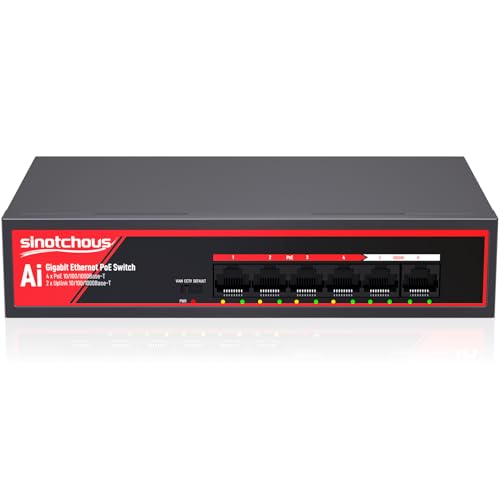
Sinotchous 6-Port Gigabit PoE Switch
Best for: Powering four IP cameras silently
- Port Count
- 6
- Port Speed
- 1 Gbps
- Management Type
- Unmanaged
- PoE Support
- PoE+ (802.3af/at)
- PoE Power Budget
- 65W
- Uplink Ports
- 2 x Gigabit Ethernet
View on Amazon: Sinotchous 6-Port Gigabit PoE Switch Affiliate link
This unmanaged switch provides four PoE+ ports and two gigabit uplinks with a 65W total power budget. It supports 802.3af/at standards for devices like IP cameras. The unit features 4KV lightning protection and a fanless design for silent operation. You can extend transmission distance up to 820 feet using the CCTV mode. It is a practical option for small office or home security setups.
Pros
- Six gigabit ports with 65W PoE budget
- 4KV lightning protection for port safety
- Fanless design ensures silent operation
- CCTV mode extends PoE distance to 820ft
Cons
- Only four ports support PoE power delivery
- Unmanaged interface limits network configuration options
- Does not support 24V passive PoE devices
Good fit if
- You need to power four IP cameras
- You want silent operation for an office
- You require basic lightning protection for ports
Skip if
- You need to power all six ports
- You require managed network settings
- You use 24V passive PoE devices
Verdict: Sinotchous 6-Port Gigabit PoE Switch suits users who need to power four cameras in a quiet office environment. It offers solid protection and extended range for standard 48V devices.
Specifications side by side
| Spec | Sinotchous 6-Port Gigabit PoE Switch |
|---|---|
| Port Count | 6 |
| Port Speed | 1 Gbps |
| Management Type | Unmanaged |
| PoE Support | PoE+ (802.3af/at) |
| PoE Power Budget | 65W |
| Uplink Ports | 2 x Gigabit Ethernet |
| Mounting Type | Desktop |
| Recommended Use | Office, IP Cameras |
| Dimensions | 7.87 × 4.72 × 1.57 inches |
| Weight | 1.41 pounds |
| Color | Black-gigabit PoE Ethernet Switch |
| Model | 6 Gigabit Ports|65W 4xPoE+ |
Frequently asked questions
Does the Sinotchous 6-Port Gigabit PoE Switch support 802.3bt?
No. The product data specifies support for 802.3af and 802.3at standards only. It does not list compatibility with the higher-power 802.3bt standard. You should verify your device requirements against these two protocols before purchasing.
How many ports provide PoE power on this switch?
Four ports provide PoE power. The switch has six total Gigabit Ethernet ports, but only four are designated for Power over Ethernet. The remaining two ports serve as dedicated uplink connections for data without power delivery.
Is this switch suitable for outdoor installation?
No. The listing describes the device as having a desktop mounting type. It lacks any mention of an outdoor-rated or weatherproof enclosure. You should only place this unit in an indoor environment, such as an office or home.
Can I connect this switch to a router without configuration?
Yes. This is an unmanaged switch, so you do not need to install software or adjust settings. You simply connect the uplink ports to your router and plug in the power cable. It works immediately upon setup.
What is the maximum power output per PoE port?
Each PoE port delivers up to 30W. This aligns with the 802.3af/at standards mentioned in the specifications. The total budget is 65W, shared across the four active ports, which suits standard IP cameras and access points.
Does the Sinotchous switch include a rack mount kit?
No. The data lists the mounting type as desktop only. There is no mention of included rack ears or a wall-mount bracket. You should plan for desk or shelf placement when setting up your network equipment.