Port Speed Explained: What It Means for Mesh Wifi Systems
As an Amazon Associate we earn from qualifying purchases. Links on this page are affiliate links.
Port Speed Explained for Mesh Systems
Port speed explained helps you choose the right hardware for your home network. This spec defines how fast data moves between your router and other devices. It sets the maximum bandwidth for wired connections. You will see different labels on product listings. These labels indicate the physical capabilities of the Ethernet ports.
Most mesh systems include Gigabit ports. This means each port supports speeds up to 1,000 megabits per second. This limit matches many standard internet plans. If your plan is under 1,000 Mbps, Gigabit ports are sufficient. They handle streaming and browsing without bottlenecks.
Some newer systems offer 2.5G ports. These ports support speeds up to 2,500 megabits per second. This upgrade helps if you have a fast internet plan above 1,000 Mbps. It also helps when connecting to a NAS or gaming PC. The extra bandwidth reduces congestion during heavy use.
High-end systems may feature 10G ports. These support speeds up to 10,000 megabits per second. This is useful for large file transfers or local media servers. It future-proofs your network for upcoming fiber connections. However, most homes do not yet need this speed.
Older or budget systems might have Fast Ethernet ports. These support speeds up to 100 megabits per second. This is slow by modern standards. Avoid these if you have a fast internet plan. They will cap your speed significantly.
You should check the number of each port type. A mesh system might have one 2.5G port and three Gigabit ports. This configuration is common. It allows you to connect your modem to the fast port. The other ports serve devices that do not need extra speed.
Understanding these specs ensures you do not waste money on unused features. It also prevents you from buying a system that limits your internet speed. Match the port speed to your plan and devices. This simple check improves your network performance.
Port Speed Options Compared
Fast Ethernet
Fast Ethernet provides a maximum wired speed of 100 Mbps. This speed is often a bottleneck for modern internet plans that exceed 100 Mbps. If your home internet plan is faster than 100 Mbps, this port speed will limit your wired throughput. You might notice slower file transfers or buffering when using wired devices. This option is suitable only for very basic internet usage or older hardware. Most current mesh systems have moved past this standard. It is rarely found in new, high-performance mesh kits. You should avoid this speed if you have a gigabit or multi-gigabit internet connection. It does not support the data demands of 4K streaming or large file downloads efficiently.
Gigabit
Gigabit ports offer a maximum wired speed of 1,000 Mbps or 1 Gbps. This speed matches standard gigabit internet plans. It is sufficient for most households with fiber or cable internet up to 1,000 Mbps. You get reliable performance for streaming, gaming, and general browsing. The Amazon eero 6+ 4-Pack is an example of a system using this speed. It suits homes with gigabit plans and many smart devices. The trade-off is that it cannot utilize internet speeds above 1,000 Mbps. If you upgrade to a faster plan later, the ports will limit your speed. It is a solid baseline for standard home networks. It balances cost and performance for average users.
2.5G
2.5G ports provide a maximum wired speed of 2,500 Mbps or 2.5 Gbps. This speed supports internet plans faster than 1 Gbps. It allows you to utilize multi-gigabit internet connections fully. You get better performance for large file transfers and high-bandwidth tasks. The Eero Pro 6E 3-Pack and eero 7 3-Pack use this speed. These systems suit users with 2.5 Gbps internet plans. It offers a good balance of future-proofing and cost. The trade-off is that it is not as fast as 10G ports. It may not be necessary if your internet plan is only 1 Gbps. It is ideal for homes that need more than gigabit speeds but do not require 10G.
10G
10G ports offer a maximum wired speed of 10,000 Mbps or 10 Gbps. This speed is for very high-performance home networks. It supports internet plans up to 10 Gbps. You get maximum throughput for wired devices and local network transfers. The TP-Link Deco Tri-Band Wi-Fi 7 and ASUS ZenWiFi BT10 use this speed. These systems suit homes with 10 Gbps internet plans. They are ideal for tech-heavy households with many wired devices. The trade-off is higher cost and complexity. You need compatible devices to take advantage of this speed. It is overkill for most standard internet plans. It is best for users who need the absolute fastest wired connectivity available.
Is Faster Port Speed Worth It
Who needs it
You should prioritize higher port speeds if your internet plan exceeds the limits of standard connections. Gigabit ports handle up to 1,000 Mbps, which suits most average households. However, if you subscribe to multi-gigabit fiber or cable service, you will need 2.5G or 10G ports to avoid bottlenecks. These faster ports allow your wired devices to receive the full speed your ISP provides. This matters most for users running large file transfers, 4K video streaming, or heavy cloud backups over Ethernet. If you have multiple devices connected via cable simultaneously, higher throughput ensures smooth performance. Upgrading to 2.5G or 10G ports future-proofs your network against increasing internet speeds. It also helps when connecting high-performance computers or NAS drives that can exceed Gigabit limits. Without these faster ports, your wired connection becomes the weak link in an otherwise fast home network.
Who can skip it
You can ignore high port speeds if your internet plan is 100 Mbps or slower. Fast Ethernet handles these speeds adequately, so upgrading offers no benefit. Even if you have a Gigabit plan, standard Gigabit ports are sufficient for most users. You only lose speed if your plan exceeds 1,000 Mbps. For typical browsing, email, and standard HD streaming, the difference is negligible. Focus your budget on better Wi-Fi coverage or more nodes instead of expensive ports. Many users get excellent performance with basic Gigabit setups. Prioritize strong wireless signals and reliable mesh connectivity over wired port upgrades. If you mostly use Wi-Fi devices, wired port speed has minimal impact on your daily experience. Save your money for a system with better range or more consistent wireless performance rather than chasing higher wired numbers.
Port Speed Glossary
Fast Ethernet
An older standard limiting wired connections to 100 Mbps. This speed often bottlenecks modern internet plans that exceed 100 Mbps, slowing down your wired devices.
Gigabit Ethernet
The current standard for home networking, supporting speeds up to 1,000 Mbps. This capacity handles most average households and supports high-speed fiber or cable connections.
Multi-Gigabit
Ports supporting speeds above 1,000 Mbps, such as 2.5 Gbps or 5 Gbps. These are necessary if your internet service provider offers multi-gigabit fiber or cable plans.
WAN Port
The port connecting your mesh node directly to your modem. This interface determines how fast your entire home network receives data from your internet service provider.
LAN Port
Ports used to connect wired devices like desktops, consoles, or smart TVs. These allow your devices to communicate with the mesh system at the port's maximum rated speed.
Backhaul
The dedicated connection between mesh nodes. While often wireless, some systems use wired LAN ports for backhaul to ensure stable, high-speed communication between nodes without interference.
Bottleneck
A limitation in your network caused by slower components. Using a 100 Mbps port with a 1,000 Mbps internet plan creates a bottleneck, reducing your actual speed.
Quick picks
| # | Product | Best for | Price |
|---|---|---|---|
| 1 | Amazon eero 6+ 4-Pack Mesh System | homes with gigabit internet plans and smart devices | Check price of Amazon eero 6+ 4-Pack Mesh System on Amazon |
| 2 | Eero Pro 6E 3-Pack Mesh System | Large homes with 2.5 Gbps internet plans | Check price of Eero Pro 6E 3-Pack Mesh System on Amazon |
| 3 | TP-Link Deco Tri-Band Wi-Fi 7 3-Pack | Gigabit internet and wired 2.5G needs | Check price of TP-Link Deco Tri-Band Wi-Fi 7 3-Pack on Amazon |
| 4 | Tenda 3-Pack Dual-Band Wi-Fi 5 Mesh System | homes with gigabit internet plans | Check price of Tenda 3-Pack Dual-Band Wi-Fi 5 Mesh System on Amazon |
| 5 | Amazon eero 7 Dual-Band Mesh 3-Pack | 2.5 Gbps wired internet users | Check price of Amazon eero 7 Dual-Band Mesh 3-Pack on Amazon |
| 6 | ASUS ZenWiFi BT10 2-Pack | Homes with 10 Gbps internet plans | Check price of ASUS ZenWiFi BT10 2-Pack on Amazon |
Our 6 picks
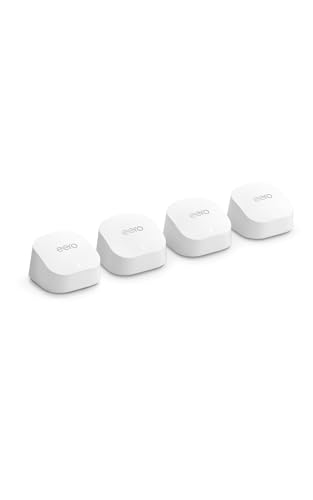
Amazon eero 6+ 4-Pack Mesh System
Best for: homes with gigabit internet plans and smart devices
- Port Speed
- Gigabit (what this guide is about)
- Wi-Fi Standard
- Wi-Fi 6
- Speed Rating
- up to a gigabit
- Coverage Area
- up to 6,000 sq. ft.
- Pack Size
- 4-pack
- Device Capacity
- 75+ devices
View on Amazon: Amazon eero 6+ 4-Pack Mesh System Affiliate link
The eero 6+ is a Wi-Fi 6 mesh system with gigabit port speeds. It covers up to 6,000 square feet and supports 75+ devices. The system includes a smart home hub for Thread and Zigbee. It uses TrueMesh technology to manage traffic. This setup suits homes with moderate internet plans and many connected gadgets. It offers reliable coverage for everyday streaming and work.
Pros
- Gigabit port speeds for standard internet plans
- Wi-Fi 6 with 160 MHz channel support
- Built-in Thread and Zigbee smart home hub
- TrueMesh technology reduces dead spots
- Covers up to 6,000 square feet
Cons
- Gigabit ports limit speeds for plans over 1 Gbps
- Wi-Fi 6 is older than the Wi-Fi 7 options on this list
- Dual-band architecture lacks the extra band found in tri-band competitors
Good fit if
- You have an internet plan under 1 Gbps
- You want to connect Thread or Zigbee smart devices
- You need coverage for a home up to 6,000 square feet
Skip if
- You have a gigabit-plus internet plan
- You want the latest Wi-Fi 7 speeds
- You need tri-band performance for heavy congestion
Verdict: Eero 6+ 4-Pack Gigabit Mesh is a solid choice for homes with gigabit internet plans that value smart home integration. It provides reliable coverage for standard streaming and work tasks without the premium cost of higher-tier models.

Eero Pro 6E 3-Pack Mesh System
Best for: Large homes with 2.5 Gbps internet plans
- Port Speed
- 2.5G (what this guide is about)
- Wi-Fi Standard
- Wi-Fi 6E
- Speed Rating
- 2.3 Gbps
- Coverage Area
- 6,000 sq. ft.
- Pack Size
- 3-pack
- Device Capacity
- 100+
View on Amazon: Eero Pro 6E 3-Pack Mesh System Affiliate link
The eero Pro 6E is a Wi-Fi 6E mesh system featuring a 2.5 Gbps Ethernet port. It supports internet plans up to 2.5 Gbps and delivers wireless speeds of 1.6 Gbps. The 3-pack covers 6,000 sq. ft. and handles 100+ devices. You need Wi-Fi 6E devices to access the 6 GHz band for lower latency. This system suits large homes with high-speed internet plans.
Pros
- 2.5 Gbps Ethernet port for gigabit+ internet plans
- Wi-Fi 6E standard with 6 GHz band access
- Covers up to 6,000 sq. ft.
- Supports 100+ connected devices
Cons
- Limited to 2.5 Gbps wired speeds, unlike 10 Gbps options
- Dual-band wireless backhaul limits total throughput compared to tri-band systems
- Requires Wi-Fi 6E devices to utilize the 6 GHz band
Good fit if
- You have an internet plan between 1 Gbps and 2.5 Gbps
- You need coverage for a large home up to 6,000 sq. ft.
- You own Wi-Fi 6E devices for lower latency
Skip if
- You require 10 Gbps wired ports for future-proofing
- You need tri-band wireless backhaul for maximum wireless capacity
- Your internet plan exceeds 2.5 Gbps
Verdict: eero Pro 6E 3-Pack Mesh System fits users with gigabit+ internet plans who need large coverage. It leverages Wi-Fi 6E for reduced latency but lacks the 10 Gbps ports found in higher-end models.

TP-Link Deco Tri-Band Wi-Fi 7 3-Pack
Best for: Gigabit internet and wired 2.5G needs
- Port Speed
- 2.5G, 10G (what this guide is about)
- Wi-Fi Standard
- Wi-Fi 7
- Speed Rating
- BE10000
- Coverage Area
- Up to 7,600 sq ft
- Frequency Bands
- Tri-Band
- Pack Size
- 3-Pack
View on Amazon: TP-Link Deco Tri-Band Wi-Fi 7 3-Pack Affiliate link
The TP-Link Deco 7 Pro is a tri-band Wi-Fi 7 mesh system with a 10G WAN/LAN port. It covers up to 7,600 sq. ft. and supports over 200 devices. You get four 2.5G LAN ports and USB 3.0 for wired connections. This setup handles heavy bandwidth needs while keeping your network future-proof for faster internet plans.
Pros
- 10G WAN/LAN port for high-speed internet plans
- Wi-Fi 7 BE10000 tri-band speeds
- Four 2.5G LAN ports for wired devices
- Covers up to 7,600 sq. ft.
Cons
- Large physical footprint at 6.93 inches tall
- No 10G LAN ports for local wired connections
- Higher device count limit than some competitors
Good fit if
- You have internet speeds over 1 Gbps
- You need multiple wired 2.5G connections
- You want Wi-Fi 7 performance
Skip if
- You only have internet under 500 Mbps
- You need 10G LAN ports for local storage
- You have a small apartment under 1,500 sq. ft.
Verdict: TP-Link Deco 7 Pro BE10000 Mesh fits users with gigabit-plus internet who need robust wired connectivity. It delivers high capacity and modern Wi-Fi 7 speeds for large homes.
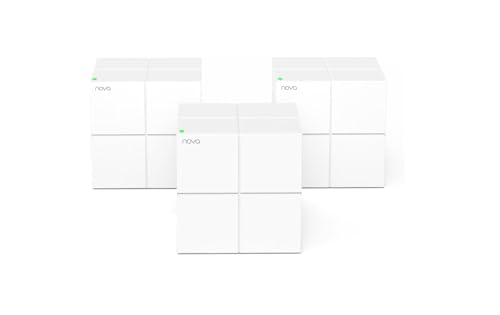
Tenda 3-Pack Dual-Band Wi-Fi 5 Mesh System
Best for: homes with gigabit internet plans
- Port Speed
- Gigabit (what this guide is about)
- Speed Rating
- AC1200
- Coverage Area
- up to 3500 sq.ft.
- Frequency Bands
- Dual-Band
- Pack Size
- 3-Pack
- Device Capacity
- up to 90 devices
View on Amazon: Tenda 3-Pack Dual-Band Wi-Fi 5 Mesh System Affiliate link
The Tenda Nova MW6 is a dual-band Wi-Fi 5 mesh system with gigabit ports. It covers up to 3500 square feet and supports 90 devices. This 3-pack set uses beamforming and MU-MIMO to manage traffic. It suits homes needing basic whole-home coverage without advanced Wi-Fi 6 or 6E speeds. You get seamless roaming across the property.
Pros
- Gigabit Ethernet ports for wired connections
- Supports up to 90 connected devices
- Covers up to 3500 square feet
- Dual-band AC1200 Wi-Fi 5 standard
Cons
- Wi-Fi 5 standard lacks Wi-Fi 6 efficiency
- Gigabit ports limit speeds above 1 Gbps
- Smaller coverage area than premium tri-band models
Good fit if
- You have internet plans under 1 Gbps
- You need basic coverage for 3500 square feet
- You want a simple setup with app control
Skip if
- You have internet plans over 1 Gbps
- You need Wi-Fi 6E speeds
- You require 10G or 2.5G wired ports
Verdict: Tenda Nova MW6 3-Pack AC1200 fits users with gigabit internet plans who need reliable coverage for smaller homes. It does not suit those seeking multi-gigabit speeds or modern Wi-Fi 6E performance.

Amazon eero 7 Dual-Band Mesh 3-Pack
Best for: 2.5 Gbps wired internet users
- Port Speed
- 2.5G (what this guide is about)
- Wi-Fi Standard
- Wi-Fi 7
- Speed Rating
- 1.8 Gbps
- Coverage Area
- 6,000 sq. ft.
- Frequency Bands
- Dual-Band
- Pack Size
- 3-Pack
View on Amazon: Amazon eero 7 Dual-Band Mesh 3-Pack Affiliate link
The eero 7 3-pack is a dual-band Wi-Fi 7 mesh system designed for homes up to 6,000 square feet. It supports internet plans up to 2.5 Gbps via two auto-sensing 2.5 GbE ports. The system handles over 120 devices and uses Multi-Link Operation for stability. It suits users needing future-proof wired connectivity and reliable whole-home coverage without dead spots.
Pros
- Wi-Fi 7 standard with Multi-Link Operation
- Two auto-sensing 2.5 GbE ports
- Supports internet plans up to 2.5 Gbps
- Covers up to 6,000 square feet
Cons
- Dual-band only, lacking a dedicated 6 GHz band
- No 10 GbE ports for high-speed wired backhaul
- Advanced security features require a paid subscription
Good fit if
- You have internet service over 1 Gbps
- You want Wi-Fi 7 features at a lower cost
- You need coverage for up to 6,000 square feet
Skip if
- You require 10 GbE ports for your network
- You need a tri-band system with a 6 GHz band
- You want advanced security without a subscription
Verdict: eero 7 3-Pack Dual-Band Wi-Fi 7 fits users who need 2.5 Gbps wired support and Wi-Fi 7 efficiency but do not require tri-band performance or 10 GbE ports.

ASUS ZenWiFi BT10 2-Pack
Best for: Homes with 10 Gbps internet plans
- Port Speed
- 10G (what this guide is about)
- Wi-Fi Standard
- Wi-Fi 7
- Speed Rating
- 18 Gbps
- Coverage Area
- 6,000 sq ft
- Frequency Bands
- Tri-Band
- Pack Size
- 2-Pack
View on Amazon: ASUS ZenWiFi BT10 2-Pack Affiliate link
This ASUS ZenWiFi BT10 system delivers 10 Gbps port speeds for wired connections. It uses Wi-Fi 7 tri-band technology to reach up to 18 Gbps wirelessly. The two-pack covers up to 6,000 square feet. It includes dual 10 G WAN and LAN ports. This setup suits homes with 10 Gbps internet plans or heavy local network traffic.
Pros
- Dual 10 Gbps Ethernet ports for high-speed wired connections
- Wi-Fi 7 tri-band architecture for 18 Gbps wireless speeds
- Covers up to 6,000 square feet with a 2-pack
- Supports Multi-WAN and 4G LTE tethering via USB
Cons
- Large physical footprint at 7.3 inches long and 1.8 pounds per unit
- Requires two units for full coverage, increasing total size
- Higher cost compared to systems with only 1 Gbps ports
Good fit if
- You have a 10 Gbps internet plan and need matching wired ports
- You need to connect multiple high-speed devices like NAS or PCs
- You want future-proof Wi-Fi 7 speeds for a large home
Skip if
- You only have internet speeds below 1 Gbps
- You have limited space and need compact, unobtrusive units
- You want a single unit for a small apartment
Verdict: ASUS ZenWiFi BT10 2-Pack Tri-Band is ideal for users with 10 Gbps internet plans who need dual 10 Gbps ports for wired devices. It provides extensive coverage and high wireless speeds for tech-heavy households.
Specifications side by side
| Spec | Amazon eero 6+ 4-Pack Mesh System | Eero Pro 6E 3-Pack Mesh System | TP-Link Deco Tri-Band Wi-Fi 7 3-Pack | Tenda 3-Pack Dual-Band Wi-Fi 5 Mesh System | Amazon eero 7 Dual-Band Mesh 3-Pack | ASUS ZenWiFi BT10 2-Pack |
|---|---|---|---|---|---|---|
| Wi-Fi Standard | Wi-Fi 6 | Wi-Fi 6E | Wi-Fi 7 | not stated | Wi-Fi 7 | Wi-Fi 7 |
| Speed Rating | up to a gigabit | 2.3 Gbps | BE10000 | AC1200 | 1.8 Gbps | 18 Gbps |
| Coverage Area | up to 6,000 sq. ft. | 6,000 sq. ft. | Up to 7,600 sq ft | up to 3500 sq.ft. | 6,000 sq. ft. | 6,000 sq ft |
| Frequency Bands | not stated | not stated | Tri-Band | Dual-Band | Dual-Band | Tri-Band |
| Pack Size | 4-pack | 3-pack | 3-Pack | 3-Pack | 3-Pack | 2-Pack |
| Port Speed | not stated | 2.5 Gbps | 2.5 Gbps | not stated | 2.5 Gbps | 10 Gbps |
| Device Capacity | 75+ devices | 100+ | Over 200 devices | up to 90 devices | 120+ | not stated |
| Frequency Band | not stated | not stated | Tri-Band | Dual-Band | Dual-Band | Tri-Band |
| Features | Mesh | Mesh | VPN, Mesh, Seamless Roaming | Mesh | Mesh | Parental Controls, Mesh |
| Intended Use | not stated | not stated | Home | Home | not stated | not stated |
| Dimensions | not stated | 5.47 × 5.47 × 2.21 inches | 4.23 × 4.23 × 6.93 inches | 3.93 × 3.93 × 3.93 inches | 5.12 × 2.52 × 5.12 inches | 7.3 × 2.8 × 6.26 inches |
| Weight | not stated | 1.41 pounds | 4.98 pounds | 1.83 pounds | 1.34 pounds | 1.8 pounds |
| Size | 4 routers | not stated | 3 Pack | 3 Pack | not stated | 2-Pack |
| Color | not stated | WHITE | White | white | WHITE | White |
| Model | not stated | S010001 | Deco BE63(3-Pack) | MW6-3 | PA10001 | BT10 (W-2-PK) |
Frequently asked questions
Can a gigabit port bottleneck a 2.5 Gbps internet plan?
Yes. A gigabit port caps wired throughput at 1,000 Mbps. If your internet plan exceeds this, the port becomes a bottleneck. You need a system with 2.5G ports, like the Eero Pro 6E or eero 7, to utilize higher speeds.
Which mesh system has the fastest wired ports?
The ASUS ZenWiFi BT10 and TP-Link Deco Tri-Band Wi-Fi 7 offer 10G ports. These handle up to 10,000 Mbps. They suit homes with 10 Gbps internet plans. Other models like the eero 6+ stick to standard gigabit speeds.
Do I need 10G ports for normal home use?
Most homes do not need 10G ports. Standard gigabit ports handle up to 1,000 Mbps, which covers typical gigabit plans. You only need 10G ports if you have a 10 Gbps internet plan or require extreme wired throughput for specific devices.
How does port speed affect Wi-Fi performance?
Port speed limits wired backhaul and device connections. It does not directly change wireless speeds. However, a slow port can bottleneck data from wired devices. For example, the Tenda MW6 uses gigabit ports, which may limit wired device performance on faster plans.
What is the difference between 2.5G and 10G ports?
2.5G ports support up to 2,500 Mbps. 10G ports support up to 10,000 Mbps. Systems like the Eero Pro 6E use 2.5G ports. Models like the ASUS ZenWiFi BT10 use 10G ports. Choose based on your internet plan speed.
Can I use a 2.5G port with a gigabit internet plan?
Yes. A 2.5G port is backward compatible with gigabit plans. It will still cap at 1,000 Mbps for gigabit service. However, it offers headroom for future upgrades. The eero 7 and Eero Pro 6E both feature these versatile ports.