What Is PoE Support? A Guide for Mesh Wifi Systems Buyers (2026)
As an Amazon Associate we earn from qualifying purchases. Links on this page are affiliate links.
PoE Support Explained for Mesh Systems
Power over Ethernet, or PoE, allows a single cable to deliver both data and electricity to a device. This eliminates the need for a separate power adapter and outlet near the network hardware. For mesh WiFi systems, this feature simplifies installation significantly. You run one cable from your router or switch to each node. The cable provides the internet connection and the necessary power simultaneously. This reduces cable clutter and gives you more flexibility in placing access points. You are not limited by where electrical outlets are located in your home.
To understand PoE support explained, you must look at the power standards involved. Most mesh nodes that support this feature use the IEEE 802.3af or 802.3at standards. These standards define the maximum power a device can draw. The 802.3af standard, often called PoE, provides up to 15.4 watts. The 802.3at standard, known as PoE+, provides up to 30 watts. Some newer devices may support 802.3bt, which offers even more power. Check the product specifications to see which standard your mesh nodes require. Using a switch or injector that supports the correct standard is crucial for proper operation.
Buyers of mesh WiFi systems care about this spec because it expands placement options. You can mount nodes on ceilings, walls, or eaves without nearby outlets. This is particularly useful for outdoor coverage or areas with difficult wiring. It also creates a more reliable connection since you are using a single, robust Ethernet link. Ensure your network switch or injector is PoE compatible. Some switches offer passive PoE, which is different and potentially damaging. Always match the power delivery method to the device requirements. This spec is a practical tool for clean, professional-looking home networks. It removes the visual and logistical burden of power cords. When planning your layout, prioritize locations with Ethernet drops. This allows you to leverage PoE for optimal performance and aesthetic simplicity.
PoE Support Options Compared
PoE
PoE support means the device receives power through its Ethernet cable. This removes the need for a nearby electrical outlet. You can place nodes in hard-to-reach spots like ceilings or eaves. The Amazon eero Outdoor 7 is an example. It uses PoE for outdoor durability. TP-Link Deco PoE also supports this. It helps with ceiling mounts. You still need a PoE switch or injector. This adds initial setup complexity. However, the clean look is worth it. No power bricks clutter your walls. Data and power travel on one line. This simplifies wiring for whole-home coverage. It is ideal for new installations. Retrofitting existing homes may require running cables. Check your switch compatibility before buying.
PoE+
PoE+ delivers more power than standard PoE. This supports devices with higher energy needs. The STEAMEMO switch offers PoE+ ports. This is useful for access points with advanced features. Higher power ensures stable operation under load. It supports longer cable runs effectively. You need a switch that explicitly lists PoE+. Standard PoE switches may not suffice. This option provides greater flexibility for future upgrades. It is essential for high-performance mesh nodes. Check the power budget of your switch. Ensure it can handle all connected devices. This standard is common in professional setups. It balances cost and capability for most users.
Is PoE Worth Your Money
Who needs it
You should prioritize this feature if you plan to mount nodes in locations without convenient power outlets. Ceiling mounts, exterior eaves, and high walls often lack nearby electrical access. PoE allows you to run a single Ethernet cable for both data and power. This simplifies your installation process significantly. You do not need to hunt for suitable outlets or run extension cords across rooms. It keeps your setup clean and secure. If you are installing a whole-home system with multiple nodes, this convenience scales well. You avoid cluttering walls with multiple power adapters. The single-cable solution reduces potential points of failure. You get reliable power delivery without extra hardware. This is ideal for renters who cannot modify wiring. It is also perfect for outdoor or garage setups where weatherproofing matters. You gain flexibility in placement while maintaining a professional look.
Who can skip it
You can ignore PoE support if all your mesh nodes will sit on desks or shelves near existing outlets. Most indoor homes have ample power access in living areas and offices. In these cases, standard AC adapters work fine. You do not need the complexity of a PoE injector or switch. Focus your budget on better coverage speed instead. Look for higher Wi-Fi standards like Wi-Fi 6E or Wi-Fi 7. More radio bands often improve performance more than power delivery method. Check for better antenna designs if you have thick walls. Prioritize coverage area over installation convenience. If you already have a PoE switch for cameras, this might change your view. Otherwise, standard power is sufficient for most users. You save money by skipping this feature. You avoid buying extra networking gear. Your setup remains simple and cost-effective.
PoE Glossary For Buyers
Power over Ethernet
A technology that sends electrical power and data through a single Ethernet cable. This simplifies installation by removing the need for a separate power outlet near the network device.
PoE Switch
A network switch that provides power to connected devices. It injects electricity into the Ethernet cable, allowing you to power mesh nodes or cameras without a local wall socket.
PoE Injector
A small adapter that adds power to a standard Ethernet cable. It connects between your switch or router and the device, enabling power delivery where the source switch lacks PoE ports.
Ethernet Cable
The physical wire used to transmit data and power. Cat5e or Cat6 cables are standard for PoE, supporting speeds up to 10 Gbps and distances up to 100 meters.
Power Budget
The total amount of power a switch or injector can supply. You must ensure your device does not exceed this limit. Higher power devices like outdoor access points require more budget.
PoE Standard
A protocol defining power levels, such as 802.3af or 802.3at. These standards ensure compatibility between the power source and the device. Always check the standard to avoid power delivery issues.
Mesh Node
A unit in a mesh WiFi system that extends coverage. PoE support allows these nodes to be placed anywhere with an Ethernet port, ideal for ceilings or exterior walls without outlets.
Data Throughput
The rate at which data transfers over the network. PoE does not significantly impact speed. Modern Cat6 cables support high throughput while delivering sufficient power to most mesh WiFi nodes.
Quick picks
| # | Product | Best for | Price |
|---|---|---|---|
| 1 | Amazon eero Outdoor 7 Dual-Band 2-Pack | outdoor mesh coverage with PoE flexibility | Check price of Amazon eero Outdoor 7 Dual-Band 2-Pack on Amazon |
| 2 | TP-Link Deco PoE WiFi 6 3-Pack | Ceiling-mounted PoE mesh setups | Check price of TP-Link Deco PoE WiFi 6 3-Pack on Amazon |
| 3 | Amazon eero PoE 6 Dual-Band Access Point | Ceiling-mounted Wi-Fi 6 coverage | Check price of Amazon eero PoE 6 Dual-Band Access Point on Amazon |
| 4 | STEAMEMO 5-Port Gigabit PoE+ Switch | Remote management and long-range PoE delivery | Check price of STEAMEMO 5-Port Gigabit PoE+ Switch on Amazon |
Our 4 picks

Amazon eero Outdoor 7 Dual-Band 2-Pack
Best for: outdoor mesh coverage with PoE flexibility
- PoE Support
- PoE (what this guide is about)
- Wi-Fi Standard
- Wi-Fi 7
- Speed Rating
- Up to 2.1 Gbps
- Coverage Area
- Up to 30,000 sq. ft.
- Frequency Bands
- Dual-band
- Pack Size
- 2-pack
View on Amazon: Amazon eero Outdoor 7 Dual-Band 2-Pack Affiliate link
The Eero Outdoor 7 is a dual-band Wi-Fi 7 mesh system designed for outdoor use. It features an IP66 weatherproof rating and supports Power over Ethernet (PoE+) for flexible installation. The 2-pack provides up to 30,000 sq. ft. of coverage and handles 100+ devices. It connects via the eero app and includes backward compatibility with previous eero generations.
Pros
- Wi-Fi 7 dual-band technology with speeds up to 2.1 Gbps
- IP66 weatherproof rating for dust, rain, and snow protection
- Supports PoE+ power for flexible outdoor placement
- Covers up to 30,000 sq. ft. with 100+ device capacity
Cons
- Dual-band only, lacking the tri-band capacity of some competitors
- Requires separate PoE switch or injector for PoE operation
- Advanced security features require an optional eero Plus subscription
Good fit if
- You need reliable Wi-Fi coverage for outdoor patios or yards
- You want to use PoE for cleaner outdoor cable management
- You already use eero devices and want seamless integration
Skip if
- You require indoor-only mesh systems without weatherproofing
- You need tri-band Wi-Fi for maximum internal throughput
- You want advanced security features included without a subscription
Verdict: Eero Outdoor 7 2-Pack delivers robust outdoor connectivity with Wi-Fi 7 speeds and PoE+ support, making it ideal for users extending their network to weather-exposed areas.

TP-Link Deco PoE WiFi 6 3-Pack
Best for: Ceiling-mounted PoE mesh setups
- PoE Support
- PoE (what this guide is about)
- Wi-Fi Standard
- WiFi 6
- Speed Rating
- AX3000
- Coverage Area
- 6,500 sq ft
- Frequency Bands
- Dual-Band
- Pack Size
- 3-Pack
View on Amazon: TP-Link Deco PoE WiFi 6 3-Pack Affiliate link
The TP-Link Deco X50-PoE is a Wi-Fi 6 mesh system designed for flexible installation. It supports Power over Ethernet (PoE+), allowing you to mount units in ceilings or walls using a compatible switch. Each node features dual 2.5 Gigabit ports for faster backhaul speeds. The system covers up to 6,500 square feet and supports 150 devices. It includes the Deco app for setup and management.
Pros
- Supports PoE+ for ceiling or wall mounting
- Dual 2.5 Gigabit Ethernet ports per node
- Wi-Fi 6 AX3000 speed rating
- Covers up to 6,500 square feet
- Supports up to 150 connected devices
Cons
- Dual-band Wi-Fi limits backhaul bandwidth compared to tri-band systems
- PoE+ switch is not included in the package
- No mention of dedicated wireless backhaul channel
Good fit if
- You want to mount access points in ceilings or walls
- You need 2.5 Gigabit ports for wired devices
- You want a complete 3-pack for medium to large homes
Skip if
- You require tri-band Wi-Fi for dedicated backhaul
- You need a PoE switch included in the box
- You only need a single access point
Verdict: TP-Link Deco X50-PoE 3-Pack is a practical solution for users who need flexible mounting options and fast wired ports. It suits those who can provide their own PoE switch and want broad Wi-Fi 6 coverage.
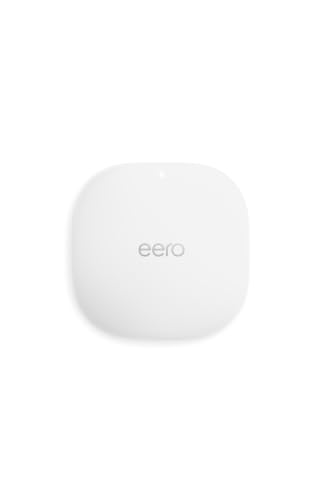
Amazon eero PoE 6 Dual-Band Access Point
Best for: Ceiling-mounted Wi-Fi 6 coverage
- PoE Support
- PoE (what this guide is about)
- Wi-Fi Standard
- Wi-Fi 6
- Speed Rating
- 1.6 Gbps
- Coverage Area
- 2,000 sq. ft.
- Frequency Bands
- Dual-band
- Device Capacity
- 100+
View on Amazon: Amazon eero PoE 6 Dual-Band Access Point Affiliate link
The Eero PoE 6 is a dual-band Wi-Fi 6 access point designed for ceiling or wall mounting. It supports PoE power, removing the need for a separate adapter. The unit covers 2,000 square feet and handles 100+ devices. You get speeds up to 1.6 Gbps. It integrates with the eero app for setup and management. This unit suits users who already have a wired network backbone.
Pros
- Supports Wi-Fi 6 for high-speed connections
- Uses Power over Ethernet for clean installation
- Covers 2,000 square feet of space
- Mounts to ceilings or walls easily
Cons
- Dual-band speeds cap at 1.6 Gbps
- AC adapter is not included
- Requires existing eero ecosystem for full features
Good fit if
- You need ceiling-mounted Wi-Fi coverage
- You want to eliminate power cord clutter
- You have a wired network backbone ready
Skip if
- You require tri-band performance
- You need a standalone router without an app
- You want a complete mesh system in one box
Verdict: Eero PoE 6 Wi-Fi 6 Access Point delivers reliable coverage for wired homes. It fits users who prioritize clean mounting and PoE power over standalone routing capabilities.
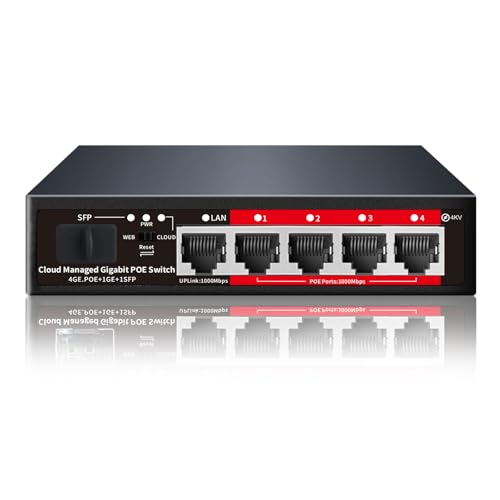
STEAMEMO 5-Port Gigabit PoE+ Switch
Best for: Remote management and long-range PoE delivery
- PoE Support
- PoE (what this guide is about)
- Number of Ports
- 5 Ports
- Port Speed
- Gigabit
- Management Type
- Smart Managed
- Uplink Port Type
- SFP
- Dimensions
- 5 × 4.5 × 1.3 inches
View on Amazon: STEAMEMO 5-Port Gigabit PoE+ Switch Affiliate link
This STEAMEMO switch provides four PoE+ ports for powering devices like mesh access points and cameras. It offers smart managed features via an app, including VLAN support and QoS. The unit supports ultra-far transmission up to 250 meters and includes 4KV lightning protection. It is designed for users who need flexible network management and reliable power delivery over long cable runs in larger homes or small offices.
Pros
- Four PoE+ ports with up to 30W per port
- Smart managed control via mobile app and software
- Ultra-far mode extends power delivery to 250 meters
- 4KV lightning protection for port and power safety
Cons
- Only four ports provide PoE power
- Requires internet connection for initial device activation
- Single uplink port limits total bandwidth capacity
Good fit if
- You need to power multiple PoE devices like access points
- You require remote network management via an app
- You have long cable runs exceeding standard limits
Skip if
- You need more than four powered PoE ports
- You prefer a plug-and-play unmanaged switch
- You want to configure the switch without internet access
Verdict: STEAMEMO 5-Port Smart Managed PoE+ Switch suits users needing managed control and long-range power delivery for specific PoE devices. It fits well for extending network coverage with access points over distance.
Specifications side by side
| Spec | Amazon eero Outdoor 7 Dual-Band 2-Pack | TP-Link Deco PoE WiFi 6 3-Pack | Amazon eero PoE 6 Dual-Band Access Point | STEAMEMO 5-Port Gigabit PoE+ Switch |
|---|---|---|---|---|
| Wi-Fi Standard | Wi-Fi 7 | WiFi 6 | Wi-Fi 6 | not stated |
| Speed Rating | Up to 2.1 Gbps | AX3000 | 1.6 Gbps | not stated |
| Coverage Area | Up to 30,000 sq. ft. | 6,500 sq ft | 2,000 sq. ft. | not stated |
| Frequency Bands | Dual-band | Dual-Band | Dual-band | not stated |
| Pack Size | 2-pack | 3-Pack | not stated | not stated |
| Port Speed | not stated | 2.5 Gbps | not stated | not stated |
| Device Capacity | 100+ devices | 150 | 100+ | not stated |
| Frequency Band | Dual-Band | not stated | Dual-Band | not stated |
| Number of Ports | not stated | not stated | not stated | 5 Ports |
| PoE Support | PoE | PoE | PoE | PoE |
| Features | Mesh | Mesh | not stated | not stated |
| Management Type | not stated | not stated | not stated | Smart Managed |
| Uplink Port Type | not stated | not stated | not stated | SFP |
| Intended Use | Outdoors | not stated | not stated | not stated |
| Operating Mode | not stated | Access Point Mode | Access Point Mode | not stated |
| Placement | Outdoor | not stated | not stated | not stated |
| Dimensions | 8.17 × 6.34 × 2.54 inches | 6.1 × 6.1 × 2.7 inches | 6.45 × 6.45 × 1.69 inches | 5 × 4.5 × 1.3 inches |
| Weight | 4.86 pounds | not stated | 15.5 ounces | 1.3 pounds |
| Size | 2-pack | 3 Pack | not stated | 5 Gigabit Ports|52W 4xPoE+ |
| Color | WHITE | White | WHITE | black |
| Model | SN10001 | Deco X50-PoE(3-pack) | T010001 | 5 Gigabit Ports|52W 4xPoE+ |
Frequently asked questions
Can I use PoE with any mesh WiFi system?
No. Only specific models support this feature. For example, the TP-Link Deco PoE WiFi 6 3-Pack includes PoE support. The Amazon eero Outdoor 7 also supports it. You must check the product attributes before buying. Standard routers without PoE need a separate power adapter. This limits where you can place them.
What is the difference between PoE and PoE+?
PoE+ provides more power than standard PoE. The STEAMEMO 5-Port Gigabit PoE+ Switch delivers up to 52W across its ports. This higher power budget supports more demanding devices. Standard PoE units like the Eero PoE 6 Access Point use less power. Always check the switch specifications to ensure it meets your device needs.
Do I need a special PoE switch for mesh nodes?
Yes, unless your router provides PoE directly. Most mesh nodes do not inject power into the cable. You need a PoE switch or injector. The STEAMEMO Smart Managed PoE+ Switch offers five gigabit ports. It connects to your main router and powers multiple access points. This setup keeps your network clean and centralized.
Can I mount eero Outdoor 7 on a ceiling?
Yes, but it is designed for outdoor use. The Amazon eero Outdoor 7 Dual-Band 2-Pack is built for weather-exposed areas. Its PoE support allows flexible placement. You can mount it under eaves or on exterior walls. The sturdy build handles outdoor conditions. Check the IP rating for full weather protection details.
Does PoE support affect WiFi speed?
No, PoE only handles power delivery. Speed depends on the WiFi standard. The TP-Link Deco X50-PoE supports Wi-Fi 6 with AX3000 speeds. The Amazon eero Outdoor 7 offers Wi-Fi 7 speeds. These standards determine your bandwidth. The PoE cable carries both data and power without reducing performance. Your connection quality remains tied to the radio specs.
Is a PoE access point better than a router?
It depends on your network layout. The Eero PoE 6 operates in Access Point Mode. It extends your existing network rather than replacing the main router. This is ideal for wired homes. It provides reliable coverage without routing overhead. Use it to fill dead zones. The main router handles internet traffic and DHCP.
How far can PoE power travel?
Standard Ethernet cables support up to 100 meters. This distance applies to both data and power. The STEAMEMO switch supports long-range delivery for specific devices. Ensure your cable quality is Cat5e or higher. Longer runs may require switches with higher power budgets. Check the switch wattage if you plan extensive deployments.