What Is Number of Ports? A Guide for Wifi Routers Buyers (2026)
As an Amazon Associate we earn from qualifying purchases. Links on this page are affiliate links.
Number of Ports Explained for Mesh Buyers
The number of ports refers to the physical Ethernet jacks on your router or mesh node. These ports allow wired connections for devices that benefit from stability, such as gaming consoles, desktop computers, or smart TVs. When you see the term number of ports explained in buying guides, it simply counts these physical interfaces.
Manufacturers label this spec clearly on product pages. You will see values like 4 ports, 5 ports, 8 ports, or even higher counts like 16, 18, 24, or 48 ports. Higher counts usually indicate enterprise-grade equipment or multi-gigabit switches rather than standard residential mesh systems. Most home mesh nodes offer between 2 and 4 ports.
Why does this matter? Wired connections reduce latency and improve reliability. Wireless signals can drop or slow down due to interference. A wired link provides a consistent baseline. If you connect a device via an Ethernet cable, you utilize one of these ports.
You need to check if the ports support Gigabit speeds (1 Gbps) or multi-gigabit speeds (2.5 Gbps or higher). The count alone does not tell you the speed. A router with 4 ports might only support 1 Gbps each. Another with 2 ports might support 2.5 Gbps. Always check the speed rating alongside the count.
For most users, 2 to 4 ports are sufficient. You connect your modem to one port. You connect your main gaming PC or media server to another. The remaining ports are for other fixed devices. If you have a large home office or many wired devices, look for nodes with more ports or consider a separate switch.
Mesh systems often use one port for the backhaul connection if they do not have a dedicated wireless backhaul. This reduces the number of available ports for your devices. Check if the backhaul is wired or wireless. This affects how many ports you actually have for end devices.
In summary, count the ports you need. Ensure the speed matches your internet plan and local network needs. This spec is a practical detail for planning your home network layout.
Port Count Options Explained
4 Ports
Four ports suit small homes or offices with limited wired devices. You get enough connections for a desktop, console, and smart TV without clutter. The Cudy WR3000 offers four gigabit ports with Wi-Fi 6, balancing speed and count. This setup avoids the need for external switches while keeping costs low. It is ideal if you rarely add new hardwired gadgets. However, it limits expansion. If you need more devices later, you must buy a separate switch. This option prioritizes simplicity over extensive connectivity. It fits users who value clean setups and do not require heavy wired infrastructure. The trade-off is limited future-proofing for growing device counts.
5 Ports
Five ports provide a slight step up from four, accommodating an extra device. The TRENDnet TWG-431BR includes five gigabit ports with Multi-WAN support. This is useful for businesses needing redundant internet connections. You can connect multiple upstream links for reliability. This count is rare in consumer gear, making it specialized. It suits users who need specific redundancy features alongside basic wired access. The extra port allows for a dedicated management or guest line. It is not common in standard home routers. If you do not need Multi-WAN, this option may be overkill. It is best for niche users who require flexible port allocation and secure remote access without extra wireless hardware.
8 Ports
Eight ports offer substantial wired capacity for small offices. The D-Link DSR-150 provides eight fast ethernet ports with VPN security. This count supports multiple desktops, printers, and access points. It reduces the need for external switches in compact environments. Fast Ethernet speeds limit bandwidth per port to 100 Mbps. This is acceptable for light office work but not for heavy file transfers. The D-Link model fits users who prioritize security and wired stability over high-speed throughput. It is a practical solution for spaces without wireless needs. The trade-off is slower port speeds compared to gigabit options. It suits users who need many connections but do not require gigabit performance on each.
16 Ports
Sixteen ports cater to high-density wired networks. The Cisco RV345P includes sixteen gigabit ports with PoE support. This eliminates the need for separate power bricks for devices like cameras and phones. It is ideal for offices with many hardwired gadgets. The Cisco model suits users who need extensive connections and power delivery. This count reduces cable clutter and simplifies network management. It is best for environments where every device needs a stable wired link. The trade-off is higher cost and larger physical size. It is overkill for typical homes. This option fits businesses requiring robust, centralized wired infrastructure with power over ethernet capabilities for seamless device deployment.
18 Ports
Eighteen ports offer high capacity for specialized deployments. This count is uncommon in standard consumer routers. It suits large offices or institutional settings with many wired endpoints. You can connect numerous workstations, printers, and IoT devices directly. The high port density reduces the need for external switching equipment. It provides a centralized hub for network traffic. This option is best for users who prioritize wired connectivity above all else. It is not suitable for homes with few devices. The trade-off is complexity and cost. It fits environments where managing many wired connections is a daily requirement. This count ensures ample capacity for growth without immediate hardware upgrades.
24 Ports
Twenty-four ports are typical for enterprise-grade routers. This count supports large offices or campus networks. You can connect dozens of devices without external switches. It is ideal for environments with extensive wired infrastructure. The high density allows for dedicated lines for critical systems. This option suits users who need maximum wired connectivity. It is overkill for residential use. The trade-off is significant cost and physical footprint. It fits businesses requiring robust, scalable network cores. This count ensures no device is left without a direct wired connection. It is best for professional settings where reliability and capacity are paramount.
Is High Port Count Worth It
Who needs it
You should prioritize a router with many ports if you run a dense home office or a smart home with dozens of wired devices. Users who connect desktop PCs, gaming consoles, network video recorders, and smart TVs directly to the main unit will benefit significantly from having eight, sixteen, or even twenty-four ports. This setup eliminates the need for additional switches, reducing cable clutter and single points of failure. If you value stability and low latency for critical tasks like video editing or competitive gaming, direct wired connections are essential. A high port count allows you to keep these devices permanently attached without worrying about running out of jacks. It is also ideal for small businesses or apartments with multiple workstations that require reliable, high-speed internet access without relying solely on wireless signals, which can be congested in large buildings.
Who can skip it
Most typical households do not need more than four or five ports. If you primarily use Wi-Fi for phones, tablets, and laptops, the number of physical jacks is irrelevant to your daily experience. You can easily expand connectivity later by adding a simple network switch to any available port, rather than buying an expensive router with unused jacks. Prioritize strong Wi-Fi coverage and mesh capabilities instead. Focus on how well the system handles wireless traffic in your specific floor plan. A router with fewer ports but better antenna design and processing power will serve you better than one with many unused Ethernet connections. Do not pay extra for port quantity if you rarely plug in devices with cables. Your time and money are better spent on ensuring seamless wireless roaming and strong signal strength throughout your home.
Ethernet Port Glossary
WAN Port
The single port that connects your router to the modem. It brings the internet signal into your home network. Look for a distinct color to identify it easily.
LAN Port
Ports used to connect wired devices like PCs or consoles. They share the internet from the WAN port. Most routers have three or four of these available for local connections.
Gigabit Port
A port supporting speeds up to 1,000 Mbps. This is the standard for most modern routers. Ensure all ports are gigabit to avoid bottlenecks in your home network.
2.5 Gbps Port
A faster port supporting speeds up to 2,500 Mbps. It helps future-proof your setup for higher internet plans. This is common in newer high-end mesh systems and routers.
USB Port
A connector for attaching external storage or printers. It turns your router into a network drive. Check if it supports USB 3.0 for faster file transfer speeds.
Total Port Count
The sum of all available Ethernet and USB connectors. This number determines how many devices can connect directly. High counts are useful for dense home offices or media centers.
Quick picks
| # | Product | Best for | Price |
|---|---|---|---|
| 1 | D-Link 8-Port Fast Ethernet Router | Small offices needing 8 wired ports and VPN | Check price of D-Link 8-Port Fast Ethernet Router on Amazon |
| 2 | TRENDnet TWG-431BR 5-Port Gigabit Router | Multi-WAN redundancy and NDAA compliance | Check price of TRENDnet TWG-431BR 5-Port Gigabit Router on Amazon |
| 3 | Cudy AX3000 4-Port Mesh Router | Homes needing four wired connections and Wi-Fi 6 | Check price of Cudy AX3000 4-Port Mesh Router on Amazon |
| 4 | Cisco RV345P 16-Port Gigabit VPN Router | High-port-density wired networks with PoE needs | Check price of Cisco RV345P 16-Port Gigabit VPN Router on Amazon |
| 5 | Cudy AC1200 Dual-Band 4G LTE Router | Small offices needing 4G LTE backup | Check price of Cudy AC1200 Dual-Band 4G LTE Router on Amazon |
| 6 | Cudy 5G Dual SIM Wi-Fi 6 4-Port Router | Users needing cellular backup connectivity | Check price of Cudy 5G Dual SIM Wi-Fi 6 4-Port Router on Amazon |
Our 6 picks

D-Link 8-Port Fast Ethernet Router
Best for: Small offices needing 8 wired ports and VPN
- Number of Ports
- 8 Ports (what this guide is about)
- Max Port Speed
- 100 Mbps
- Ethernet Ports
- 9
- Features
- VPN
- Dimensions
- 11.3 × 2.6 × 9.76 inches
- Weight
- 1 pounds
View on Amazon: D-Link 8-Port Fast Ethernet Router Affiliate link
This D-Link router provides eight 10/100 LAN ports and one 10/100 WAN port for your network. It supports up to ten IPsec VPN tunnels and includes dynamic web content filtering. The device measures 11.3 inches in length and weighs one pound. You get policy-based firewall rules and D-Link Green Ethernet to save power. It suits users who need multiple wired connections with secure remote access capabilities.
Pros
- Eight 10/100 LAN ports for wired devices
- Supports up to ten IPsec VPN tunnels
- Dynamic web content filtering for access control
- D-Link Green Ethernet technology reduces power use
Cons
- Port speed is limited to 100 Mbps Fast Ethernet
- Large footprint at 11.3 inches long
- No mention of Wi-Fi or wireless capabilities
Good fit if
- You need eight wired connections for a small office
- You require secure remote access via IPsec tunnels
- You want to filter web content at the network level
Skip if
- You need Gigabit Ethernet speeds above 100 Mbps
- You require wireless Wi-Fi connectivity for devices
- You prefer a compact desktop form factor
Verdict: D-Link DSR-150 8-Port VPN Router fits users who need eight wired ports and VPN security but can accept 100 Mbps speeds. It is a practical wired solution for small offices without wireless needs.

TRENDnet TWG-431BR 5-Port Gigabit Router
Best for: Multi-WAN redundancy and NDAA compliance
- Number of Ports
- 5 Ports (what this guide is about)
- Max Port Speed
- Gigabit
- Ethernet Ports
- 5
- Features
- VPN
- Dimensions
- 10.4 × 7.28 × 1.75 inches
- Weight
- 2.44 pounds
View on Amazon: TRENDnet TWG-431BR 5-Port Gigabit Router Affiliate link
This TRENDnet router offers five Gigabit Ethernet ports configured as either one WAN and four LAN ports or four WAN and one LAN port. It supports Multi-WAN load balancing across up to four internet connections and includes built-in VPN capabilities for secure remote access. The device also features advanced content filtering and is NDAA compliant for government use. It suits users needing flexible port allocation and enterprise-grade connectivity.
Pros
- Five Gigabit Ethernet ports with flexible WAN/LAN configuration
- Supports Multi-WAN load balancing for up to four internet connections
- Built-in VPN support for IPSec, PPTP, L2TP, and SSL protocols
- NDAA and TAA compliant for government and enterprise requirements
- Advanced content filtering and parental controls via Router Limits
Cons
- Limited to five ports, which is fewer than 8, 16, or 24-port options
- No mention of Wi-Fi capabilities, making it a wired-only solution
- Console port only, lacking a modern web interface description
Good fit if
- You need to load-balance multiple internet connections for redundancy
- You require NDAA compliance for government or enterprise projects
- You want flexible port allocation between WAN and LAN
Skip if
- You need more than five wired connections
- You require built-in Wi-Fi for wireless devices
- You are looking for a consumer-grade mesh system
Verdict: TRENDnet 5-Port Gigabit Multi-WAN VPN Router is a specialized wired router for users who need Multi-WAN redundancy and NDAA compliance. It fits businesses requiring flexible port allocation and secure remote access without Wi-Fi.

Cudy AX3000 4-Port Mesh Router
Best for: Homes needing four wired connections and Wi-Fi 6
- Number of Ports
- 4 Ports (what this guide is about)
- Wi-Fi Standard
- Wi-Fi 6
- Speed Rating
- AX3000
- Frequency Bands
- dual-band
- Coverage Area
- 1,400 ft²
- Device Capacity
- 128 devices
View on Amazon: Cudy AX3000 4-Port Mesh Router Affiliate link
This Cudy router offers AX3000 Wi-Fi 6 speeds with four gigabit Ethernet ports. It supports 160 MHz channels and 1024-QAM for high throughput. The device includes VPN capabilities and mesh functionality. It suits users needing reliable wired connections for gaming or streaming. The compact design fits easily in home networks.
Pros
- AX3000 Wi-Fi 6 with 160 MHz channels
- Four gigabit Ethernet ports for wired devices
- Supports WireGuard, OpenVPN, and IPsec
- Cudy App with parental controls and scheduling
- Mesh mode for seamless home coverage
Cons
- Only four gigabit ports limit wired expansion
- No 2.5 Gbps WAN port for faster internet
- No dedicated WAN/LAN switch configuration
Good fit if
- You need four wired connections for key devices
- You want Wi-Fi 6 speeds for streaming
- You require VPN support for privacy
Skip if
- You need more than four wired ports
- You require 2.5 Gbps internet speeds
- You prefer a router with more port options
Verdict: Cudy WR3000 4-Port Wi-Fi 6 Router provides solid Wi-Fi 6 performance and four gigabit ports for homes needing reliable wired connections. It fits users who prioritize speed and security over extensive port counts.

Cisco RV345P 16-Port Gigabit VPN Router
Best for: High-port-density wired networks with PoE needs
- Number of Ports
- 8 Ports (what this guide is about)
- Max Port Speed
- Gigabit
- PoE Support
- PoE
- Features
- VPN, Dual WAN
- Dimensions
- 17.7 × 11.7 × 3.23 inches
- Weight
- 3.2 pounds
View on Amazon: Cisco RV345P 16-Port Gigabit VPN Router Affiliate link
This Cisco RV345P router features an integrated 16-port Gigabit Ethernet switch. It includes Power over Ethernet on eight ports, reducing cable clutter for connected devices. The unit supports Dual WAN connections for load balancing and failover. You get VPN security protocols and access to the Cisco AnyConnect client for remote access. It is a robust networking solution for environments requiring extensive wired connectivity and power delivery.
Pros
- Integrated 16-port Gigabit Ethernet switch
- 8 ports support Power over Ethernet
- Dual WAN for load balancing and failover
- Supports IPsec/L2TP VPN protocols
- Includes Cisco AnyConnect Secure Mobility Client
Cons
- Large physical footprint at 17.7 inches long
- Heavy build weighing 3.2 pounds
- Only one year of technical support included
Good fit if
- You need to power multiple devices via Ethernet
- You require high port density for wired networks
- You want Dual WAN redundancy for uptime
Skip if
- You prefer compact desktop routers
- You need Wi-Fi 6 wireless speeds
- You want unlimited technical support coverage
Verdict: Cisco RV345P 16-Port Gigabit PoE Router suits users who need extensive wired connections and PoE power without managing separate power bricks. It is ideal for offices or homes with many hardwired devices.
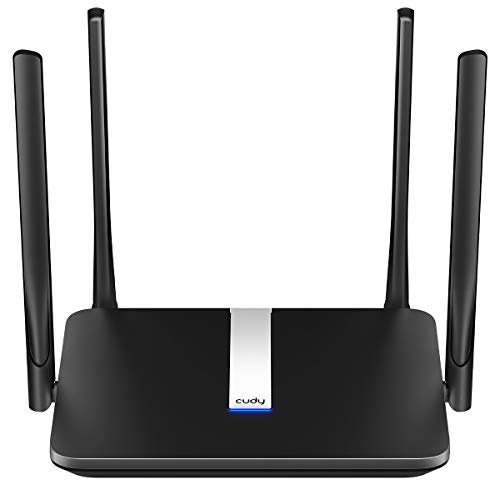
Cudy AC1200 Dual-Band 4G LTE Router
Best for: Small offices needing 4G LTE backup
- Number of Ports
- 4 Ports (what this guide is about)
- Wi-Fi Standard
- Wi-Fi 5
- Speed Rating
- AC1200
- Frequency Bands
- Dual-Band
- Max Port Speed
- 100 Mbps
- Ethernet Ports
- 4
View on Amazon: Cudy AC1200 Dual-Band 4G LTE Router Affiliate link
The Cudy LT500 is a 4-port AC1200 Wi-Fi 5 router with a built-in SIM slot for 4G LTE Cat 4 connectivity. It offers dual-band speeds up to 1,167 Mbps and includes Fast Ethernet ports for wired devices. This unit supports WireGuard, OpenVPN, and IPsec for secure networking. It is designed for small offices or as a failover solution where cellular backup is needed alongside local Wi-Fi distribution.
Pros
- 4 Fast Ethernet ports for wired connections
- Built-in nano SIM slot for 4G LTE backup
- Supports WireGuard, OpenVPN, and IPsec VPN
- Dual-band Wi-Fi 5 with beamforming
- Automatic WAN failover to cellular
Cons
- Fast Ethernet ports limit wired speeds to 100 Mbps
- Wi-Fi 5 standard is older than Wi-Fi 6
- 4G LTE Cat 4 max download speed is 150 Mbps
Good fit if
- You need a SIM slot for cellular internet backup
- You require VPN server and client capabilities
- You want a compact router for small offices
Skip if
- You need Gigabit Ethernet port speeds
- You require Wi-Fi 6 or Wi-Fi 7 performance
- You need more than 4 wired ports
Verdict: Cudy LT500 4-Port AC1200 Router fits users who need a 4-port wired setup with cellular backup. It is suitable for small spaces requiring VPN features and reliable failover, rather than high-speed wired networking.

Cudy 5G Dual SIM Wi-Fi 6 4-Port Router
Best for: Users needing cellular backup connectivity
- Number of Ports
- 4 Ports (what this guide is about)
- Wi-Fi Standard
- Wi-Fi 6
- Speed Rating
- AX3000
- Max Port Speed
- 1 Gbps
- Ethernet Ports
- 4
- Features
- VPN, SIM Card Slot, Mesh
View on Amazon: Cudy 5G Dual SIM Wi-Fi 6 4-Port Router Affiliate link
This Cudy P5 is a Wi-Fi 6 router with four Gigabit Ethernet ports and dual 5G SIM slots. It uses a Qualcomm X62 modem for up to 3.4 Gbps cellular speeds. The device supports triple failover between WAN and two cellular connections. It includes detachable antennas for better signal reception. This setup suits users needing backup internet or remote connectivity options.
Pros
- Dual Nano SIM slots for carrier redundancy
- Triple failover keeps internet live during outages
- Four detachable SMA antennas for signal upgrades
- Supports Wi-Fi 6 AX3000 speeds
Cons
- Only four Gigabit Ethernet ports
- No mention of PoE support
- Heavier build at 2.43 pounds
Good fit if
- You need cellular backup for your network
- You want to switch between mobile carriers
- You require reliable connectivity in remote areas
Skip if
- You need more than four Ethernet ports
- You require Power over Ethernet (PoE)
- You prefer a standard single-WAN setup
Verdict: Cudy P5 4-Port 5G AX3000 Router offers dual SIM slots and triple failover for users needing cellular backup. It fits those prioritizing network redundancy over high port counts.
Specifications side by side
| Spec | D-Link 8-Port Fast Ethernet Router | TRENDnet TWG-431BR 5-Port Gigabit Router | Cudy AX3000 4-Port Mesh Router | Cisco RV345P 16-Port Gigabit VPN Router | Cudy AC1200 Dual-Band 4G LTE Router | Cudy 5G Dual SIM Wi-Fi 6 4-Port Router |
|---|---|---|---|---|---|---|
| Wi-Fi Standard | not stated | not stated | Wi-Fi 6 | not stated | Wi-Fi 5 | Wi-Fi 6 |
| Speed Rating | not stated | not stated | AX3000 | not stated | AC1200 | AX3000 |
| Frequency Bands | not stated | not stated | dual-band | not stated | Dual-Band | not stated |
| Coverage Area | not stated | not stated | 1,400 ft² | not stated | not stated | not stated |
| Device Capacity | not stated | not stated | 128 devices | not stated | not stated | not stated |
| Max Port Speed | 100 Mbps | Gigabit | 1 Gigabit | Gigabit | 100 Mbps | 1 Gbps |
| Ethernet Ports | 9 | 5 | 4 | not stated | 4 | 4 |
| Frequency Band | not stated | not stated | not stated | not stated | Dual-Band | not stated |
| Number of Ports | 8 Ports | 5 Ports | 4 Ports | 8 Ports | 4 Ports | 4 Ports |
| PoE Support | not stated | not stated | not stated | PoE | not stated | not stated |
| Features | VPN | VPN | VPN, MU-MIMO, Mesh | VPN, Dual WAN | VPN, SIM Card Slot | VPN, SIM Card Slot, Mesh |
| Port Speed | Fast Ethernet | Gigabit | not stated | Gigabit | not stated | Gigabit |
| Dimensions | 11.3 × 2.6 × 9.76 inches | 10.4 × 7.28 × 1.75 inches | 7.87 × 6.69 × 1.38 inches | 17.7 × 11.7 × 3.23 inches | 9.84 × 5.48 × 1.42 inches | 19.7 × 19.7 × 11 inches |
| Weight | 1 pounds | 2.44 pounds | 8.91 ounces | 3.2 pounds | 6.07 ounces | 2.43 pounds |
| Size | 8-Port Fast LAN, 1-Port Fast WAN + USB | 5-Port | WR3000 | not stated | 25 x 14 x 4 cm | 9.94 x 6.34 x 1.9 inches |
| Model | DSR-150 | TWG-431BR | WR3000 | RV345P | LT500 | P5 EU |
| Color | not stated | Black | Black | Black | White | Black |
Frequently asked questions
Do I need 8 ports for my home network?
Eight ports suit small offices needing dedicated wired connections and VPN security. The D-Link DSR-150 provides eight Fast Ethernet LAN ports plus a WAN port. This count allows you to connect multiple desktops and servers without needing a separate switch. It is practical for users who prioritize wired stability over high wireless speeds.
What is the benefit of having 5 ports on a router?
Five ports offer flexibility for businesses requiring Multi-WAN redundancy and NDAA compliance. The TRENDnet TWG-431BR includes five Gigabit ports for secure remote access. This setup fits users who need flexible port allocation for different network segments. It is ideal for offices that require specific wired configurations without relying on Wi-Fi for critical devices.
Can a 4-port router handle a smart home?
Four ports handle homes needing reliable wired connections for key devices. The Cudy WR3000 provides four Gigabit ports alongside Wi-Fi 6 performance. You can connect a gaming console, desktop, and smart TV directly. This count balances speed and port availability for users who prioritize security and moderate wired density over extensive port counts.
Is 16 ports too many for a residential user?
Sixteen ports suit users needing extensive wired connections and PoE power. The Cisco RV345P offers high port density for offices or homes with many hardwired devices. You can power cameras or access points directly through the router. This eliminates the need for separate power bricks and simplifies cable management for dense network environments.
Do 4-port routers support cellular backup?
Yes, some 4-port routers include cellular backup features for reliability. The Cudy LT500 offers four ports with a SIM card slot for 4G LTE failover. The Cudy P5 provides four Gigabit ports with dual SIM slots for 5G backup. These models fit users prioritizing network redundancy and secure remote access over high-speed wired networking alone.
How does port count affect Wi-Fi performance?
Port count does not directly limit wireless speed, but it supports device connectivity. The Cudy WR3000 combines four Gigabit ports with Wi-Fi 6 AX3000 speeds. The Cudy P5 pairs four ports with 5G backup and Wi-Fi 6. You get reliable wired connections for stationary devices while maintaining strong wireless coverage for mobile devices throughout your space.