NETGEAR Nighthawk Tri-Band WiFi 7 or NETGEAR Nighthawk Cable Modem WiFi? Which NETGEAR Model to Buy
As an Amazon Associate we earn from qualifying purchases. Links on this page are affiliate links.
You are comparing the netgear nighthawk wifi 7 router vs nighthawk cable modem wifi to find the right gear for your home. Both devices use the Nighthawk app for easy setup and management. They share a focus on reliable connectivity and security features for your family. The main difference lies in their function and technology generation. One is a standalone router requiring an existing modem, while the other combines a cable modem and router into a single unit. Your choice depends on your internet service type and upgrade needs.
Key differences
| Aspect | NETGEAR Nighthawk Tri-Band WiFi 7 Router | NETGEAR Nighthawk Cable Modem WiFi 6 Router Combo |
|---|---|---|
| Wi-Fi Standard | Wi-Fi 7 | Wi-Fi 6 |
| Frequency Bands | Tri-Band | Dual-Band |
| Coverage Area | Up to 3,500 sq ft | Up to 2,500 sq ft |
| Max Port Speed | 10 Gbps | 2.5 Gbps |
| Device Capacity | 200 devices | 30+ connected devices |
| Internet Connection Type | Pairs with existing modem | All-in-one cable modem |
Which one should you choose?
Choose NETGEAR Nighthawk Tri-Band WiFi 7 Router if
- You want the latest Wi-Fi 7 technology for future-proofing your network
- You have a large home up to 3,500 square feet with many devices
- You already have a compatible modem and need a high-speed router
Choose NETGEAR Nighthawk Cable Modem WiFi 6 Router Combo if
- You use cable internet from providers like Xfinity, Spectrum, or Cox
- You prefer a single device that combines modem and router functions
- You want a simpler setup without needing to configure a separate modem
Verdict: Choose the Wi-Fi 7 router if you need maximum speed, wider coverage, and have an existing modem. Select the cable modem combo if you want an all-in-one solution for cable internet with easier initial setup. Your internet service provider and current equipment should guide this decision.
WiFi 7 Router vs Cable Modem Combo
Wi-Fi standard
The NETGEAR Nighthawk Tri-Band WiFi 7 Router uses the latest Wi-Fi 7 standard. This technology offers up to 19 Gbps of total throughput. It is designed to handle the fastest internet plans available today. The NETGEAR Nighthawk Cable Modem WiFi 6 Combo relies on Wi-Fi 6. This is a proven standard that supports AX6000 speeds. While Wi-Fi 7 is newer, Wi-Fi 6 remains robust for most households. The choice depends on whether you need the absolute latest protocol or a reliable, established one. Both standards support modern devices, but the newer standard provides a future-proof edge for high-end gear.
Frequency bands
The NETGEAR Nighthawk Tri-Band WiFi 7 Router features three distinct frequency bands. It includes 2.4 GHz, 5 GHz, and a dedicated 6 GHz band. This tri-band design helps reduce congestion by giving demanding devices their own channel. The NETGEAR Nighthawk Cable Modem WiFi 6 Combo uses dual-band connectivity. It operates on 2.4 GHz and 5 GHz frequencies only. Dual-band is sufficient for many homes, but it shares bandwidth between all connected devices. The third band on the WiFi 7 model allows for faster speeds for specific devices without slowing down the rest of your network.
Coverage area
Coverage is a key factor for whole-home connectivity. The NETGEAR Nighthawk Tri-Band WiFi 7 Router covers up to 3,500 square feet. This larger range is supported by a 12-stream design for stronger signal reach. The NETGEAR Nighthawk Cable Modem WiFi 6 Combo covers up to 2,500 square feet. This size is suitable for smaller to medium-sized homes. If you have a larger house or multiple floors, the WiFi 7 router provides better reach. The difference in coverage area is significant for users with extensive square footage to cover.
Device capacity
How many devices can connect simultaneously matters for busy households. The NETGEAR Nighthawk Tri-Band WiFi 7 Router supports up to 200 devices. This high capacity ensures that smart home gadgets, phones, and computers stay connected without issues. The NETGEAR Nighthawk Cable Modem WiFi 6 Combo supports 30 or more connected devices. While this is adequate for typical usage, it may struggle in very dense smart home environments. The WiFi 7 router offers a much higher limit, making it better for large families or extensive IoT setups.
Wired ports
Wired connections provide stability for gaming and streaming. The NETGEAR Nighthawk Tri-Band WiFi 7 Router includes a 10 Gig WAN port and a 10 Gig LAN port. It also has four 1 Gig LAN ports. This 10 Gigabit capability is ready for premium fiber plans. The NETGEAR Nighthawk Cable Modem WiFi 6 Combo has one 2.5 Gig port and four Gigabit ports. It lacks a 10 Gig port. The 10 Gigabit option on the WiFi 7 router provides significantly more headroom for future internet speed upgrades and high-speed local transfers.
All-in-one function
The NETGEAR Nighthawk Cable Modem WiFi 6 Combo is a 2-in-1 device. It functions as both a cable modem and a Wi-Fi router. This eliminates the need for a separate modem box. It works with major cable providers like Xfinity, Spectrum, and Cox. The NETGEAR Nighthawk Tri-Band WiFi 7 Router is a standalone router. It requires your existing modem to function. It pairs with existing gateways via Ethernet. If you already have a compatible modem, the combo device saves space. If you need a new modem, the combo is the only option here.
Which NETGEAR Nighthawk Model Fits You
Users with fiber internet and 10G ports
Choose the WiFi 7 router if you have a 10 Gigabit fiber plan. It features a dedicated 10 Gig WAN port to unlock full speeds. The tri-band design and 19 Gbps throughput handle heavy loads. It covers 3,500 square feet for up to 200 devices, making it ideal for large homes with many connected gadgets.
Renters with cable internet plans
Pick the cable modem combo if you use Xfinity, Spectrum, or Cox. It combines a DOCSIS 3.1 modem and WiFi 6 router in one unit. It supports speeds up to 1Gbps on cable. The dual-band AX6000 WiFi covers 2,500 square feet. You save space by not needing a separate modem device.
Gamers wanting wired stability
Select the WiFi 7 router for superior wired performance. It includes a 10 Gig LAN port for gaming rigs or NAS drives. This ensures the lowest latency and highest stability. The four Gigabit LAN ports also connect other devices. The 12-stream design provides stronger reach for demanding gaming sessions.
The products compared

NETGEAR Nighthawk Tri-Band WiFi 7 Router
Best for: Existing modem setups needing WiFi 7 speed
- Wi-Fi Standard
- WiFi 7
- Speed Rating
- BE19000
- Frequency Bands
- Tri-Band
- Coverage Area
- 3,500 sq ft
- Device Capacity
- 200 devices
- Max Port Speed
- 10 Gbps
View on Amazon: NETGEAR Nighthawk Tri-Band WiFi 7 Router Affiliate link
The NETGEAR Nighthawk RS700S is a tri-band WiFi 7 router designed for homes up to 3,500 square feet. It supports 200 devices and offers 19 Gbps of wireless speed. The unit features a 10 Gig WAN port and a 10 Gig LAN port for high-speed wired connections. You can manage the network using the Nighthawk app. This model pairs with your existing modem rather than replacing it.
Pros
- Tri-band WiFi 7 standard with 19 Gbps aggregate speed
- 10 Gigabit WAN and LAN ports for premium fiber plans
- Supports up to 200 connected devices
- Free Nighthawk app for iOS and Android management
Cons
- Requires a separate modem for internet access
- 30-day trial for NETGEAR Armor security software
- Coverage limited to 3,500 square feet
Good fit if
- You want WiFi 7 speeds for future-proofing
- You have a high-speed fiber internet plan
- You need to connect many devices simultaneously
Skip if
- You need an all-in-one modem and router
- You live in a home larger than 3,500 square feet
- You want to avoid subscription-based security features
Verdict: NETGEAR Nighthawk RS700S WiFi 7 Router is the right choice for users with existing modems who need high-capacity tri-band performance. It suits households with fast fiber plans and many connected devices.
NETGEAR Nighthawk Cable Modem WiFi 6 Router Combo
Best for: cable internet users with small homes
- Wi-Fi Standard
- WiFi 6
- Speed Rating
- AX6000
- Frequency Bands
- Dual-band
- Coverage Area
- 2,500 sq ft
- Device Capacity
- 30+
- Max Port Speed
- 2.5 Gig
View on Amazon: NETGEAR Nighthawk Cable Modem WiFi 6 Router Combo Affiliate link
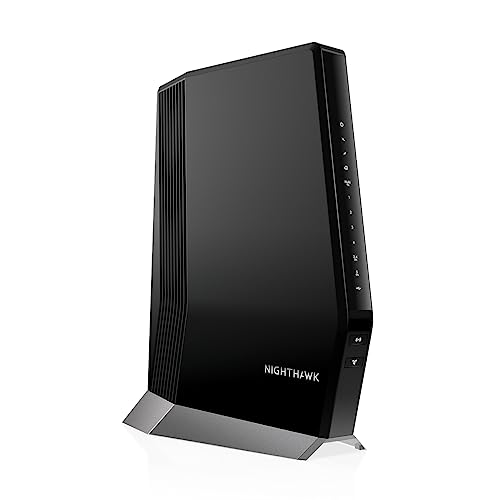
This NETGEAR Nighthawk CAX80 combines a DOCSIS 3.1 cable modem with a dual-band Wi-Fi 6 router. It delivers AX6000 speeds across up to 2,500 square feet, supporting 30 or more connected devices. The unit includes one 2.5 Gigabit Ethernet port and four Gigabit ports for wired connections. It works with major cable providers like Xfinity, Spectrum, and Cox. You get whole-home coverage and multi-gig speeds for compatible plans.
Pros
- DOCSIS 3.1 modem supports plans up to 1 Gbps
- Wi-Fi 6 AX6000 dual-band coverage for 2,500 sq ft
- One 2.5 Gigabit port for fast wired connections
- Manage network via the free Nighthawk app
Cons
- Limited to Wi-Fi 6, not the newer Wi-Fi 7
- Only covers up to 2,500 square feet
- Incompatible with Verizon, AT&T, or fiber services
Good fit if
- You rent cable internet from Xfinity, Spectrum, or Cox
- You want a single device for modem and router
- Your home is under 2,500 square feet
Skip if
- You use Verizon Fios or AT&T fiber
- You need Wi-Fi 7 speeds
- Your home exceeds 2,500 square feet
Verdict: NETGEAR Nighthawk CAX80 Cable Modem Router is a solid all-in-one solution for cable internet users with smaller homes. It simplifies your setup by merging modem and router functions, though it lacks the latest Wi-Fi 7 standard found in newer standalone routers.
Specifications side by side
| Spec | NETGEAR Nighthawk Tri-Band WiFi 7 Router | NETGEAR Nighthawk Cable Modem WiFi 6 Router Combo |
|---|---|---|
| Wi-Fi Standard | WiFi 7 | WiFi 6 |
| Speed Rating | BE19000 | AX6000 |
| Frequency Bands | Tri-Band | Dual-band |
| Coverage Area | 3,500 sq ft | 2,500 sq ft |
| Device Capacity | 200 devices | 30+ |
| Max Port Speed | 10 Gbps | 2.5 Gig |
| Ethernet Ports | 4 | not stated |
| Frequency Band | Tri-Band | Dual-Band |
| Port Speed | Gigabit, 10G | not stated |
| Dimensions | not stated | 8.5 × 4.3 × 10.4 inches |
| Weight | not stated | 4.45 pounds |
| Size | 19.0 Gbps | 8.5 x 4.3 x 10.4 inches |
| Color | Black | Black |
| Model | RS700S-100NAS | CAX80-100NAS |
Frequently asked questions
Is the NETGEAR Nighthawk Tri-Band WiFi 7 Router compatible with any existing modem?
Yes, this device functions as a standalone router. You connect it to your current modem via the Ethernet WAN port. This setup is ideal if you already have a working modem and want to upgrade your local network speed. It does not contain a built-in cable modem, so it requires an external connection to your internet service provider.
Does the NETGEAR Nighthawk Cable Modem WiFi 6 Combo replace my modem?
Yes, the NETGEAR Nighthawk CAX80 combines a cable modem and a Wi-Fi router into one unit. It connects directly to your cable wall outlet. This all-in-one design simplifies your home network by reducing the number of devices you need to power and manage. It is designed specifically for cable internet users.
Which model offers faster Wi-Fi speeds for my home network?
The NETGEAR Nighthawk Tri-Band WiFi 7 Router offers higher potential speeds. It supports the Wi-Fi 7 standard with a combined throughput of up to 19 Gbps. The CAX80 combo uses Wi-Fi 6 and is rated at AX6000. If your internet plan exceeds typical gigabit speeds, the Wi-Fi 7 router provides the necessary bandwidth.
Can I use the WiFi 7 router if I have a fiber internet connection?
Yes, the NETGEAR Nighthawk RS700S is well-suited for fiber connections. It includes a dedicated 10 Gigabit WAN port to handle high-speed fiber plans. This ensures you can utilize the full speed of your fiber service. The tri-band architecture also helps manage multiple connected devices without congestion.
Is the NETGEAR Nighthawk Cable Modem WiFi 6 Combo suitable for large homes?
This model is best for smaller homes. It is an all-in-one solution that simplifies setup for cable internet users. While it provides solid coverage, it lacks the advanced tri-band capacity and Wi-Fi 7 speeds of the standalone router. If you have a large home or many devices, the dedicated router may offer better performance.
What is the main difference between these two NETGEAR Nighthawk devices?
The primary difference is their function. The RS700S is a standalone router that requires an external modem. It features Wi-Fi 7 and tri-band technology for maximum speed. The CAX80 is a modem-router combo that connects directly to cable lines. It uses Wi-Fi 6 and is designed for users who want a single device for connectivity.