NETGEAR Nighthawk Pro Gaming AC2600 Review: Who It Fits and Who Should Skip It
As an Amazon Associate we earn from qualifying purchases. Links on this page are affiliate links.
This netgear nighthawk pro gaming ac2600 review looks at the XR500 router. It is a dual-band AC2600 device with a 1.7 GHz dual-core processor. The unit offers wireless speeds up to 2.6 Gbps. It includes four 1 Gigabit Ethernet ports for wired connections. The design is black and measures 12.7 by 9.6 by 2.2 inches. It weighs 3.71 pounds. This router targets gamers who need low latency. The specs focus on traffic prioritization and network monitoring. You get explicit and implicit beamforming for better signal direction. The LED lights can be turned off for a cleaner look.
What stands out
- AC2600 dual-band Wi-Fi with speeds up to 2.6 Gbps
- Four 1 Gigabit Ethernet ports for stable wired connections
- Advanced Quality of Service to prioritize gaming traffic
- Real-time network and ping monitoring for each device
- Geo-filtering to connect to the closest game servers
Who it fits
Good fit for
Gamers who need consistent, low-latency connections will benefit from the advanced Quality of Service. The four Gigabit Ethernet ports suit setups with multiple wired consoles or PCs. Users who want to see real-time ping and bandwidth usage per device will appreciate the monitoring tools. The geo-filtering feature helps players connect to nearby servers. If you play competitive games and want to minimize lag spikes, this router’s 1.7 GHz processor and traffic management features are useful. It fits well in homes where wired backhaul is preferred for stability.
Who should skip it
You should look elsewhere if you need Wi-Fi 6 or higher speeds. This router only supports AC2600 dual-band Wi-Fi. It lacks multi-gigabit WAN or LAN ports, as the max port speed is 1 Gbps. If you want a mesh system for large homes, this single router may not cover enough area. Users who do not care about gaming-specific features like geo-filtering or QoS may find the options unnecessary. It is not designed for whole-home coverage without additional nodes. Those needing the latest Wi-Fi standards should consider newer models.
Verdict: The XR500 is a solid choice for gamers who prioritize wired stability and traffic prioritization. Its AC2600 speeds and QoS features help reduce lag in competitive play.
NETGEAR XR500 Key Specs Explained
Speed Rating: AC2600
This rating combines wireless speeds across two frequency bands. It indicates a total theoretical throughput of 2.6 Gbps. This classification helps you compare the device against other dual-band routers in the same performance tier. Higher numbers generally suggest better handling of multiple simultaneous high-bandwidth streams, which is useful for households with many connected devices.
Max Port Speed: 1 Gbps
The Ethernet ports support data transfer rates up to one gigabit per second. This ensures your wired connections can keep pace with modern fiber or high-speed cable internet plans. If your internet plan exceeds 1 Gbps, this router becomes a bottleneck for wired devices. This spec is critical for gamers and streamers who rely on stable, high-speed wired links.
Frequency Bands: Dual-Band
The router operates on both 2.4 GHz and 5 GHz frequencies. The 2.4 GHz band offers wider coverage but slower speeds, while the 5 GHz band provides faster data rates over shorter distances. This separation allows you to connect older devices on one band and high-performance gadgets on the other, reducing interference and optimizing network efficiency for different device types.
Ethernet Ports: 4
The device includes four physical ports for wired connections. This count is standard for home routers and supports multiple consoles, PCs, or smart TVs simultaneously. It is sufficient for most single-family homes but may limit you if you have many wired devices. When comparing to mesh systems, note that mesh nodes often add more ports or require separate access points for more connections.
Physical Design and Build Quality
The NETGEAR XR500 presents a standard router silhouette with a black finish. According to the listing, the chassis measures 12.7 inches in width, 9.6 inches in height, and 2.2 inches in depth. These dimensions suggest a footprint that requires a dedicated shelf or desk space rather than a compact corner. The unit weighs 3.71 pounds. This mass provides stability, reducing the risk of tipping if cables are tugged, but it also means the device is not easily portable for temporary setups.
The design prioritizes function over form, featuring a utilitarian aesthetic common to gaming peripherals. The listing highlights an LED on/off option, allowing you to control the visual noise in your home. This feature is practical for users who prefer a dark environment while gaming or working late. The four 1 Gigabit Ethernet ports are likely arranged along the rear panel, facilitating organized cabling for wired devices.
You should consider the size when planning your network location. The height may interfere with stacking other electronics, so a flat, open surface is ideal. The durable plastic construction is typical for this class of router, balancing cost and heat dissipation. The layout keeps the active ports accessible for frequent connection changes. This physical setup supports a stationary home office or gaming room where the router remains fixed for optimal wireless coverage.
Setup And Everyday Use Guide
You configure this router through the NETGEAR app or web interface. The device relies on a 1.7 GHz dual-core processor to manage network traffic efficiently. This hardware handles the dual-band AC2600 speeds, which reach up to 2.6 Gbps across 2.4 GHz and 5 GHz bands. You connect wired devices to the four 1 Gigabit Ethernet ports. These ports provide stable, lag-free connectivity for gaming consoles, PCs, or smart TVs. The router uses implicit and explicit beamforming to direct signals toward your devices. This technology helps maintain stronger connections in rooms far from the unit. You can turn off the LED lights if you prefer a darker setup. Daily use involves managing network priority. The Quality of Service feature allows you to designate express lanes for gaming traffic. This reduces lag spikes and jitters during intense sessions. You can also enable geo filtering to connect to the nearest game servers. This minimizes latency by selecting optimal connection points. The interface lets you monitor network usage in real time. You see which devices and applications consume bandwidth. This helps you identify sources of congestion. The unit measures 12.7 inches wide and 9.6 inches high. It weighs 3.71 pounds. These dimensions require a stable surface. The black finish blends with most home setups. You do not need additional hardware to access these features. The router handles these tasks internally using its dual-core processor. This ensures consistent performance for multiple connected devices. The design supports a dedicated gaming environment by prioritizing low-latency connections. You benefit from clear visibility into network health without external tools.
Before You Buy This Router
This unit serves as a dedicated gaming router rather than a whole-home mesh system. You likely need it alongside existing mesh nodes if you want low-latency wired connections for consoles or PCs. Verify your internet plan does not exceed the 1 Gigabit Ethernet port limits. The dual-band AC2600 speeds may bottleneck if your ISP provides fiber speeds above 1 Gbps. You must check compatibility with your modem and existing network infrastructure. Regular firmware updates are essential to maintain the QoS features that prioritize gaming traffic. This device fits best in setups where specific devices need direct, lag-free wired access. It does not replace mesh coverage for entire floors. Consider it a specialized tool for competitive gaming rather than a general home networking solution. Ensure your gaming setup can utilize the four available Ethernet ports effectively.
Check before you buy
- Confirm your internet plan stays under 1 Gbps to match port speeds.
- Check if your gaming devices need wired connections for best performance.
- Verify compatibility with your current modem and existing network setup.
- Ensure you have space for four Ethernet cables near the router.
The product at a glance
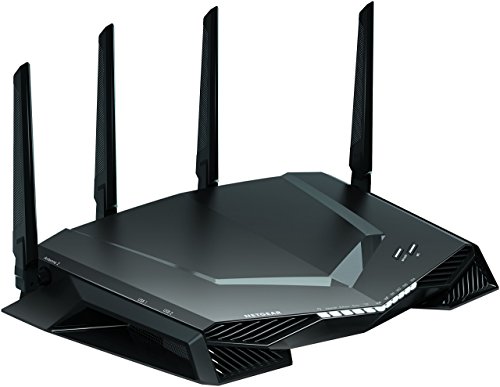
NETGEAR Nighthawk Pro Gaming AC2600 Router
Best for: Gamers needing wired stability and traffic prioritization
- Speed Rating
- AC2600
- Frequency Bands
- Dual-Band
- Max Port Speed
- 1 Gbps
- Ethernet Ports
- 4
- Use Case
- Gaming
- Dimensions
- 2.2 × 12.7 × 9.6 inches
View on Amazon: NETGEAR Nighthawk Pro Gaming AC2600 Router Affiliate link
The NETGEAR Nighthawk XR500 is a dual-band AC2600 router designed for gaming. It features four Gigabit Ethernet ports and a 1.7 GHz dual-core processor. The device uses Quality of Service to prioritize gaming traffic and includes geo-filtering to connect to nearby servers. It also offers real-time network monitoring. This router suits gamers who need wired stability and low latency for competitive play.
Pros
- Four Gigabit Ethernet ports for wired connectivity
- AC2600 dual-band speeds up to 2.6 Gbps
- 1.7 GHz dual-core processor for network efficiency
- Quality of Service prioritizes gaming traffic
- Geo-filtering connects to the closest servers
Cons
- Dual-band only, lacking Wi-Fi 6 support
- Large physical footprint at 12.7 inches wide
- No mention of Wi-Fi 6E or 5 GHz channel bonding specs
Good fit if
- You need dedicated wired ports for consoles and PCs
- You want to prioritize gaming traffic over other devices
- You play competitive games requiring low ping
Skip if
- You require Wi-Fi 6 for newer devices
- You need a compact router for small spaces
- You want a mesh system for whole-home coverage
Verdict: NETGEAR Nighthawk XR500 AC2600 Gaming Router is a solid choice for gamers who prioritize wired connections and traffic prioritization. It fits players who need stable, low-latency performance for competitive titles.
Specifications side by side
| Spec | NETGEAR Nighthawk Pro Gaming AC2600 Router |
|---|---|
| Speed Rating | AC2600 |
| Frequency Bands | Dual-Band |
| Max Port Speed | 1 Gbps |
| Ethernet Ports | 4 |
| Use Case | Gaming |
| Dimensions | 2.2 × 12.7 × 9.6 inches |
| Weight | 3.71 pounds |
| Size | XR500 |
| Color | Black |
| Model | XR500-100NAS |
Frequently asked questions
Is the NETGEAR Nighthawk Pro Gaming AC2600 good for competitive gaming?
Yes, it is designed for gamers who need stable, low-latency performance. The router includes traffic prioritization features to help manage network load. It fits players who rely on wired connections for competitive titles. This focus on stability makes it a solid choice for serious gaming setups.
Does this router support mesh networking for whole-home coverage?
No, the NETGEAR XR500 is a dedicated gaming router, not a mesh system. It does not include mesh nodes for extending coverage. You likely need it alongside existing mesh nodes if you want low-latency wired connections. It is best used for a specific gaming zone rather than whole-home coverage.
What are the physical dimensions of the NETGEAR XR500 router?
The unit measures 12.7 inches in width, 9.6 inches in height, and 2.2 inches in depth. It weighs 3.71 pounds. These dimensions suggest a footprint that requires a dedicated space. The black finish allows it to blend into most home office or gaming room environments without standing out.
How many Ethernet ports does the NETGEAR Nighthawk AC2600 have?
It includes four 1 Gigabit Ethernet ports for wired connections. You should verify that your internet plan does not exceed these port limits. This configuration is ideal for connecting consoles and PCs directly. It ensures stable, high-speed wired links for devices that require consistent data throughput.
What processor powers the NETGEAR Nighthawk Pro Gaming router?
The device relies on a 1.7 GHz dual-core processor. This hardware handles the dual-band AC2600 speeds efficiently. It manages network traffic to support wireless speeds up to 2.6 Gbps. This processing power helps maintain stability during heavy gaming sessions or when multiple devices are active.
Can I control the NETGEAR XR500 via a mobile app?
Yes, you configure this router through the NETGEAR app or web interface. This allows you to manage settings remotely. The app provides access to traffic prioritization and other gaming-focused features. You can adjust network parameters easily without needing to access the physical device directly.