NETGEAR Nighthawk AX5400 WiFi 6 Alternatives: 6 Similar Picks Compared
As an Amazon Associate we earn from qualifying purchases. Links on this page are affiliate links.
You might be looking for netgear nighthawk 6 stream dual band wifi alternatives because the original RAX54S has specific limitations. This router covers up to 2,500 square feet and supports 25 devices. It offers AX5400 speeds on dual bands. It includes four gigabit Ethernet ports and one USB 3.0 port. The device also comes with a one-year subscription to NETGEAR Armor for security. These specs suit small homes with moderate device counts. You may want something else if you need tri-band connectivity or higher port speeds. The RAX54S is also a single-unit router. You might prefer a mesh system for larger spaces. You could also want a router with a 2.5 Gbps WAN port for multi-gig internet plans. This list compares 6 similar picks. We chose these alternatives because their specifications overlap with the original. They share the same Wi-Fi 6 standard and AX5400 speed ratings. Some offer tri-band features or different physical sizes. This guide helps you compare the actual data to find the right fit for your home network.
Our top pick: NETGEAR Nighthawk AX5400 WiFi 6 Router.
How each alternative compares
NETGEAR Nighthawk AX5400 WiFi 6 Router
The NETGEAR RAX50 shares the same AX5400 speed rating and dual-band Wi-Fi 6 standard as the RAX54S. It also covers up to 2,500 square feet. However, it is physically larger, measuring 14.7 inches in length compared to the RAX54S’s 9.84 inches. You get similar performance for medium homes but with a bulkier footprint. If you prioritize compact design, stick with the RAX54S. If you need a slightly different form factor for shelf placement, this model works. Both routers support up to 25 devices and offer gigabit Ethernet ports. The choice comes down to physical size preferences rather than speed or coverage differences.
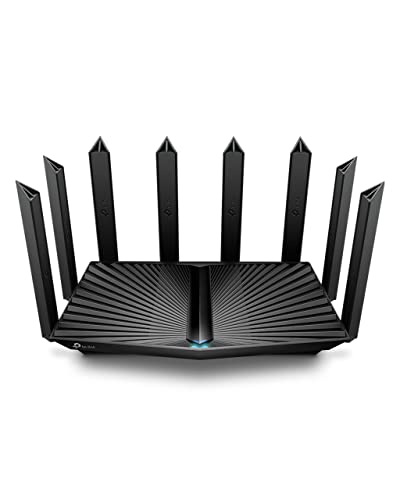
TP-Link AX6000 Dual-Band Wi-Fi 6 Router
The TP-Link Archer AX80 upgrades the speed rating to AX6000 while remaining dual-band. It targets users with multi-gigabit internet plans by including a 2.5 Gbps port, which the RAX54S lacks. The RAX54S is limited to 1 Gbps Ethernet ports. If your internet plan exceeds 1 Gbps, this TP-Link model handles the extra throughput. It covers a similar area but delivers higher wireless speeds. You give up the included NETGEAR Armor security subscription found with the RAX54S. This router suits those building a network with OneMesh extenders rather than buying a full mesh system. It is the better choice for high-speed wired connections.
ASUS Dual-Band WiFi 6 Gaming Router
The ASUS RT-AX82U is a gaming-focused router with AX5400 speeds and dual-band Wi-Fi 6. It matches the RAX54S in wireless performance but adds dedicated acceleration ports for gaming traffic. The RAX54S offers general-purpose security features and a USB 3.0 port. The ASUS model includes AiMesh support, allowing you to expand coverage with compatible nodes. If you play competitive games, the dedicated ports provide lower latency. If you need a USB port for storage sharing, the RAX54S is better. Both cover similar areas. The ASUS model is ideal for gamers who want to build a scalable mesh network later, while the RAX54S is better for straightforward home office or streaming setups.
ASUS Dual-Band WiFi 6 Gaming Router
This ASUS RT-AX82U variant highlights VPN capabilities alongside its AX5400 dual-band performance. It shares the same physical dimensions and weight as the other ASUS model. The RAX54S includes a one-year NETGEAR Armor subscription for security. The ASUS router relies on its built-in VPN features for privacy. If you need strong encryption for remote access, this ASUS model is preferable. If you want automatic malware protection without manual configuration, the RAX54S is easier. Both support AiMesh for expansion. The ASUS model lacks the USB 3.0 port found on the RAX54S. Choose the ASUS model for security-focused users who manage their own VPN settings. Choose the RAX54S for users who prefer automated, out-of-the-box protection.
Netgear Orbi Tri-Band WiFi 6 Mesh System
The NETGEAR Orbi RBK763 is a tri-band mesh system, unlike the dual-band RAX54S. It provides dedicated backhaul for better performance across multiple units. The RAX54S is a single router. The Orbi system covers larger areas more effectively by using separate bands for communication between satellites. If you have a large home or many walls, the Orbi system offers superior whole-home coverage. The RAX54S is limited to 2,500 square feet. The Orbi system includes voice control integration. You gain mesh flexibility but lose the compact, single-unit simplicity of the RAX54S. The Orbi is heavier and requires more space. Pick the Orbi for large homes needing seamless roaming. Pick the RAX54S for small apartments or single-story homes.
TP-Link AX5400 Wi-Fi 6 Router
The TP-Link Archer AX73 offers AX5400 dual-band Wi-Fi 6 in a smaller, lighter form factor. It measures 10.7 inches in length and weighs less than the RAX54S. The RAX54S includes four gigabit Ethernet ports and a USB 3.0 port. The TP-Link model typically has fewer wired ports, though specific port counts are not listed here. It is designed for homes under 2,000 square feet. If you have a smaller space and fewer wired devices, the TP-Link model is sufficient. The RAX54S is better for homes near the 2,500 square foot limit. The TP-Link lacks the included security subscription of the RAX54S. Choose the TP-Link for compact setups. Choose the RAX54S for larger spaces or users needing more wired connections.
Quick picks
Our 7 picks

NETGEAR Nighthawk AX5400 WiFi 6 Router
Best for: small homes with moderate device counts
- Wi-Fi Standard
- WiFi 6
- Speed Rating
- AX5400
- Frequency Bands
- Dual-Band
- Coverage Area
- 2,500 sq. ft.
- Device Capacity
- 25 devices
- Max Port Speed
- 1 Gbps
View on Amazon: NETGEAR Nighthawk AX5400 WiFi 6 Router Affiliate link
The NETGEAR RAX54S is a dual-band WiFi 6 router offering AX5400 speeds. It covers up to 2,500 square feet and supports 25 devices. You get four Gigabit Ethernet ports and one USB 3.0 port for wired connections. The unit includes a one-year subscription to NETGEAR Armor for security. It works with any internet service provider up to 1Gbps. You can manage settings via the Nighthawk app.
Pros
- AX5400 WiFi 6 speeds for streaming and gaming
- Covers up to 2,500 square feet
- Includes one-year NETGEAR Armor security subscription
- Four Gigabit Ethernet ports and one USB 3.0 port
Cons
- Limited to dual-band frequencies
- Supports only 25 connected devices
- Made for use in the U.S. only
Good fit if
- You need a simple router for a small apartment
- You want built-in security without extra setup
- You have fewer than 25 devices
Skip if
- You require tri-band performance for large homes
- You need to connect more than 25 devices
- You live outside the United States
Verdict: NETGEAR RAX54S AX5400 Dual-Band Router is a straightforward choice for small spaces. It suits renters or single-family homes with moderate device counts who prioritize ease of setup and included security.

NETGEAR Nighthawk AX5400 WiFi 6 Router
Best for: Medium homes needing stable dual-band Wi-Fi 6
- Wi-Fi Standard
- Wi-Fi 6
- Speed Rating
- AX5400
- Frequency Bands
- Dual-Band
- Coverage Area
- Up to 2,500 sq ft
- Device Capacity
- Up to 25 devices
- Max Port Speed
- 1 Gbps
View on Amazon: NETGEAR Nighthawk AX5400 WiFi 6 Router Affiliate link
The NETGEAR Nighthawk RAX50 delivers AX5400 dual-band Wi-Fi 6 speeds up to 5.4 Gbps. It covers up to 2,500 square feet and supports up to 25 devices. This router replaces your existing unit and works with any ISP up to 1 Gbps. It includes four Gigabit Ethernet ports and a USB 3.0 port for storage sharing. It suits users needing reliable coverage for streaming and gaming in medium-sized homes.
Pros
- AX5400 Wi-Fi 6 speed up to 5.4 Gbps
- Covers up to 2,500 square feet
- Supports up to 25 connected devices
- Four Gigabit Ethernet ports for wired connections
Cons
- Limited to dual-band operation unlike tri-band alternatives
- Max port speed is 1 Gbps, not 2.5 Gbps
- Only 25 device capacity is lower than some competitors
Good fit if
- You need reliable Wi-Fi 6 coverage for a single floor
- You want a straightforward router with Ethernet ports
- You have up to 25 devices to connect
Skip if
- You require tri-band performance for heavy congestion
- You need 2.5 Gbps WAN or LAN ports
- You plan to connect more than 25 devices
Verdict: NETGEAR RAX50 AX5400 Dual-Band Router provides solid AX5400 performance for medium homes. It fits users who prioritize basic Wi-Fi 6 stability over tri-band features or higher port speeds.
TP-Link AX6000 Dual-Band Wi-Fi 6 Router
Best for: Multi-gigabit internet users needing a 2.5G port
- Wi-Fi Standard
- Wi-Fi 6
- Speed Rating
- AX6000
- Frequency Bands
- Dual Band
- Max Port Speed
- 2.5 Gbps
- Use Case
- Streaming
- Features
- WPA3
View on Amazon: TP-Link AX6000 Dual-Band Wi-Fi 6 Router Affiliate link
The TP-Link Archer AX80 is a dual-band Wi-Fi 6 router rated AX6000. It delivers up to 4804 Mbps on the 5 GHz band and 1148 Mbps on the 2.4 GHz band. A key feature is the 2.5 Gbps multi-gigabit port, which prevents wired bottlenecks for faster internet plans. It uses eight high-gain antennas with beamforming for coverage. You get HomeShield security and OneMesh support for extending range.
Pros
- AX6000 speed rating with 4804 Mbps on 5 GHz
- 2.5 Gbps multi-gigabit WAN/LAN port
- Eight high-gain antennas with beamforming technology
- OneMesh support for seamless range extension
- Built-in VPN client for secure remote access
Cons
- Dual-band only, lacking the third band found in some competitors
- No mention of tri-band capability for dedicated backhaul
- Physical size is larger than compact AX5400 alternatives
Good fit if
- You have an internet plan faster than 1 Gbps
- You want to extend coverage with OneMesh extenders
- You need a wired port for high-speed devices
Skip if
- You require tri-band Wi-Fi for mesh backhaul
- You need a router smaller than 10 inches wide
- You prefer a gaming-focused router with game acceleration
Verdict: TP-Link Archer AX80 AX6000 Router is a solid choice for users with multi-gig internet plans who need a 2.5 Gbps port. It suits those who want to expand coverage using OneMesh extenders rather than a full mesh system.

ASUS Dual-Band WiFi 6 Gaming Router
Best for: Gaming with dedicated acceleration ports
- Wi-Fi Standard
- WiFi 6
- Speed Rating
- AX5400
- Frequency Bands
- Dual-Band
- Use Case
- Gaming
- Features
- MU-MIMO, Mesh
- Dimensions
- 11 × 7.26 × 6.5 inches
View on Amazon: ASUS Dual-Band WiFi 6 Gaming Router Affiliate link
The ASUS RT-AX82U is a dual-band AX5400 Wi-Fi 6 router designed for gaming. It offers speeds up to 5400 Mbps using 160MHz channels. The device includes a dedicated port for game acceleration and supports ASUS AiMesh for whole-home coverage. It features commercial-grade security with AiProtection Pro. Its compact dimensions and included mobile game mode make it a practical option for gamers seeking low latency.
Pros
- AX5400 speed rating with 160MHz channels
- Dedicated port for game acceleration
- ASUS AiMesh support for mesh networks
- Lifetime free AiProtection Pro security
- Mobile Game Mode via app
Cons
- Dual-band only, lacks tri-band performance
- No mention of 2.5G WAN port
- Physical size is bulkier than standard routers
Good fit if
- You need low-latency gaming performance
- You want AiProtection Pro security
- You plan to expand with AiMesh nodes
Skip if
- You require tri-band connectivity
- You need a 2.5G WAN port
- You prefer a compact travel router
Verdict: ASUS RT-AX82U AX5400 Gaming Router fits gamers who prioritize dedicated acceleration ports and robust security over tri-band speeds. It is ideal for users building a mesh network with AiMesh-compatible devices.
ASUS Dual-Band WiFi 6 Gaming Router
Best for: Gaming-focused home networks with AiMesh
- Wi-Fi Standard
- WiFi 6
- Speed Rating
- AX5400
- Frequency Bands
- Dual Band
- Use Case
- Gaming
- Features
- VPN
- Dimensions
- 11 × 7.26 × 6.5 inches
View on Amazon: ASUS Dual-Band WiFi 6 Gaming Router Affiliate link
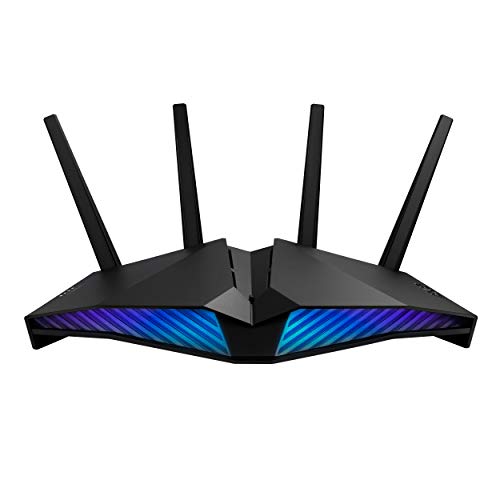
The ASUS RT-AX82U is a dual-band WiFi 6 router rated AX5400. It uses a 1.5 GHz tri-core processor to manage network traffic. This model includes a dedicated gaming port and Mobile Game Mode to reduce latency. It also supports AiMesh for extending coverage and AiProtection Pro for security. This router suits users who prioritize gaming performance and customizable lighting in a home network.
Pros
- AX5400 speed rating with 160MHz channels
- Dedicated gaming port and Mobile Game Mode
- AiProtection Pro security powered by Trend Micro
- AiMesh compatible for network extension
- Customizable Aura RGB lighting effects
Cons
- Dual-band only, lacking tri-band capacity
- No mention of a 2.5G WAN port
- Larger physical footprint than compact routers
Good fit if
- You play mobile or console games and want lower latency
- You want to extend your network with AiMesh
- You prefer a router with visible RGB lighting
Skip if
- You need tri-band speeds for heavy multi-device use
- You require a 2.5G WAN port for high-speed internet
- You want a compact router without visible lights
Verdict: The ASUS RT-AX82U AX5400 Gaming Router fits gamers who want dedicated hardware features and AiMesh support. It delivers solid AX5400 speeds but lacks the tri-band flexibility of more expensive mesh systems.
Netgear Orbi Tri-Band WiFi 6 Mesh System
Best for: Tri-band mesh coverage with voice control
- Wi-Fi Standard
- WiFi 6
- Speed Rating
- AX5400
- Frequency Bands
- Tri-Band
- Features
- Mesh
- Weight
- 5 pounds
View on Amazon: Netgear Orbi Tri-Band WiFi 6 Mesh System Affiliate link
The NETGEAR Orbi RBK763 is a tri-band mesh system offering AX5400 speeds up to 5.4Gbps. It includes one router and two satellites for whole-home coverage. The system uses a dedicated wireless backhaul to maintain consistent performance. It supports voice control via Amazon Alexa or Google Assistant. This setup suits users needing broad coverage and high capacity for multiple devices simultaneously.
Pros
- Tri-band Wi-Fi 6 with dedicated wireless backhaul
- Includes router and two satellites for mesh coverage
- Supports up to 5.4Gbps combined speeds
- Voice control compatible with Alexa and Google Assistant
Cons
- Heavier build at 5 pounds per unit
- Renewed condition rather than new retail
- Limited to 7 Gigabit LAN ports total
Good fit if
- You need dedicated backhaul for stable mesh performance
- You want to control settings via voice commands
- You require coverage for a large home area
Skip if
- You prefer a dual-band only configuration
- You need more than 7 wired connections
- You require brand new sealed retail units
Verdict: NETGEAR Orbi AX5400 Tri-Band Mesh provides reliable whole-home coverage through its tri-band architecture and included satellites. It fits users prioritizing stable backhaul speeds and voice control integration over new packaging.

TP-Link AX5400 Wi-Fi 6 Router
Best for: Standard homes under 2,000 sq ft
- Wi-Fi Standard
- Wi-Fi 6
- Speed Rating
- AX5400
- Frequency Bands
- Dual-Band
- Coverage Area
- 2,000 sq ft
- Max Port Speed
- Gigabit
- Use Case
- Streaming
View on Amazon: TP-Link AX5400 Wi-Fi 6 Router Affiliate link
The TP-Link Archer AX73 is an AX5400 dual-band Wi-Fi 6 router designed for homes up to 2,000 square feet. It uses 4T4R architecture and HE160 technology on the 5 GHz band to support high throughput. The unit includes a USB 3.0 port for local storage and relies on TP-Link HomeShield for basic security and parental controls. It fits well if you need solid coverage without tri-band complexity.
Pros
- AX5400 speed rating with 4T4R and HE160 support
- Covers up to 2,000 square feet with beamforming
- Includes one USB 3.0 port for media sharing
- Built-in TP-Link HomeShield security and parental controls
Cons
- Dual-band only, lacking the third band for dedicated backhaul
- No mention of a 2.5G WAN port for speeds above 1 Gbps
- Coverage area is smaller than tri-band mesh alternatives
Good fit if
- You have a home under 2,000 square feet
- You want a single router without mesh nodes
- You need a USB port for local file sharing
Skip if
- You require tri-band connectivity for large homes
- Your internet plan exceeds 1 Gbps
- You need a dedicated backhaul band for mesh extenders
Verdict: TP-Link Archer AX73 AX5400 Router is a practical single-unit solution for average-sized homes that do not require tri-band speeds or wired backhaul capabilities.
Specifications side by side
| Spec | NETGEAR Nighthawk AX5400 WiFi 6 Router | NETGEAR Nighthawk AX5400 WiFi 6 Router | TP-Link AX6000 Dual-Band Wi-Fi 6 Router | ASUS Dual-Band WiFi 6 Gaming Router | ASUS Dual-Band WiFi 6 Gaming Router | Netgear Orbi Tri-Band WiFi 6 Mesh System | TP-Link AX5400 Wi-Fi 6 Router |
|---|---|---|---|---|---|---|---|
| Wi-Fi Standard | WiFi 6 | Wi-Fi 6 | Wi-Fi 6 | WiFi 6 | WiFi 6 | WiFi 6 | Wi-Fi 6 |
| Speed Rating | AX5400 | AX5400 | AX6000 | AX5400 | AX5400 | AX5400 | AX5400 |
| Frequency Bands | Dual-Band | Dual-Band | Dual Band | Dual-Band | Dual Band | Tri-Band | Dual-Band |
| Coverage Area | 2,500 sq. ft. | Up to 2,500 sq ft | not stated | not stated | not stated | not stated | 2,000 sq ft |
| Device Capacity | 25 devices | Up to 25 devices | not stated | not stated | not stated | not stated | not stated |
| Max Port Speed | 1 Gbps | 1 Gbps | 2.5 Gbps | not stated | not stated | not stated | Gigabit |
| Ethernet Ports | not stated | 4 | not stated | not stated | not stated | not stated | not stated |
| Frequency Band | Dual-Band | Dual-Band | Dual-Band | Dual-Band | Dual-Band | Tri-Band | Dual-Band |
| Use Case | not stated | not stated | Streaming | Gaming | Gaming | not stated | Streaming |
| Features | not stated | not stated | WPA3 | MU-MIMO, Mesh | VPN | Mesh | not stated |
| Port Speed | not stated | not stated | 2.5G | not stated | not stated | not stated | Gigabit |
| Operating Mode | not stated | not stated | Access Point Mode | not stated | not stated | not stated | not stated |
| Dimensions | 9.84 × 7.87 × 3.15 inches | 14.7 × 10 × 4.6 inches | 9.84 × 7.87 × 3.15 inches | 11 × 7.26 × 6.5 inches | 11 × 7.26 × 6.5 inches | not stated | 10.7 × 5.8 × 1.94 inches |
| Weight | not stated | 2.5 pounds | 2 pounds | 1.57 pounds | 1.57 pounds | 5 pounds | not stated |
| Size | Standard | 25.4 cm x 76.2 cm x 10.2 cm | 10.9 x 7.2 x 2.3 inches | not stated | not stated | 7 | AX5400 |
| Color | Black | Black | Black | not stated | BLACK | 7 | Black |
| Model | RAX54S-2AZNAS | RAX50-100NAS | Archer AX80 | AX5400 | RT-AX82U | RBK763 | Archer AX73 |
Readers of this guide also look at victorinox dual grip 6 boning alternatives.
Frequently asked questions
Which AX5400 router is best for small homes?
The NETGEAR Nighthawk RAX54S is the top pick for small homes with moderate device counts. It covers up to 2,500 square feet and provides straightforward setup. Its compact size measures 9.84 inches in length. This makes it easy to place in tighter spaces without overwhelming the area.
Does the TP-Link Archer AX80 have a multi-gigabit port?
Yes, the TP-Link Archer AX80 includes a 2.5 Gbps port. It is rated AX6000, offering higher speeds than standard AX5400 models. This router suits users with multi-gig internet plans. It also supports OneMesh extenders to expand coverage beyond its single-unit range.
Can I use these routers for gaming?
The ASUS RT-AX82U is designed specifically for gaming. It features dedicated acceleration ports and robust security features. It supports AiMesh, allowing you to build a larger network. This model prioritizes low latency and stable connections for demanding gaming sessions over tri-band flexibility.
Is there a tri-band option in this list?
The NETGEAR Orbi RBK763 is the only tri-band mesh system on this list. It provides stable backhaul speeds through its dedicated wireless band. This system includes satellites for whole-home coverage. It is ideal if you need reliable performance across a larger area without speed loss.
How does the RAX50 compare to the RAX54S?
The NETGEAR RAX50 shares the same AX5400 speed and 2,500 square foot coverage as the RAX54S. However, it is physically larger, measuring 14.7 inches in length. It focuses on basic Wi-Fi 6 stability. It is a solid choice if you do not need the smaller footprint of the RAX54S.
What is the best budget-friendly AX5400 choice?
The ASUS RT-AX82U is listed as the best budget option. It delivers solid AX5400 speeds for dual-band Wi-Fi 6. It includes features like MU-MIMO and VPN support. This router is ideal for users who want dedicated hardware benefits without paying for premium tri-band features.
Does the TP-Link Archer AX73 support mesh networking?
The TP-Link Archer AX73 is a practical single-unit solution. It covers average-sized homes under 2,000 square feet. It does not require wired backhaul capabilities. It is best for standard homes that do not need the expanded coverage of a multi-node mesh system.