NETGEAR Multi-Gigabit Dual WAN Router Review: Who It Fits and Who Should Skip It
As an Amazon Associate we earn from qualifying purchases. Links on this page are affiliate links.
This netgear 10g multi gigabit dual wan cloud review focuses on the NETGEAR PR60X. It is a cloud-managed pro router designed for small to medium enterprises. The device features one 10G/Multi-Gig configurable port and one 2.5G WAN port. It also includes three 2.5G LAN ports and a 10G SFP+ port. These ports allow for flexible wiring and high-speed backhaul. The router supports up to 100 connected devices. It offers dual WAN capabilities for failover and load balancing. This setup ensures reliable connectivity for business networks that require consistent uptime and performance.
What stands out
- One 10G/Multi-Gig configurable LAN/WAN port for high-speed connections.
- Dual WAN ports with failover and load balancing for reliability.
- Supports up to 32 VLANs for network segmentation.
- Secure remote access via IPSec, OpenVPN, and WireGuard.
- Integrates with NETGEAR Pro WiFi Access Points and Smart switches.
Who it fits
Good fit for
This router suits small businesses and home offices that need robust connectivity. It fits setups requiring dual WAN links for redundancy. Users who manage multiple VLANs will benefit from the 32 VLAN support. Remote workers who need secure VPN access will appreciate the IPSec and WireGuard options. It also works well for those already using NETGEAR Pro WiFi access points. The cloud management via NETGEAR Insight allows easy oversight from anywhere. If you need a scalable solution for up to 100 devices, this is a strong choice.
Who should skip it
You should look elsewhere if you need a simple home mesh system. This device is a pro router, not a consumer mesh node. It lacks the easy plug-and-play setup of typical home routers. If you do not need dual WAN or VLANs, the features may be overkill. Users who prefer local management without a subscription might find the NETGEAR Insight model less appealing. It is also not designed for large enterprises with hundreds of devices. For basic home use, a standard router or mesh system is more appropriate.
Verdict: The NETGEAR PR60X is a capable pro router for businesses needing dual WAN and VLAN support. It offers reliable connectivity and secure remote access for small to medium setups.
Key specs explained for this router
Max Port Speed: 10 Gbps
This router supports data transfer rates up to 10 gigabits per second on its highest-capacity ports. You benefit from faster file transfers and smoother streaming when using compatible devices. Compare this to standard gigabit routers that cap at 1 Gbps. This speed is ideal for users with high-bandwidth internet plans or those moving large data sets locally. It ensures the router does not become a bottleneck for modern connections.
Device Capacity: 100 devices
The router can handle up to 100 connected devices simultaneously. This capacity suits small offices or homes with many smart gadgets, laptops, and phones. It prevents network congestion when multiple users are online. Compare this to basic home routers that may struggle with fewer connections. This limit ensures stable performance for SMEs or tech-heavy households without requiring additional access points for device management.
One 10G/Multi-Gig configurable LAN/WAN port
This single port can be set up as either a local area network connection or a wide area network input. You gain flexibility to connect high-speed internet sources or link to fast local storage. This configuration adapts to your specific network layout. Compare this to fixed ports that only serve one purpose. It allows you to optimize performance by assigning the highest speed port to your primary internet connection or critical server.
One 2.5G WAN port
This dedicated port accepts internet signals up to 2.5 gigabits per second. It provides a secondary high-speed input for your network setup. You can use this for a backup internet connection or to balance traffic. Compare this to standard 1G WAN ports that limit input speed. This port ensures you can utilize faster-than-gigabit internet services without compromising on the input capability of your router.
Three 2.5G LAN ports
These ports provide local connections for devices like desktop computers or media servers at 2.5 gigabits per second. You benefit from faster local file sharing and reduced latency for wired devices. Compare this to standard gigabit LAN ports that restrict local transfer speeds. This setup is useful for users who need consistent, high-speed wired connections for workstations or gaming consoles within the local network.
Design and Build Overview
The NETGEAR PR60X is a cloud-managed pro router built for small to medium enterprises. Its hardware prioritizes connectivity density over aesthetic flair. The unit features one 10G/Multi-Gig configurable LAN/WAN port, one 2.5G WAN port, and three 2.5G LAN ports. You also get one 10G SFP+ port for long-distance backhaul. These ports are arranged to facilitate flexible network topology. You can configure the main port for either incoming internet or local area networking. This flexibility allows you to adapt the layout to your existing infrastructure without buying extra adapters.
According to the listing, the device supports up to 32 VLANs. This feature lets you segment your network for security or traffic management. The router integrates with NETGEAR Pro WiFi Access Points and select Smart switches. This design choice means the unit is intended to work as part of a larger enterprise solution. It is not a standalone home device. The focus is on seamless management through NETGEAR Insight. You get a one-year subscription for remote network access. This allows you to manage settings from anywhere.
The build targets reliability and scalability. The dual WAN ports offer failover and load balancing. This ensures continuous connectivity even if one internet link fails. The device supports up to 100 client device connections. This capacity suits busy office environments. The physical design reflects its professional role. It is built to sit in a rack or on a desk where multiple cables converge. The finish is utilitarian, focusing on port accessibility and airflow rather than decorative elements.
Setup and Everyday Use Guide
Setting up the NETGEAR PR60X begins with connecting your internet source to the dedicated 2.5G WAN port or the configurable 10G/Multi-Gig port. You can assign the 10G port as a LAN connection for local devices or keep it as a WAN input. This flexibility allows you to match your specific internet plan. The device supports dual WAN configurations with failover and load balancing. You can distribute traffic across both connections to maintain stability if one link drops. For complex network needs, you can configure up to 32 VLANs to segment traffic. This helps isolate different groups of devices for better security and performance management.
Daily operation relies on the NETGEAR Insight platform for remote management. You can monitor and adjust settings from anywhere using the included one-year subscription. This cloud-based approach removes the need for local software installation on your computers. The router integrates with NETGEAR Pro WiFi Access Points and select Smart switches. This creates a cohesive enterprise network solution for small to medium businesses. You can manage the entire system as a single unit.
Security features are built into the everyday workflow. You can enable IPSec Site-to-Site or Client-to-Site VPNs for secure remote access. The system supports Open VPN and WireGuard protocols. You can establish up to 30 VPN tunnels for different locations or users. The device handles up to 100 client connections simultaneously. This capacity ensures stable performance for teams with multiple devices. The hardware prioritizes connectivity density, allowing you to connect wired devices directly to the three 2.5G LAN ports or the 10G SFP+ port for high-speed backhaul.
Before You Buy This Router
This router serves small to medium enterprises rather than typical home users. You need compatible NETGEAR Pro WiFi Access Points to build a full mesh system. The device integrates with select Smart switches for broader network management. Check your existing ISP connection speed. If you lack a multi-gigabit plan, the 10G port offers little benefit. You must configure dual WAN failover or load balancing manually via the cloud interface. The included one-year Insight subscription helps with remote management but expires. Plan for additional hardware if you need more wired connections. This unit sits alongside other pro-grade options in the 1 product list. It suits businesses needing VLAN support and VPN tunnels. Home users with simple setups may find it overly complex. Verify your device capacity needs. The 100-device limit applies to connected clients. Ensure your current infrastructure supports cloud-managed networking before purchasing. This router demands technical knowledge for optimal setup and ongoing upkeep.
Check before you buy
- Verify you need dual WAN failover or load balancing for your business.
- Confirm your ISP provides multi-gigabit speeds to utilize the 10G port.
- Check compatibility with NETGEAR Pro WiFi Access Points for mesh extension.
- Ensure you can manage VLANs and VPN tunnels via cloud interface.
- Assess if your total connected devices stay under the 100 limit.
The product at a glance
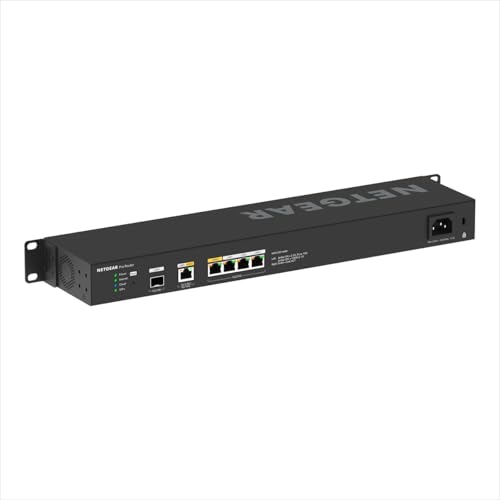
NETGEAR Multi-Gigabit Dual WAN Router
Best for: Small offices needing dual WAN redundancy
- Device Capacity
- 100 client devices
- Max Port Speed
- 10 Gbps
- Features
- Dual WAN
- Mounting Type
- Rackmount
- Uplink Port Type
- SFP
View on Amazon: NETGEAR Multi-Gigabit Dual WAN Router Affiliate link
The NETGEAR PR60X is a cloud-managed router built for small businesses. It features a configurable 10G port, a 2.5G WAN port, and three 2.5G LAN ports. It supports dual WAN failover and load balancing. You get secure VPN access for up to 100 devices. The system integrates with NETGEAR Pro WiFi access points. It includes a one-year Insight subscription for remote management.
Pros
- Configurable 10G/Multi-Gig LAN/WAN port
- Dual WAN ports with failover and load balancing
- Supports up to 32 VLANs
- IPSec, OpenVPN, and WireGuard VPN support
- Integrates with NETGEAR Pro WiFi Access Points
Cons
- Device capacity limited to 100 connections
- Requires NETGEAR Insight subscription for full management
- No local web interface mentioned in specs
Good fit if
- You need dual WAN redundancy for business continuity
- You want to manage the network remotely via cloud
- You plan to use NETGEAR Pro WiFi access points
Skip if
- You need to connect more than 100 devices
- You prefer a standalone router without cloud dependency
- You do not need 10G or 2.5G port speeds
Verdict: NETGEAR PR60X Dual WAN Router is a solid choice for small offices needing reliable dual WAN connectivity and cloud management. It fits users who prioritize network redundancy and remote access over local control.
Specifications side by side
| Spec | NETGEAR Multi-Gigabit Dual WAN Router |
|---|---|
| Device Capacity | 100 client devices |
| Max Port Speed | 10 Gbps |
| Features | Dual WAN |
| Port Speed | Gigabit, 2.5G, 10G |
| Mounting Type | Rackmount |
| Uplink Port Type | SFP |
| Model | PR60X-100NAS |
Frequently asked questions
Does the NETGEAR PR60X support dual WAN connections?
Yes, it supports dual WAN connectivity. This feature allows you to connect two separate internet sources for redundancy. If one connection fails, the other can maintain your network uptime. This is ideal for small offices where reliable access is critical for daily operations.
What ports are available on this router?
The device includes one 10G/Multi-Gig configurable port, one 2.5G WAN port, and three 2.5G LAN ports. You can assign the 10G port as a WAN or LAN connection based on your needs. This flexibility helps you optimize bandwidth for both internet and local traffic.
Is this router suitable for home use?
It is designed primarily for small to medium enterprises. The cloud management and port configuration suit professional environments more than typical homes. Home users might find the setup and features more complex than necessary for standard residential networking needs.
Can I manage this router remotely?
Yes, it is a cloud-managed router. You can access and configure settings remotely through the NETGEAR Pro system. This allows you to monitor network status and apply updates from anywhere, which is useful for managing small office networks without being on-site.
Does it work with other NETGEAR devices?
It integrates with select NETGEAR Pro WiFi Access Points and Smart switches. You need compatible access points to build a full mesh system. This ecosystem approach helps create a unified network for larger spaces or multiple rooms in a business setting.
What is the maximum port speed?
The highest port speed is 10 Gbps. This supports fast data transfer for connected devices and internet connections. You benefit from reduced bottlenecks when handling large files or multiple high-bandwidth users simultaneously in a small office environment.