Linksys Velop Wall Plug-in Node Review: Specs, Pros and Cons
As an Amazon Associate we earn from qualifying purchases. Links on this page are affiliate links.
This linksys velop whole home wifi review focuses on the Velop Wall Plug-in Node, an expansion device for existing systems. It measures 2.1 inches wide, 4.7 inches high, and weighs 9.3 ounces. The unit plugs directly into a wall socket, eliminating the need for extra cables or dedicated power outlets. It is designed to extend your current mesh network into spaces that are hard to reach. You use the Linksys app to set it up quickly. This node works seamlessly with other Velop nodes to create a unified network. It is intended for home use only.
What stands out
- Plugs directly into a standard wall outlet without extra cables
- Compact dimensions of 2.1 x 4.7 x 3.5 inches
- Lightweight design at 9.3 ounces for easy placement
- Intended for home use to extend existing mesh coverage
Who it fits
Good fit for
You should buy this node if you already own a Linksys Velop system and have dead zones in hard-to-reach spots. The wall-plug design fits well in corners or behind furniture where a standard router cannot go. It is ideal for renters or users who want a clean look without running power cables across floors. If you need to boost signal in a traditionally underused area, this compact unit integrates easily into your current setup.
Who should skip it
Skip this product if you are building a new mesh network from scratch. This node does not work as a standalone router; it requires an existing Velop system to function. If you need a primary router with Ethernet ports for wired devices, this plug-in unit is not the right choice. It is strictly an extender. You must already have a compatible Velop base node to use this device effectively.
Verdict: This is a convenient add-on for existing Velop users who need to fill specific dead zones. It offers a clean, cable-free solution for extending coverage to difficult areas.
Key specs for this node
Size: 2.1 x 4.7 x 3.5 inches
These dimensions define the physical footprint of the device. The compact profile allows it to fit into standard wall outlets without blocking adjacent sockets. This form factor is ideal for tight spaces where traditional routers fail. You can place it in corners or hallways to fill dead zones. The small size ensures it blends into home decor while extending your mesh network coverage effectively.
Weight: 9.3 ounces
This lightweight construction contributes to the plug-in design. The low mass means the unit relies on the wall socket for stability rather than a heavy base. This makes installation simple as you do not need to secure it to a surface. It is easy to handle during setup. The light weight also suggests minimal internal components, focusing on connectivity rather than raw processing power for standalone use.
Model: MAIN-68992
This identifier distinguishes this specific hardware revision from other Velop nodes. It helps you verify compatibility with your existing mesh system. When purchasing replacements or additional nodes, using this model number ensures you get the correct wall-plug variant. It also assists in finding firmware updates or troubleshooting guides specific to this unit. Always check this number against your current system requirements before buying.
Intended Use: Home
This classification indicates the device is optimized for residential environments. It is designed to handle typical household traffic from streaming, browsing, and smart home devices. It is not rated for high-density commercial loads. This focus on home use means the firmware prioritizes ease of setup and coverage over enterprise-grade security features. It suits families looking to extend their existing mesh network to hard-to-reach rooms.
Design and build specs
According to the listing, the Linksys Velop Wall Plug-in Node is built for home environments. The unit measures 2.1 inches wide, 4.7 inches high, and 3.5 inches long. It weighs 9.3 ounces. These dimensions create a compact profile that fits directly into standard wall outlets. This design eliminates the need for extra cables or separate power bricks. You can place it in areas where traditional routers might be too bulky or visually intrusive. The small footprint ensures it does not block adjacent sockets, allowing you to maximize available power sources in your home.
The device features a simple plug-in layout. There are no external antennas or complex control panels visible on the exterior. This minimalist approach supports its role as an expansion node rather than a primary router. The listing notes it works with the Velop whole home Wi-Fi system. This means the node integrates seamlessly with your existing setup. You do not need to manage individual settings on the device itself. Instead, you use the Linksys app to configure the entire mesh network. The design prioritizes ease of installation and unobtrusive placement. It is intended to extend coverage to traditionally underused areas without adding clutter to your living space. The straightforward construction aligns with its function as a reliable, low-maintenance extension of your home network.
Setup and everyday use
Setting up this device requires an existing Linksys Velop whole home Wi-Fi system. The node does not function as a standalone router. You must integrate it into your current network to extend range. The listing highlights ease of setup through the Linksys app. This software guide helps you connect the node in minutes. You will add the unit to your existing mesh configuration rather than creating a new network from scratch. Once connected, the node operates as part of a flexible system. The nodes work seamlessly together to create your preferred coverage layout. This integration ensures you can roam around your home without losing connectivity. The wall-plug design impacts daily use significantly. It occupies one wall socket and requires no cables. This eliminates clutter and allows placement in areas where traditional routers cannot fit. You can position it in traditionally underused spaces to improve signal strength. The compact physical dimensions support this placement strategy. The unit measures 2.1 inches wide, 4.7 inches high, and 3.5 inches long. Its small footprint ensures it fits into standard outlets without blocking adjacent sockets. This makes it suitable for tight spaces. The device weighs 9.3 ounces, keeping it lightweight and stable when plugged in. Daily use involves relying on the app for management. You do not need to interact with physical buttons or displays on the node itself. The system handles the mesh networking automatically. This allows you to focus on using your devices rather than managing network hardware. The intended use is for home environments, ensuring stable coverage for all your connected gadgets.
Check Compatibility Before Buying
Before you buy, verify that you already own a Linksys Velop whole home Wi-Fi system. This node is an expansion unit and cannot function as a standalone router. It requires an existing network to extend range effectively. Check your current setup to ensure compatibility. The listing notes it works seamlessly with other Velop nodes. You must have the Linksys app ready for setup. This tool helps you integrate the new node into your network quickly. Consider your home layout. This device fits into wall sockets, making it ideal for areas where traditional routers struggle. It does not require extra cables. This simplifies placement in tight spaces. However, it relies on your main system’s performance. If your primary router is outdated, this node may not improve speeds significantly. Review your mesh network needs. This product suits users who need targeted coverage in specific rooms. It is not a complete solution for new homes. Ensure your existing nodes support wall-plug integration. This ensures a stable and unified network experience throughout your property.
Check before you buy
- Confirm you own a Linksys Velop whole home system.
- Ensure you have the Linksys app installed on your device.
- Verify your current nodes support wall-plug expansion.
- Check if your home has accessible wall outlets in dead zones.
- Review your existing mesh network’s current performance and coverage.
The product at a glance
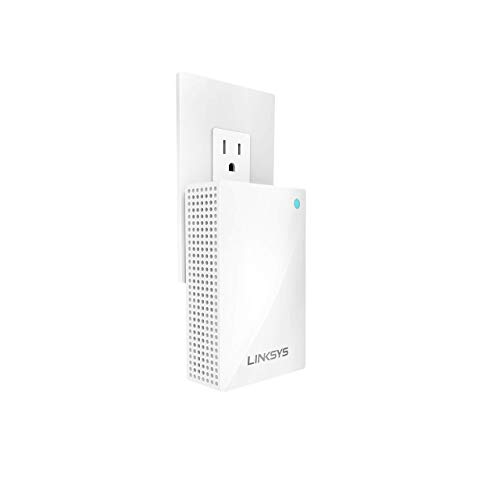
Linksys Velop Wall Plug-in Node
Best for: Extending Velop mesh coverage in corners
- Features
- Mesh
- Intended Use
- Home
- Dimensions
- 3.5 × 2.1 × 4.7 inches
- Weight
- 9.3 ounces
View on Amazon: Linksys Velop Wall Plug-in Node Affiliate link
This is a Linksys Velop wall plug-in node designed to extend your existing whole-home mesh system. It measures 2.1 by 3.5 by 4.7 inches and weighs 9.3 ounces. The device plugs directly into a wall socket, requiring no cables or additional power adapters. It works with the Linksys app for setup. You should use this if you need to cover hard-to-reach areas without running wires.
Pros
- Plugs directly into a wall socket
- No cables required for power
- Compact dimensions fit tight spaces
- Extends existing Velop mesh system
Cons
- Requires a main Velop system to function
- Limited to extending range only
- Only one node per wall outlet
Good fit if
- You have a Linksys Velop mesh system
- You need to cover dead zones in corners
- You want to avoid running power cables
Skip if
- You do not own a Velop system
- You need a standalone router
- You require wired Ethernet backhaul
Verdict: Linksys Velop Wall Plug-in Node is a compact extender for existing Velop systems. It fits buyers who need to fill dead zones in corners without using cables. It does not work as a standalone router.
Specifications side by side
| Spec | Linksys Velop Wall Plug-in Node |
|---|---|
| Features | Mesh |
| Intended Use | Home |
| Dimensions | 3.5 × 2.1 × 4.7 inches |
| Weight | 9.3 ounces |
| Size | WHW01P For US Only |
| Color | For Canada Only |
| Model | MAIN-68992 |
Frequently asked questions
Can I use the Linksys Velop Wall Plug-in Node as a standalone router?
No, this device cannot function as a standalone router. It is designed strictly as an expansion node for existing Linksys Velop whole home Wi-Fi systems. You must already have a primary Velop system in place to integrate this unit. It extends your current network coverage rather than creating a new one from scratch.
What are the physical dimensions of the Wall Plug-in Node?
The unit measures 2.1 inches wide, 4.7 inches high, and 3.5 inches long. These compact dimensions allow it to fit directly into standard wall outlets. The small footprint ensures it does not block adjacent sockets, making it suitable for tight spaces where traditional extenders might be too bulky to install discreetly.
How much does the Linksys Velop Wall Plug-in Node weigh?
The node weighs 9.3 ounces. This lightweight design supports its compact form factor. The low weight helps it remain stable when plugged directly into a wall socket without requiring additional mounting hardware or stands, keeping your installation clean and unobtrusive in your home environment.
Where is this node best placed in my home?
It is best used for extending Velop mesh coverage in corners. The wall-plug design allows you to fill dead zones in areas that are difficult to reach with cables. Plugging it directly into the wall eliminates the need for extra power cords, making it ideal for tight corners or hard-to-reach outlets.
Is this device intended for commercial or home use?
The Linksys Velop Wall Plug-in Node is intended for home use. Its compact size and plug-in design are optimized for residential environments. It is not marketed for heavy commercial loads but is suitable for typical household needs where you want to seamlessly expand your existing whole home Wi-Fi network.
What is the model number for this specific node?
The model number is MAIN-68992. This identifier corresponds to the WHW01P version available for the US market. The listing also notes a color variant for Canada, but the core model remains the same. You should verify this model number to ensure compatibility with your existing Velop system components.