Linksys Dual-Band Wi-Fi 5 Router vs Linksys AX1500 Dual-Band WiFi 6 (2026): Key Differences
As an Amazon Associate we earn from qualifying purchases. Links on this page are affiliate links.
This comparison covers the Linksys E5400 WiFi 5 Dual vs Mesh WiFi 6 router. Both units offer dual-band connectivity and cover up to 1,500 square feet. They share similar physical dimensions and browser-based setup processes. The main difference lies in the underlying technology. One uses the older WiFi 5 standard, while the other utilizes the newer WiFi 6 protocol. This affects speed ratings, device capacity, and overall network efficiency for modern homes.
Key differences
| Aspect | Linksys Dual-Band Wi-Fi 5 Router | Linksys AX1500 Dual-Band WiFi 6 Mesh Router |
|---|---|---|
| Wi-Fi Standard | WiFi 5 | WiFi 6 |
| Speed Rating | AC1200 | AX1500 |
| Device Capacity | 10+ Devices | 20+ Devices |
| Ethernet Ports | 4 Gigabit | not listed |
| Coverage Area | 1,500 Sq. ft | Up to 1,500 sq ft |
Which one should you choose?
Choose Linksys Dual-Band Wi-Fi 5 Router if
- You need a simple, standalone router for a small apartment with few devices.
- You prefer a device with clearly listed Gigabit Ethernet ports for wired connections.
- You want a budget-friendly option that handles basic streaming and browsing.
Choose Linksys AX1500 Dual-Band WiFi 6 Mesh Router if
- You have many smart home devices or multiple users streaming simultaneously.
- You want better performance with modern devices that support WiFi 6.
- You plan to expand your network later using Mesh technology nodes.
Verdict: The Linksys E5400 is suitable for small spaces with light usage and wired port requirements. The Linksys AX1500 is better for larger device counts and future-proofing with WiFi 6. Choose based on your current device load and need for mesh expansion.
Linksys E5400 vs AX1500 Comparison
Wi-Fi standard
The Linksys E5400 uses Wi-Fi 5 technology, delivering AC1200 speeds. This is an older standard that handles basic tasks well but may struggle with heavy modern traffic. The Linksys AX1500 router features Wi-Fi 6, offering AX1500 speeds. Wi-Fi 6 is designed for higher efficiency and better performance in crowded networks. It manages multiple data streams more effectively than Wi-Fi 5. If you want the latest connectivity protocol for future-proofing your home network, the AX1500 is the clear choice. Wi-Fi 5 remains reliable for simple setups, but Wi-Fi 6 provides a tangible upgrade in handling modern device loads.
Device capacity
Linksys rates the E5400 for 10 or more connected devices. This capacity suits small households with a few phones and laptops. The AX1500 router supports 20 or more devices. This double capacity allows for larger smart home ecosystems with many sensors, cameras, and gadgets. Wi-Fi 6 technology helps maintain stability when many devices are active simultaneously. If you have a growing number of connected gadgets, the AX1500 offers significantly more headroom. The E5400 is adequate for minimal setups, but the AX1500 handles denser networks with less congestion and better overall performance.
Ethernet ports
The E5400 includes four Gigabit Ethernet ports for wired connections. This allows you to connect multiple devices like gaming consoles or PCs directly to the router. The AX1500 data does not explicitly list the number of Ethernet ports. When a specific value is missing, you cannot assume it matches the other model. You should check the product details or box contents for the AX1500 port count. If the AX1500 has fewer ports, the E5400 wins for wired connectivity. If it has the same number, it is a tie. Rely on the published specs for the AX1500 to confirm this detail.
Coverage area
Both routers claim coverage for up to 1,500 square feet. The E5400 lists this area clearly in its specifications. The AX1500 also states up to 1,500 square feet of coverage. In terms of raw square footage, they are identical. However, the AX1500 uses Wi-Fi 6, which may help maintain signal quality across that space more effectively than Wi-Fi 5. If your home is exactly 1,500 square feet, both should reach all areas. The difference lies in how well they handle the load within that space. For pure coverage distance, this is a tie.
Mesh capability
The AX1500 is explicitly described as a Mesh WiFi 6 router. It uses Intelligent Mesh technology to eliminate dead zones and expand range by adding nodes. This makes it suitable for building a whole-home mesh system. The E5400 is listed as a standard dual-band router. It does not mention mesh compatibility or node expansion features. If you plan to expand your network later with additional access points, the AX1500 is the only viable option. The E5400 is a standalone unit. For flexibility and whole-home coverage via mesh, the AX1500 has a distinct advantage.
Which Linksys router fits your needs
Users needing parental controls
The Linksys E5400 includes built-in parental controls. You can set time limits and restrict websites on kids' devices. This feature helps you manage internet access safely. The router also supports guest WiFi for up to 10 guests. These tools provide clear management options for families.
Buyers with many connected devices
The Linksys AX1500 supports over 20 devices. This higher capacity handles multiple streams of data simultaneously. It uses Wi-Fi 6 technology for stable connectivity. This standard offers improved performance for gaming and streaming. You get better reliability when many devices are active at once.
Users wanting future-ready tech
The Linksys AX1500 uses Wi-Fi 6 standards. This technology provides higher bandwidth limits and lower latency. It delivers more efficient data transmission for modern devices. The router supports Intelligent Mesh for expanding range. This setup ensures stable connections across your 1,500 square foot home.
Shoppers on a budget
The Linksys E5400 is positioned as an affordable option. It offers dual-band connectivity and gigabit ports. The router handles basic tasks like streaming and browsing well. It includes four Ethernet ports for wired connections. This model provides essential features without the cost of newer standards.
The products compared
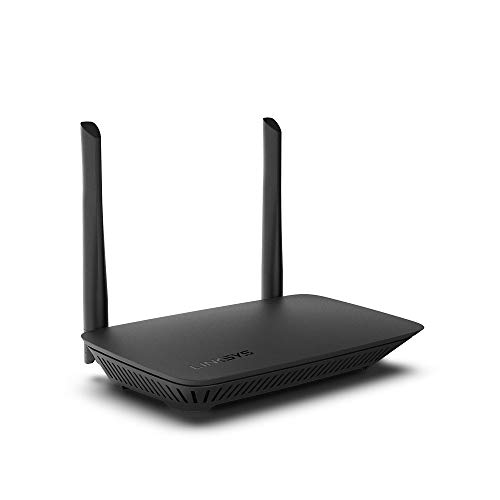
Linksys Dual-Band Wi-Fi 5 Router
Best for: small homes with few devices
- Wi-Fi Standard
- WiFi 5
- Speed Rating
- AC1200
- Frequency Bands
- Dual Band
- Coverage Area
- 1,500 Sq. ft
- Device Capacity
- 10+ Devices
- Max Port Speed
- Gigabit
View on Amazon: Linksys Dual-Band Wi-Fi 5 Router Affiliate link
The Linksys E5400 is a dual-band WiFi 5 router designed for small spaces. It covers up to 1,500 square feet and supports 10 or more devices. With AC1200 speed ratings and four gigabit Ethernet ports, it handles basic streaming and browsing. The browser-based setup simplifies configuration. It includes parental controls and guest network access for household management.
Pros
- Covers 1,500 square feet of space
- Supports 10 or more connected devices
- Includes four gigabit Ethernet ports
- Features built-in parental controls
Cons
- Uses older WiFi 5 standard instead of WiFi 6
- Limited to 1,500 square feet coverage area
- Max capacity is only 10 devices
Good fit if
- You have a small home under 1,500 square feet
- You connect 10 or fewer devices
- You need basic parental controls
Skip if
- You require WiFi 6 speeds
- You need to cover more than 1,500 square feet
- You have more than 10 devices to connect
Verdict: Linksys E5400 Dual-Band WiFi 5 Router suits small apartments with few devices. It provides stable dual-band connectivity for light usage but lacks modern WiFi 6 performance.

Linksys AX1500 Dual-Band WiFi 6 Mesh Router
Best for: small homes with up to 20 devices
- Wi-Fi Standard
- WiFi 6
- Speed Rating
- AX1500
- Frequency Bands
- Dual-Band
- Coverage Area
- Up to 1,500 sq ft
- Device Capacity
- 20+ devices
- Features
- Mesh
View on Amazon: Linksys AX1500 Dual-Band WiFi 6 Mesh Router Affiliate link
The Linksys MR7 is a dual-band WiFi 6 router designed for small spaces. It covers up to 1,500 square feet and supports 20 or more devices. The AX1500 speed rating provides 1.5 Gbps of throughput. It uses Intelligent Mesh technology to help eliminate dead zones. This unit suits users who need reliable connectivity for streaming and gaming in compact homes or apartments.
Pros
- Supports WiFi 6 standard for stable connectivity
- Covers up to 1,500 square feet
- Handles 20 or more connected devices
- Uses Intelligent Mesh technology to expand range
Cons
- Limited to dual-band frequencies only
- AX1500 speed rating is lower than WiFi 6E options
- Browser-based setup lacks a dedicated mobile app in the data
Good fit if
- You need WiFi 6 in a small home under 1,500 sq ft
- You have 20 or fewer devices on your network
- You want to expand your network with mesh nodes later
Skip if
- You require tri-band speeds for large homes
- You have more than 20 devices connected simultaneously
- You need WiFi 6E performance for high-bandwidth tasks
Verdict: Linksys MR7 Dual-Band WiFi 6 Router fits small homes with moderate device counts. It offers solid WiFi 6 performance for basic streaming and gaming but lacks the speed and bands needed for larger spaces.
Specifications side by side
| Spec | Linksys Dual-Band Wi-Fi 5 Router | Linksys AX1500 Dual-Band WiFi 6 Mesh Router |
|---|---|---|
| Wi-Fi Standard | WiFi 5 | WiFi 6 |
| Speed Rating | AC1200 | AX1500 |
| Frequency Bands | Dual Band | Dual-Band |
| Coverage Area | 1,500 Sq. ft | Up to 1,500 sq ft |
| Device Capacity | 10+ Devices | 20+ devices |
| Max Port Speed | Gigabit | not stated |
| Ethernet Ports | 4 | not stated |
| Frequency Band | Dual-Band | Dual-Band |
| Features | Parental Controls | Mesh |
| Dimensions | 2.17 × 8.46 × 7.36 inches | 6.1 × 8.46 × 2.2 inches |
| Size | WIFI 5 | WIFI 6 |
| Color | Black | black |
| Model | E5400 | MR7340-RM2 |
Frequently asked questions
Is the Linksys E5400 suitable for a mesh network setup?
No, the Linksys E5400 is a standalone router. It does not support mesh networking technology. You cannot add it to a mesh system to extend coverage. If you need whole-home coverage, you should choose a dedicated mesh router instead. The E5400 is designed for small spaces with single-unit deployment.
Does the AX1500 router support Wi-Fi 6 standards?
Yes, the Linksys AX1500 supports Wi-Fi 6. This standard offers better performance in crowded networks compared to older technologies. It handles multiple devices more efficiently. This makes it ideal for homes with up to 20 devices. You get improved speed and reduced latency for streaming and gaming.
What is the maximum speed rating for the E5400?
The Linksys E5400 has an AC1200 speed rating. This combines speeds from both its 2.4 GHz and 5 GHz bands. It is suitable for basic internet tasks like web browsing and standard definition streaming. It may not handle heavy 4K video traffic as well as newer models.
Can I use the AX1500 for online gaming?
Yes, the AX1500 is suitable for basic gaming. It offers solid Wi-Fi 6 performance for moderate device counts. The Wi-Fi 6 standard helps reduce lag in busy networks. It fits small homes with up to 20 devices. You get stable connections for casual gaming sessions.
How many devices can the AX1500 handle?
The Linksys AX1500 is best for small homes with up to 20 devices. It manages moderate device counts effectively. The Wi-Fi 6 technology helps maintain performance even with multiple connected gadgets. This includes phones, laptops, and smart home devices. It ensures stable connectivity for everyday use.
Does the E5400 include parental control features?
Yes, the Linksys E5400 includes built-in parental controls. You can set time limits for internet access on specific devices. You can also restrict access to certain websites. These features help you manage internet usage safely for children. It is a useful tool for households with younger users.
Is the AX1500 better for streaming 4K video?
The AX1500 offers better performance for modern streaming than the E5400. Its Wi-Fi 6 standard handles higher bandwidth demands more efficiently. It supports AX1500 speeds for smoother playback. While it lacks the speed for very large spaces, it works well for small homes. You get reliable streaming for multiple devices.