KuWFi Outdoor 4G LTE Router Review (2026): A Spec-Based Look
As an Amazon Associate we earn from qualifying purchases. Links on this page are affiliate links.
This kuwfi 300mbps outdoor 4g lte review covers the KuWFi QC300K-L, a rugged wireless router designed for external use. It connects to cellular networks via a SIM card slot, offering internet access where wired options are unavailable. The device supports up to 32 connected devices simultaneously, making it suitable for small offices or remote homes. Key specifications include a download speed of up to 150 Mbps and upload speeds of 50 Mbps. It also features built-in high-gain antennas to maintain signal stability in challenging environments. This spec-based look explains who benefits from these technical details.
What stands out
- Built-in 5dBi high-gain outdoor antennas for LTE and WiFi signals
- Supports up to 32 WiFi users on a single network
- Compatible with major US 4G LTE bands (B2, B4, B5, B12, B13, B14, B66, B71)
- Includes a SIM card slot for carrier-based internet access
- Compact dimensions: 7.87 inches height by 1.97 inches length
Who it fits
Good fit for
You should consider this router if you need reliable internet in a location without broadband infrastructure. It suits remote offices, construction sites, or rural homes where cellular coverage is strong. The ability to connect 32 devices makes it ideal for small teams or families sharing a single connection. If you already have a SIM card from a compatible carrier, this device provides a straightforward way to extend WiFi coverage outdoors or to connected security cameras.
Who should skip it
You should look elsewhere if you require high-speed gaming or heavy streaming, as the 150 Mbps download limit may bottleneck large file transfers. This unit does not support roaming services, virtual SIM cards, or IoT SIM cards, limiting carrier flexibility. Users in areas with weak 4G signals may experience frequent disconnects. Additionally, you must manually configure APN settings and disable SIM PIN codes, which may not suit those seeking a true plug-and-play experience.
Verdict: The KuWFi QC300K-L offers a practical cellular connectivity solution for small groups in areas with decent 4G coverage. Its spec sheet highlights suitability for remote work rather than high-bandwidth entertainment needs.
Key specs explained
Download speed up to 150mbps
This limit defines the maximum rate at which data moves from the cellular network to your devices. For most users, this speed handles standard web browsing, email, and video streaming on a single screen. It may struggle if multiple devices stream high-definition video simultaneously. You should compare this against wired broadband options, which often offer higher consistent speeds for heavy household usage.
Upload speed up to 50mbps
This value determines how fast your device sends data to the internet. It supports clear video calls, cloud backups, and online gaming without significant lag. If you frequently upload large files or host live streams, this rate provides a stable baseline. It is sufficient for typical remote work tasks. You can compare this metric with other cellular routers to ensure it meets your specific upload needs.
Device Capacity 32
The router can maintain active connections with thirty-two devices at once. This capacity suits small offices or families with several phones, tablets, and smart home gadgets. It prevents congestion when multiple users access the network simultaneously. If you have more than thirty-two devices, you may experience slowdowns or connection drops. Compare this limit with mesh systems that often support many more simultaneous connections for larger homes.
5dBi high Gain outdoor antenna
This antenna design captures cellular signals more effectively than standard internal antennas. It helps maintain a stable connection in areas with weak signal strength or moderate distance from the tower. This feature is particularly useful for rural locations or outdoor installations. You should place the device where it can directly face the nearest cell tower for best results. Compare this with indoor routers that lack external antenna options for weaker signal performance.
Support 4G FDD-LTE: B2/B4/B5/B12/B13/B14/B66/B71
These bands represent the specific frequencies the router uses to connect to 4G networks. Compatibility with these bands ensures the device works with major carriers in North America and parts of Latin America. You must verify your SIM card supports these frequencies to avoid connectivity issues. This list helps you determine if the router matches your local carrier infrastructure. Compare this band support with other routers to ensure regional compatibility.
Physical Design and Build Quality
The KuWFi QC300K-L measures 7.87 inches in height, 1.97 inches in length, and 1.18 inches in width. It weighs 13.4 ounces. The listing identifies the color as QC300K and notes its placement as outdoor. These dimensions suggest a compact, vertical form factor designed for wall mounting or secure placement in exposed areas. The small footprint allows it to fit into tight spaces without obstructing views or access.
According to the listing, the device includes built-in antennas with a 5dBi high gain rating. It features two WiFi antennas and two LTE antennas. This configuration supports external connectivity without requiring separate external aerials. The unit also provides one LAN port, one WAN port, and a SIM card slot interface. This layout prioritizes direct wired connections alongside wireless distribution. You can connect devices via Ethernet for stable links while sharing the remaining bandwidth wirelessly.
The physical design supports its intended use in remote or small business locations. The inclusion of a POE adapter enables easier installation in areas without nearby power outlets. The compact size and integrated antenna system reduce the number of external components that could fail or get damaged. This all-in-one approach simplifies setup for users who need reliable cellular internet in challenging environments. The build appears focused on durability and ease of deployment rather than aesthetic appeal.
Setup And Daily Use Guide
Setting up this router requires a few specific steps before you get online. The device includes a POE adapter, which simplifies installation for outdoor placements by providing power and data over a single cable. You insert a standard SIM card into the dedicated slot. However, the listing notes that this is not always a simple plug-and-play process. You may need to disable the SIM card PIN code and manually configure the APN settings. You can find the correct APN details on your carrier’s official website. Ensure your SIM card is active and compatible with the supported bands. The router does not support roaming, virtual SIM cards, or IoT SIM cards. If you are in a rural area with weak signal coverage, occasional disconnections are normal and expected behavior.
Once configured, the router broadcasts a WiFi signal using its built-in 2x2 WiFi antennas. It can share the network with up to 32 devices simultaneously. This capacity suits small offices or home networks with moderate usage. You can connect devices via the single LAN or WAN port for wired connections, or wirelessly through the 5dBi high-gain outdoor antennas. The device is designed to securely bridge internet access for multiple users in hotels or public spaces. It also supports outside IP cameras, providing stable coverage for security systems. Daily use involves relying on the 4G LTE network, so your experience depends on local carrier signal strength and data allowances.
Before You Buy This Router
You need to verify your SIM card’s frequency bands match the device’s supported LTE bands for your region. The router does not support roaming, virtual SIMs, or IoT cards. You must disable any PIN on the card and configure the APN settings manually. These settings come from your carrier’s website. Without correct APN data, the device will not connect. The unit supports up to thirty-two connected devices. This capacity suits small offices or homes with limited usage. It is not designed for heavy multi-screen streaming or large households. You should place it where cellular signal is strong. Weak rural coverage may cause disconnections. This is normal behavior for cellular routers. Consider this option only if wired internet is unavailable. It fits alongside mesh systems as a backup or primary source for remote locations. Do not expect plug-and-play simplicity. You must handle the initial configuration yourself. Ensure your carrier provides standard postpaid or prepaid plans compatible with this hardware.
Check before you buy
- Confirm your SIM card’s LTE bands match local networks.
- Disable PIN codes on your SIM before insertion.
- Find your carrier’s APN settings on their website.
- Ensure your SIM is a standard plan, not IoT.
The product at a glance
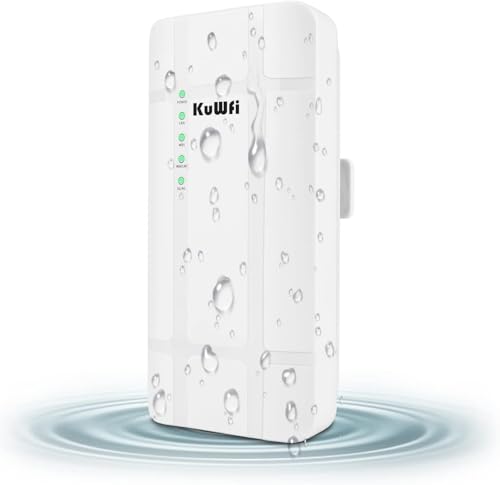
KuWFi Outdoor 4G LTE Router
Best for: remote offices needing basic outdoor 4G internet
- Device Capacity
- 32 WiFi users
- PoE Support
- PoE
- Features
- SIM Card Slot
- Intended Use
- Outdoors
- Dimensions
- 1.97 × 1.18 × 7.87 inches
- Weight
- 13.4 ounces
View on Amazon: KuWFi Outdoor 4G LTE Router Affiliate link
This KuWFi router provides 4G LTE internet via a SIM card slot for outdoor use. It supports download speeds up to 150 Mbps and upload speeds up to 50 Mbps. The device includes a built-in 5dBi high-gain antenna and connects up to 32 WiFi users. It features one LAN and one WAN port. This unit is designed for small businesses or remote offices needing wireless connectivity where wired internet is unavailable.
Pros
- Supports 4G FDD-LTE bands B2, B4, B5, B12, B13, B14, B66, and B71
- Built-in 5dBi high-gain outdoor antenna for improved signal reception
- Connects up to 32 WiFi users simultaneously
- Includes POE adapter for easy installation
Cons
- Maximum download speed is limited to 150 Mbps
- Does not support roaming, virtual SIM cards, or IoT SIM cards
- Requires manual APN configuration and SIM PIN disabling for setup
Good fit if
- You need internet in a remote office or outdoor location without wired access
- You require a router that supports Power over Ethernet (POE)
- You need to connect up to 32 devices to the network
Skip if
- You require speeds higher than 150 Mbps download
- You need to use a roaming or IoT SIM card
- You want a plug-and-play setup without configuring APN settings
Verdict: KuWFi Outdoor 4G LTE Router offers basic 4G connectivity with a POE adapter for outdoor sites. It fits remote offices needing simple wireless internet for up to 32 devices, provided you can configure the APN manually.
Specifications side by side
| Spec | KuWFi Outdoor 4G LTE Router |
|---|---|
| Device Capacity | 32 WiFi users |
| PoE Support | PoE |
| Features | SIM Card Slot |
| Intended Use | Outdoors |
| Placement | Outdoor |
| Dimensions | 1.97 × 1.18 × 7.87 inches |
| Weight | 13.4 ounces |
| Color | QC300K |
| Model | QC300K-L |
Frequently asked questions
Can I use this router for a remote cabin?
Yes, the KuWFi Outdoor 4G LTE Router is designed for outdoor placement. It supports up to 32 connected devices, making it suitable for small remote offices or cabins. The included POE adapter simplifies installation by providing power and data over a single cable. This setup works well where wired internet is unavailable.
Does it support 5G networks?
No, this device is a 4G LTE router. It does not support 5G networks. The maximum download speed is limited to 150 Mbps. This speed is sufficient for standard web browsing, email, and video streaming on a single screen, but it will not provide the higher speeds associated with 5G technology.
Is the device waterproof?
The listing identifies the placement as outdoor, indicating it is built for external use. It features a rugged design to withstand outdoor conditions. However, specific IP rating details are not provided in the product data. You should ensure it is installed in a location that protects it from direct heavy rain or extreme weather.
How many devices can it connect to?
The router supports up to 32 connected devices simultaneously. This capacity is adequate for small groups or remote workspaces. It allows multiple users to access the internet concurrently. Keep in mind that performance may vary based on the cellular signal strength and the number of active connections.
Can I use a virtual SIM card?
No, the router does not support virtual SIMs or IoT cards. You must use a standard physical SIM card. Before inserting the card, you need to disable any PIN protection. You also must manually configure the APN settings to ensure proper connectivity with your cellular provider.
What are the physical dimensions?
The KuWFi QC300K-L measures 7.87 inches in height, 1.97 inches in length, and 1.18 inches in width. It weighs 13.4 ounces. These compact dimensions allow for easy mounting in outdoor locations. The vertical orientation helps it fit neatly into tight spaces while maintaining a sturdy presence.
Does it come with a power adapter?
Yes, the device includes a POE (Power over Ethernet) adapter. This component simplifies installation by delivering both power and data through a single cable. You do not need a separate power source for the router itself. This feature is particularly useful for outdoor placements where electrical outlets are scarce.