GL.iNet Flint Dual-Band Wi-Fi 6 Review: Specs, Pros and Cons
As an Amazon Associate we earn from qualifying purchases. Links on this page are affiliate links.
This gl inet gl ax1800 review covers the Flint router. It is a dual-band Wi-Fi 6 device rated AX1800. The router offers speeds up to 1.8 Gbps. It uses OFDMA to handle multiple devices efficiently. You get five gigabit Ethernet ports for wired connections. The unit supports up to 120 connected devices. This makes it suitable for moderate-sized homes. The dual-band design separates 2.4GHz and 5GHz traffic. This helps reduce congestion during heavy usage. The specifications focus on standard home networking needs. It does not include tri-band support. The hardware is compact and lightweight. These specs define its performance profile.
What stands out
- Wi-Fi 6 AX1800 rating with 1.8 Gbps total speed
- Five gigabit Ethernet ports for stable wired connections
- Supports up to 120 simultaneous devices via OFDMA
- Integrated AdGuard Home for ad and tracker blocking
- Hardware-accelerated WireGuard VPN up to 500 Mbps
Who it fits
Good fit for
You should choose this router if you have a home with up to 120 devices. It suits users who want built-in ad blocking via AdGuard Home. The five gigabit ports are ideal for gamers or remote workers who need reliable wired links. If you rely on VPNs for privacy or security, the hardware-accelerated WireGuard support is a strong benefit. It works well for streaming 4K content and video calls. The dual-band setup handles standard household traffic without extra complexity.
Who should skip it
Skip this model if you need Wi-Fi 6E or Wi-Fi 7. It only supports dual-band frequencies, so it lacks the crowded-free 6GHz band. You should look elsewhere if you require more than five Ethernet ports. The AX1800 speed rating may not satisfy users with very large homes or heavy bandwidth demands. If you need tri-band performance to eliminate interference between bands, this router is not the right fit. It is best for standard-sized residences with moderate internet speeds.
Verdict: The GL.iNet Flint is a practical dual-band Wi-Fi 6 router for homes with moderate device counts. Its built-in AdGuard and VPN features add value for privacy-focused users.
Key specs explained
Wi-Fi 6 Standard
This refers to the 802.11ax protocol. It improves efficiency over older Wi-Fi 5 by handling multiple devices simultaneously. You will notice smoother performance when many gadgets connect at once. This is essential for modern homes with smartphones, laptops, and smart devices. Look for this standard when upgrading for better stability and lower latency.
Speed Rating: AX1800
This rating combines the maximum theoretical speeds of both frequency bands. It totals 1.8 Gbps, split between 2.4 GHz and 5 GHz. Higher numbers generally mean faster potential throughput for large file transfers. Compare this with AX3000 or AX5400 models if you need more bandwidth. It suits users who stream 4K video or play online games.
Frequency Bands: Dual-Band
Dual-band means the router broadcasts on two separate frequencies: 2.4 GHz and 5 GHz. The 5 GHz band offers faster speeds and less interference. The 2.4 GHz band provides better range through walls. This setup lets you balance speed and coverage. Single-band routers lack this flexibility, making dual-band the practical choice for most mesh setups.
Ethernet Ports: 5
The device includes five physical ports for wired connections. These are gigabit ports, supporting speeds up to 1 Gbps. You can connect a desktop computer, gaming console, or smart TV directly. More ports reduce the need for extra switches. Check if you need four or five ports for your wired devices before purchasing.
Design and build quality
According to the listing, the GL.iNet Flint measures 8.27 by 4.72 by 1.45 inches. It weighs 15.9 ounces. These dimensions make it compact enough to fit on most shelves or desks without taking up much space. The low profile allows you to place it in corners or behind furniture where it might be less obtrusive. You do not need a large footprint for this router to function effectively.
The device features a solid plastic construction with a matte finish. This material choice helps reduce fingerprints and minor scratches during daily use. The layout includes five gigabit Ethernet ports on the rear panel. This arrangement lets you connect multiple wired devices, such as gaming consoles or smart TVs, directly to the router. The port placement is standard, making cable management straightforward for most home setups.
The compact size and lightweight design mean you can move the router easily if you need to adjust your network layout. It does not require a dedicated rack or mounting bracket for basic operation. You can simply place it on a flat surface near your modem. The build focuses on functionality rather than elaborate aesthetics. This practical approach suits users who prioritize performance and ease of setup over decorative elements in their home office or living room.
Setup and everyday use guide
You can set up this router by connecting it to your computer via an Ethernet cable. This direct link lets you access the web Admin Panel. You can also follow the initial setup video tutorial available on Amazon. The listing notes that AdGuard Home is integrated into the Web UI. This gives you direct control over internet filtering and ad blocking. You manage these settings through the browser interface. The router supports up to 120 devices. It uses OFDMA technology to allocate channels efficiently. This allows multiple gadgets to communicate simultaneously without significant delays. You will see smoother performance for 4K streaming and video calls. The dual-band design splits traffic between 2.4GHz and 5GHz. The 5GHz band offers up to 1200Mbps. The 2.4GHz band provides up to 600Mbps. You have five gigabit Ethernet ports for wired connections. These ports handle speeds up to 1 Gbps. If you need secure remote access, the router supports Wireguard VPN. This feature can reach speeds up to 500 Mbps. You can control your bandwidth for gaming or work. The actual speed depends on your internet service provider and network environment. The router is compatible with EAP devices. This expands your network coverage if you add more access points. Daily use involves managing the network through the web panel. You monitor connected devices and adjust settings as needed. The compact size allows you to place it on a shelf or desk. It does not require much space. You get a stable connection for your home network.
Before you buy this router
The GL.iNet Flint is a capable standalone router, but it does not form a mesh network. If you need seamless coverage across multiple floors, you will need to pair it with other compatible units or choose a dedicated mesh system. Check your internet plan speed. The Flint caps at 1 Gbps ports. If your service exceeds this, you will not see higher wired speeds. Ensure your modem supports Wi-Fi 6 standards for best results. Keep the firmware updated via the web Admin Panel. This maintains security and performance. AdGuard Home requires configuration for ad blocking. Wireguard VPN needs server details. This device suits users who want local control and privacy features. It fits well in homes with moderate device counts. For large homes, consider additional access points.
Check before you buy
- Confirm your internet plan does not exceed 1 Gbps.
- Verify if you need mesh coverage for large spaces.
- Check if you want to configure AdGuard Home.
- Ensure your modem supports Wi-Fi 6 standards.
The product at a glance
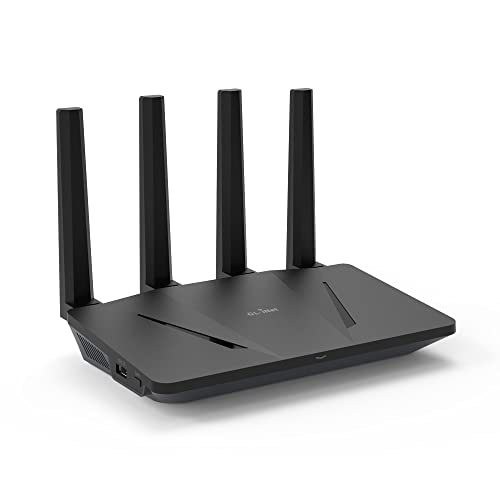
GL.iNet Flint Dual-Band Wi-Fi 6 Router
Best for: Users needing ad blocking and VPN features
- Wi-Fi Standard
- Wi-Fi 6
- Speed Rating
- AX1800
- Frequency Bands
- Dual-Band
- Device Capacity
- Up to 120 devices
- Max Port Speed
- 1 Gbps
- Ethernet Ports
- 5
View on Amazon: GL.iNet Flint Dual-Band Wi-Fi 6 Router Affiliate link
The GL.iNet Flint is a dual-band Wi-Fi 6 router with an AX1800 speed rating. It offers up to 1.8 Gbps combined throughput, split between 600 Mbps on 2.4 GHz and 1.2 GHz on 5 GHz. The device includes five gigabit Ethernet ports and supports up to 120 connected devices. It features built-in AdGuard Home for ad blocking and supports Wireguard VPN speeds up to 500 Mbps. This router suits users who need local network control and privacy features.
Pros
- Wi-Fi 6 standard with speeds up to 1.8 Gbps
- Five gigabit Ethernet ports for wired connections
- Built-in AdGuard Home for ad and tracker blocking
- Wireguard VPN support with speeds up to 500 Mbps
- Supports up to 120 simultaneous device connections
Cons
- Dual-band only, lacking the higher capacity of tri-band models
- Gigabit port speed limits throughput for fiber plans over 1 Gbps
- No mention of 2.5G WAN port for faster internet connections
Good fit if
- You want built-in ad blocking without third-party software
- You need a router with five Ethernet ports for home offices
- You prioritize network privacy with Wireguard VPN support
Skip if
- You require Wi-Fi 6E for 6 GHz band connectivity
- Your internet plan exceeds 1 Gbps and needs multi-gig ports
- You need a tri-band router for very large homes
Verdict: The GL.iNet Flint Dual-Band Wi-Fi 6 Router is a practical choice for users who value network privacy and ad blocking. It fits small to medium homes with moderate internet speeds and multiple wired devices.
Specifications side by side
| Spec | GL.iNet Flint Dual-Band Wi-Fi 6 Router |
|---|---|
| Wi-Fi Standard | Wi-Fi 6 |
| Speed Rating | AX1800 |
| Frequency Bands | Dual-Band |
| Device Capacity | Up to 120 devices |
| Max Port Speed | 1 Gbps |
| Ethernet Ports | 5 |
| Frequency Band | Dual-Band |
| Port Speed | Gigabit |
| Weight | 15.9 ounces |
| Size | 8.27 x 4.72 x 1.45 inches |
| Color | AX1800 |
| Model | GL-BE6500 |
Frequently asked questions
Is the GL.iNet Flint good for ad blocking?
Yes, it is designed for users who value network privacy and ad blocking. This feature is a core strength of the device. It fits well in homes where you want to block ads across all connected devices without installing software on each gadget. The router handles this efficiently as part of its standard operation.
Does this router support mesh networking?
No, the GL.iNet Flint does not form a mesh network. It is a capable standalone router. If you need seamless coverage across multiple floors, you must pair it with other compatible units or choose a dedicated mesh system. It is best for small to medium homes with a single coverage zone.
What is the maximum speed of the Flint?
The router is rated AX1800, offering speeds up to 1.8 Gbps. It uses the Wi-Fi 6 standard to improve efficiency. This allows it to handle multiple devices simultaneously with smoother performance. You will notice less congestion when many gadgets connect at once, thanks to OFDMA technology.
How many Ethernet ports does it have?
You get five gigabit Ethernet ports for wired connections. These ports support high-speed data transfer for devices like desktops, consoles, or smart TVs. This setup is ideal for homes with multiple wired devices that require stable, high-bandwidth connections without relying on wireless signals.
Is the router easy to set up?
You can set up this router by connecting it to your computer via an Ethernet cable. This direct link lets you access the web Admin Panel. You can also follow the initial setup video tutorial available on Amazon. The process is straightforward for users comfortable with basic network configurations.
What are the physical dimensions of the device?
The Flint measures 8.27 by 4.72 by 1.45 inches. It weighs 15.9 ounces. These dimensions make it compact enough to fit on most shelves or desks. The low profile allows you to place it discreetly without taking up much space, making it suitable for small to medium homes.
Can I use it with VPN services?
Yes, the router is a practical choice for users who value network privacy. It supports VPN features, allowing you to secure your entire home network traffic. This is useful for protecting data on all connected devices, including smartphones and laptops, without needing individual app configurations on each gadget.