What Is Frequency Band? A Guide for Mesh Wifi Systems Buyers (2026)
As an Amazon Associate we earn from qualifying purchases. Links on this page are affiliate links.
Frequency Band Explained for Buyers
A frequency band is a specific range of radio waves that your mesh wifi system uses to talk to your devices. Think of it like lanes on a highway. More lanes mean more traffic can flow at once without slowing down. Your router and your phone both use these invisible waves to send data back and forth.
In the mesh wifi world, you will mostly see two labels on product listings: dual-band and tri-band. This label tells you how many separate radio channels the system has. It is a key spec because it directly impacts how many devices can connect smoothly at the same time.
Dual-band systems use two frequency bands. The first is 2.4 gigahertz. This band travels through walls well and covers a larger area. However, it is slower and gets crowded easily. The second band is 5 gigahertz. It is much faster but has a shorter range. Most dual-band mesh systems split their traffic between these two options. They try to keep the fast 5 gigahertz band clear for streaming and gaming.
Tri-band systems add a third lane. This extra band is also 5 gigahertz. It is dedicated specifically to communication between the main router and the satellite nodes. This is called the backhaul. By giving the nodes their own private highway, tri-band systems keep your devices off that link. This preserves speed for your actual internet traffic. You get better performance when many people are online.
Understanding frequency band explained helps you choose the right gear. If you have few devices, dual-band is often enough. If you have many smart home gadgets or stream 4k video, tri-band provides more headroom. Check the listing for these terms before you buy. The spec tells you exactly how your network handles load.
Dual-Band and Tri-Band Options
Dual-Band
Dual-band systems operate on two frequency ranges: 2.4 GHz and 5 GHz. The 2.4 GHz band offers wider coverage and better wall penetration but slower speeds. The 5 GHz band provides faster data rates over shorter distances. Devices share both bands, which can cause congestion when many gadgets connect simultaneously. This setup suits smaller homes or users with moderate internet plans. It is a cost-effective choice for basic streaming and browsing. The TP-Link Deco X50-Outdoor is a dual-band example. It extends coverage to patios using these two bands. Buyers seeking Wi-Fi 7 efficiency without tri-band redundancy may prefer this. It balances price and performance for standard household needs.
Tri-Band
Tri-band systems add a third frequency, typically the 6 GHz band, to the standard 2.4 GHz and 5 GHz ranges. This extra band often serves as a dedicated backhaul for communication between mesh nodes. This keeps client devices off the backhaul channel, reducing congestion and maintaining speed. The 6 GHz band offers high capacity and low interference, ideal for dense environments. It suits large homes with many connected devices or users with multi-gig internet plans. The Amazon eero Pro 7 is a tri-band Wi-Fi 7 example. It delivers high-speed performance for demanding internet plans. The TP-Link Deco XE75 also uses this layout. It provides wide coverage for households ready to upgrade to Wi-Fi 6E. This option maximizes throughput for heavy users.
Is Tri-Band Worth The Upgrade
Who needs it
You should consider tri-band if you have many devices connected simultaneously or run bandwidth-heavy tasks. Tri-band systems add a third radio, typically another 5 GHz band, dedicated to backhaul communication between nodes. This dedicated lane prevents your main network traffic from competing with the signal linking your mesh points together. If you stream 4K video, host large video calls, or download large files while others are gaming, this separation keeps performance stable. It is ideal for larger homes where signal loss between nodes would otherwise throttle speeds. By offloading inter-node communication to its own frequency, you preserve maximum bandwidth for your actual devices. This setup reduces congestion and maintains consistent speeds across the entire mesh network, even during peak usage hours.
Who can skip it
You can likely skip tri-band if you have a smaller home or fewer connected devices. Dual-band systems handle most standard household activities well. If you only browse the web, check email, or stream standard definition video, the extra band offers little visible benefit. The cost difference often does not justify the marginal gain for light users. Instead, prioritize strong single-band performance and good node placement. Focus on ensuring your primary 5 GHz band covers your main living areas effectively. For most apartments or small houses, a well-placed dual-band system provides sufficient coverage and speed. Do not overpay for hardware you will not utilize. Stick to dual-band unless you specifically notice slowdowns during heavy usage, which indicates a need for more capacity rather than just more bands.
Frequency Band Glossary
2.4 GHz Band
The lower frequency range offering wider coverage and better wall penetration. It supports more devices but delivers slower speeds, making it ideal for smart home gadgets and distant rooms.
5 GHz Band
The higher frequency range providing faster data rates over shorter distances. It handles high-bandwidth tasks like streaming and gaming better, though it struggles more with physical obstructions than lower bands.
Tri-Band System
A mesh setup using three radios. It typically adds a dedicated third band for backhaul traffic between nodes, keeping your main network lanes free for device connections and improving overall performance.
Backhaul
The communication link between mesh nodes. A dedicated backhaul band ensures node-to-node data transfer does not compete with your devices, maintaining stable speeds throughout your home network coverage area.
Dual-Band System
A mesh setup using two radios on the 2.4 GHz and 5 GHz bands. All devices and node communications share these two lanes, which is cost-effective but may cause congestion in larger homes.
Frequency Range
The specific slice of radio spectrum used for wireless communication. Different bands have unique propagation characteristics, affecting how far signals travel and how well they penetrate walls and other obstacles in your home.
Channel Width
The bandwidth of a single frequency channel. Wider channels allow more data to flow at once, increasing speed, but they may overlap with neighboring networks, potentially causing interference and reduced stability.
Quick picks
| # | Product | Best for | Price |
|---|---|---|---|
| 1 | TP-Link Deco Outdoor WiFi 6 Mesh Extender | extending Deco mesh to outdoor spaces | Check price of TP-Link Deco Outdoor WiFi 6 Mesh Extender on Amazon |
| 2 | TP-Link Deco Tri-Band WiFi 6E 2-Pack | Large homes with many Wi-Fi 6E devices | Check price of TP-Link Deco Tri-Band WiFi 6E 2-Pack on Amazon |
| 3 | Amazon eero 7 Dual-Band Mesh 3-Pack | large homes with fast internet plans | Check price of Amazon eero 7 Dual-Band Mesh 3-Pack on Amazon |
| 4 | Amazon eero Pro 7 Tri-Band Mesh System (3-Pack) | Large homes with high-speed internet plans | Check price of Amazon eero Pro 7 Tri-Band Mesh System (3-Pack) on Amazon |
| 5 | TP-Link Deco Dual-Band WiFi 7 2-Pack | Wi-Fi 7 homes under 4,500 sq ft | Check price of TP-Link Deco Dual-Band WiFi 7 2-Pack on Amazon |
| 6 | TP-Link Deco Tri-Band Wi-Fi 7 3-Pack | large homes with multi-gig internet plans | Check price of TP-Link Deco Tri-Band Wi-Fi 7 3-Pack on Amazon |
Our 6 picks

TP-Link Deco Outdoor WiFi 6 Mesh Extender
Best for: extending Deco mesh to outdoor spaces
- Frequency Band
- Dual-Band (what this guide is about)
- Wi-Fi Standard
- WiFi 6
- Speed Rating
- AX3000
- Frequency Bands
- Dual Band
- Pack Size
- 1-Pack
- Port Speed
- Gigabit
View on Amazon: TP-Link Deco Outdoor WiFi 6 Mesh Extender Affiliate link
This is a TP-Link Deco X50-Outdoor add-on extender for mesh Wi-Fi systems. It uses Wi-Fi 6 technology on dual-band frequencies with an AX3000 speed rating. The unit is designed for outdoor placement, featuring waterproof and dustproof construction. It connects via gigabit Ethernet ports and supports PoE power. You can use it to extend your existing Deco mesh network to patios or guest houses. It includes basic security features through the Deco app.
Pros
- IP67-rated waterproof and dustproof design for outdoor use
- Supports 802.3at PoE for flexible power installation
- Dual-band Wi-Fi 6 with AX3000 speed rating
- Integrates with existing TP-Link Deco mesh systems
Cons
- Limited to dual-band Wi-Fi 6, lacking Wi-Fi 6E or 7 bands
- Only includes gigabit ports, not multi-gigabit speeds
- Sold as a single add-on unit, not a complete mesh pack
Good fit if
- You need to extend mesh Wi-Fi to an outdoor area
- You already own a TP-Link Deco mesh system
- You want a weatherproof extender with PoE support
Skip if
- You need a complete mesh system starter pack
- You require Wi-Fi 7 speeds or tri-band connectivity
- You are building a mesh network from scratch
Verdict: TP-Link Deco X50-Outdoor AX3000 is a specialized outdoor extender for existing Deco users. It fits buyers who need reliable weatherproof coverage for patios or gardens. It does not suit those seeking a new primary mesh router or the latest Wi-Fi 7 standards.
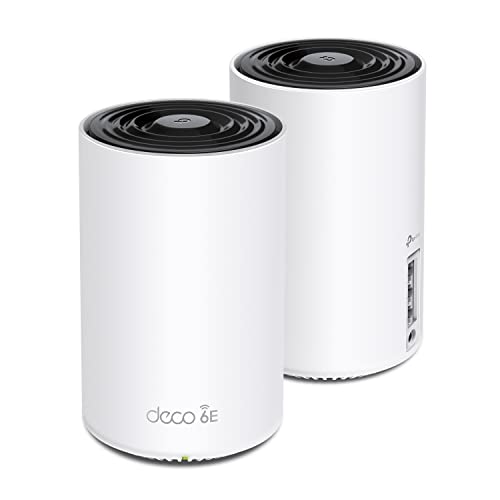
TP-Link Deco Tri-Band WiFi 6E 2-Pack
Best for: Large homes with many Wi-Fi 6E devices
- Frequency Band
- Tri-Band (what this guide is about)
- Wi-Fi Standard
- WiFi 6E
- Speed Rating
- AXE5400
- Coverage Area
- up to 5500 Sq.Ft
- Frequency Bands
- Tri-Band
- Pack Size
- 2-Pack
View on Amazon: TP-Link Deco Tri-Band WiFi 6E 2-Pack Affiliate link
The TP-Link Deco XE75 is a Wi-Fi 6E tri-band mesh system covering up to 5,500 square feet. It supports 200 devices with a total speed rating of AXE5400. The dedicated 6 GHz band acts as the backhaul, reducing congestion on the 5 GHz and 2.4 GHz bands. This setup suits larger homes needing high capacity and stable connections for many devices simultaneously.
Pros
- Tri-band Wi-Fi 6E architecture for reduced interference
- Dedicated 6 GHz band serves as the backhaul
- Supports up to 200 connected devices
- Covers areas up to 5,500 square feet
- Includes HomeShield for network security and parental controls
Cons
- Larger physical footprint at 6.67 inches tall
- Heavier build at 2.69 pounds per unit
- Requires Wi-Fi 6E devices to utilize the 6 GHz band
Good fit if
- You have a large home over 2,500 square feet
- You own many Wi-Fi 6E capable devices
- You need a dedicated backhaul band for stability
Skip if
- You only have older Wi-Fi 5 devices
- You have a small apartment under 1,500 square feet
- You prefer a more compact single-node design
Verdict: TP-Link Deco XE75 Tri-Band Mesh System is ideal for large households with many connected devices that benefit from the dedicated 6 GHz backhaul. It delivers high capacity and wide coverage for users ready to upgrade to Wi-Fi 6E.

Amazon eero 7 Dual-Band Mesh 3-Pack
Best for: large homes with fast internet plans
- Frequency Band
- Dual-Band (what this guide is about)
- Wi-Fi Standard
- Wi-Fi 7
- Speed Rating
- 1.8 Gbps
- Coverage Area
- 6,000 sq. ft.
- Frequency Bands
- Dual-Band
- Pack Size
- 3-Pack
View on Amazon: Amazon eero 7 Dual-Band Mesh 3-Pack Affiliate link
The Amazon eero 7 is a dual-band Wi-Fi 7 mesh system sold as a 3-pack. It supports internet plans up to 2.5 Gbps and covers up to 6,000 sq. ft. with a capacity for 120+ devices. You get two auto-sensing 2.5 GbE ports and wireless speeds up to 1.8 Gbps. This setup suits larger homes needing reliable Wi-Fi 7 coverage with future-proof ports.
Pros
- Wi-Fi 7 standard with dual-band configuration
- Supports internet plans up to 2.5 Gbps
- Covers up to 6,000 sq. ft.
- Handles 120+ connected devices
- Includes two 2.5 GbE ports
Cons
- Dual-band only, lacking a dedicated backhaul band
- No mention of Ethernet backhaul support
- Advanced security features require an optional subscription
Good fit if
- You want Wi-Fi 7 performance in a larger home
- You have internet speeds up to 2.5 Gbps
- You need coverage for over 100 devices
Skip if
- You require tri-band speeds for heavy traffic
- You need a dedicated backhaul channel
- You want advanced security without a subscription
Verdict: Amazon eero 7 3-Pack Dual-Band is a solid choice for users with fast internet plans who need wide coverage. It fits homes up to 6,000 sq. ft. that prioritize Wi-Fi 7 efficiency over tri-band redundancy.

Amazon eero Pro 7 Tri-Band Mesh System (3-Pack)
Best for: Large homes with high-speed internet plans
- Frequency Band
- Tri-Band (what this guide is about)
- Wi-Fi Standard
- Wi-Fi 7
- Speed Rating
- 3.9 Gbps
- Coverage Area
- 6,000 sq ft
- Frequency Bands
- Tri-Band
- Pack Size
- 3-Pack
View on Amazon: Amazon eero Pro 7 Tri-Band Mesh System (3-Pack) Affiliate link
The eero Pro 7 is a tri-band Wi-Fi 7 mesh system designed for homes up to 6,000 square feet. It supports internet plans up to 5 Gbps with wireless speeds reaching 3.9 Gbps. The system includes two auto-sensing 5 GbE ports and handles over 600 devices. It uses multi-link operation for reliability. This setup suits users with high-bandwidth needs or large spaces requiring consistent coverage across multiple floors.
Pros
- Tri-band Wi-Fi 7 standard with multi-link operation
- Supports internet plans up to 5 Gbps
- Two auto-sensing 5 GbE Ethernet ports
- Covers up to 6,000 square feet
- Handles 600+ connected devices
Cons
- Advanced security features require an optional eero Plus subscription
- Larger physical footprint at 7.09 inches tall
- Base price is higher due to 3-pack configuration
Good fit if
- You need coverage for a large home up to 6,000 sq. ft.
- You subscribe to internet plans exceeding 1 Gbps
- You have over 200 devices on your network
Skip if
- You only need coverage for a small apartment under 1,500 sq. ft.
- You want to avoid monthly subscription fees for security features
- You are on a tight budget and need a single unit
Verdict: eero Pro 7 Tri-Band Wi-Fi 7 3-Pack delivers high-speed Wi-Fi 7 performance for large homes with demanding internet plans. It is the right choice for users who need extensive coverage and high device capacity without dead spots.

TP-Link Deco Dual-Band WiFi 7 2-Pack
Best for: Wi-Fi 7 homes under 4,500 sq ft
- Frequency Band
- Dual-Band (what this guide is about)
- Wi-Fi Standard
- WiFi 7
- Speed Rating
- BE3600
- Coverage Area
- 4,500 sq. ft
- Frequency Bands
- Dual-Band
- Pack Size
- 2-Pack
View on Amazon: TP-Link Deco Dual-Band WiFi 7 2-Pack Affiliate link
The Deco 7 BE23 is a dual-band Wi-Fi 7 mesh system with a 2-pack configuration. It covers up to 4,500 square feet and supports 150 devices. Each node includes two 2.5 Gbps ports for wired connections. The system uses Multi-Link Operation for stable backhaul. It suits homes needing modern Wi-Fi 7 features without the cost of tri-band models.
Pros
- Wi-Fi 7 standard with Multi-Link Operation
- Two 2.5 Gbps ports per node
- Covers up to 4,500 square feet
- Supports 150 connected devices
Cons
- Dual-band architecture limits wireless backhaul bandwidth
- No dedicated tri-band radio for backhaul traffic
- Single 2.5 Gbps port may bottleneck gigabit+ internet
Good fit if
- You want Wi-Fi 7 features on a budget
- You have a multi-gig internet connection
- You need coverage for a medium-sized home
Skip if
- You require tri-band performance for heavy wireless backhaul
- You have a very large home over 4,500 sq ft
- You need dedicated backhaul for many wireless devices
Verdict: TP-Link Deco 7 BE23 Dual-Band offers Wi-Fi 7 speed and 2.5 Gbps ports for homes under 4,500 square feet. It fits buyers who want modern standards without tri-band costs.

TP-Link Deco Tri-Band Wi-Fi 7 3-Pack
Best for: large homes with multi-gig internet plans
- Frequency Band
- Tri-Band (what this guide is about)
- Wi-Fi Standard
- Wi-Fi 7
- Speed Rating
- BE14000
- Coverage Area
- Up to 8,100 sq. ft.
- Frequency Bands
- Tri-Band
- Pack Size
- 3-Pack
View on Amazon: TP-Link Deco Tri-Band Wi-Fi 7 3-Pack Affiliate link
The TP-Link Deco 7 Pro BE14000 is a Wi-Fi 7 mesh system that uses tri-band architecture for high throughput. It covers up to 8,100 square feet and supports over 200 devices. Each unit includes a 10 Gbps port, a 2.5 Gbps port, and a 1 Gbps port. This setup handles multi-gig internet plans and wired backhaul. It suits large homes with many connected devices and high-speed internet connections.
Pros
- Wi-Fi 7 standard with 8-stream tri-band design
- 10 Gbps WAN/LAN port for multi-gig connectivity
- Coverage up to 8,100 square feet
- Supports over 200 simultaneous devices
Cons
- Large physical footprint at 6.93 inches in length
- Heavier build at 5.09 pounds per unit
- No mention of Bluetooth or USB-C ports
Good fit if
- You have internet speeds exceeding 1 Gbps
- You need coverage for a large home over 8,000 square feet
- You connect more than 200 devices to your network
Skip if
- You live in a small apartment under 1,500 square feet
- You only have standard gigabit internet plans
- You prefer compact, low-profile router designs
Verdict: TP-Link Deco 7 Pro BE14000 Tri-Band is a high-capacity mesh system for large homes with multi-gig internet. It delivers maximum throughput for heavy users who need extensive coverage and device support.
Specifications side by side
| Spec | TP-Link Deco Outdoor WiFi 6 Mesh Extender | TP-Link Deco Tri-Band WiFi 6E 2-Pack | Amazon eero 7 Dual-Band Mesh 3-Pack | Amazon eero Pro 7 Tri-Band Mesh System (3-Pack) | TP-Link Deco Dual-Band WiFi 7 2-Pack | TP-Link Deco Tri-Band Wi-Fi 7 3-Pack |
|---|---|---|---|---|---|---|
| Wi-Fi Standard | WiFi 6 | WiFi 6E | Wi-Fi 7 | Wi-Fi 7 | WiFi 7 | Wi-Fi 7 |
| Speed Rating | AX3000 | AXE5400 | 1.8 Gbps | 3.9 Gbps | BE3600 | BE14000 |
| Coverage Area | not stated | up to 5500 Sq.Ft | 6,000 sq. ft. | 6,000 sq ft | 4,500 sq. ft | Up to 8,100 sq. ft. |
| Frequency Bands | Dual Band | Tri-Band | Dual-Band | Tri-Band | Dual-Band | Tri-Band |
| Pack Size | 1-Pack | 2-Pack | 3-Pack | 3-Pack | 2-Pack | 3-Pack |
| Port Speed | Gigabit | not stated | 2.5 Gbps | 5 Gbps | 2.5 Gbps | 10 Gbps |
| Device Capacity | not stated | 200 devices | 120+ | 600+ | 150 devices | Over 200 devices |
| Frequency Band | Dual-Band | Tri-Band | Dual-Band | Tri-Band | Dual-Band | Tri-Band |
| Use Case | not stated | Gaming, Streaming | not stated | not stated | not stated | not stated |
| Features | Mesh | Mesh, WPA3 | Mesh | Mesh | VPN, Mesh, Seamless Roaming | Mesh, Seamless Roaming |
| Intended Use | Outdoors | Home | not stated | not stated | not stated | not stated |
| Placement | Outdoor | not stated | not stated | not stated | not stated | not stated |
| Dimensions | 4.78 × 4.33 × 8.48 inches | 4.13 × 4.13 × 6.67 inches | 5.12 × 2.52 × 5.12 inches | 5.79 × 3.11 × 7.09 inches | 7.99 × 7.13 × 6.26 inches | 6.93 × 4.23 × 4.23 inches |
| Weight | 1.96 pounds | 2.69 pounds | 1.34 pounds | 1.68 pounds | not stated | 5.09 pounds |
| Size | 1 Pack | 2 Pack | not stated | 3-pack | 2 - Pack | 3 Pack |
| Color | White | Black and White | WHITE | WHITE | White | White |
| Model | Deco X50-Outdoor(1-pack) | Deco XE75(2-pack) | PA10001 | ME10001 | Deco BE23(2-Pack) | Deco BE67(3-Pack) |
Frequently asked questions
Does a tri-band mesh system always mean faster speeds?
Not necessarily. Tri-band adds a third radio, often for dedicated backhaul between nodes, which improves capacity and reduces congestion. Speeds depend on the Wi-Fi standard, such as Wi-Fi 6E or Wi-Fi 7, and your internet plan. For example, the TP-Link Deco XE75 uses tri-band with Wi-Fi 6E for high capacity, while the eero Pro 7 combines tri-band with Wi-Fi 7 efficiency.
Can I mix dual-band and tri-band nodes in one system?
No. Mesh systems require compatible nodes from the same product line to form a single network. You cannot combine a dual-band node with a tri-band node. Each system, like the TP-Link Deco X50-Outdoor or the Amazon eero 7, is designed with specific frequency bands in mind. Mixing incompatible hardware will prevent proper mesh formation and reduce performance.
What is the difference between the 2.4 GHz and 5 GHz bands?
The 2.4 GHz band offers wider coverage and better wall penetration but slower speeds. The 5 GHz band provides faster data rates over shorter distances. Dual-band systems like the TP-Link Deco BE23 use both. Tri-band systems add another 5 GHz band, often dedicated to backhaul, to handle more devices without slowing down your main network traffic.
Do I need tri-band for a small apartment?
You likely do not. Dual-band systems cover smaller spaces effectively and handle typical device loads. The TP-Link Deco BE23 is designed for homes under 4,500 square feet. Tri-band is better for large homes with many connected devices or bandwidth-heavy tasks. For smaller areas, dual-band Wi-Fi 7 offers modern efficiency without the complexity of a third band.
How does Wi-Fi 7 change frequency band usage?
Wi-Fi 7 improves efficiency across both 2.4 GHz and 5 GHz bands. It supports multi-link operation, allowing devices to use multiple bands simultaneously. Both dual-band and tri-band options exist in Wi-Fi 7, such as the Amazon eero 7 and the TP-Link Deco BE67. The standard enhances speed and latency regardless of whether you choose one or two frequency ranges.
Is an outdoor mesh extender dual-band or tri-band?
Outdoor extenders are typically dual-band. The TP-Link Deco X50-Outdoor uses dual-band Wi-Fi 6 to extend coverage to patios or gardens. It connects to your main Deco system using the standard 2.4 GHz and 5 GHz frequencies. Tri-band is less common in outdoor-specific nodes, as the primary goal is reliable weatherproof coverage rather than high-capacity backhaul.
Does the number of bands affect my internet speed?
The bands manage traffic, but your internet plan sets the maximum speed. Tri-band systems prevent congestion by dedicating a band for node-to-node communication. This keeps your main network fast. For instance, the TP-Link Deco BE67 uses tri-band with 10 Gbps ports to handle multi-gig internet. The bands ensure that high-speed data flows smoothly to your devices.