Eero Amazon eero 7 Dual-Band Review: Who It Fits and Who Should Skip It
As an Amazon Associate we earn from qualifying purchases. Links on this page are affiliate links.
In this eero amazon eero 7 dual band review, we look at a single router that brings Wi-Fi 7 to your home. It supports internet plans up to 2.5 Gbps and covers up to 2,000 square feet. The device features two auto-sensing 2.5 GbE ports and handles 120+ devices. You get wireless speeds up to 1.8 Gbps on dual bands. This setup helps minimize dead spots and keeps your connection stable. It is backward compatible with previous eero generations. The design is simple, measuring 5.12 by 5.12 inches with a white finish. It weighs 1.34 pounds.
What stands out
- Wi-Fi 7 standard with multi-link operation for better performance
- Two 2.5 GbE ports supporting internet plans up to 2.5 Gbps
- Coverage for 2,000 sq. ft. with a 25-foot radius
- Supports 120+ connected devices simultaneously
- Backward compatible with all previous eero generations
Who it fits
Good fit for
This router suits small to medium homes that need reliable coverage for up to 2,000 square feet. It is ideal for users with fast internet plans, as the dual 2.5 GbE ports handle speeds up to 2.5 Gbps. If you have many devices, the 120+ capacity helps keep things running smoothly. Existing eero users can add this unit to expand their network easily. The Wi-Fi 7 features provide future-proofing for newer devices. You get stable connections thanks to TrueMesh software and TrueRoam technology.
Who should skip it
You should look at another option if you need tri-band performance for heavy congestion or very large homes over 2,000 square feet. This is a dual-band unit, so it lacks the dedicated backhaul of tri-band systems. If you require more than two wired connections, the two-port limit may be restrictive. Users wanting a display or advanced manual controls will not find them here. The system relies on the eero app for management. If you need extensive local network customization, this streamlined approach may not fit your needs.
Verdict: The eero 7 offers solid Wi-Fi 7 performance for homes up to 2,000 square feet with fast 2.5 Gbps wired ports. It is a practical choice for users who want easy setup and reliable coverage for over 120 devices.
Key specs explained for eero 7
Wi-Fi Standard: Wi-Fi 7
This is the latest wireless protocol, offering better efficiency and lower latency than older versions. It supports Multi-Link Operation, allowing the router to use multiple frequency bands at once. This helps maintain a stable connection even in crowded areas. If you want future-proof performance and reduced interference, this standard is a strong choice for modern homes.
Max Port Speed: 2.5 Gbps
The Ethernet ports support speeds up to 2.5 gigabits per second. This allows you to utilize internet plans faster than the standard 1 Gbps limit found on many older routers. It ensures your wired devices can reach higher throughput speeds. If you have a fast internet subscription, this port speed prevents the router from becoming a bottleneck for your network.
Coverage Area: up to 2,000 sq. ft.
This single unit covers approximately 2,000 square feet, which is about a 25-foot radius. It is suitable for small to medium-sized homes or apartments. Larger spaces may require additional nodes to eliminate dead zones. If your home is within this size range, one unit might suffice, but you should measure your actual floor plan to be sure.
Device Capacity: 120+ devices
The router can handle more than 120 connected devices simultaneously. This is useful for smart homes with many IoT gadgets, phones, and laptops. It helps prevent network congestion when multiple devices are active. If you have a large household or many smart devices, this capacity ensures each connection remains responsive without significant slowdowns.
Frequency Bands: Dual-Band
This router operates on two frequency bands: 2.4 GHz and 5 GHz. The 2.4 GHz band offers better range, while the 5 GHz band provides faster speeds. This balance allows you to connect different types of devices optimally. Unlike tri-band models, it shares the 5 GHz band for both client and backhaul traffic, which is standard for this price tier.
Design and Build Overview
The eero 7 router has a cylindrical shape with a white finish. According to the listing, the unit measures 5.12 inches in height and 5.12 inches in width. It weighs 1.34 pounds. This compact footprint allows you to place the device on a shelf, desk, or floor without taking up much space. The smooth, matte surface helps it blend into most home decor styles rather than standing out as a technical component.
The layout is minimal, focusing on function over complex controls. You get two auto-sensing 2.5 GbE Ethernet ports on the back. These ports let you connect wired devices like gaming consoles or desktop computers to benefit from the higher speeds. The dual-band design means the router manages traffic across two frequency ranges to reduce congestion. This setup supports up to 120 connected devices, which is useful for homes with many smart gadgets.
Wi-Fi 7 technology is built into this model. It uses Multi-Link Operation to send data over multiple bands simultaneously. This feature improves stability and reduces latency for demanding tasks. The device also supports backward compatibility with older eero systems. You can add it to an existing network to extend coverage. The software manages connections automatically, so you do not need to adjust settings manually for basic operation. This design prioritizes ease of use and reliable performance for modern internet plans.
Setup And Everyday Use
You set up the eero 7 router using the dedicated mobile application. The process is straightforward, allowing you to replace your current router or add the unit to an existing eero network. The system relies on patented TrueMesh software to manage connections. This software uses TrueRoam and TrueChannel to keep your devices on the optimal band automatically. You do not need to manually switch between networks as you move through your home. The router supports internet plans up to 2.5 Gbps. It achieves this through two auto-sensing 2.5 GbE ports. These ports handle wired connections for high-bandwidth devices like gaming consoles or desktop computers. The device supports over 120 connected devices simultaneously. This capacity ensures that multiple users can stream, work, and browse without significant slowdowns. The coverage area extends up to 2,000 square feet. This range covers a radius of approximately 25 feet. The dual-band Wi-Fi 7 standard provides faster wireless speeds up to 1.8 Gbps. You can expand your system by adding more eero units later. The router is backward compatible with previous eero generations. It also works with eero Built-in on select Amazon Echo devices. This integration allows you to manage your network using voice commands. The setup is designed to be simple, requiring minimal technical knowledge. You place the unit in a central location for best results. The compact design allows it to fit discreetly in most rooms. Daily use involves minimal maintenance, as the software handles optimization in the background.
Before You Buy eero 7
You should verify your internet plan speed before purchasing this unit. It supports plans up to 2.5 Gbps, so lower-tier plans will not utilize its full potential. Check if your current modem supports 2.5 Gbps connections to avoid bottlenecks. If you already own older eero devices, this model is backward compatible, allowing you to expand your existing network seamlessly. You will need to ensure your devices support Wi-Fi 7 to benefit from Multi-Link Operation. For homes larger than 2,000 square feet, you may need additional units to maintain coverage. Keep the firmware updated via the app to ensure optimal performance. This router fits well for users seeking future-proof technology without excessive cost. It sits alongside other mesh options by offering a balance of modern specs and ease of use. Consider your device count, as it supports over 120 connections. This makes it suitable for medium-sized households with multiple connected gadgets.
Check before you buy
- Verify your internet plan supports speeds up to 2.5 Gbps
- Check if your modem has a 2.5 Gbps port
- Confirm existing eero devices are compatible for expansion
- Ensure your Wi-Fi 7 devices support MLO features
- Measure your home area against the 2,000 sq ft limit
The product at a glance
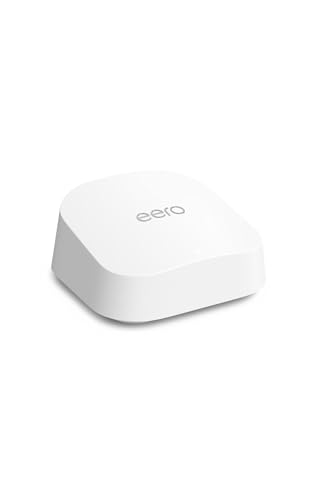
Amazon eero 7 Dual-Band Wi-Fi 7 Router
Best for: small homes with 2.5 Gbps internet plans
- Wi-Fi Standard
- Wi-Fi 7
- Frequency Bands
- Dual-Band
- Coverage Area
- 2,000 sq ft
- Device Capacity
- 120+ devices
- Max Port Speed
- 2.5 Gbps
- Ethernet Ports
- 2
View on Amazon: Amazon eero 7 Dual-Band Wi-Fi 7 Router Affiliate link
The eero 7 is a dual-band Wi-Fi 7 mesh router designed for homes up to 2,000 square feet. It supports internet plans up to 2.5 Gbps and includes two auto-sensing 2.5 GbE ports. The system handles 120+ devices and uses Multi-Link Operation for better performance. It fits users who want future-proof Wi-Fi 7 speeds in a compact, single-unit package.
Pros
- Wi-Fi 7 standard with Multi-Link Operation
- Two auto-sensing 2.5 GbE Ethernet ports
- Supports internet plans up to 2.5 Gbps
- Handles 120+ connected devices
- Backward compatible with previous eero generations
Cons
- Dual-band design lacks a dedicated tri-band backhaul
- Single unit covers only 2,000 square feet
- No mention of a built-in display or local storage
Good fit if
- You have internet speeds up to 2.5 Gbps
- You need Wi-Fi 7 features in a small space
- You already use eero devices and want expansion
Skip if
- You require coverage larger than 2,000 square feet
- You need tri-band speeds for heavy wireless backhaul
- You want a router with a physical display panel
Verdict: eero 7 Dual-Band Wi-Fi 7 Router delivers solid Wi-Fi 7 performance for small to medium homes with gigabit-plus internet plans, making it a practical choice for existing eero users.
Specifications side by side
| Spec | Amazon eero 7 Dual-Band Wi-Fi 7 Router |
|---|---|
| Wi-Fi Standard | Wi-Fi 7 |
| Frequency Bands | Dual-Band |
| Coverage Area | 2,000 sq ft |
| Device Capacity | 120+ devices |
| Max Port Speed | 2.5 Gbps |
| Ethernet Ports | 2 |
| Frequency Band | Dual-Band |
| Pack Size | 1-Pack |
| Features | Mesh |
| Port Speed | 2.5G |
| Dimensions | 5.12 × 2.52 × 5.12 inches |
| Weight | 1.34 pounds |
| Color | WHITE |
| Model | PA10001 |
Frequently asked questions
Does the eero 7 support Wi-Fi 7 standards?
Yes, this router operates on the Wi-Fi 7 standard. This latest protocol offers improved efficiency and lower latency compared to previous generations. It also supports Multi-Link Operation, which allows the device to utilize multiple frequency bands simultaneously for a more stable connection.
How much area does one eero 7 unit cover?
A single eero 7 router covers up to 2,000 square feet. This makes it suitable for small to medium-sized homes. If your living space exceeds this limit, you may need to add additional mesh nodes to ensure consistent signal strength throughout the entire property.
Is the eero 7 compatible with 2.5 Gbps internet plans?
Yes, the eero 7 is designed to handle internet plans up to 2.5 Gbps. It features auto-sensing 2.5 GbE ports to manage these high speeds. Ensure your modem also supports 2.5 Gbps connections to avoid any bottlenecks that could limit your maximum throughput.
What are the physical dimensions of the eero 7 router?
The eero 7 router measures 5.12 inches in height and 5.12 inches in width. It weighs 1.34 pounds. Its compact cylindrical design and white finish allow it to blend into most home environments without taking up excessive space on a shelf or desk.
Can I use the eero 7 with an existing eero network?
Yes, you can add this unit to an existing eero network. The dedicated mobile application makes setup straightforward for both new installations and expansions. It uses patented TrueMesh software to manage connections, ensuring seamless roaming and consistent performance across all connected devices in your home.
What type of Wi-Fi bands does the eero 7 use?
The eero 7 is a dual-band router. It operates on two frequency bands to balance range and speed. This configuration helps manage network traffic effectively, providing reliable coverage for everyday tasks while maintaining performance for bandwidth-intensive activities within its 2,000 square foot coverage area.