Eero Amazon eero 6 Wi-Fi Review: Specs, Pros and Cons
As an Amazon Associate we earn from qualifying purchases. Links on this page are affiliate links.
This eero amazon eero 6 mesh review covers the single router option from Eero. It is a Wi-Fi 6 device designed for smaller living spaces. The listing states it covers up to 1,500 square feet. It supports internet speeds up to 900 Mbps. These two figures define its practical use case. You get one white router in the box. It measures 3.82 by 3.91 inches. The unit weighs 10.6 ounces. This is a straightforward entry-level node for basic home networking needs.
What stands out
- Wi-Fi 6 standard for improved device handling
- Built-in Zigbee smart home hub for Alexa devices
- Coverage up to 1,500 square feet
- Supports 75+ connected devices simultaneously
- TrueMesh technology for traffic routing
Who it fits
Good fit for
This router suits renters or small-home owners with apartments under 1,500 square feet. It works well for households with moderate internet plans up to 900 Mbps. You will appreciate the built-in Zigbee hub if you use many Alexa-compatible smart devices. It reduces the need for separate hubs. The setup is simple via the app. It is ideal for light streaming and video conferencing without complex network configurations.
Who should skip it
Skip this model if your home exceeds 1,500 square feet. A single unit will not provide adequate coverage for larger spaces. You should also look elsewhere if your internet plan exceeds 900 Mbps. This router cannot handle higher speeds. It lacks multi-gigabit ports. If you need extensive range or high-throughput performance for heavy gaming or 4K streaming across multiple rooms, this single-pack node is insufficient.
Verdict: The eero 6 is a compact, spec-driven solution for small spaces with modest internet needs. It offers solid basic coverage and smart home integration without complexity.
Key specs explained for eero 6
Wi-Fi 6
This standard handles more devices than older Wi-Fi 5. It manages traffic from over 75 connected gadgets without slowing down. You benefit from stable connections during video calls or streaming. Compare this to older routers that struggle with multiple users. Wi-Fi 6 ensures your network remains responsive as you add smart home devices.
Up to 900 Mbps
This speed rating matches internet plans up to 900 Mbps. It ensures your router does not bottleneck your service. If you pay for high-speed fiber or cable, this unit delivers that speed. Compare this to slower routers that cap performance. It suits users who stream 4K video or download large files quickly.
Up to 1,500 sq. ft.
This coverage area fits small apartments or single-story homes. It provides a 22-foot radius from the router. You get consistent signal strength in nearby rooms. Compare this to larger mesh systems for bigger houses. If your space exceeds this, you will need additional units to eliminate dead spots in larger areas.
75+ device capacity
This limit allows many connected devices on one unit. It supports phones, laptops, and smart home gadgets simultaneously. You avoid network congestion when multiple people use the internet. Compare this to basic routers that drop connections under load. It is ideal for households with numerous smart devices and active users.
Design and build of eero 6
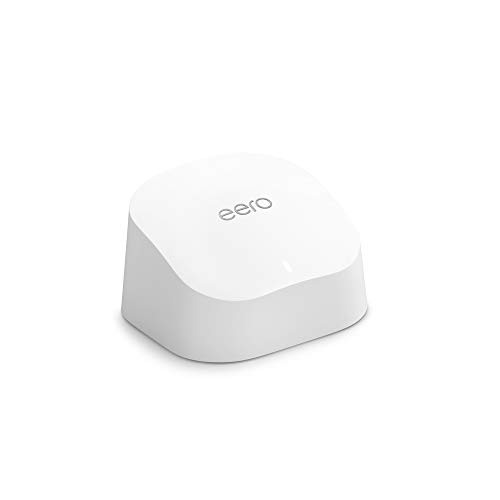
According to the listing, the eero 6 router measures 3.82 inches in width, 3.91 inches in length, and 2.42 inches in height. The device weighs 10.6 ounces. These dimensions create a compact, low-profile form factor. The white finish blends into most home decor styles. You can place it on a shelf or desk without it dominating the space. The small footprint allows for flexible placement throughout your home.
The unit contains a single router in this 1-pack configuration. There are no external antennas visible in the provided data. The internal antenna design likely contributes to its sleek appearance. This layout minimizes clutter in your living area. You do not need to worry about cable management for external parts. The smooth, rounded edges make it easy to move if you change your network layout.
Its physical size supports the stated coverage of 1,500 square feet. The compact design helps it fit into tight spaces. You can position it centrally for optimal signal distribution. The lightweight build makes installation simple. You can carry it easily to different rooms during setup. The white color helps it remain unobtrusive. This practical design choice ensures the hardware does not distract from your home’s aesthetic while providing whole-home Wi-Fi 6 coverage.
Setup and daily network use
The eero 6 relies on the eero app for installation. The listing states that setup takes minutes. The app walks you through each step. You can manage your network from any location after installation. This remote management capability allows you to adjust settings without being near the router.
Your daily use involves connecting up to 75 devices. Wi-Fi 6 handles this capacity by managing traffic more efficiently than previous standards. You can stream 4K video, game, or video conference without buffering. TrueMesh technology routes traffic intelligently to reduce drop-offs. This ensures stable connections across the 1,500 square foot coverage area.
The device includes a built-in Zigbee smart home hub. This feature lets you connect compatible smart devices directly to the eero 6 through Alexa. You do not need separate hubs for each gadget. This simplifies your network setup and reduces clutter.
The router receives automatic updates. These updates bring the latest security patches and performance improvements. The system gets better over time without manual intervention. You also have access to free customer support seven days a week in the US. The eero 6 is designed to expand easily. You can add more eero products as your needs change. This makes the system adaptable for growing households.
Things to check before buying
Before you buy this eero 6, check your internet plan. The listing supports speeds up to 900 Mbps. If your plan exceeds this, you will not get full speeds. Also, verify your space. The unit covers up to 1,500 square feet. Larger homes need additional nodes. This device is a single router. You may need to buy more units for whole-home coverage. Check for compatible Zigbee devices. This model acts as a smart home hub. It connects compatible gadgets to Alexa. This saves you from buying separate hubs. Keep the eero app updated. Automatic updates keep your network secure. Compare this to other options in the guide. The eero 6 fits smaller spaces well. Larger plans might require higher capacity units. Ensure your existing devices work with Wi-Fi 6. This standard supports over 75 connected devices. It handles traffic efficiently. Verify that your current router is not a bottleneck. The eero 6 replaces your main gateway. Setup takes minutes via the app. You can manage the network remotely. This convenience is key for daily use.
Check before you buy
- Verify your internet plan speed is under 900 Mbps
- Ensure your home is under 1,500 square feet
- Check if you need extra nodes for larger areas
- Confirm Zigbee device compatibility for smart home integration
The product at a glance
Amazon eero 6 Wi-Fi 6 Router (1-Pack)
Best for: small homes under 1,500 sq. ft.
- Wi-Fi Standard
- Wi-Fi 6
- Speed Rating
- up to 900 Mbps
- Coverage Area
- up to 1,500 sq. ft.
- Pack Size
- 1-pack
- Device Capacity
- 75+
- Features
- Mesh
View on Amazon: Amazon eero 6 Wi-Fi 6 Router (1-Pack) Affiliate link
The Amazon eero 6 is a single Wi-Fi 6 router designed for small homes. It covers up to 1,500 square feet and supports speeds up to 900 Mbps. The device handles 75 or more connected devices. It includes a built-in Zigbee hub for smart home management. You can set it up quickly using the eero app. This system suits renters or those needing basic whole-home coverage.
Pros
- Wi-Fi 6 standard for improved performance
- Built-in Zigbee smart home hub
- Supports 75+ connected devices
- Covers up to 1,500 sq. ft.
Cons
- Single unit limits coverage to 1,500 sq. ft.
- Speed rating capped at 900 Mbps
- No mention of Ethernet port count or gaming features
Good fit if
- You live in a small apartment or home under 1,500 sq. ft.
- You want a simple setup using the eero app
- You need basic smart home integration via Zigbee
Skip if
- You require coverage for large homes over 1,500 sq. ft.
- You have internet plans faster than 900 Mbps
- You need high-end gaming features or low latency
Verdict: Amazon eero 6 Single Router is a practical entry point for small spaces. It fits users who prioritize easy setup and basic smart home features over raw speed or large coverage.
Specifications side by side
| Spec | Amazon eero 6 Wi-Fi 6 Router (1-Pack) |
|---|---|
| Wi-Fi Standard | Wi-Fi 6 |
| Speed Rating | up to 900 Mbps |
| Coverage Area | up to 1,500 sq. ft. |
| Pack Size | 1-pack |
| Device Capacity | 75+ |
| Features | Mesh |
| Dimensions | 3.91 × 3.82 × 2.42 inches |
| Weight | 10.6 ounces |
| Size | 1 router |
| Color | WHITE |
| Model | N010111 |
Frequently asked questions
Does the eero 6 single router cover large homes?
No. This unit is designed for small spaces under 1,500 square feet. If your home exceeds this size, the signal will likely weaken in distant rooms. You would need additional mesh nodes to extend coverage effectively. This single pack is not sufficient for larger floor plans.
Can the eero 6 handle multiple smart home devices?
Yes. The listing states it supports over 75 connected devices. This capacity helps maintain stable connections for smart lights, cameras, and phones simultaneously. Wi-Fi 6 technology manages this traffic efficiently, reducing lag even when many gadgets are online at once.
What internet speed does this router support?
It supports speeds up to 900 Mbps. This limit applies to the router itself, not your internet plan. If your service provider offers faster speeds, you will not exceed 900 Mbps with this single device. Check your plan details to ensure compatibility.
Is the eero 6 easy to install without a computer?
Yes. You can set it up using the eero app on a smartphone. The process takes minutes and requires no computer. The app guides you through each step. You can manage your network remotely from any location after the initial installation is complete.
What is the physical size of the eero 6 router?
It measures 3.82 inches wide, 3.91 inches long, and 2.42 inches high. The device weighs 10.6 ounces. This compact, low-profile design allows it to fit easily on shelves or desks. The white finish helps it blend into most home decors.
Does this model work with older Wi-Fi devices?
Yes. Wi-Fi 6 is backward compatible with older standards. You can connect legacy devices that do not support the newest technology. The router manages traffic from both new and older gadgets, ensuring stable connections for all your electronics without requiring an immediate upgrade.