Cudy AC1200 Dual-Band 4G LTE Review: Who It Fits and Who Should Skip It
As an Amazon Associate we earn from qualifying purchases. Links on this page are affiliate links.
This cudy 4g ac1200 4 port wi fi review covers the LT500 router. It combines 4G LTE Cat.4 cellular connectivity with dual-band Wi-Fi 5. You get up to 150 Mbps download speeds via a nano SIM slot. The wireless side offers AC1200 performance across two bands. This device serves as a standalone internet solution or a backup failover for your primary connection. It includes four Fast Ethernet ports for wired devices. The compact design fits small offices or retail spaces where cabling is difficult. You simply insert a SIM card to establish a connection anywhere with cellular coverage.
What stands out
- 4G LTE Cat.4 cellular modem with nano SIM slot
- Dual-band Wi-Fi 5 with beamforming technology
- Four Fast Ethernet ports for wired connections
- Built-in WireGuard, OpenVPN, and IPsec support
- Automatic WAN failover to cellular internet
Who it fits
Good fit for
This router suits users in rural areas with weak or no cable internet. It is ideal for backup internet setups where automatic failover keeps your network alive if the primary connection drops. Small offices, retail kiosks, and temporary workspaces benefit from the plug-and-play cellular setup. You also need this if you require wired ports for desktops or IP cameras without running long Ethernet cables. The compact size fits easily in tight spaces while providing reliable LTE reception.
Who should skip it
You should skip this model if you need high-speed Wi-Fi 6 or Wi-Fi 7. The AC1200 rating and Wi-Fi 5 standard limit wireless throughput for modern high-bandwidth devices. If you require Gigabit Ethernet speeds, the Fast Ethernet ports will bottleneck your wired connections. Users needing advanced mesh networking capabilities or extensive smart home app controls will find this device too basic. It is not designed for large homes with multiple floors or heavy simultaneous streaming across many devices.
Verdict: The Cudy LT500 delivers reliable cellular internet and basic wired connectivity for small spaces. It is a practical choice for rural users or as a robust backup internet solution.
Key specs explained for Cudy AC1200
Wi-Fi Standard: Wi-Fi 5
This router uses the 802.11ac standard, known as Wi-Fi 5. It supports higher speeds and better efficiency than older Wi-Fi 4 devices. You will notice smoother video calls and faster file transfers on compatible devices. If you are building a mesh system, ensure your other nodes also support Wi-Fi 5 or newer for consistent performance across your home network.
Speed Rating: AC1200
AC1200 indicates a combined wireless speed of approximately 1200 Mbps. This breaks down into 867 Mbps on the 5 GHz band and 300 Mbps on the 2.4 GHz band. This rating is suitable for moderate home use, including streaming 4K video and online gaming. It is lower than modern Wi-Fi 6 mesh systems, so prioritize this for single-device throughput rather than whole-home capacity.
Ethernet Ports: 4
The device includes four Fast Ethernet ports for wired connections. These ports allow you to connect desktop computers, smart TVs, or gaming consoles directly to the router. Wired connections provide more stability and lower latency than wireless links. This is useful for critical devices in a mesh setup, ensuring they maintain a strong link even if Wi-Fi signals are weak in certain rooms.
Max Port Speed: Fast Ethernet
Fast Ethernet limits wired connections to 100 Mbps. This is slower than Gigabit Ethernet, which supports 1000 Mbps. If your internet plan exceeds 100 Mbps, you will not get full speeds through these ports. This spec is important to note if you plan to connect high-speed devices or use the router as a central hub for a large mesh network.
Frequency Bands: Dual-Band
Dual-Band means the router broadcasts on both 2.4 GHz and 5 GHz frequencies. The 2.4 GHz band offers better range and wall penetration, while the 5 GHz band provides faster speeds with less interference. You can connect different devices to each band to optimize performance. This flexibility is standard in mesh systems, allowing you to balance coverage and speed across your home.
Compact Design and Physical Build
According to the listing, the Cudy LT500 measures 25 by 14 by 4 centimeters. You can also view these dimensions as 9.84 by 5.48 by 1.42 inches. The unit weighs 10.9 ounces. This modest footprint allows it to fit easily on a desk or shelf without dominating your workspace. The black finish blends into most home or office environments without drawing attention. It is not a bulky mesh node or a large central hub. Instead, it is a streamlined device meant to sit quietly in the background. The compact size supports its role as a portable or secondary internet source. You can move it between locations if your cellular signal varies. The small size also means it does not require a dedicated rack or large cable management setup. It is designed for plug-and-play simplicity in small offices or retail kiosks. The external antennas are integrated into this slim profile. They help maintain reliable LTE reception without adding excessive bulk. This balance of size and function makes it practical for spaces where every inch counts. You do not need to rearrange furniture to accommodate it. The lightweight construction further supports easy relocation. You can carry it in a bag if needed for temporary setups. The design prioritizes utility over aesthetics. It looks like a standard networking device. This neutrality ensures it fits into any professional or residential setting without clashing with existing decor. The physical form factor aligns with its technical purpose as a versatile connectivity solution.
Setup And Everyday Use Guide
Setting up this router begins with inserting a nano SIM card into the dedicated slot. This step enables 4G LTE Cat.4 connectivity, allowing the device to access cellular networks for internet access. You do not need a traditional cable modem or DSL line. Once the SIM is in place, you connect the power adapter and wait for the device to register with the local network. The external antennas help maintain a stable signal, which is critical for consistent performance in areas with variable coverage.
For everyday use, the router provides four Fast Ethernet ports. You can connect wired devices such as desktop computers, IP cameras, or gaming consoles directly. This ensures stable connections for devices that benefit from lower latency. The dual-band Wi-Fi 5 capability supports up to 867 Mbps on the 5 GHz band and 300 Mbps on the 2.4 GHz band. Beamforming technology helps direct signals toward your devices, improving range and reliability for streaming or video calls.
The built-in VPN features, including WireGuard and OpenVPN, allow you to secure your network traffic. Automatic WAN failover is a key feature for daily reliability. If your primary internet connection fails, the router can switch to the cellular link if configured to do so. This setup makes the LT500 suitable for small offices or as a backup internet solution where consistent connectivity is required.
Before You Buy This Router
You need a compatible nano SIM card and an active data plan from a local carrier. Check that your target location has strong 4G LTE Cat.4 signal strength before relying on this as your primary connection. The router supports Wi-Fi 5, so ensure your devices are compatible for optimal speeds. You may want to connect wired devices via the four Fast Ethernet ports if you have desktops or IP cameras. This unit fits well as a backup or for rural setups where cable internet is unavailable. It does not replace a full mesh system for large homes. Consider your cellular coverage and device compatibility carefully. Regularly update the firmware to maintain security and performance. This router is best for small offices or as a failover WAN solution. It integrates with other networking gear but requires manual configuration for advanced features like VPN. Keep it in a ventilated area to prevent overheating during extended use.
Check before you buy
- Verify strong 4G LTE signal at your location
- Confirm your SIM card is nano size and active
- Check Wi-Fi 5 compatibility with your devices
- Ensure adequate ventilation for the compact unit
The product at a glance
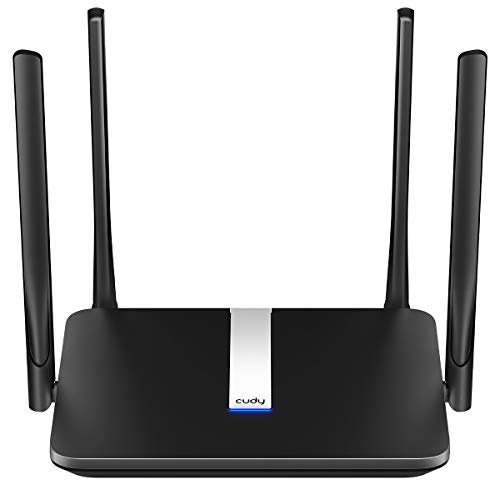
Cudy AC1200 Dual-Band 4G LTE Router
Best for: Small offices needing cellular backup internet
- Wi-Fi Standard
- Wi-Fi 5
- Speed Rating
- AC1200
- Frequency Bands
- Dual-Band
- Max Port Speed
- 100 Mbps
- Ethernet Ports
- 4
- Number of Ports
- 4 Ports
View on Amazon: Cudy AC1200 Dual-Band 4G LTE Router Affiliate link
The Cudy LT500 is a dual-band Wi-Fi 5 router with a built-in SIM slot for 4G LTE Cat 4 connectivity. It provides up to 867+300 Mbps over the air and includes four Fast Ethernet ports. The device supports WireGuard, OpenVPN, and IPsec for secure connections. It also features automatic WAN failover to switch to cellular if your primary internet drops. This compact unit is designed for small offices or backup internet setups.
Pros
- Built-in nano SIM slot for 4G LTE Cat 4 connectivity
- Automatic WAN failover switches to cellular when primary internet drops
- Supports WireGuard, OpenVPN, and IPsec VPN server and client
- Four Fast Ethernet ports for wired devices
Cons
- Wi-Fi 5 standard limits wireless speeds compared to newer Wi-Fi 6 models
- Fast Ethernet ports cap wired connections at 100 Mbps
- 4G LTE Cat 4 max download speed is limited to 150 Mbps
Good fit if
- You need a reliable backup internet connection for a small office
- You require a router with a SIM slot for rural areas
- You want automatic failover to cellular when your main internet goes down
Skip if
- You need gigabit wired speeds for large file transfers
- You want the latest Wi-Fi 6 performance for high-bandwidth devices
- You require download speeds faster than 150 Mbps over cellular
Verdict: The Cudy LT500 AC1200 4G Router is a practical solution for small offices or backup internet needs where cellular connectivity is essential. It fits users who prioritize failover reliability and VPN security over maximum wireless speed.
Specifications side by side
| Spec | Cudy AC1200 Dual-Band 4G LTE Router |
|---|---|
| Wi-Fi Standard | Wi-Fi 5 |
| Speed Rating | AC1200 |
| Frequency Bands | Dual-Band |
| Max Port Speed | 100 Mbps |
| Ethernet Ports | 4 |
| Frequency Band | Dual-Band |
| Number of Ports | 4 Ports |
| Features | VPN, SIM Card Slot |
| Dimensions | 9.84 × 5.48 × 1.42 inches |
| Weight | 6.07 ounces |
| Size | 25 x 14 x 4 cm |
| Color | White |
| Model | LT500 |
Frequently asked questions
Does the Cudy AC1200 support Wi-Fi 6?
No, this router uses Wi-Fi 5 technology. It relies on the 802.11ac standard for wireless connectivity. This means it offers dual-band performance up to AC1200 speeds. It does not include the newer Wi-Fi 6 features. You should check your device compatibility if you need the latest wireless generation.
What type of SIM card does this router use?
The Cudy LT500 requires a nano SIM card. You insert this card into the dedicated slot to enable 4G LTE connectivity. This allows the router to connect to cellular networks for internet access. You must also have an active data plan from a local carrier to use this feature effectively.
Is this router suitable for large homes?
This device is best for small offices or backup internet needs. It provides AC1200 dual-band wireless performance. It is not designed as a mesh system for large areas. You should consider it for failover reliability and VPN security rather than maximum wireless speed or wide coverage.
How many Ethernet ports are on the Cudy LT500?
The router features four Ethernet ports. These ports allow you to connect wired devices directly to the network. This setup supports both cellular internet and local network connections. You can use these ports for desktops, gaming consoles, or smart TVs that benefit from stable wired connections.
What are the physical dimensions of the Cudy AC1200?
The unit measures 25 by 14 by 4 centimeters. In inches, this is approximately 9.84 by 5.48 by 1.42 inches. It weighs 10.9 ounces. This compact size allows it to fit easily in most office or home environments. The black color helps it blend into standard setups without drawing attention.
Can this router work without a cable modem?
Yes, it can operate without a traditional cable modem. You insert a nano SIM card to access 4G LTE networks. This provides internet connectivity through cellular signals instead of fixed-line infrastructure. It is a practical solution where cellular connectivity is essential or where wired options are unavailable.
Does the Cudy LT500 support cellular backup internet?
This router is ideal for small offices needing cellular backup. It combines 4G LTE Cat.4 connectivity with dual-band Wi-Fi. You get up to 150 Mbps download speeds via the SIM slot. It fits users who prioritize failover reliability and VPN security over maximum wireless speed.