3,000 Sq ft or 4,500 Sq ft Mesh Wifi Systems? Compared by Specs
As an Amazon Associate we earn from qualifying purchases. Links on this page are affiliate links.
You are comparing a 3000 sq ft vs 4500 sq ft mesh wifi system from Amazon's eero lineup. Both options use the same eero 6 hardware and Wi-Fi 6 standard. They share identical speed ratings and device capacity limits. The main difference lies in the number of units included. The smaller pack targets compact homes. The larger pack covers more space. This guide breaks down the spec differences to help you choose the right coverage for your floor plan.
Key differences
| Aspect | Amazon eero 6 2-Pack Mesh System | Amazon eero 6 3-Pack Mesh System |
|---|---|---|
| Coverage Area | up to 3,000 sq ft. | up to 4,500 sq. ft. |
| Pack Size | 2-pack | 3-pack |
| Wi-Fi Standard | Wi-Fi 6 | Wi-Fi 6 |
| Speed Rating | up to 900 Mbps | up to 900 Mbps |
| Device Capacity | 75+ devices | 75+ devices |
Which one should you choose?
Choose Amazon eero 6 2-Pack Mesh System if
- You need coverage for a home up to 3,000 square feet.
- You want a simpler two-unit setup for a smaller layout.
- You have fewer than 75 connected devices.
Choose Amazon eero 6 3-Pack Mesh System if
- Your home exceeds 3,000 square feet but is under 4,500 square feet.
- You prefer extra units for better redundancy in a larger space.
- You want the same Wi-Fi 6 speeds with wider coverage.
Verdict: Choose the 2-pack if your floor plan is under 3,000 square feet. Opt for the 3-pack if you need to cover up to 4,500 square feet. Both systems offer identical performance and smart home features.
3000 vs 4500 Sq Ft Mesh Comparison
Coverage Area
The primary difference between these two packages is the stated coverage area. The Amazon eero 6 2-Pack Mesh System covers up to 3,000 square feet. This configuration is suitable for smaller homes or apartments where a single node might struggle. The Amazon eero 6 3-Pack Mesh System covers up to 4,500 square feet. This larger area rating helps you manage expectations for bigger floor plans. You get more physical units in the larger pack to support this extended range. If your home exceeds 3,000 square feet, the 4,500 square foot option provides the necessary headroom for stable connectivity throughout the entire property.
Pack Size
You receive a different number of hardware units with each purchase. The first option includes a 2-pack of eero 6 devices. This means you get two routers to establish your mesh network. The second option includes a 3-pack of eero 6 devices. You receive three routers instead of two. This extra unit allows for more strategic placement in a larger home. It also provides a built-in spare if one unit fails or needs replacement. The physical size of each individual router remains identical in both packages. You simply get an additional node with the larger coverage system.
Speed Rating
Both systems offer the same maximum speed rating for your internet connection. The Amazon eero 6 2-Pack Mesh System supports speeds up to 900 Mbps. The Amazon eero 6 3-Pack Mesh System also supports speeds up to 900 Mbps. This rating indicates the combined throughput capability of the network hardware. Since both use the same eero 6 hardware model, the speed limits are identical. You will not see a difference in maximum bandwidth between the two choices. Your actual speeds will depend on your internet service plan and network conditions. Neither option provides a speed advantage over the other.
Device Capacity
Both mesh systems are rated to handle the same number of connected devices. The Amazon eero 6 2-Pack Mesh System permits 75 or more connected devices. The Amazon eero 6 3-Pack Mesh System also permits 75 or more connected devices. This capacity limit applies to the entire network, not per router. Wi-Fi 6 technology helps manage multiple connections efficiently. You can connect phones, laptops, smart home gadgets, and streaming devices without hitting a hard limit. The device capacity remains consistent regardless of whether you choose the two-node or three-node setup.
Wi-Fi Standard
Both packages utilize the same underlying wireless technology for your network. The Amazon eero 6 2-Pack Mesh System uses the Wi-Fi 6 standard. The Amazon eero 6 3-Pack Mesh System also uses the Wi-Fi 6 standard. This standard provides improved performance over older Wi-Fi 5 networks. It offers better efficiency when many devices are connected simultaneously. You get the same benefits in both cases, such as reduced latency and better battery life for mobile devices. The wireless protocol does not change based on the number of routers included in the box.
Which eero 6 Pack Suits Your Home
Small home or apartment dweller
If your living space is under 3,000 square feet, the 2-pack covers your entire area. It supports speeds up to 900 Mbps and handles 75+ devices. You get full Wi-Fi 6 performance without buying unnecessary extra units for your smaller footprint.
Large house or multi-floor layout
For homes exceeding 3,000 square feet, the 3-pack ensures coverage up to 4,500 square feet. It delivers the same 900 Mbps speed and 75+ device capacity. The additional unit bridges larger distances and reduces dead spots in expansive or multi-story residences.
Budget-conscious starter setup
The 2-pack provides the same core Wi-Fi 6 technology and app management as the larger set. You receive identical smart home hub features and automatic updates. This option offers essential whole-home coverage for smaller spaces at a lower hardware count.
Future-proofing for expansion
Starting with three units gives you immediate headroom for growing device counts or home additions. The system easily expands with cross-compatible hardware. You maintain consistent 900 Mbps speeds across a larger 4,500 square foot area while keeping the same reliable eero 6 standard.
Quick picks
| # | Product | Best for | Price |
|---|---|---|---|
| 1 | Amazon eero 6 2-Pack Mesh System | homes up to 3,000 square feet | Check price of Amazon eero 6 2-Pack Mesh System on Amazon |
| 2 | Amazon eero 6 3-Pack Mesh System | 4,500 sq. ft. homes with 75+ devices | Check price of Amazon eero 6 3-Pack Mesh System on Amazon |
The products compared

Amazon eero 6 2-Pack Mesh System
Best for: homes up to 3,000 square feet
- Coverage Area
- 3,000 Sq Ft (what this guide is about)
- Wi-Fi Standard
- Wi-Fi 6
- Speed Rating
- up to 900 Mbps
- Pack Size
- 2-pack
- Device Capacity
- 75+ devices
- Features
- Mesh
View on Amazon: Amazon eero 6 2-Pack Mesh System Affiliate link
The eero 6 2-pack covers up to 3,000 square feet with Wi-Fi 6. It supports internet speeds up to 900 Mbps and handles 75+ connected devices. This system includes a built-in Zigbee hub for Alexa control. You get automatic updates and easy app management. It suits homes needing whole-home coverage without dead spots.
Pros
- Covers up to 3,000 square feet
- Supports speeds up to 900 Mbps
- Handles 75+ connected devices
- Built-in Zigbee smart home hub
Cons
- Limited to 3,000 square feet coverage
- Max speed capped at 900 Mbps
- Only includes two routers in the pack
Good fit if
- You have a home up to 3,000 square feet
- You want a Zigbee hub for smart devices
- You need support for 75+ devices
Skip if
- You need coverage larger than 3,000 square feet
- You require speeds above 900 Mbps
- You want more than two routers included
Verdict: eero 6 2-Pack Mesh System is ideal for homes up to 3,000 square feet that need reliable Wi-Fi 6 coverage and smart home integration.
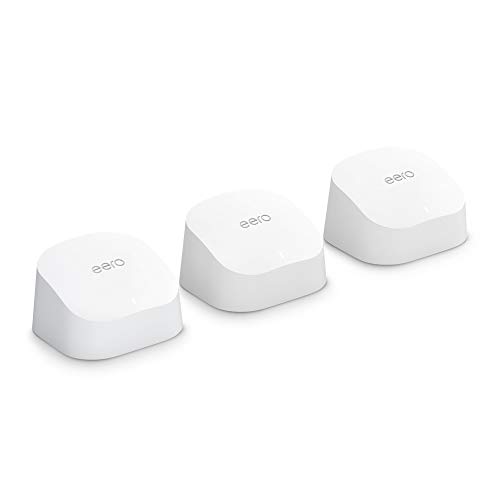
Amazon eero 6 3-Pack Mesh System
Best for: 4,500 sq. ft. homes with 75+ devices
- Coverage Area
- 4,500 Sq Ft (what this guide is about)
- Wi-Fi Standard
- Wi-Fi 6
- Speed Rating
- up to 900 Mbps
- Pack Size
- 3-pack
- Device Capacity
- 75+ devices
- Features
- Mesh
View on Amazon: Amazon eero 6 3-Pack Mesh System Affiliate link
The Amazon eero 6 3-pack delivers Wi-Fi 6 coverage for spaces up to 4,500 square feet. It supports speeds up to 900 Mbps and connects 75+ devices. This system includes a built-in Zigbee smart home hub. You get whole-home reliability for streaming and video calls. It suits households needing broad coverage without extra hubs.
Pros
- Wi-Fi 6 standard for faster speeds
- Covers up to 4,500 sq. ft.
- Built-in Zigbee smart home hub
- Supports 75+ connected devices
Cons
- Speed rating caps at 900 Mbps
- No mention of Wi-Fi 6E or 5GHz-only bands
- No mention of Ethernet backhaul support
Good fit if
- You need coverage for up to 4,500 sq. ft.
- You want to connect 75+ devices
- You prefer a built-in smart home hub
Skip if
- You require speeds over 900 Mbps
- You have a home larger than 4,500 sq. ft.
- You need dedicated Ethernet backhaul
Verdict: Amazon eero 6 3-Pack Mesh System covers 4,500 sq. ft. with 900 Mbps speeds and 75+ device capacity. It fits users wanting simple whole-home Wi-Fi 6 with a built-in Zigbee hub.
Specifications side by side
| Spec | Amazon eero 6 2-Pack Mesh System | Amazon eero 6 3-Pack Mesh System |
|---|---|---|
| Wi-Fi Standard | Wi-Fi 6 | Wi-Fi 6 |
| Speed Rating | up to 900 Mbps | up to 900 Mbps |
| Coverage Area | up to 3,000 sq ft. | up to 4,500 sq. ft. |
| Pack Size | 2-pack | 3-pack |
| Device Capacity | 75+ devices | 75+ devices |
| Features | Mesh | Mesh |
| Dimensions | 3.91 × 3.82 × 2.42 inches | 3.91 × 3.82 × 2.42 inches |
| Weight | 1.32 pounds | 1.98 pounds |
| Size | 2 routers | 3 routers |
| Color | WHITE | WHITE |
| Model | N010111 | N010111 |
Frequently asked questions
Does the eero 6 3-Pack actually cover 4,500 square feet?
Yes, Amazon lists the 3-Pack as covering up to 4,500 square feet. This setup includes three routers to extend signal range further than the two-pack. You get reliable Wi-Fi 6 performance across larger single-story homes or multi-level spaces where walls block signals.
Can I mix the 2-Pack and 3-Pack units?
Both systems use the same N010111 model hardware. You can add extra nodes from either pack to your existing network. This allows you to expand coverage gradually. The system manages connections automatically through the eero app without manual configuration.
How many devices can each system support?
Both the 2-Pack and 3-Pack support 75 or more connected devices. This capacity handles smartphones, laptops, smart TVs, and IoT gadgets simultaneously. You do not need to upgrade to a larger pack just to add more devices to your network.
What is the physical size of the eero 6 nodes?
Each unit measures 3.82 inches wide, 2.42 inches high, and 3.91 inches long. They are compact and white, designed to blend into home decor. The 2-Pack weighs 1.32 pounds total, while the 3-Pack weighs 1.98 pounds. They fit easily on shelves or tables.
Is Wi-Fi 6 included in both packages?
Yes, both the 2-Pack and 3-Pack feature Wi-Fi 6 technology. This standard provides faster speeds and better efficiency for multiple connected devices. You benefit from improved performance in congested areas without needing to change your internet plan or hardware.
Do I need a modem for these mesh systems?
You must connect one eero unit to your existing modem via Ethernet. The other units connect wirelessly to extend the network. The modem is not included in either package. You need an active internet service connection from your provider to use these systems.
Can I add more eero units later if needed?
Yes, you can add additional eero 6 nodes to either system. The nodes are compatible with each other due to identical hardware. You can purchase extra packs separately to expand coverage beyond the initial 3,000 or 4,500 square feet as your home grows.