11 Best Wifi Routers Under $50, Compared
As an Amazon Associate we earn from qualifying purchases. Links on this page are affiliate links.
Finding a capable wifi router under 50 requires balancing port speeds, wireless standards, and network management tools. We compared 11 products based strictly on the specifications published on their listings to identify the most reliable hardware configurations. The TP-Link Wired Gigabit VPN Router earns the top position with its multi-WAN capabilities and hardware VPN support across Gigabit ports.
This guide helps you decide whether a dedicated wired gateway, a standalone Wi-Fi 6 model, or an expandable mesh system fits your home network.
Quick picks
The best fit for you
- You need wired multi-WAN routing and VPN capabilities. TP-Link Wired Gigabit VPN Router It features dedicated multi-WAN routing and gigabit ports for purely wired networks.
- You need broad multi-room coverage for large spaces. TP-Link Deco Dual-Band Wi-Fi 6 2-Pack This two-pack Wi-Fi 6 mesh kit covers homes up to 3,900 square feet.
- You need a portable networking setup for travel. GL.iNet Opal Travel Router with Storage Case It includes an AC1200 dual-band travel design, gigabit ports, and a storage case.
- You need AX3000 speeds with four gigabit ports. Cudy AX3000 4-Port Mesh Router It combines dual-band AX3000 Wi-Fi 6 throughput with four gigabit ports and 160 MHz bandwidth.
Our 11 picks

TP-Link Wired Gigabit VPN Router
Best for: wired multi-WAN setups and VPN routing
- Max Port Speed
- Gigabit
- Features
- VPN
- Dimensions
- 6.22 × 3.94 × 1 inches
- Weight
- 12.6 ounces
View on Amazon: TP-Link Wired Gigabit VPN Router (paid link)
This is a dedicated wired router designed for secure multi-network routing rather than wireless broadcast. You get five gigabit Ethernet ports, allowing up to three simultaneous WAN connections for load balancing or failover, alongside a USB port for 4G or 3G modem backup. It supports hardware-level VPN tunnels, including OpenVPN and IPsec. This unit suits you if you already manage standalone access points and need centralized wired routing.
Pros
- Up to three gigabit WAN ports for multi-line load balancing
- Supports up to 20 IPsec and 16 OpenVPN connections
- USB WAN port provides 4G or 3G mobile broadband backup
- Integrated SPI firewall and DoS defense
Cons
- No integrated Wi-Fi connectivity
- Requires separate wireless access points for Wi-Fi devices
Good fit if
- You need multi-WAN load balancing or cellular backup
- You manage site-to-site IPsec or OpenVPN tunnels
- You already own dedicated Wi-Fi access points
Skip if
- You want an all-in-one router with built-in Wi-Fi antennas
- You only have a single internet connection with basic home routing needs
Verdict: TP-Link Wired Gigabit VPN Router delivers robust multi-WAN routing and hardware VPN capabilities for wired network setups. It requires separate wireless access points if you need to provide Wi-Fi coverage.

TP-Link AC1900 Dual-Band Router
Best for: homes needing multiple Gigabit LAN connections
- Wi-Fi Standard
- Wi-Fi 5
- Speed Rating
- AC1900
- Frequency Bands
- Dual Band
- Coverage Area
- 1,200 sq. ft.
- Max Port Speed
- Gigabit
- Ethernet Ports
- 5
View on Amazon: TP-Link AC1900 Dual-Band Router (paid link)
This TP-Link dual-band router delivers Wi-Fi 5 coverage across spaces up to 1,200 square feet. It provides speeds up to 1300 Mbps on the 5 GHz band and 600 Mbps on 2.4 GHz, using 3-stream MU-MIMO to handle multiple devices simultaneously. With four Gigabit LAN ports for wired setups and OneMesh extender compatibility, this unit suits you if you need reliable dual-band networking for a mid-sized space.
Pros
- Speeds up to 1300 Mbps on 5 GHz and 600 Mbps on 2.4 GHz
- Four Gigabit LAN ports and one Gigabit WAN port
- OneMesh compatibility for pairing with TP-Link extenders
- 3-stream MU-MIMO and beamforming coverage up to 1,200 sq. ft.
Cons
- No USB port provided
- Wi-Fi 5 dual-band hardware lacks 6 GHz support
- Requires a separate standalone modem
Good fit if
- You need four dedicated Gigabit Ethernet ports for wired devices.
- You want coverage for an area up to 1,200 square feet.
- You plan to build a mesh network using OneMesh extenders.
Skip if
- You need a USB port for shared network storage.
- You require newer Wi-Fi 6 technology or 6 GHz connectivity.
Verdict: TP-Link AC1900 Dual-Band Router delivers solid Wi-Fi 5 speeds and four Gigabit wired ports for areas up to 1,200 square feet. It provides practical parental controls and mesh expandability without hardware clutter.

FWOOPS AX3000 Wi-Fi 6 Router
Best for: app-free setup and dual-band Wi-Fi 6
- Wi-Fi Standard
- Wi-Fi 6
- Speed Rating
- AX3000
- Frequency Bands
- Dual-Band
- Device Capacity
- 20+ devices
- Max Port Speed
- 1 Gbps
- Ethernet Ports
- 4
View on Amazon: FWOOPS AX3000 Wi-Fi 6 Router (paid link)
The FWOOPS AX3000 Wi-Fi 6 Router gives you dual-band wireless speeds reaching up to 2402 Mbps on 5 GHz and 574 Mbps on 2.4 GHz. It features five external antennas, one Gigabit WAN port, and three Gigabit LAN ports for wired gear. Configuration runs through a web browser without requiring a mobile app. This router suits you if you need modern Wi-Fi 6 bandwidth and wired connectivity for everyday streaming and browsing.
Pros
- Dual-band Wi-Fi 6 speeds up to 2402 Mbps on 5 GHz and 574 Mbps on 2.4 GHz
- Browser-based setup without requiring a mobile app download
- EasyMesh support with a dedicated hardware mesh pairing button
- Five external antennas paired with Beamforming technology
- One Gigabit WAN port and three Gigabit LAN ports
Cons
- Three Gigabit LAN ports instead of the standard four
- EasyMesh expansion requires purchasing an additional compatible router unit
- Lacks a dedicated smartphone management app
Good fit if
- You prefer configuring your router through a web browser without an app.
- You want AX3000 Wi-Fi 6 speeds for streaming and everyday connected devices.
- You plan to build a mesh system using compatible EasyMesh hardware.
Skip if
- You need more than three wired Gigabit LAN connections for your devices.
- You prefer managing your home network through a native mobile application.
Verdict: FWOOPS AX3000 Wi-Fi 6 Router provides dual-band throughput and browser-based setup for everyday home networks. Its five external antennas and EasyMesh support deliver reliable coverage for standalone or expandable systems.

Cudy AX3000 4-Port Mesh Router
Best for: homes needing four gigabit ports with Wi-Fi 6
- Wi-Fi Standard
- Wi-Fi 6
- Speed Rating
- AX3000
- Frequency Bands
- Dual-Band
- Max Port Speed
- 1 Gbps
- Ethernet Ports
- 4
- Number of Ports
- 4 Ports
View on Amazon: Cudy AX3000 4-Port Mesh Router (paid link)
The Cudy AX3000 4-Port Mesh Router gives you dual-band Wi-Fi 6 speeds reaching 2402 Mbps on 5 GHz and 574 Mbps on 2.4 GHz. It features four gigabit ports, configured as one WAN and three LAN connections, along with 160 MHz channel support and mesh expansion capability. Built-in VPN server and client options handle secure traffic. This router fits your home if you need high wireless bandwidth and multiple physical Ethernet connections.
Pros
- AX3000 Wi-Fi 6 with up to 2402 Mbps on 5 GHz
- Four gigabit Ethernet ports with 1 WAN and 3 LAN
- 160 MHz channel bandwidth support
- Built-in VPN server and client including WireGuard and OpenVPN
Cons
- Only three dedicated LAN ports for wired devices
- No Ethernet ports faster than 1 Gbps
Good fit if
- You need AX3000 speeds with 160 MHz channel support.
- You require up to three wired gigabit LAN connections.
- You want built-in VPN server and client capabilities.
Skip if
- You need more than three local wired LAN ports.
- You require multi-gigabit wired network ports.
Verdict: Cudy AX3000 4-Port Mesh Router delivers dual-band Wi-Fi 6 performance and four total gigabit ports for balanced home networking. Its integrated VPN hub and 160 MHz bandwidth offer strong throughput for both wired and wireless setups.

Cudy Gigabit Multi-WAN OpenWrt Router
Best for: OpenWrt wired routing and multi-WAN setups
- Max Port Speed
- 1 Gbps
- Ethernet Ports
- 5
- Features
- OpenWrt
- Dimensions
- 3.35 × 1.1 × 4.65 inches
- Weight
- 1 pounds
View on Amazon: Cudy Gigabit Multi-WAN OpenWrt Router (paid link)
The Cudy Multi-WAN OpenWrt Gigabit Wired Router provides network control through five Gigabit Ethernet ports configurable for up to five WAN connections with load balancing and failover. You get native OpenWrt support for VLAN segmentation and custom firewall rules, alongside built-in WireGuard and OpenVPN suites. It suits you if you run a multi-ISP wired setup or home lab requiring specialized routing and gateway management.
Pros
- Supports OpenWrt for VLAN segmentation, custom QoS, and package installation
- Five Gigabit Ethernet ports support up to five WAN connections with failover
- Integrated VPN suite supporting WireGuard, OpenVPN, IPsec, PPTP, and L2TP
- Hardware security includes SPI firewall, DoS protection, and IP/MAC binding
Cons
- No integrated Wi-Fi wireless capabilities
- Ports capped at 1 Gbps max speed without multi-gigabit support
Good fit if
- You want an OpenWrt-compatible router for advanced firewall rules and packages.
- You manage multiple ISP connections requiring automatic failover or load balancing.
- You use standalone access points and only need a wired gateway.
Skip if
- You need an all-in-one router with built-in Wi-Fi radios.
- You require wired throughput speeds faster than 1 Gbps.
Verdict: Cudy Multi-WAN OpenWrt Gigabit Wired Router delivers enterprise-level OpenWrt flexibility and multi-WAN failover across five Gigabit ports. It is an ideal wired gateway if you deploy external access points or need multi-ISP redundancy.

Tenda Dual-Band AX1500 Wi-Fi 6 Router
Best for: basic home Wi-Fi 6 wireless setups
- Wi-Fi Standard
- WiFi 6
- Speed Rating
- AX1500
- Frequency Bands
- Dual Band
- Max Port Speed
- Gigabit
- Ethernet Ports
- 4
- Pack Size
- 1-Pack
View on Amazon: Tenda Dual-Band AX1500 Wi-Fi 6 Router (paid link)
This is a dual-band Wi-Fi 6 router designed for home networks. It provides AX1500 theoretical speeds split across a 300 Mbps 2.4 GHz band and a 1201 Mbps 5 GHz band. You get four gigabit Ethernet ports for wired gear, five external 6dBi antennas for broadcast range, and WPA3 wireless security. It suits you if you want entry-level Wi-Fi 6 wireless throughput and wired gigabit ports on a single standalone unit.
Pros
- Wi-Fi 6 support with OFDMA, MU-MIMO, and WPA3
- Five external 6dBi antennas for signal transmission
- Four gigabit Ethernet ports for wired devices
- Theoretical throughput up to 1201 Mbps on 5 GHz and 300 Mbps on 2.4 GHz
Cons
- AX1500 specification limits the 2.4 GHz band to 300 Mbps
- No USB ports listed for local shared storage
Good fit if
- You want Wi-Fi 6 connectivity with WPA3 security on a dual-band network.
- You need four wired gigabit ports for stationary devices.
- You prefer managing network settings and parental controls via a mobile app.
Skip if
- You need multi-gigabit LAN or WAN speeds beyond standard 1 Gbps.
- You require faster 2.4 GHz speeds than the 300 Mbps ceiling.
Verdict: Tenda WiFi 6 Dual-Band Gigabit Router delivers entry-level AX1500 wireless speeds and four gigabit Ethernet connections for basic home networking. It provides modern Wi-Fi 6 efficiency and WPA3 security through a traditional five-antenna form factor.

TP-Link Deco Dual-Band Wi-Fi 6 2-Pack
Best for: multi-room coverage up to 3,900 square feet
- Wi-Fi Standard
- Wi-Fi 6
- Speed Rating
- AX1500
- Frequency Bands
- Dual-Band
- Coverage Area
- up to 3,900 Sq. ft.
- Pack Size
- 2-Pack
- Intended Use
- Home
View on Amazon: TP-Link Deco Dual-Band Wi-Fi 6 2-Pack (paid link)
The TP-Link Deco Wi-Fi 6 Mesh 2-Pack is a dual-band home mesh router system designed for broad indoor coverage. It provides Wi-Fi 6 connectivity with an AX1500 speed rating across two units. The setup covers up to 3,900 square feet, distributing signal throughout your living space. This system suits you if you need multi-room coverage that a single standalone router cannot reach.
Pros
- Includes two mesh units in the pack
- Wi-Fi 6 dual-band connectivity
- AX1500 speed rating
- Indoor coverage up to 3,900 square feet
Cons
- Dual-band only without a dedicated third backhaul band
- AX1500 speed rating is lower than AX3000 alternatives
Good fit if
- You need up to 3,900 square feet of Wi-Fi 6 coverage.
- You want a two-unit mesh system out of the box.
Skip if
- You require tri-band connectivity for dedicated backhaul.
- You need network throughput higher than the AX1500 rating.
Verdict: TP-Link Deco Wi-Fi 6 Mesh 2-Pack delivers up to 3,900 square feet of dual-band Wi-Fi 6 coverage across two paired home nodes. It is a practical mesh choice when you prioritize broad coverage at AX1500 speeds.
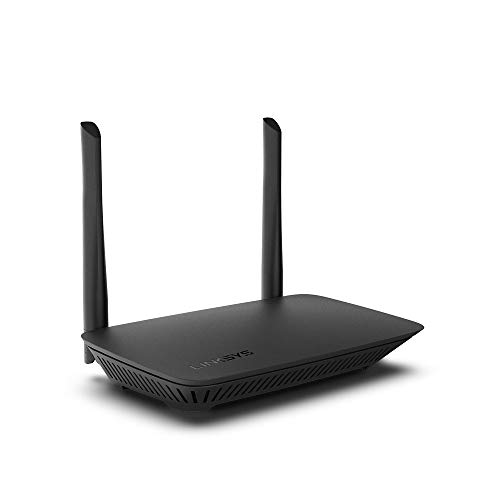
Linksys Dual-Band Wi-Fi 5 Router
Best for: small homes needing four Gigabit wired ports
- Wi-Fi Standard
- WiFi 5
- Speed Rating
- AC1200
- Frequency Bands
- Dual Band
- Coverage Area
- 1,500 Sq. ft
- Device Capacity
- 10+ Devices
- Max Port Speed
- Gigabit
View on Amazon: Linksys Dual-Band Wi-Fi 5 Router (paid link)
The Linksys Dual-Band WiFi 5 Router provides wireless coverage across up to 1,500 square feet for 10 or more connected devices. It delivers dual-band AC1200 speeds reaching up to 1.2 Gbps and includes four Gigabit Ethernet ports for wired hardware. You can configure the network using browser-based setup, establish a guest network for up to 10 guests, and manage access with built-in parental controls. It suits small homes needing basic dual-band coverage.
Pros
- Four Gigabit Ethernet ports for wired connections
- Covers up to 1,500 square feet
- Dual-band AC1200 speeds up to 1.2 Gbps
- Built-in parental controls and SPI firewall
Cons
- Rated for only 10+ connected devices
- Uses older WiFi 5 standard instead of WiFi 6
- Guest access limited to 10 guests
Good fit if
- You have a home up to 1,500 square feet.
- You need four Gigabit Ethernet ports for wired equipment.
- You want scheduled access limits via parental controls.
Skip if
- You require the newer WiFi 6 standard.
- You need to connect dozens of smart devices simultaneously.
- You need guest access for more than 10 users.
Verdict: Linksys Dual-Band WiFi 5 Router delivers standard AC1200 performance and four Gigabit Ethernet ports for homes up to 1,500 square feet. It provides essential network features including parental controls and guest access for everyday connectivity.

GL.iNet Opal Travel Router with Storage Case
Best for: portable travel networking with protective storage
- Speed Rating
- AC1200
- Frequency Bands
- Dual-Band
- Max Port Speed
- 1 Gbps
- Use Case
- Travel
View on Amazon: GL.iNet Opal Travel Router with Storage Case (paid link)
This portable dual-band package combines an AC1200 travel router with a dedicated EVA storage case. You get dual-band wireless speeds reaching up to 300 Mbps on 2.4 GHz and 867 Mbps on 5 GHz, alongside three Gigabit Ethernet ports. Weighing 145 grams, it fits easily into luggage while packing dedicated wired connections for your trips. It suits you if you need a compact networking setup on the go.
Pros
- Lightweight 145-gram travel design
- AC1200 dual-band speeds up to 867 Mbps on 5 GHz and 300 Mbps on 2.4 GHz
- Three Gigabit ports with one WAN and two LAN connections
- Includes crush-resistant and water-resistant EVA organizer case
Cons
- Limited to two LAN ports for wired devices
- Uses Wi-Fi 5 rather than faster Wi-Fi 6 standards
Good fit if
- You need a lightweight 145-gram router designed specifically for travel.
- You want an included protective EVA case to pack your router and accessories.
- You need gigabit wired Ethernet ports in a pocket-sized format.
Skip if
- You need more than two local LAN ports for wired clients.
- You require Wi-Fi 6 capacity for heavy home network traffic.
Verdict: GL.iNet Opal Travel Router with Storage Case provides a lightweight, pocket-sized AC1200 networking solution complete with gigabit ports and a protective organizer. It gives you reliable dual-band connections on the road without taking up space.
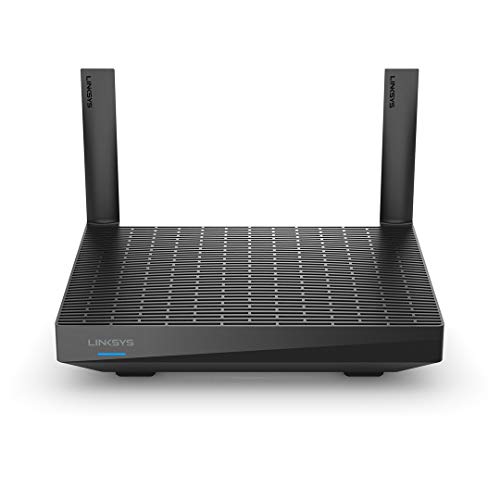
Linksys Dual-Band WiFi 6 Mesh Router
Best for: Wi-Fi 6 homes wanting network storage
- Wi-Fi Standard
- WiFi 6
- Speed Rating
- AX1500
- Frequency Bands
- Dual-Band
- Coverage Area
- 1,700 sq. ft.
- Device Capacity
- 25+ devices
- Features
- Parental Controls
View on Amazon: Linksys Dual-Band WiFi 6 Mesh Router (paid link)
This Linksys dual-band router brings Wi-Fi 6 connectivity to your home network with AX1500 speed ratings reaching up to 1.5 Gbps. It covers areas up to 1,700 square feet and supports 25 or more connected devices simultaneously. You can attach external storage using the integrated USB 3.0 port or expand coverage via Intelligent Mesh technology. It suits you if you need modern wireless standards and local network file sharing.
Pros
- Wi-Fi 6 standard with speeds up to 1.5 Gbps (AX1500)
- Coverage up to 1,700 square feet for 25+ devices
- USB 3.0 port for network file and storage sharing
- Intelligent Mesh technology for expandable network coverage
Cons
- Dual-band design without a dedicated third backhaul band
- Device handling rated for 25+ units rather than higher-density environments
Good fit if
- You need Wi-Fi 6 coverage for homes up to 1,700 square feet.
- You want to connect external storage directly to your network using USB 3.0.
- You plan to expand coverage later using compatible Intelligent Mesh nodes.
Skip if
- You manage networks with significantly more than 25 active devices.
- You require a tri-band system for dedicated wireless backhaul traffic.
Verdict: Linksys Dual-Band WiFi 6 Mesh Router delivers AX1500 wireless speeds and reliable coverage up to 1,700 square feet. It provides practical mesh expansion and USB storage sharing for small to medium households.

Linksys AX1500 Dual-Band WiFi 6 Mesh Router
Best for: small homes needing expandable WiFi 6 coverage
- Wi-Fi Standard
- WiFi 6
- Speed Rating
- AX1500
- Frequency Bands
- Dual-Band
- Coverage Area
- Up to 1,500 sq ft
- Device Capacity
- 20+ devices
- Dimensions
- 6.1 × 8.46 × 2.2 inches
View on Amazon: Linksys AX1500 Dual-Band WiFi 6 Mesh Router (paid link)
This Linksys dual-band router delivers WiFi 6 speeds up to 1.5 Gbps with coverage for up to 1,500 square feet. It supports 20 or more devices simultaneously and integrates Intelligent Mesh technology, which lets you expand coverage by adding compatible nodes. It suits you if you need a baseline WiFi 6 setup with straightforward browser-based setup and separate guest network access for a small home.
Pros
- WiFi 6 dual-band throughput up to 1.5 Gbps (AX1500)
- Intelligent Mesh support for expanding coverage with additional nodes
- Browser-based configuration with dedicated guest network access
- Handles 20 or more connected devices across 1,500 square feet
Cons
- Coverage limited to 1,500 square feet without extra nodes
- Device rating capped at 20+ devices
- Dual-band design lacks a dedicated third backhaul band
Good fit if
- You live in a home up to 1,500 square feet.
- You want entry-level WiFi 6 speeds with browser-based setup.
- You plan to expand coverage later using Linksys Intelligent Mesh nodes.
Skip if
- You manage significantly more than 20 active devices on your network.
- You require tri-band connectivity with a dedicated backhaul channel.
- You need coverage beyond 1,500 square feet from a standalone unit.
Verdict: Linksys Dual-Band WiFi 6 Mesh Router provides reliable AX1500 speeds and 1,500 square feet of coverage with simple mesh expandability. It gives you an accessible entry point to WiFi 6 networking for smaller households.
Specifications side by side
| Spec | TP-Link Wired Gigabit VPN Router | TP-Link AC1900 Dual-Band Router | FWOOPS AX3000 Wi-Fi 6 Router | Cudy AX3000 4-Port Mesh Router | Cudy Gigabit Multi-WAN OpenWrt Router | Tenda Dual-Band AX1500 Wi-Fi 6 Router | TP-Link Deco Dual-Band Wi-Fi 6 2-Pack | Linksys Dual-Band Wi-Fi 5 Router | GL.iNet Opal Travel Router with Storage Case | Linksys Dual-Band WiFi 6 Mesh Router | Linksys AX1500 Dual-Band WiFi 6 Mesh Router |
|---|---|---|---|---|---|---|---|---|---|---|---|
| Wi-Fi Standard | not specified | Wi-Fi 5 | Wi-Fi 6 | Wi-Fi 6 | not specified | WiFi 6 | Wi-Fi 6 | WiFi 5 | not specified | WiFi 6 | WiFi 6 |
| Speed Rating | not specified | AC1900 | AX3000 | AX3000 | not specified | AX1500 | AX1500 | AC1200 | AC1200 | AX1500 | AX1500 |
| Frequency Bands | not specified | Dual Band | Dual-Band | Dual-Band | not specified | Dual Band | Dual-Band | Dual Band | Dual-Band | Dual-Band | Dual-Band |
| Coverage Area | not specified | 1,200 sq. ft. | not specified | not specified | not specified | not specified | up to 3,900 Sq. ft. | 1,500 Sq. ft | not specified | 1,700 sq. ft. | Up to 1,500 sq ft |
| Device Capacity | not specified | not specified | 20+ devices | not specified | not specified | not specified | not specified | 10+ Devices | not specified | 25+ devices | 20+ devices |
| Max Port Speed | Gigabit | Gigabit | 1 Gbps | 1 Gbps | 1 Gbps | Gigabit | not specified | Gigabit | 1 Gbps | not specified | not specified |
| Ethernet Ports | not specified | 5 | 4 | 4 | 5 | 4 | not specified | 4 | not specified | not specified | not specified |
| Frequency Band | not specified | Dual-Band | not specified | not specified | not specified | Dual-Band | Dual-Band | Dual-Band | not specified | Dual-Band | Dual-Band |
| Number of Ports | not specified | not specified | not specified | 4 Ports | not specified | not specified | not specified | not specified | not specified | not specified | not specified |
| Pack Size | not specified | not specified | not specified | not specified | not specified | 1-Pack | 2-Pack | not specified | not specified | not specified | not specified |
| Use Case | not specified | not specified | not specified | not specified | not specified | not specified | not specified | not specified | Travel | not specified | not specified |
| Features | VPN | not specified | not specified | not specified | OpenWrt | Parental Controls | not specified | Parental Controls | not specified | Parental Controls | not specified |
| Port Speed | Gigabit | not specified | not specified | Gigabit | Gigabit | Gigabit | not specified | not specified | not specified | not specified | not specified |
| Intended Use | not specified | not specified | not specified | not specified | not specified | Home | Home | not specified | not specified | not specified | not specified |
| Dimensions | 6.22 × 3.94 × 1 inches | 9.57 × 6.32 × 1.28 inches | not specified | 7.87 × 6.69 × 1.38 inches | 3.35 × 1.1 × 4.65 inches | 9.4 × 5.67 × 1.59 inches | not specified | 2.17 × 8.46 × 7.36 inches | not specified | 5.4 × 9.8 × 5.9 inches | 6.1 × 8.46 × 2.2 inches |
| Weight | 12.6 ounces | 14.6 ounces | not specified | 8.91 ounces | 1 pounds | 1.68 pounds | not specified | not specified | not specified | not specified | not specified |
| Color | silver | Black | Black | Black | gray | Black2 | not specified | Black | black | not specified | black |
| Model | ER605 | Archer A8 | LNN 788 | WR3000 | R700 | RX2Pro | not specified | E5400 | GL-SFT1200 | MR7310 | MR7340-RM2 |
| Size | not specified | Wi-Fi 5 AC1900 | not specified | 48.07 cubic inches | not specified | 1Pack | not specified | WIFI 5 | not specified | WIFI 6 | WIFI 6 |
If you want to secure your entryway on a tight hardware budget, evaluate a deadbolt under 50 by examining ANSI lock grades and cylinder specifications.
Key Specs to Check Before Buying
-
Compare Wi-Fi Generations
Check the generation rating before selecting a unit. Wi-Fi 6 models use the AX prefix, while Wi-Fi 5 models use AC. Wi-Fi 6 improves handling for environments packed with connected devices and smart electronics. If your household relies on older phones or basic streaming sticks, a Wi-Fi 5 unit provides sufficient bandwidth for everyday tasks. If you own modern laptops and smartphones, choose an AX unit like the FWOOPS AX3000 Wi-Fi 6 Router. Selecting the newer generation ensures your local wireless network matches your device capabilities.
-
Evaluate Speed Ratings
Router labels display combined speed classes such as AC1200, AX1500, or AX3000. These numbers represent theoretical cumulative bandwidth across all radio bands rather than throughput on a single device. Higher classes often include wider channel support. For instance, the Cudy AX3000 4-Port Mesh Router supports 160 MHz channel bandwidth, which doubles data transmission rates on compatible hardware compared to standard 80MHz channels. Review your client hardware capabilities. If your devices support wide channels, higher speed ratings offer measurable improvements during large local file transfers.
-
Match Coverage to Square Footage
Check the stated square footage coverage before you finalize your purchase. Single standalone routers generally cover between 1,200 and 1,700 square feet. This suits apartments or compact single-story homes. For larger floor plans or multi-story buildings, single-unit signals degrade through walls and floors. A multi-node system solves this issue without running extra cables. The TP-Link Deco Dual-Band Wi-Fi 6 2-Pack covers up to 3,900 square feet across two coordinated units. Assess your layout to decide whether one desktop router or a multi-pack mesh kit fits your space.
-
Count Physical Gigabit Ports
Review the number and speed of Ethernet ports on the back of the chassis. Wired connections deliver steady latency and avoid wireless interference for gaming consoles, desktop PCs, and network storage drives. Most standard home models provide four Gigabit LAN ports alongside the internet WAN port. If you plan to wire multiple rooms or stationary office hardware, confirm the port count directly on the spec sheet. The TP-Link AC1900 Dual-Band Router provides four dedicated Gigabit ports, making it practical for connecting multiple wired devices without purchasing an extra external switch.
-
Check Firmware and Customization
Consider the operating software installed on the router. Standard consumer routers offer fixed web interfaces or mobile apps with straightforward controls for basic settings. Advanced users who need policy routing, open-source package installation, or multi-ISP failover should look for specialized firmware support. The Cudy Gigabit Multi-WAN OpenWrt Router includes pre-installed OpenWrt software and five Gigabit ports. OpenWrt gives you granular control over firewall rules, DNS routing, and network diagnostics. If you only need typical home connectivity, standard manufacturer firmware requires much less manual configuration and ongoing maintenance.
-
Assess Physical Form Factor
Check the physical dimensions and weight if your setup demands mobility or unobtrusive placement. Standard desktop models feature external antennas and wider frames intended for stationary placement on desks or shelves. In contrast, compact travel models prioritize portability and packable accessories. The GL.iNet Opal Travel Router with Storage Case provides dual-band AC1200 wireless connectivity in a pocket-sized enclosure. If you move frequently between hotel rooms or temporary workstations, a dedicated portable router saves luggage space while maintaining wired gigabit ethernet access wherever you travel.
Frequently asked questions
Can you get a router with OpenWrt support in this category?
Yes, you can select models designed specifically for OpenWrt firmware. The Cudy R700 features OpenWrt support alongside five Gigabit Ethernet ports and multi-WAN failover capability. This wired unit operates without internal wireless broadcast, so you use it primarily as an operating gateway paired with external access points or multiple internet service providers.
Which models include built-in VPN capabilities?
Multiple hardware options include integrated VPN support depending on your installation needs. The TP-Link ER605 functions as a dedicated wired VPN router with multi-WAN capabilities, though it requires separate wireless access points for Wi-Fi. For an all-in-one wireless solution, the Cudy WR3000 provides an integrated VPN hub paired with dual-band Wi-Fi 6 speeds and 160 MHz channel bandwidth.
Do entry-level wireless routers provide Gigabit Ethernet ports?
Yes, many budget-friendly routers include full Gigabit Ethernet ports for high-speed wired connections. The Linksys E5400 and TP-Link Archer A8 both feature four Gigabit LAN connections for wired devices alongside their Wi-Fi 5 wireless bands. The Tenda RX2Pro also includes four Gigabit ports while upgrading your local network to dual-band AX1500 Wi-Fi 6 speeds.
Can you set up a router without downloading a mobile app?
Yes, certain routers allow complete network configuration directly through an internet browser. The FWOOPS AX3000 Wi-Fi 6 Router uses app-free setup with standard browser access to establish your network. This dual-band unit also features five external antennas and EasyMesh support, giving you modern AX3000 transmission speeds without requiring smartphone software during installation.
Which routers support local USB storage sharing?
Some standalone models include physical ports for shared network storage. The Linksys MR7310 provides USB storage sharing to let you access drives across your local network. It also delivers AX1500 Wi-Fi 6 performance, parental controls, and coverage up to 1,700 square feet, making it useful when you need shared files and wireless coverage from one device.
Are there portable Wi-Fi routers designed for travel?
Yes, compact options exist specifically for portable networking on the road. The GL.iNet Opal GL-SFT1200 comes with a dedicated protective storage organizer case and a pocket-sized design. It delivers dual-band AC1200 wireless speeds alongside physical Gigabit Ethernet ports, allowing you to connect wired equipment or establish localized wireless networks while moving between locations.
How do coverage ratings compare among standalone routers?
Standalone router coverage typically ranges from 1,200 to 1,700 square feet per unit. The TP-Link Archer A8 covers up to 1,200 square feet, while the Linksys E5400 and Linksys MR7340-RM2 cover homes up to 1,500 square feet. If you need slightly wider single-unit reach, the Linksys MR7310 provides dual-band coverage across spaces up to 1,700 square feet.